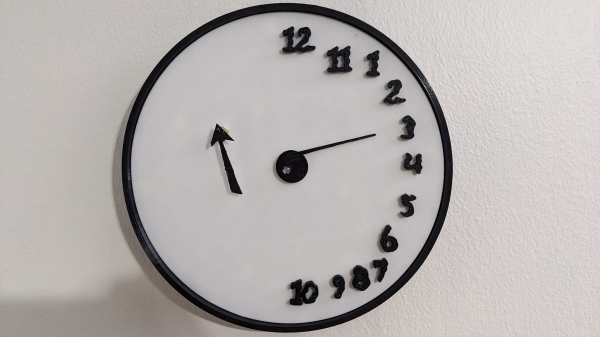
A black-and-white clock face is shown. The numerals are ranged around the right edge of the clock. One pointer extends from the center of the clock, and one is on the left side of the face.

A Clock Inspired By Failed Cognitive Tests

One simple screening tool for cognitive impairment is the clock-drawing test (CDT): the patient is provided with a printed circle and asked to draw a clock face with the hands pointing to a certain time. Depending on how the clock is drawn, this could indicate a variety of different disorders, particularly dementia, with a particular deformity in the drawing sometimes pointing to a specific issue. These failed tests inspired [John Silvia] to create a clock with a unique, disordered face.

The numerals in this clock face are placed exclusively along the right half of the clock (in the test, this can be a sign of damage to the right parietal lobe, or of executive dysfunction caused by dementia), and out of order. The hour hand is controlled by a servo motor, and the minute hand is mounted on a separate, commercially-purchased clock mechanism on the left-hand side of the face.

The frame for the clock and the face are 3D-printed, and the servo motor is controlled by an ESP32-C3 with an RTC module. To minimize power draw, a MOSFET disconnects the servo motor from power except for the once-per-hour position update. Once per month, the ESP32 connects to Wi-Fi to synchronize to NTP time, otherwise remaining in a low-power state – even its indicator LEDs are disconnected to save power. These efforts paid off: when the servo isn’t active, it draws only about 160 µA, and a set of three AA NiMH cells lasts about a year.

Since the servo motor draws most of the power budget, it wouldn’t make much difference, but the ESP32’s co-processor can also be used for ultra-low-power projects. For a happier take on a drawing-related clock, check out one of these projects.
PenPal, A Robotic Drawing Assistant

Emergent properties include examples like murmurations of starlings which can’t be predicted from looking at a single bird, weather which can’t be predicted by looking at a few air molecules, and consciousness which can’t be predicted by looking at a neuron. Likewise, when adding a new tool to a workflow, emergent properties can show up as well. A group at Chicago University developed a robotic drawing tool and a few artists developed some unique drawing methods using it.

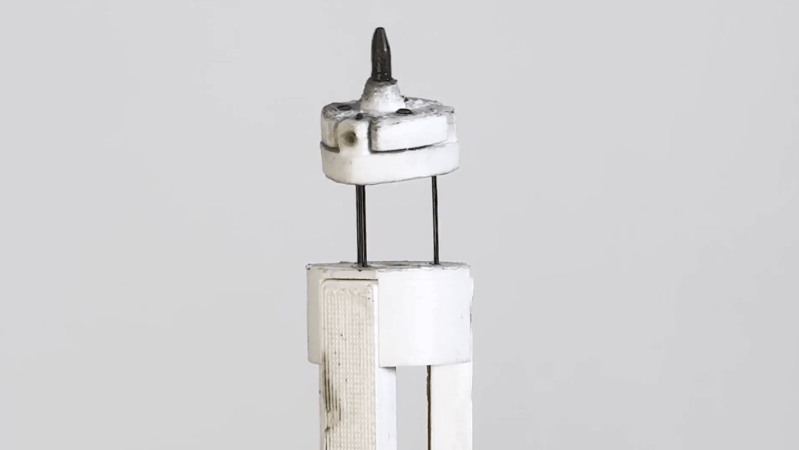
The robotic pen uses a pair of tendons to extend the working end out a certain amount. From there it uses a set of servos to can be programmed to revolve around in a defined path, making repeating movements while the artist makes larger movements over the paper. Originally meant for shading, small circles or simpler back-and-forth movements were preset, but with full control over the pen’s behavior the artist can shift focus away to other tasks within the creative process. A study with ten participants was done which showed artists coming up with novel ways of using a tool like this, and others reporting that it’s almost like drawing together with another person.

Looking for novel ways that humans can interact with computers and robots can often lead to surprising outcomes like this. Members of this group aren’t new to novel human interface devices either; they’ve also built a squishy dynamic button as well.

Continue reading “PenPal, A Robotic Drawing Assistant”

The Many-Sprites Interpretation Of Amiga Mechanics

The invention of sprites triggered a major shift in video game design, enabling games with independent moving objects and richer graphics despite the limitations of early video gaming hardware. As a result, hardware design was specifically built to manipulate sprites, and generally as new generations of hardware were produced the number of sprites a system could produce went up. But [Coding Secrets], who published games for the Commodore Amiga, used an interesting method to get this system to produce far more sprites at a single time than the hardware claimed to support.

This hack is demonstrated with [Coding Secrets]’s first published game on the Amiga, Leander. Normally the Amiga can only display up to eight sprites at once, but there is a coprocessor in the computer that allows for re-drawing sprites in different areas of the screen. It can wait for certain vertical and horizontal line positions and then execute certain instructions. This doesn’t allow unlimited sprites to be displayed, but as long as only eight are displayed on any given line the effect is similar. [Coding Secrets] used this trick to display the information bar with sprites, as well as many backgrounds, all simultaneously with the characters and enemies we’d normally recognize as sprites.

Of course, using built-in hardware to do something the computer was designed to do isn’t necessarily a hack, but it does demonstrate how intimate knowledge of the system could result in a much more in-depth and immersive experience even on hardware that was otherwise limited. It also wasn’t free to use this coprocessor; it stole processing time away from other tasks the game might otherwise have to perform, so it did take finesse as well. We’ve seen similar programming feats in other gaming projects like this one which gets Tetris running with only 1000 lines of code.

Continue reading “The Many-Sprites Interpretation Of Amiga Mechanics”

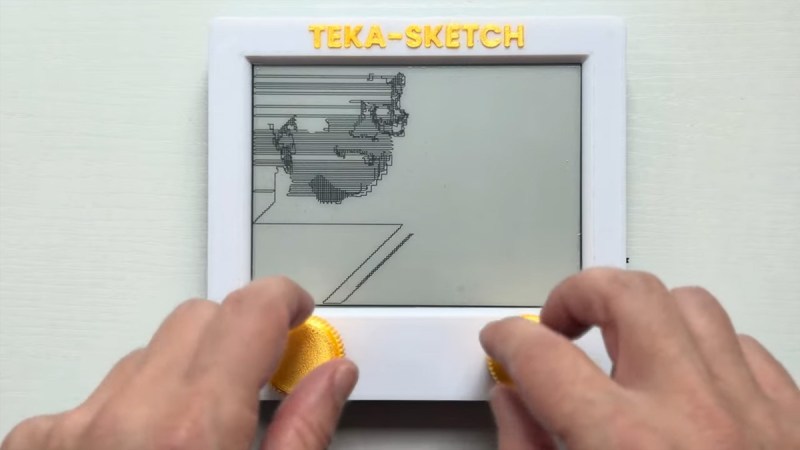
Two hands working a TekaSketch

TekaSketch: Where Etch A Sketch Meets Graph Theory

The Etch A Sketch was never supposed to meet a Raspberry Pi, a camera, or a mathematical algorithm, but here we are. [Tekavou]’s Teka-Cam and TekaSketch are a two-part hack that transforms real photos into quite stunning, line-drawn Etch A Sketch art. Where turning the knobs only results in wobbly doodles, this machine plots out every curve and contour better than your fingertips ever could.

Essentially, this is a software hack mixed with hardware: an RPi Zero W 2, a camera module, Inkplate 6, and rotary encoders. Snap a picture, and the image is conveyed to a Mac Mini M4 Pro, where Python takes over. It’s stripped to black and white, and the software creates a skeleton of all black areas. It identifies corner bridges, and unleashes a modified Chinese Postman Algorithm to stitch everything into one continuous SVG path. That file then drives the encoders, producing a drawing that looks like a human with infinite patience and zero caffeine jitters. Originally, the RPi did all the work, but it was getting too slow so the Mac was brought in.

It’s graph theory turned to art, playful and serious at the same time, and it delivers quite unique pieces. [Tekavou] is planning on improving with video support. A bit of love for his efforts might accellerate his endeavours. Let us know in the comments below!

Continue reading “TekaSketch: Where Etch A Sketch Meets Graph Theory”

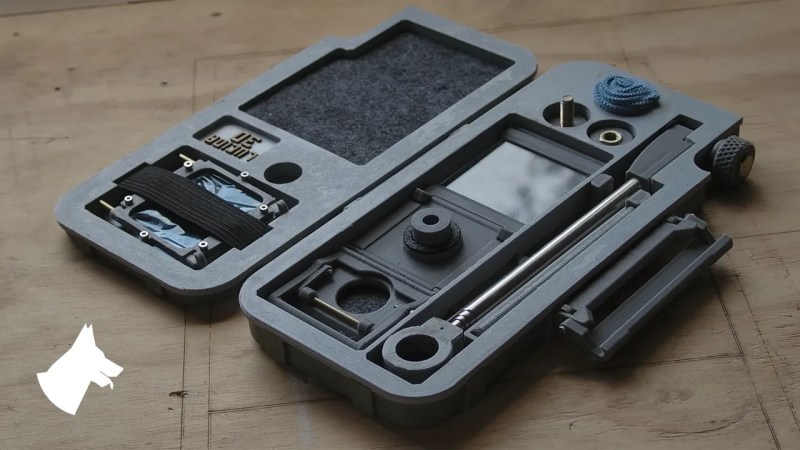
An image of a grey plastic carrying case, approximately the size of an A5 notebook. Inside are darker grey felt lined cubbies with a mirror, piece of glass, a viewfinder, and various small printed parts to assemble a camera lucida.

Camera Lucida – Drawing Better Like It’s 1807

As the debate rages on about the value of AI-generated art, [Chris Borge] printed his own version of another technology that’s been the subject of debate about what constitutes real art. Meet the camera lucida.

Developed in the early part of the nineteenth century by [William Hyde Wollaston], the camera lucida is a seemingly simple device. Using a prism or a mirror and piece of glass, it allows a person to see the world overlaid onto their drawing surface. This moves details like proportions and shading directly to the paper instead of requiring an intermediary step in the artist’s memory. Of course, nothing is a substitute for practice and skill. [Professor Pablo Garcia] relates a story in the video about how [Henry Fox Talbot] was unsatisfied with his drawings made using the device, and how this experience was instrumental in his later photographic experiments.

[Borge]’s own contribution to the camera lucida is a portable version that you can print yourself and assemble for about $20. Featuring a snazzy case that holds all the components nice and snug on laser cut felt, he wanted a version that could go in the field and not require a table. The case also acts as a stand for the camera to sit at an appropriate height so he can sketch landscapes in his lap while out and about.

Interested in more drawing-related hacks? How about this sand drawing bot or some Truly Terrible Dimensioned Drawings?

Continue reading “Camera Lucida – Drawing Better Like It’s 1807”

2022 Sci-Fi Contest: A Friendly Wall Drawing Robot

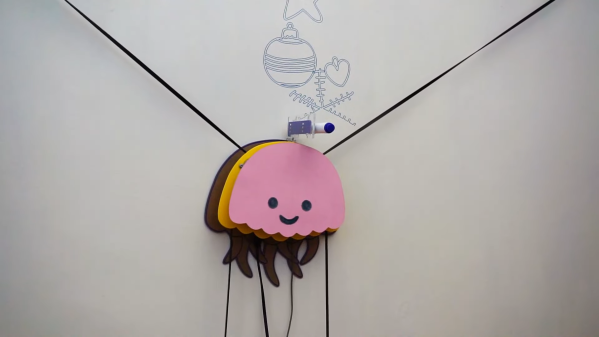
Drawing on walls is fine for children, but adults tend to get bored quickly with such antics. Even more so when they realize who is responsible for cleaning up afterwards. Instead, consider delegating those duties to a friendly helper by the name of Fumik, as [engineer2you] has done.

Fumik, who looks like a cute little jellyfish, can draw pictures up to 5 meters wide and 3 meters high, making for a massive canvas. Powered by an Arduino Mega 2560 outfitted with a CNC shield, a pair of stepper motors drive pulleys with toothed belts to move Fumik to various positions along the wall. Another smaller stepper motor is used to drive the pen forwards and backwards as needed. Fumik can be programmed to trace out various designs in SVG format. These must be converted to code and programmed into the Arduino, at which point Fumik can begin work, drawing on the wall with its pen.

It’s a fun build, and based on photos shared by [engineer2you,] Fumik is quite able at drawing clean and neat designs without a lot of smudging or jagged lines. As a bonus, it’s easy to swap out the pen, so multicolored designs can be drawn in multiple passes.

We’ve seen other robot drawing builds before, too, like this capable portrait artist. Video after the break.

Continue reading “2022 Sci-Fi Contest: A Friendly Wall Drawing Robot”

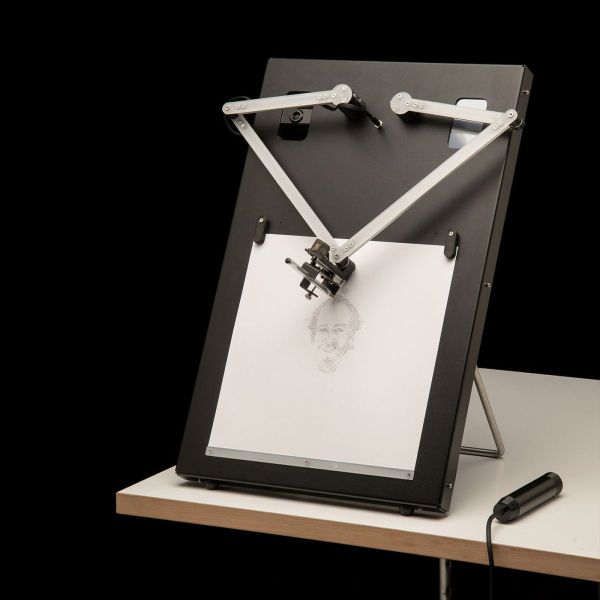
A portrait-drawing robot on a table

Drawing Robot Creates Portraits Using Pen, Paper And Algorithms

Although the market for hand-drawn portraits largely collapsed following the invention of photography, there’s something magical about watching an artist create a lifelike image using nothing but a pencil, some paper, and their fine motor skills. Watching a machine do the same is a similarly captivating experience, though often the end result is not so great. Trying to fix this deficiency, [Joris Wegner] and [Felix Fisgus] created the Pankraz Piktograph which seems to do a pretty good job at capturing faces. They were inspired by classic picture-drawing automatons, and made a 21st-century version to be used in museums or at events like trade shows.

The operation of the Piktograph is very simple: you stand in front of the machine, look into the camera and take a selfie. If you like what you see, the robot will then begin to draw your portrait on a piece of paper. It does this using two human-like arms which are made from aluminium and driven by two stepper motors. An ordinary ballpoint pen is held in a spring-loaded carrier, which provides just enough pen-to-paper pressure to reliably draw lines without lifting off or scratching the paper. We can’t help but be impressed with the overall look of the machine: with a sleek, powder-coated aluminium case and a stainless steel stand it’s a work of art by itself.

Inside, the Piktograph is powered by a Raspberry Pi 3, which runs a rather sophisticated algorithm to generate a vector image which doesn’t take too long to draw, but still results in a recognizable image of the subject. The makers’ thesis goes into quite some detail to explain the process, which uses Canny edge detection to create an outline drawing, then fills in the empty bits to create bright and dark areas. A certain amount of noise and wigglyness is added to the lines to give it a more “handmade” feel, and the resulting drawing is divided into continuous lines for efficient drawing by the plotter.

We’ve seen several types of specialized art robots before, capable of drawing portraits with a pen, painting them, or even using an Etch-a-Sketch, but [Joris] and [Felix]’s creation seems to win on speed, workmanship, and the quality of the end result. Video embedded after the break.
Continue reading “Drawing Robot Creates Portraits Using Pen, Paper And Algorithms”