Stomping On Microcontrollers: Arduino Mega Guitar Effects Pedal

Effects pedals: for some an object of overwhelming addiction, but for many, an opportunity to hack. Anyone who plays guitar (or buys presents for someone who does) knows of the infinite choice of pedals available. There are so many pedals because nailing the tone you hear in your head is an addictive quest, an itch that must be scratched. Rising to meet this challenge are a generation of programmable pedals that can tweak effects in clever ways.

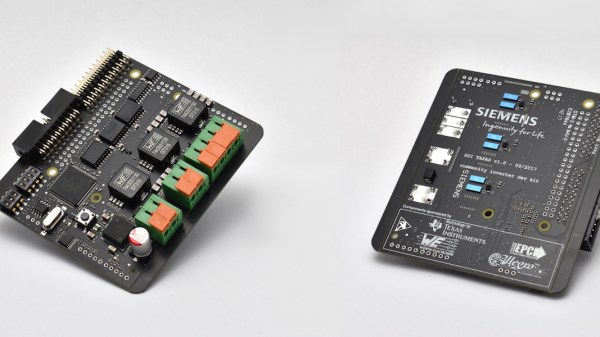
With this in mind, [ElectroSmash] are back at it with another open source offering: the pedalSHIELD MEGA. Aimed at musicians and hackers who want to learn more about audio, DSP and programming, this is an open-hardware/open-software shield for the Arduino MEGA which transforms it into an effects pedal.

The hardware consists of an analog input stage which amplifies and filters the incoming signal before passing it to the Arduino, as well as an output stage which does the DAC-ing from the Arduino’s PWM outputs, and some more filtering/amplifying. Two 8-bit PWM outputs are used simultaneously to make pseudo 16-bit resolution — a technique you can read more about in their handy forum guide.

The list of effects currently implemented covers all the basics you’d expect, and provides a good starting point for writing custom effects. Perhaps a library for some of the commonly used config/operations would be useful? Naturally, there are some computational constraints when using an Arduino for DSP, though it’s up to you whether this is a frustrating fact, or an opportunity to write some nicely optimised code.

[ElectroSmash] don’t just do pedals either: here’s their open source guitar amp.

Continue reading “Stomping On Microcontrollers: Arduino Mega Guitar Effects Pedal”

The Anxiety Of Open Source: Why We Struggle With Putting It Out There

You’ve just finished your project. Well, not finished, but it works and you’ve solved all the problems worth solving, and you have a thing that works for you. Then you think about sharing your creation with the world. “This is cool” you think. “Other people might think it’s cool, too.” So you have to take pictures and video, and you wish you had documented some more of the assembly steps, and you have to do a writeup, and comment your code, and create a repository for it, maybe think about licensing. All of a sudden, the actual project was only the beginning, and now you’re stressing out about all the other things involved in telling other people about your project, because you know from past experience that there are a lot of haters out there who are going to tear it down unless it’s perfect, or even if it is, and even if people like it they are going to ask you for help or to make one for them, and now it’s 7 years later and people are STILL asking you for the source code for some quick little thing you did and threw up on YouTube when you were just out of college, and of course it won’t work anymore because that was on Windows XP when people still used Java.

Take a deep breath. We’ve all been there. This is an article about finding a good solution to sharing your work without dealing with the hassle. If you read the previous paragraph and finished with a heart rate twice what you started, you know the problem. You just want to share something with the world, but you don’t want to support that project for the rest of your life; you want to move on to new and better and more interesting projects. Here are some tips.

Continue reading “The Anxiety Of Open Source: Why We Struggle With Putting It Out There”

Stecchino Game Is All About Balancing A Big Toothpick

Stecchino demo by the creator

Self-described “Inventor Dad” [pepelepoisson]’s project is called Stecchino (English translation link here) and it’s an Arduino-based physical balancing game that aims to be intuitive to use and play for all ages. Using the Stecchino (‘toothpick’ in Italian) consists of balancing the device on your hand and trying to keep it upright for as long as possible. The LED strip fills up as time passes, and it keeps records of high scores. It was specifically designed to be instantly understood and simple to use by people of all ages, and we think it has succeeded in this brilliantly.

To sense orientation and movement, Stecchino uses an MPU-6050 gyro and accelerometer board. An RGB LED strip gives feedback, and it includes a small li-po cell and charger board for easy recharging via USB. The enclosure is made from a few layers of laser-cut and laser-engraved material that also holds the components in place. The WS2828B WS2812B LED strip used is technically a 5 V unit, but [pepelepoisson] found that feeding them direct from the 3.7 V cell works just fine; it’s not until the cell drops to about three volts that things start to glitch out. All source code and design files are on GitHub.

Games are great, and the wonderful options available to people today allow for all kinds of interesting experimentation like a blind version of tag, or putting new twists on old classics like testing speed instead of strength.

Can Open-source Hardware Be Like Open-source Software?

Hardware and software are certainly different beasts. Software is really just information, and the storing, modification, duplication, and transmission of information is essentially free. Hardware is expensive, or so we think, because it’s made out of physical stuff which is costly to ship or copy. So when we talk about open-source software (OSS) or open-source hardware (OSHW), we’re talking about different things — OSS is itself the end product, while OSHW is just the information to fabricate the end product, or have it fabricated.

The fabrication step makes OSHW essentially different from OSS, at least for now, but I think there’s something even more fundamentally different between the current state of OSHW and OSS: the pull request and the community. The success or failure of an OSS project depends on the community of people developing it, and for smaller projects that can hinge on the ease of a motivated individual digging in and contributing. This is the main virtue of OSS in my opinion: open-source software is most interesting when people are reading and writing that source.

With pure information, it’s essentially free to copy, modify, and push your changes upstream so that others can benefit. The open hardware world is just finding its feet in this respect, but that’s changing as we speak, and I have great hopes. Costs of fabrication are falling all around, open and useful tools are being actively developed to facilitate interchange of the design information. I think there are lessons that OSHW can learn from the OSS community’s pull-request culture, and that will help push the hardware hacker’s art forward.

What would it take to get you to build someone else’s OSHW project, improve on it, and contribute back? That’s a question worth a thoughtful deep dive.

Continue reading “Can Open-source Hardware Be Like Open-source Software?”

France Proposes Software Security Liability For Manufacturers, Open Source As Support Ends

It sometimes seems as though barely a week can go by without yet another major software-related hardware vulnerability story. As manufacturers grapple with the demands of no longer building simple appliances but instead supplying them containing software that may expose itself to the world over the Internet, we see devices shipped with insecure firmware and little care for its support or updating after the sale.

The French government have a proposal to address this problem that may be of interest to our community, to make manufacturers liable for the security of a product while it is on the market, and with the possibility of requiring its software to be made open-source at end-of-life. In the first instance it can only be a good thing for device security to be put at the top of a manufacturer’s agenda, and in the second the ready availability of source code would present reverse engineers with a bonanza.

It’s worth making the point that this is a strategy document, what it contains are only proposals and not laws. As a 166 page French-language PDF it’s a long read for any Francophones among you and contains many other aspects of the French take on cybersecurity. But it’s important, because it shows the likely direction that France intends to take on this issue within the EU. At an EU level this could then represent a globally significant move that would affect products sold far and wide.

What do we expect to happen in reality though? It would be nice to think that security holes in consumer devices would be neutralised overnight and then we’d have source code for a load of devices, but we’d reluctantly have to say we’ll believe it when we see it. It is more likely that manufacturers will fight it tooth and nail, and given some recent stories about devices being bricked by software updates at the end of support we could even see many of them willingly consigning their products to the e-waste bins rather than complying. We’d love to be proven wrong, but perhaps we’re too used to such stories. Either way this will be an interesting story to watch, and we’ll keep you posted.

Merci beaucoup [Sebastien] for the invaluable French-language help.

French flag: Wox-globe-trotter [Public domain].

Here’s Why Hoverboard Motors Might Belong In Robots

[madcowswe] starts by pointing out that the entire premise of ODrive (an open-source brushless motor driver board) is to make use of inexpensive brushless motors in industrial-type applications. This usually means using hobby electric aircraft motors, but robotic applications sometimes need more torque than those motors can provide. Adding a gearbox is one option, but there is another: so-called “hoverboard” motors are common and offer a frankly outstanding torque-to-price ratio.

A teardown showed that the necessary mechanical and electrical interfacing look to be worth a try, so prototyping has begun. These motors are really designed for spinning a tire on the ground instead of driving other loads, but [madcowswe] believes that by adding an encoder and the right fixtures, these motors could form the basis of an excellent robot arm. The ODrive project was a contender for the 2016 Hackaday Prize and we can’t wait to see where this ends up.

Accident Forgiveness Comes To GPLv2

Years ago, while the GPLv3 was still being drafted, I got a chance to attend a presentation by Richard Stallman. He did his whole routine as St IGNUcius, and then at the end said he would be answering questions in a separate room off to the side. While the more causal nerds shuffled out of the presentation room, I went along with a small group of free software aficionados that followed our patron saint into the inner sanctum.

When my turn came to address the free software maestro, I asked what advantages the GPLv3 would have to a lowly hacker like myself? I was familiar with the clause about “Tivoization“, the idea that any device running GPLv3 code from the manufacturer should allow the user to be able to install their own software on it, but this didn’t seem like the kind of thing most individuals would ever need to worry about. Was there something in the new version of the GPL that would make it worth adopting in personal or hobby projects?

Yes, he really dresses up like this.

Interestingly, a few years after this a GPLv2 program of mine was picked up by a manufacturer and included in one of their products (never underestimate yourself, folks). So the Tivoization clause was actually something that did apply to me in the end, but that’s not the point of this story.

Mr. Stallman responded that he believed the biggest improvement GPLv3 made over v2 for the hobbyist programmer was the idea of “forgiveness” in terms of licensing compliance. Rather than take a hard line approach like the existing version of the GPL, the new version would have grace periods for license compliance. In this way, legitimate mistakes or misunderstandings of the requirements of the GPL could be resolved more easily.

So when I read the recent announcement from Red Hat that said they would be honoring the grace period for GPLv2 projects, I was immediately interested. Will the rest of the community follow Red Hat’s lead? Will this change anyone’s mind when deciding between the GPL v2 and v3? Is this even a good idea? Join me below as I walk through these questions.

Continue reading “Accident Forgiveness Comes To GPLv2”