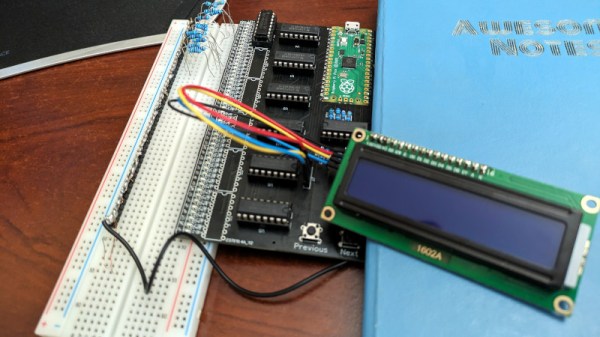
PicoDebugger Makes Development Easier

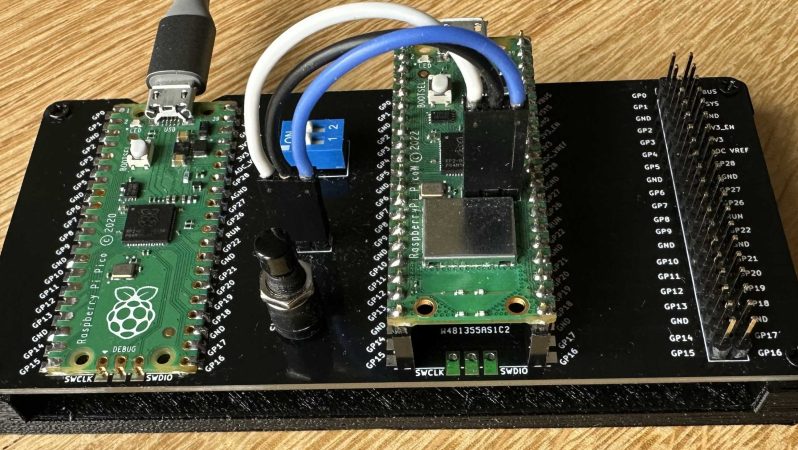
Debugging a Raspberry Pi Pico is straightforward enough; it simply involves hooking up something up to the USB and SWD pins. [Mark Stevens] whipped up the PicoDebugger to make this job easier than ever before.

The Raspberry Pi Foundation developed the Picoprobe system to allow a RP2040 to act as a USB to SWD and UART bridge for debugging another Pico or RP2040. The problem is that hooking it up time and time again can be fussy and frustrating.

To get around this, [Mark] whipped up the PicoDebugger board, which directly connects most of the important pins for you. Drop a Pico into the “Target” slot, and you can hook up the PicoDebugger to its UART lines with the flick of a DIP switch. The SWD pins can then also be connected via jumpers if so desired.  It also features a 2×20-pin header to allow the target to be wired into other hardware as necessary.

It’s a neat project, and it certainly beats running a bird’s nest of jumper wires every time you want to debug a Pico project. Simply dropping a board in is much more desirable.

We’ve seen some other neat debug tools over the years, too. If you’ve got your own development productivity hacks in the works, don’t hesitate to let us know!

Picopad Is A New Open Source Game Console

Microcontrollers are so powerful these days that you can build color handheld games with them that match or exceed what you’d ever get on the Game Boys and Game Gears of yesteryear. The Picopad aims to offer just this, in an open-source hackable format that’s friendly to experimenters.

As you might have guessed from the name, the Picopad is based on the Raspberry Pi Pico and its RP2040 microcontroller. It features four face buttons and a D-pad, along with a small color LCD with a 320×240 resolution. There is also a microSD slot upon which programs can be stored, and also an expansion port with headers for a variety of IO from the RP2040 itself including both GPIOs, serial, I2C and analog input pins. The housing is constructed out of PCBs, with some cheerful gaming artwork adding a fun aesthetic. Development is via a custom C SDK, with support for Micropython as well.

If you want to build your own and don’t fancy starting from scratch, kits are available online. We’ve seen some other great gaming experiments with the Raspberry Pi Pico before, too, like an open-world 3D game and ZX Spectrum emulators. Video after the break.

Continue reading “Picopad Is A New Open Source Game Console”

A BASIC Interpreter For The Raspberry Pi Pico

It’s pretty easy to program the Raspberry Pi Pico in Python, or you can use C or C++ if you so desire. However, if you fancy the easy language of yesteryear, you might like PiccoloBASIC from [Gary Sims].

Putting it simply, piccoloBASIC is a BASIC interpreter that runs on the Raspberry Pi Pico. It features all the good bits of BASIC such as GOTO and GOSUB commands, that fancier languages kind of look down upon. It’s also got enough built-in routines to handle regular programming life, like sleeps, delays, a basic pseudorandom number source, trigonometric functions, and the ability to deal with floating point numbers. As far as microcontroller tasks go, it’s got rudimentary support for talking to GPIOs right now via the pinon and pinoff commands. However, it’s probably not the way to go if you want to bit-bang an SD card to within an inch of its speed rating.

Down the road, [Gary] hopes to add support for features like the Pico’s I2C, SPI, and PIO hardware, along with networking protocols and Bluetooth. PEEK and POKE are also hopefully on the way for those that like to fiddle with memory directly.

Meanwhile, if you’re looking for a different yet similar take, explore the port of MMBasic to the Pico platform. Video after the break.

Continue reading “A BASIC Interpreter For The Raspberry Pi Pico”

A Pico-Based ZX Spectrum Emulator

The ZX Spectrum was a popular computer of the 8-bit era. Now, it’s possible to emulate this machine on a microcontroller so cheap that it’s literally been given away on the front cover of magazines. Yes, we’re talking about the Pico ZX Spectrum project.

The project consists of all the necessary code to emulate a ZX Spectrum upon the hardware of the RP2040 microcontroller that makes up the Raspberry Pi Pico. The community has then taken this code and run with it, using it as the basis for all manner of different ZX Spectrum builds. If so desired, you can go barebones and use the Pico to run a ZX Spectrum off a breadboard with HDMI video output. Alternatively, you can build something like the PicoZX from [Bobricius]. The handheld computer features a PCB-based housing, along with an LCD and an integrated keyboard. Other configurations support features like USB keyboards, VGA outputs, and working sound output.

It’s great to see a classic 8-bit computer reimagined in all kinds of new tribute form factors. The Spectrum was always beloved for its neat all-in-one design, and there are several modern remixes that riff on that theme. The fact that they can all be powered by a cheap single-board microcontroller is all the more astounding. Video after the break.

Continue reading “A Pico-Based ZX Spectrum Emulator”

Bringing The PIO To The FPGA

We’ve seen some pretty incredible hacks using the Raspberry Pi 2040. However, one of the most exciting bits of hardware onboard is the Programmable I/O (PIO). Not content with it just being a part of RP2040-based projects, [Lawrie Griffiths] has been porting the PIO to Verilog so anyone can enjoy it.

This particular implementation is based only on the spec that Raspberry Pi provides. For assembling PIO code, [Lawrie] uses Adafruit’s pioasm assembler they use for their MicroPython framework. There’s a simulator to test different programs, and the project targets the Blackice MX and the Ulx3s. A few example programs are included in the repo, such as outputting a pleasant guitar note over I2S and driving a chain of WS2812s.

The project is still incomplete but slowly making progress. It’s an incredible feat of reverse engineering. While the simulator can be used to debug programs, step through instructions, and inspect waveforms, the ultimate value of bringing the PIO to other systems is that now we can re-use the code. Things like the can2040, an implementation of the CAN bus protocol using the PIO. Or even a PIO-based USB host.

Bust Out That Old Analog Scope For Some Velociraster Fun!

[Oli Wright] is back again with another installation of CRT shenanigans. This time, the target is the humble analog oscilloscope, specifically a Farnell DTV12-14 12 MHz dual-channel unit, which features a handy X-Y mode. The result is the Velociraster, a simple (in hardware terms) Raspberry Pi Pico based display driver.

Using a Pico to drive a pair of AD767 12-bit DACs, the outputs of which drive the two ‘scope input channels directly, this breadboard and pile-of-wires hack can produce some seriously impressive results. On the software side of things, the design is a now a familiar show, with core0 running the application’s high-level processing, and core1 acting in parallel as the rendering engine, determining static DAC codes to be pushed out to the DACs using the DMA and the PIO.

Continue reading “Bust Out That Old Analog Scope For Some Velociraster Fun!”

PicoCray - Raspberry Pi Pico Cluster

Parallel Computing On The PicoCray RP2040 Cluster

[ExtremeElectronics] cleverly demonstrates that if one Raspberry Pi Pico is good, then nine must be awesome.  The PicoCray project connects multiple Raspberry Pi Pico microcontroller modules into a parallel architecture leveraging an I2C bus to communicate between nodes.

The same PicoCray code runs on all nodes, but a grounded pin on one of the Pico modules indicates that it is to operate as the controller node.  All of the remaining nodes operate as processor nodes.  Each processor node implements a random back-off technique to request an address from the controller on the shared bus. After waiting a random amount of time, a processor will check if the bus is being used.  If the bus is in use, the processor will go back to waiting.  If the bus is not in use, the processor can request an address from the controller.

Once a processor node has an address, it can be sent tasks from the controller node.  In the example application, these tasks involve computing elements of the Mandelbrot Set. The particular elements to be computed in a given task are allocated by the controller node which then later collects the results from each processor node and aggregates the results for display.

The name for this project is inspired by Seymore Cray. Our Father of the Supercomputer biography tells his story including why the Cray-1 Supercomputer was referred to as “the world’s most expensive loveseat.” For even more Cray-1 inspiration, check out this Raspberry Pi Zero Cluster.