Battery Swap Keeps Sansa Clip+ Chugging

You’d be forgiven for not realizing there’s still a diehard group of people out there carrying around dedicated MP3 players. While they were all the rage a decade or so back, most consumers have since moved over to using their handy dandy pocket supercomputer for playing their music. Plus controlling every other aspect of their personal life and finances, of course. Though that’s another story entirely.
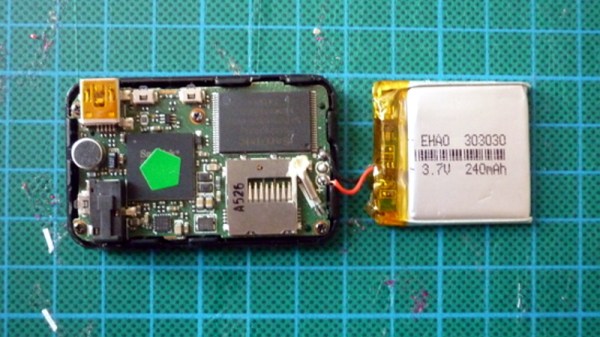
But as [Conno Brooks] explained to us, there’s a sizable group of open source fanatics who prefer to store their jams on devices running the Rockbox firmware. Only problem is, some of the desirable Rockbox-compatible players are from the Golden Age of dedicated players, and aren’t getting any younger. In a recent blog post, he briefly goes over his ultimately successful attempt to put a new-made battery into his Sansa Clip+, a particularly desirable player that was released in 2009.

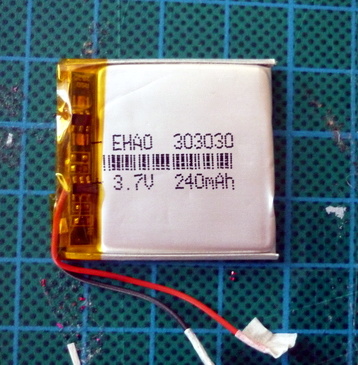
There are a few problems with the procedure that has kept it from being very widespread, according to [Conno]. For one, the Sansa Clip+ is tiny and not easily disassembled without destroying it. Worse, the diminutive 30mm x 36mm x 3mm OEM battery is effectively unobtainium. But ironically he was able to find an even smaller battery which seemed like it should work, assuming he could get it wired up.

The OEM battery on the Clip+ uses three wires, which [Conno] presumed was part of some thermal protection system. He first tried to take the circuit board off the original dead battery and graft it onto the modern cell, but something must have tripped because the resulting Franken-pack didn’t output any voltage. On his second attempt he simply ignored the third wire, and luckily the Clip+ didn’t seem to complain and started up as expected.

[Conno] says there’s some careful flexing required to get the new pack installed and the Clip+ closed properly, and the device’s runtime is somewhat diminished by the new battery’s lower capacity. But if it means another few years of keeping Big Brother out of your digital media habits, he figures it’s a worthy trade.

We’ve actually seen a few hacks now for the Sansa Clip line of players at this point, thanks to its second lease on life as an open source darling; from a slightly less stock-looking battery replacement, to adding a line-in option. When you get sick of listening to Hanson’s discography, you can even boot up what is perhaps the world’s worst port of DOOM.
Scratch-Building A Supersized Laser Cutter

Now that 3D printers have more or less hit the mass market, hackers need a new “elite” tool to spend their time designing and fiddling with. Judging by the last couple of years, it looks like laser cutters will be taking over as the hacker tool du jour; as we’re starting to see more and more custom builds and modifications of entry-level commercial models. Usually these are limited to relatively small and low powered diode lasers, but as the following project shows, that’s not always the case.

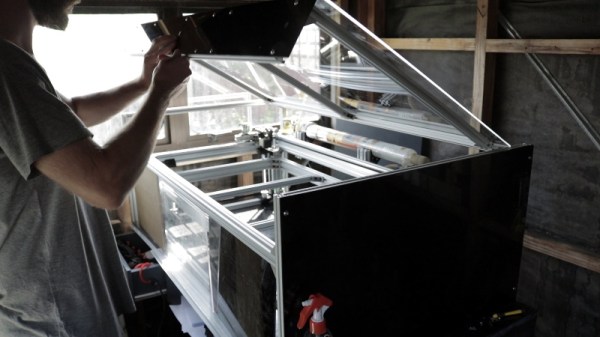
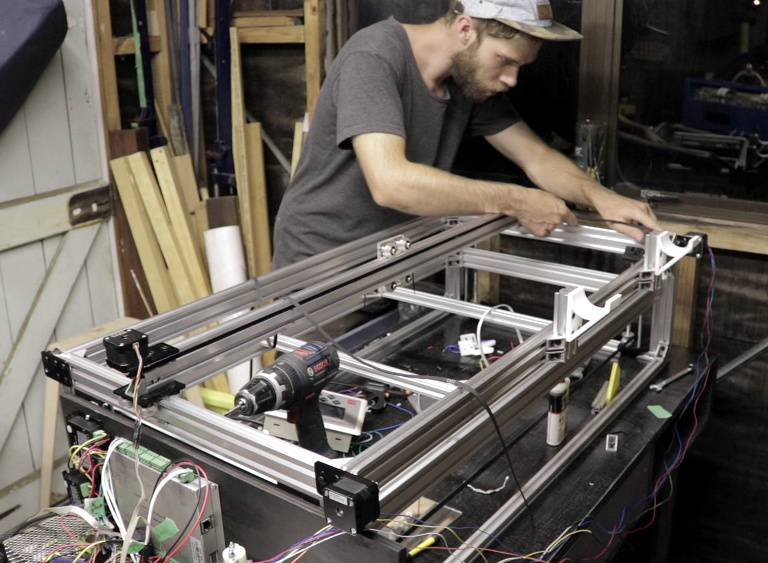
This large format laser cutter designed and built by [Rob Chesney] is meticulously detailed on his blog, as well as in the in the video after the break. It’s made up of aluminium profile and a splattering of ABS 3D printed parts, and lives in an acrylic enclosure that’s uniquely isolated from the laser’s internal gantry. All told it cost about $2,000 USD to build, but considering the volume and features of this cutter that’s still a very fair price.

[Rob] carefully planned every aspect of this build, modeling the entire machine in CAD before actually purchasing any hardware. Interestingly enough his primary design constraint was the door to his shed: he wanted to build the largest possible laser cutter that could still be carried through it. That led to the final machine’s long and relatively shallow final dimensions. The design was also guided by a desire to minimize material waste, so when possible parts were designed to maximize how many could be cut from a one meter length of aluminum extrusion.

The laser features a movable Z axis that’s similar in design to what you might see in a Prusa-style 3D printer, with each corner of the gantry getting an 8 mm lead screw and smooth rod which are used in conjunction to lift and guide. All of the lead screws are connected to each other via pulleys and standard GT2 belt, but as of this version, [Rob] notes the Z axis must be manually operated. In the future he’ll be able to add in a stepper motor and automate it easily, but it wasn’t critical to get the machine running.

He used 3D printed parts for objects which had a relatively complex geometry, such as the laser tube holders and Z axis components, but more simplistic brackets were made out of cut acrylic. In some components, [Rob] used welding cement to bond two pieces of acrylic and thereby double the thickness. Large acrylic panels were also used for the laser’s outer enclosure, which was intentionally designed as a separate entity from the laser itself. He reasoned that this would make assembly easier and faster, as the enclosure would not have to be held to the same dimensional tolerances as it would have been if it was integrated into the machine.

[Rob] gives plenty of detail about all the finer points of water cooling, laser control electronics, aligning the mirrors, and really anything else you could possibly want to know about building your own serious laser cutter. If you’ve been considering building your own laser and have anything you’re curious or unsure about, there’s a good chance he addresses it in this build.

Short of having the fantastically good luck to find a laser cutter in the trash that you can refurbish, building your own machine may still be the best upgrade path if you outgrow your eBay K40.

Continue reading “Scratch-Building A Supersized Laser Cutter”

Gorgeous Bartop Arcade Build Is A Cut Above

At this point we’ve seen a good number of desktop-sized arcade cabinets, and while they’ve naturally all been impressive in their own ways, they do tend to follow a pretty familiar formula. Cut the side panels out of MDF (or just buy a frame kit), stick a Raspberry Pi and an old LCD monitor in there, and then figure out how to control the thing. Maybe a couple strategically placed stickers and blinking LEDs to add a few extra horsepower, but nothing too surprising.

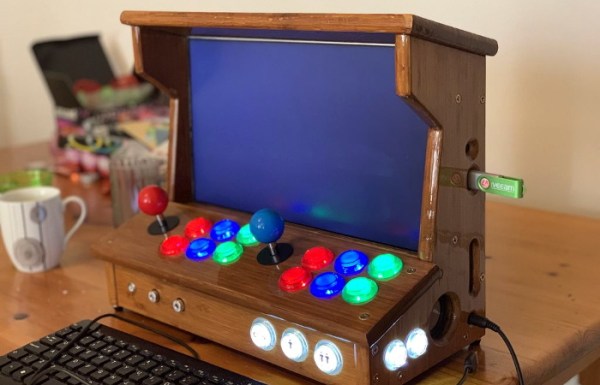
[Andy Riley] had seen plenty of builds like that, and he wasn’t having any of it. With the heart of an old laptop and bones made of IKEA cutting boards, his build is proof positive that there’s always more than one way to approach a problem that most would consider “solved” already. From the start, he set out to design and build a miniature arcade cabinet that didn’t look and feel like all the other ones he’d seen floating around online, and we think you’ll agree he delivered in a big way.

Powering the arcade with an old laptop is really a brilliant idea, especially since you can pick up older models for a song now that they’re considered nearly disposable by many users. As long as it doesn’t have a cracked display, you’ll get a nice sized LCD panel and potentially a rather powerful computer to drive it. Certainly the graphical capabilities of even the crustiest of used laptops will run circles around the Raspberry Pi, and of course it opens the possibility of playing contemporary PC games. As [Andy] shows in his detailed write-up, using a laptop does take more custom work than settling for the Pi, but we think the advantages make a compelling case for putting in the effort.

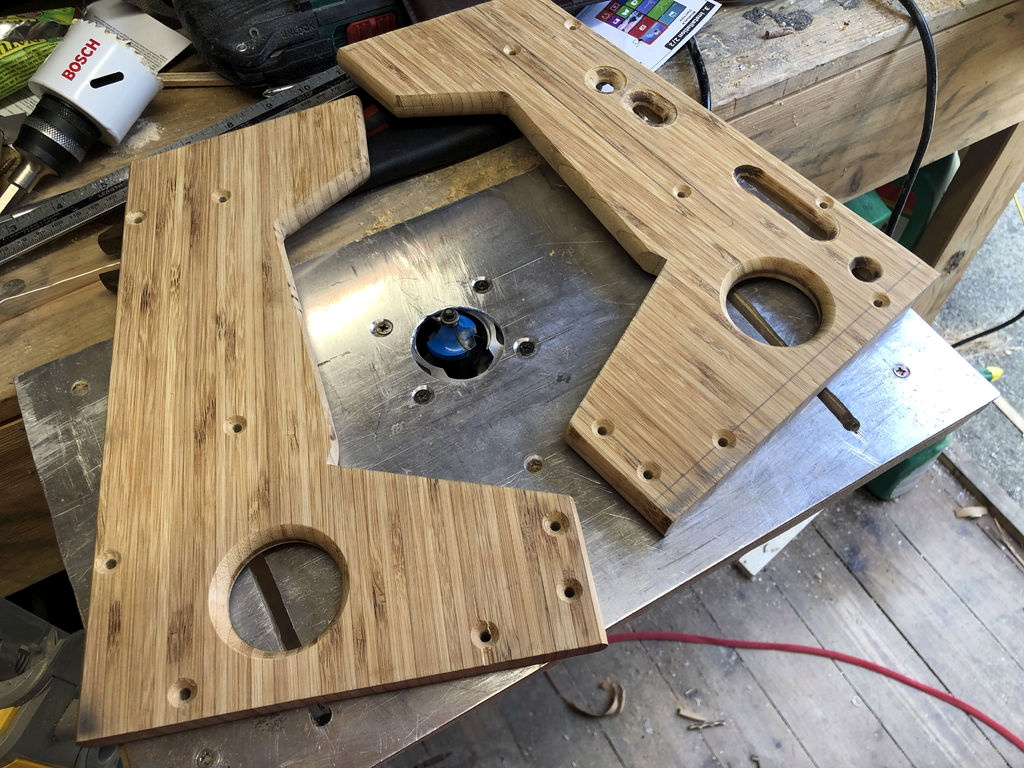
Of course, that’s only half the equation. Arguably the most impressive aspect of this build is the cabinet itself, which is made out of a couple IKEA bamboo cutting boards. [Andy] used his not inconsiderable woodworking skills, in addition to some pretty serious power tools, to turn the affordable kitchen accessories into a furniture-grade piece that really stands out from the norm. Even if you aren’t normally too keen on working with dead trees, his step-by-step explanations and pictures are a fascinating look at true craftsman at work.

If you’re more concerned with playing Galaga than the finer points of varnish application, you can always just turbocharge the old iCade and be done with it. But we think there’s something to be said for an arcade cabinet that could legitimately pass as a family heirloom.

Flagging Down Aliens With World’s Biggest Laser Pointer

As you’re no doubt aware, humans are a rather noisy species. Not just audibly, like in the case of somebody talking loudly when you’re in a movie theater, but also electromagnetically. All of our wireless transmissions since Marconi made his first spark gap broadcast in 1895 have radiated out into space, and anyone who’s got a sensitive enough ear pointed into our little corner of the Milky Way should have no trouble hearing us. Even if these extraterrestrial eavesdroppers wouldn’t be able to understand the content of our transmissions, the sheer volume of them would be enough to indicate that whatever is making all that noise on the third rock orbiting Sol can’t be a natural phenomena. In other words, one of the best ways to find intelligent life in the galaxy may just be to sit around and wait for them to hear us.

Of course, there’s some pesky physics involved that makes it a bit more complicated. Signals radiate from the Earth at the speed of light, which is like a brisk walk in interstellar terms. Depending on where these hypothetical listeners are located, the delay between when we broadcast something and when they receive it can be immense. For example, any intelligent beings that might be listening in on us from the closest known star, Proxima Centauri, are only just now being utterly disappointed by the finale for “How I Met Your Mother“. Comparatively, “Dallas” fans from Zeta Reticuli are still on the edge of their seats waiting to find out who shot J.R.

But rather than relying on our normal broadcasts to do the talking for us, a recent paper in The Astrophysical Journal makes the case that we should go one better. Written by James R. Clark and Kerri Cahoy,  “Optical Detection of Lasers with Near-term Technology at Interstellar Distances” makes the case that we could use current or near-term laser technology to broadcast a highly directional beacon to potentially life-harboring star systems. What’s more, it even theorizes it would be possible to establish direct communications with an alien intelligence simply by modulating the beam.

Continue reading “Flagging Down Aliens With World’s Biggest Laser Pointer”

The Electric Imp Sniffs Out California Wildfires

The wildfires in California are now officially the largest the state has ever seen. Over 50,000 people have been displaced from their homes, hundreds are missing, and the cost in property damage will surely be measured in the billions of dollars when all is said and done. With a disaster of this scale just the immediate effects are difficult to conceptualize, to say nothing of the collateral damage.

While not suggesting their situation is comparable to those who’ve lost their homes or families, Electric Imp CEO [Hugo Fiennes] has recently made a post on their blog calling attention to the air quality issues they’re seeing at their offices in Los Altos. To quantify the problem so that employees with respiratory issues would know the conditions before they came into work, they quickly hacked together a method for displaying particulate counts in their Slack server.

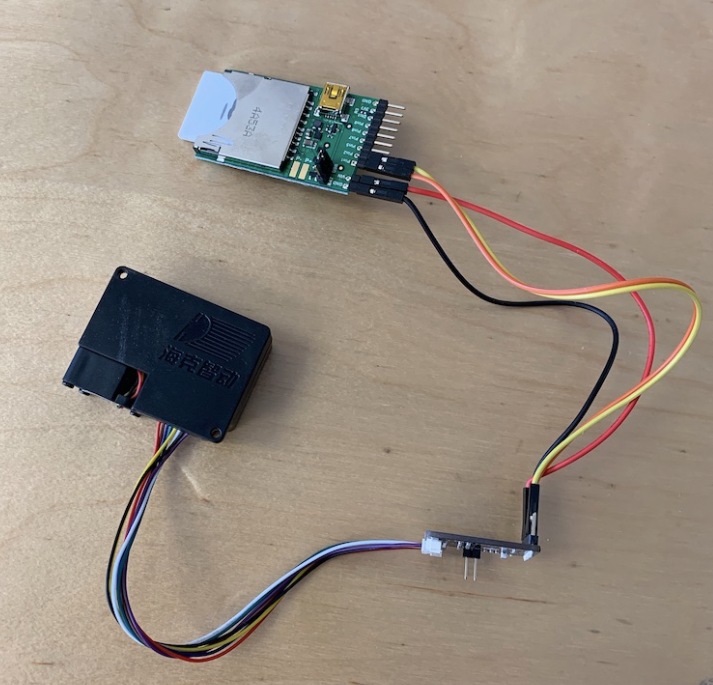
The key to the system is one of the laser particle sensors that we’re starting to see more of thanks to a fairly recent price drop on the technology. A small fan pulls air to be tested into the device, where a very sensitive optical sensor detects the light reflected by particles as they pass through the laser beam. The device reports not only how many particles are passing through it, but how large they are. The version of the sensor [Hugo] links to in his blog post includes an adapter board to make it easier to connect to your favorite microcontroller, but we’ve previously seen DIY builds which accomplish the same goal.

[Hugo] then goes on to provide firmware for the Electric Imp board that reads the current particulate counts from the sensor and creates a simple web page that can be viewed from anywhere in the world to see real-time conditions at the office. From there, this data can be plugged into a Slack webhook which will provide an instantaneous air quality reading anytime a user types “air” into the channel.

We’ve covered a number of air quality sensors over the years, and it doesn’t look like they’re going to become any less prevalent as time goes on. If anything, we’re seeing a trend towards networks of distributed pollution sensors so that citizens can collect their own data on their air they’re breathing.

[Thanks to DillonMCU for the tip.]

A 3D Printed Kinematic Camera Mount

[Enginoor] is on a quest. He wants to get into the world of 3D printing, but isn’t content to run off little toys and trinkets. If he’s going to print something, he wants it to be something practical and ideally be something he couldn’t have made quickly and easily with more traditional methods. Accordingly, he’s come out the gate with a fairly strong showing: a magnetic Maxwell kinematic coupling camera mount.

If you only recognized some of those terms, don’t feel bad. Named for its creator James Clerk Maxwell who came up with the design in 1871, the Maxwell kinematic coupling is self-orienting connection that lends itself to applications that need a positive connection while still being quick and easy to remove. Certainly that sounds like a good way to stick a camera on a tripod to us.

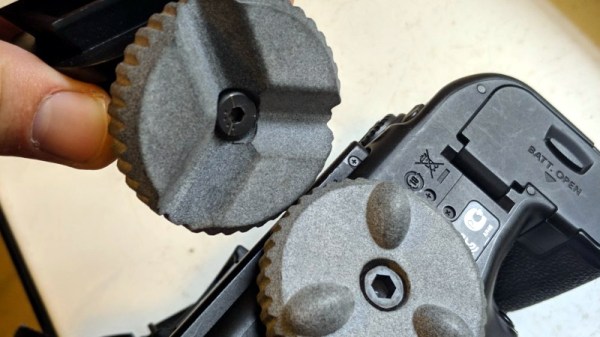
But the Maxwell design, which consists of three groves and matching hemispheres, is only half of the equation. It allows [enginoor] to accurately and repeatably line the camera up, but it doesn’t have any holding power of its own. That’s where the magnets come in. By designing pockets into both parts, he was able to install strong magnets in the mating faces. This gives the mount a satisfying “snap” when attaching that he trusts it enough to hold his Canon EOS 70D and lens.

[enginoor] says he could have made the holes a bit tighter for the magnets (thereby skipping the glue he’s using currently), but otherwise his first 3D printed design was a complete success. He sent this one off to Shapeways to be printed, but in the future he’s considering taking the reins himself if he can keep coming up with ideas worth committing to plastic.

Of course we’ve seen plenty of magnetic camera mounts in the past, but we really like the self-aligning aspect of this design. It definitely seems to fit the criterion for something that would otherwise have been difficult to fabricate if not for 3D printing.

Meat-Seeking Raspberry Pi Leads You To Flavortown

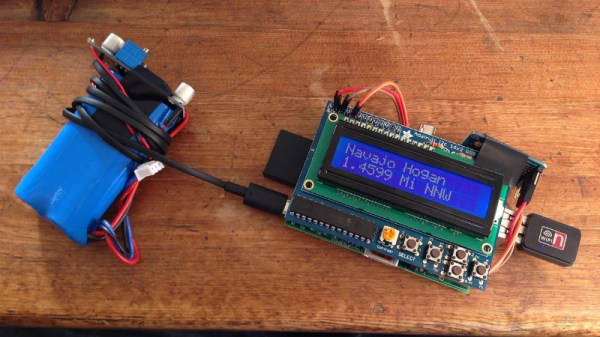
[Patrick McDavid] and his wife had a legitimate work-related reason for writing some Python code that would pull the exact latitude and longitude of the individual locations within a national retain chain from Google’s Geocoding API. But don’t worry about that part of the story. What’s important now is that this simple concept was then expanded into a pocket-sized device that will lead the holder to the nearest White Castle or Five Guys location.

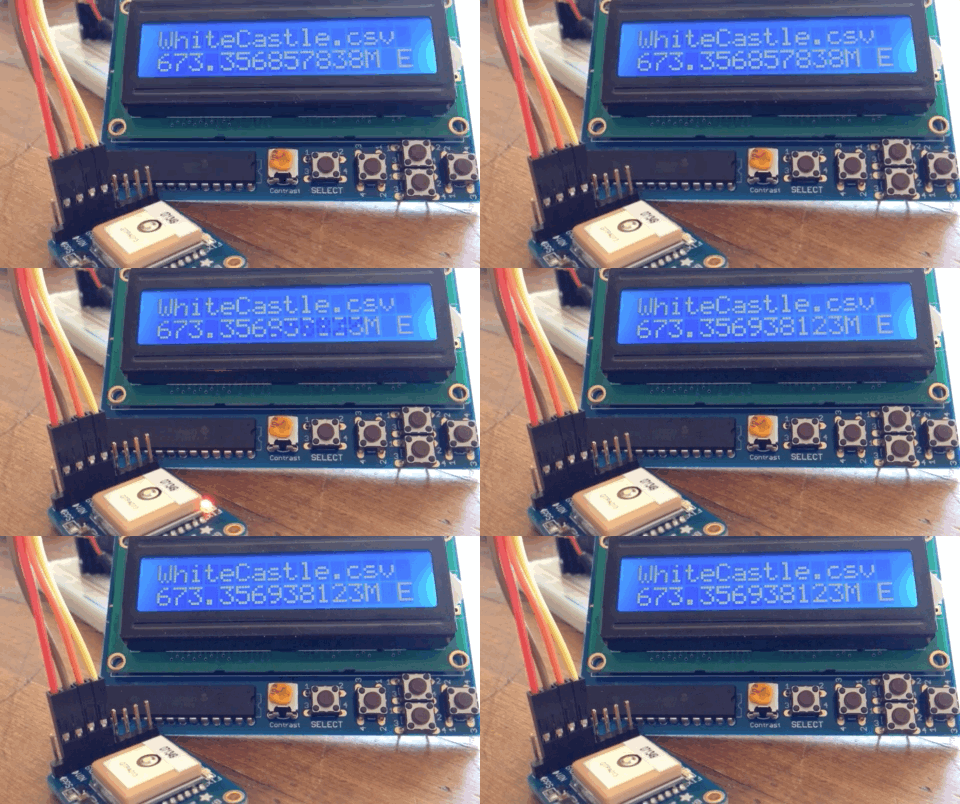
The device, which [Patrick] lovingly referrers to as the “Cheeseburger Compass”, uses a Raspberry Pi 3, an Adafruit 16×2 LCD with keypad, a GPS module, and the requisite battery and charger circuit to make it mobile. With the coordinates for the various places one can obtain glorious artery clogging meat circles loaded up, the device will give the user the cardinal direction and current distance from the nearest location of the currently selected chain.

[Patrick] has published the source code for this meat-seeking gadget on GitHub, but notes that most of it is just piecing together existing libraries and tools. As with many Python projects, it turns out there’s already a popular library to do whatever it is you were trying to do manually, so his early attempts at calculating distances and bearings were ultimately replaced with turn-key solutions. Though he did come up with a quick piece of code that would convert a compass heading in degrees to a cardinal direction that he couldn’t find a better solution for. Maybe he should make it a library…

Sadly the original Cheeseburger Compass got destroyed from being carried around so much, but at least it died doing what it loved. [Patrick] says a second version of the device would likely switch over to a microcontroller rather than the full Raspberry Pi experience, as it would make the device much smaller and greatly improve on the roughly two hour battery life.

This project reminds us of the various geocache devices we’ve covered in the past, but with the notable addition of hot sizzling meat. Talk about improving on a good thing.