Recovering Data From A Vintage MFM Drive

Even if you aren’t a vintage computer aficionado, you’re probably aware that older computer hard drives were massive and didn’t hold much data. Imagine a drive that weighs several pounds, and only holds 1/1000th of what today’s cheapest USB flash drives can. But what you might not realize is that if you go back long enough, the drives didn’t just have lower capacity, they utilized fundamentally different technology and relied on protocols which are today little more than historical footnotes.
A case in point is the circa 1984 Modified Frequency Modulation (MFM) drive which [Michał Słomkowski] was tasked with recovering some files from. You can’t just pop this beast into a USB enclosure; copying files from it required an interesting trip down computing’s memory lane, with a sprinkling of modern techniques that are sure to delight hackers who still like to dip their toes into the MS-DOS waters from time to time.

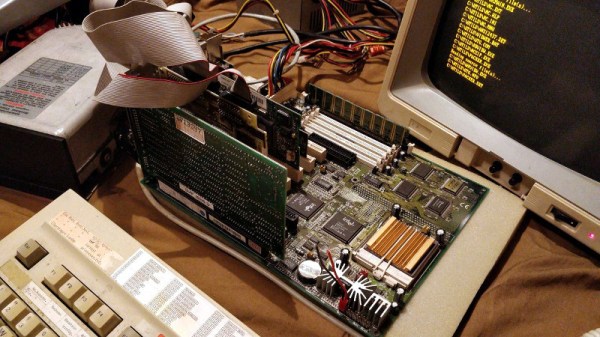
The drive, a MiniScribe 2012, has its own WD1002A-WX1 8-bit ISA controller card. [Michał] is the kind of guy who just so happens to have an ISA-compatible AT motherboard laying around, but he didn’t have the correct cooler for its Pentium processor. He stuck a random heatsink down onto it with a rubber band and set the clock speed as low as possible, which worked well enough to get him through the copying process.

Not wanting to fiddle with floppies, [Michał] then put together a setup which would let him PXE boot MS-DOS 6.22 under Arch Linux. He used PXELINUX, part of the syslinux package, and created an entry for DOS in the configuration file under the pxelinux.cfg directory. He then installed netboot which combines a DHCP and TFTP server into one simple package, and configured it for the MAC address of the AT machine’s 3com 3C905C-TXM network card.

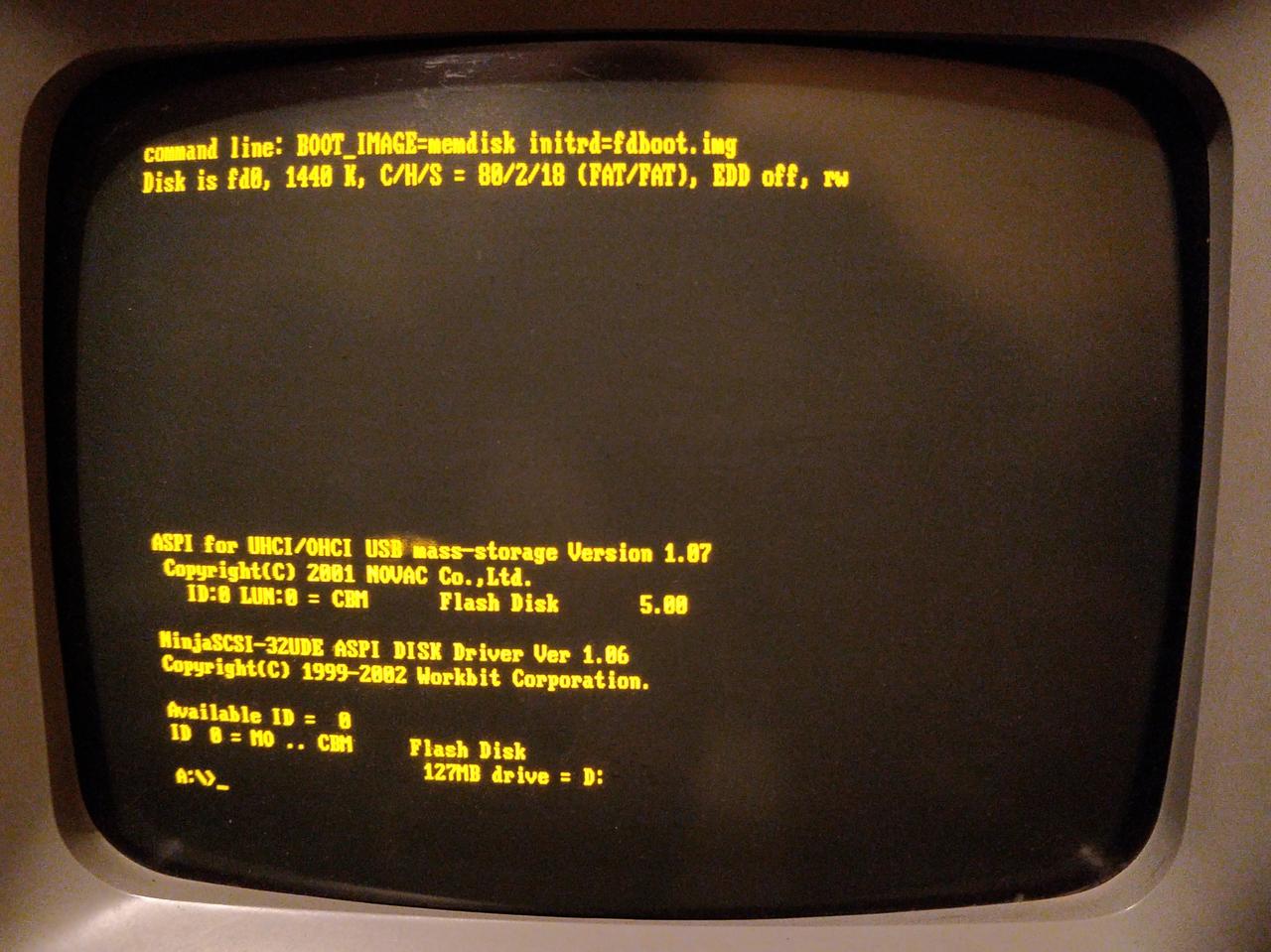
With the hardware and operating system up and running, it was just a matter of getting the files off of the MFM drive and onto something a bit more contemporary. He tried to copy them to a secondary IDE drive, but it seemed there was some kind of conflict as both drives wouldn’t operate at the same time. So he pulled another solution from his bag of tricks: using a USB mass storage device on MS-DOS. By emulating a SCSI drive, he was able to get a standard flash drive plugged into a PCI USB card working, which ultimately dragged these ~35 year old files kicking and screaming into the 21st century.

We love keeping old hardware alive here at Hackaday, and documented methods to not only PXE boot DOS but use USB storage devices when you get it up and running will hopefully inspire some more hackers to blow the dust off that old 386 in the attic.

3D Printed Catamaran Eats Benchy’s Lunch

If we’ve learned anything, it’s that 3D printers are exceptionally well suited to printing little boats. According to the Internet, 3D printers are at their best when pumping out cute PLA boats in all the colors of the rainbow; perfect for collecting dust on a shelf somewhere. Ask not what your Benchy can do for you, ask what you can do your Benchy.

But this 3D printed boat isn’t so cute and cuddly. In fact, it’s an absolute beast. Built by [Wayne Andrews], this nearly meter long 3D printed racing catamaran looks more Batman than Popeye. In the video after the break you can see a recent run of the boat on the lake, and we think you’ll agree it definitely has the performance to back up its fierce looks.

Impressively, the hull isn’t printed out of some expensive high-tech filament. It’s the cheapest PLA [Wayne] could get his hands on, and glued together with nothing more exotic than Loctite Super Glue Gel. The secret is the internal “West System” fiberglass cloth and resin work, which is the same stuff used on real boat hulls. It took about 5 days of continuous printing to produce all the pieces needed to assemble the hull, which is a scaled up version of a design by [Thomas Simon].

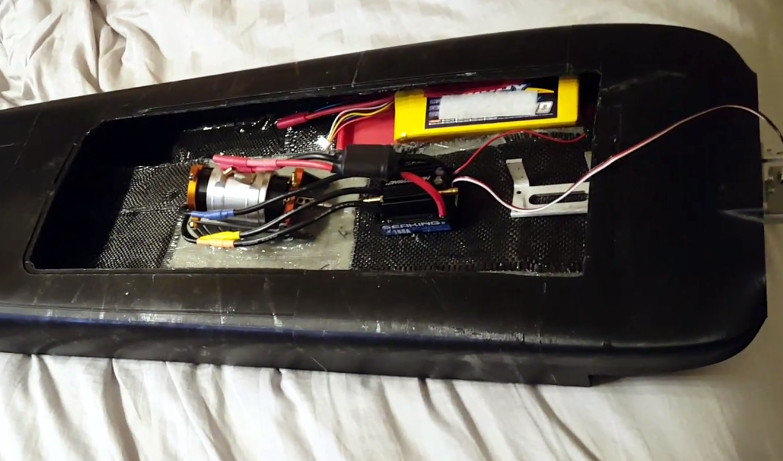
The internal layout is about what you’d expect in a fast RC boat. It’s running on a 1900 Kv motor powered by dual 6S batteries and a water cooled 180 A Seaking ESC which provides 5 BHP to the Octura x452 propeller. On the business end of his boat, [Wayne] used a commercial aluminum strut and rudder unit. Running gear printed out of something strong like nylon would be an interesting experiment, but perhaps a tall order for this particular motor.

We recently covered a 3D printed jet boat that’s no slouch either, but if you’re looking for a more relaxed ride you could always 3D print a FPV lifeboat.

Continue reading “3D Printed Catamaran Eats Benchy’s Lunch”

Adding Bluetooth To Original SNES Controllers

There’s a bunch of companies selling wireless Super Nintendo style controllers out there. You can go on Amazon and get any number of modern pads that at least kinda-sorta look like what came with Nintendo’s legendary 1990’s game console. They’ve got all kinds of bells and whistles, Bluetooth, USB-C, analog sticks, etc. But none of them are legitimate SNES controllers, and for some people that’s just not good enough.

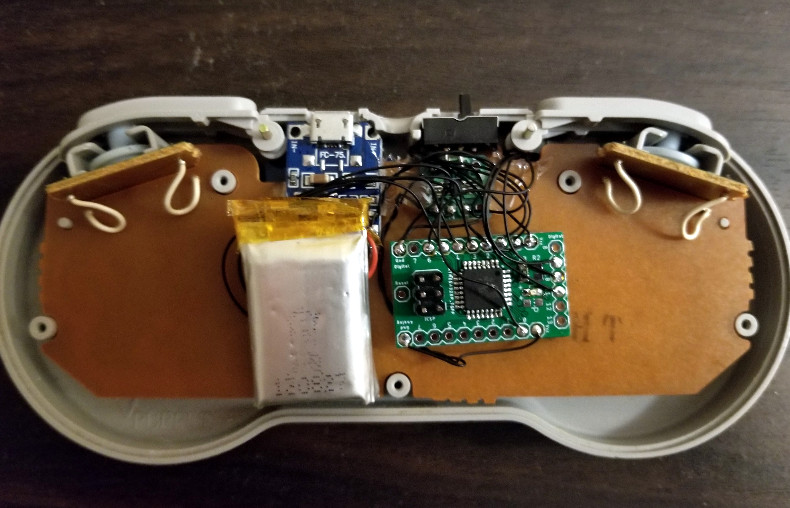
[sjm4306] is one of those people. He wanted to add Bluetooth and some other modern niceties to a legitimate first-party SNES controller, so he picked up a broken one off of eBay and got to work grafting in his custom hardware. The final result works with Nintendo’s “Classic Edition” consoles, but the concept could also work with the original consoles as well as the computer if you prefer your classic games emulated.

A custom ATMEGA328P-powered board polls the controller’s SPI serial shift register in much the same way the original SNES would have. It then takes those button states and sends them out over UART with a HC-05 Bluetooth module. The controller is powered by a 330 mAh 3.7V battery, and a charging circuit allows for easily topping the controller off with a standard USB cable.

A particularly nice touch on the controller is the use of custom light pipes for the status LEDs. [sjm4306] made them by taking pieces of transparent PLA 3D printer filament, heating and flattening the end, and then sanding it smooth. This provides a diffusing effect on the light, and we’ve got to say it looks very good. Definitely a tip to file away for the future.

On the receiving side, this project was inspired by a custom NES Classic Edition Advantage controller we featured last year, and borrows the work creator [bbtinkerer] did to get his receiver hardware talking to the Classic console over I2C.

We’ve seen a number of projects which have added wireless functionality to the classic Super Nintendo controller, but most tend to be more invasive than this one. We like the idea of reading the controller’s original hardware rather than completely gutting it.

Continue reading “Adding Bluetooth To Original SNES Controllers”

Hacking The ZH03B Laser Particle Sensor

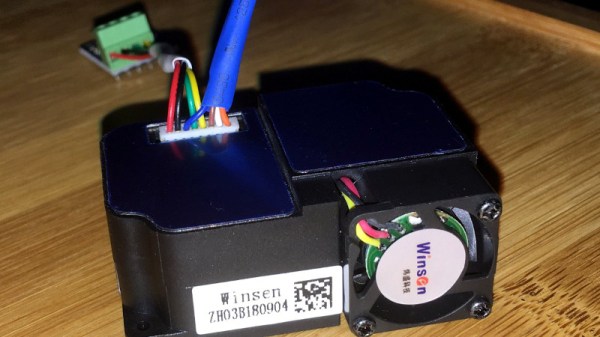
Laser particle detectors are a high-tech way for quantifying whats floating around in the air. With a fan, a laser, and a sensitive photodetector, they can measure smoke and other particulates in real-time. Surprisingly, they are also fairly cheap, going for less than $20 USD on some import sites. They just need a bit of encouragement to do our bidding.

[Dave Thompson] picked up a ZH03B recently and wanted to get it working with his favorite sensor platform, Mycodo. With a sprinkling of hardware and software, he was able to get these cheap laser particle sensors working on his Raspberry Pi, and his work was ultimately incorporated upstream into Mycodo. Truly living the open source dream.

The ZH03B has PWM and UART output modes, but [Dave] focused his attention on UART. With the addition of a CP2102 USB-UART adapter, he was able to connect it to his Pi and Mac, but still needed to figure out what it was saying. He eventually came up with some Python code that lets you use the sensor both as part of a larger network or service like Mycodo and as a stand-alone device.

His basic Python script (currently only tested on Linux and OS X), loops continuously and gives a running output of the PM1, PM2.5, and PM10 measurements. These correspond to particles with a diameter of 1, 2.5, and 10 micrometers respectively. If you want to plug the sensor into another service, the Python library is a bit more mature and lets you do things like turn off the ZH03B’s fan to save power.

These sensors are getting cheap enough that you can build distributed networks of them, a big breakthrough for crowd-sourced environmental monitoring; especially with hackers writing open source code to support them.

Dirty Video Mixing With The Raspberry Pi Zero

Don’t get too excited now, we aren’t talking about that kind of dirty video. There’s plenty of other places on the Internet you can go to find that sort of thing. No, this video mixer is “dirty” because it combines two composite video streams into one garbled up mess that’s best viewed on an old CRT TV. Why, you may ask? Because rock and roll, that’s why.

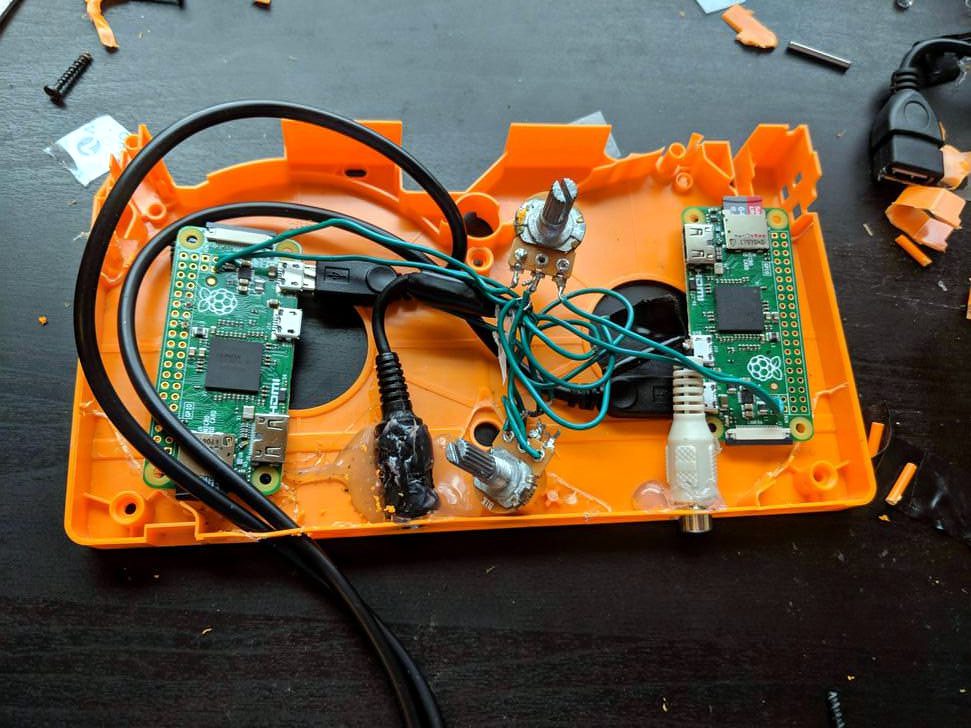
Created by [Luke Blackford] as a visual for his band’s performances, the “Dirty Pi” is an exceptionally simple way to create some wild imagery with two Raspberry Pi Zeros. It might not be the most practical of devices, but if you want so throw some creepy looking video up on screens all over the house (say for an upcoming Halloween party), this is a fantastic way to do it on the cheap.

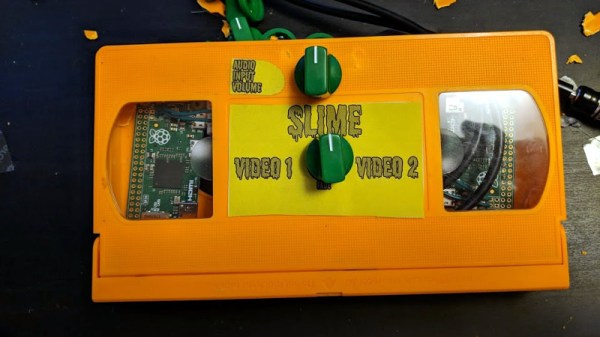
The idea is simple: connect the oft-forgotten composite video outputs of two Pi Zeros to a potentiometer, which then leads to the display. Play different videos on the Pis with the media player of your choice, and twiddle the potentiometer to create ghosting and interference. If you want to get that true 1980’s retro feel, put the whole thing into an old VHS cassette like [Luke] did, and you’re ready to rock.

Those who’ve been around the block a few times might recognize this trick as a variation of the [Karl Klomp] Dirty Video Mixer, and [Luke] tells us he likes this project because he was able to pull it off without writing any code or even doing any complex wiring, though he does imagine a future version where he adds some remote control functionality.

If you like your video mixers with more smarts and less dirt, we’ve covered a very slick build using the LM1881 in the past.

Continue reading “Dirty Video Mixing With The Raspberry Pi Zero”

Google Discovers Google+ Servers Are Still Running

Google is pulling the plug on their social network, Google+. Users still have the better part of a year to say their goodbyes, but if the fledgling social network was a ghost town before, news of its imminent shutdown isn’t likely to liven the place up. A quick check of the site as of this writing reveals many users are already posting their farewell messages, and while there’s some rallying behind petitions to keep the lights on, the majority realize that once Google has fallen out of love with a project there’s little chance of a reprieve.

To say that this is a surprise would be disingenuous. We’d wager a lot of you already thought it was gone, honestly. It’s no secret that Google’s attempt at a “Facebook Killer” was anything but, and while there was a group of dedicated users to be sure, it never attained anywhere near the success of its competition.

According to a blog post from Google, the network’s anemic user base isn’t the only reason they’ve decided to wind down the service. A previously undisclosed security vulnerability also hastened its demise, a revelation which will particularly sting those who joined for the privacy-first design Google touted. While this fairly transparent postmortem allows us to answer what ended Google’s grand experiment in social networking, there’s still one questions left unanswered. Where are the soon to be orphaned Google+ users supposed to go?

Continue reading “Google Discovers Google+ Servers Are Still Running”

Flying Human Head Lands Just In Time For Halloween

We love the fall here at Hackaday. The nights are cooler, the leaves are changing, and our tip line starts lighting up with some of the craziest things we’ve ever seen. Something about terrifying children of all ages just really speaks to the hacker mindset. That sounds bad, but we’re sure there’s a positive message in there someplace if you care to look hard enough.

Today’s abomination is a truly horrifying human head quadcopter, which exists for literally no other reason than to freak people out. We love it. Created by [Josh] and a few friends, the “HeadOCopter” is built around a meticulously detailed 3D print of his own head. This thing is so purpose-built that they didn’t even put landing gear on it: there’s no point sitting on the ground when you’re in the business of terrorizing people from above.

Sure, you could do this project with a cheap plastic skull. But there’s no way it would have the same effect. [Josh] created this monstrosity by scanning his own head with the Microsoft Kinect, cleaning the model up in ZBrush, adding in mounts for hardware, and 3D printing the result. After doing some smoothing and filling, the head got passed off to artist [Lisa Svingos] for the final painting. He even thought to include an FPV camera where one of his eyes should be, giving a whole new meaning to the term.

As for the quadcopter hardware itself, it uses a BrainFPV RADIX flight controller (get it?) and 12×5 props on Sunnysky V3508 motors with 30A BLHELI ESCs. Measuring 1 meter (3.2 feet) from motor to motor, it’s an impressive piece of hardware itself; head or no head.

This project reminds us of the flying ghost we saw years back, but we have to admit, this raises the bar pretty high. We’re almost afraid to see what comes next.

Continue reading “Flying Human Head Lands Just In Time For Halloween”