DIY Cable Chain Looks Great, Stays Cheap

If you’ve built a 3D printer, CNC, laser cutter, or basically any piece of electrical equipment that moves around, then you’ve run into the problem of securing the bundle of wires that such machines always require. The easy way out is to zip tie them all up into a tight harness or put them in commercially available wraps or sleeves, but these don’t really impart any mechanical strength on the wires. With repetitive motion it’s not unheard of to break a conductor or two, causing intermittent failures and generally leading to a painful diagnostic session trying to isolate the broken wire.
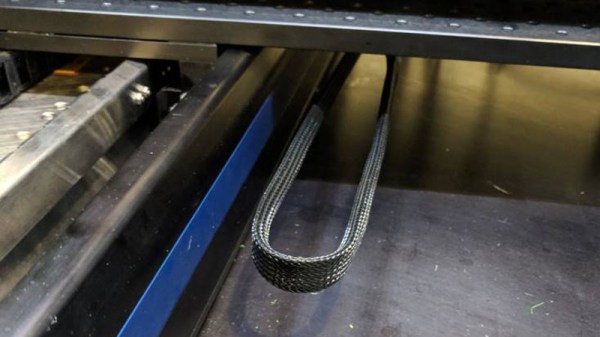
An alternative are what are generally referred to as “cable chains”. These are rigid enclosures for your wiring that not only keep things tidy, but give the wires the mechanical support necessary to prevent fatigue. Unfortunately, they are often many times more expensive than a simple wire wrap or pack of zip ties. But [Brad Parcels] has written into our tip line to share with us a sort of hybrid approach to wire management that has many of the same advantages as a traditional cable chain, but at a greatly reduced cost.

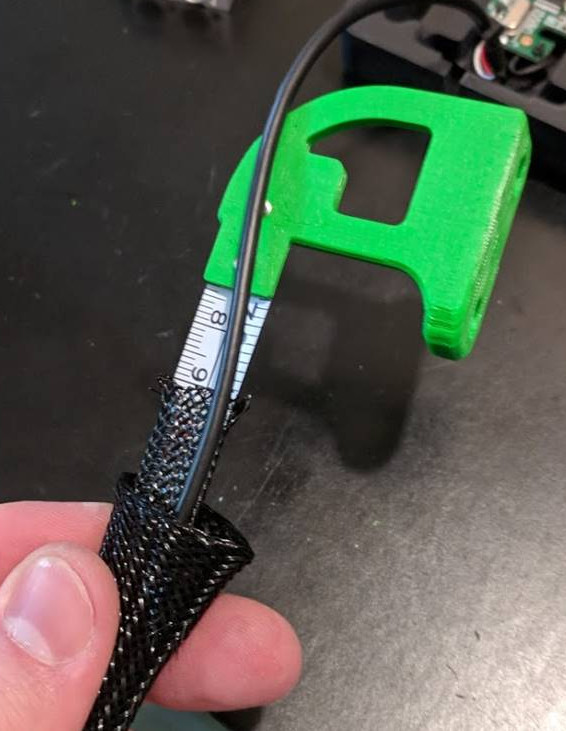
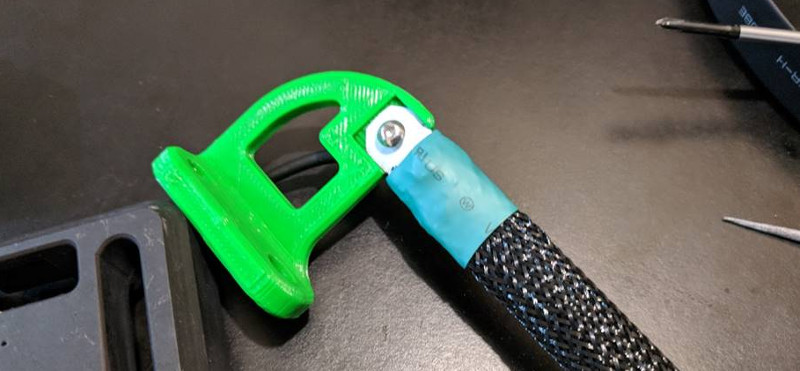
The key to the design is using the metallic tape from a cheap tape measure to give the bundle of wires some mechanical strength. As anyone who’s ever played around with a tape measure knows, if you bend the tape over into a U shape it will hold the bend even if you extend and retract it. Thanks to this principle, [Brad] realized that all he need to do was add some wire sleeves and he would have a cheap and effective way to keep his wiring neat and sag-free.

[Brad] punches holes in the tape to secure it to his 3D printed mounting arms, but really any method of securing the tape to the frame of your machine will work just as well. He then slides a cable sleeve over the tape itself to protect from any possibility of the edge of the tape nicking a wire, and then finally a larger wire sleeve over the entire assembly.

After running the wires between the two sleeves, heatshrink can be used on the ends to neatly close everything up. Just make sure you remember all your wires before you seal it, [Brad] learned that one the hard way. But overall, he reports this DIY cable chain arrangement has been working wonderfully in his machine, providing smooth and silent movement for only a few bucks.
Cable management for projects that move is one of those things that doesn’t always get the attention it deserves. Not only can it keep your project looking professional, but it just might save you some time down the road by preventing failures.

Turning Saw Blades Into Throwing Stars

The holidays are nearly upon us, and if you haven’t found the perfect gift for the Mall Ninja in your life yet, this latest hack might be just what you’re looking for. On his YouTube channel, [The Nocturnal Alchemist] demonstrates how to make ninja throwing stars (shuriken) out of an old circular saw blade. One could probably argue that a circular saw itself is close enough to throwing star if your only goal is to wreck some stuff in your backyard, but with this method they’ll have that official samurai look.

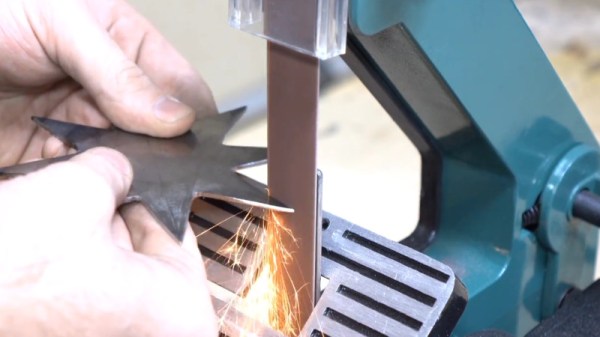
To start the process, he hits both sides of the circular saw blade with a grinder to smooth out the surface. He then traces the desired star shapes onto the blade, and cuts the blade into pieces so it’s easier to manage. The rough shape of the stars is cut out with an angle grinder, and a belt sander lets him sharpen the edges.

At this point the stars are effectively finished, but if you want something that’s going to look good on the shelf next to the katana you bought online, you need to do some more finish work. He sands both sides of the stars by hand, starting at 80 grit and working all the way up to 1200 grit wet paper. Once sanded, paste wax is rubbed in with a cloth to give it a protective coating.

With the finish work done, all that’s left to do is throw your new shuriken at cans of soda and watermelons as a demonstration of their power. To this end, he has come prepared with a 1,000 FPS camera; so if you’ve ever wanted to see cans of off-brand soda getting exploded with a throwing star, your Mall Ninja friend isn’t the only one about to get a gift.

With circular saw blade shuriken completed, all you’ll need to do to complete your urban samurai transformation is forge yourself a sword, and perfect your run in virtual reality.

Continue reading “Turning Saw Blades Into Throwing Stars”

Reverse Engineering The Nintendo Wavebird

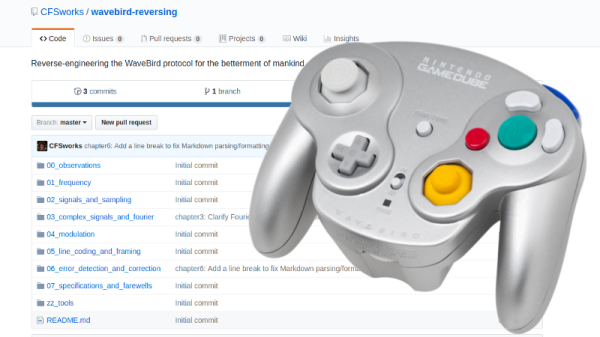
Readers who were firmly on Team Nintendo in the early 2000’s or so can tell you that there was no accessory cooler for the Nintendo GameCube than the WaveBird. Previous attempts at wireless game controllers had generally either been sketchy third-party accessories or based around IR, and in both cases the end result was that the thing barely worked. The WaveBird on the other hand was not only an official product by Nintendo, but used 2.4 GHz to communicate with the system. Some concessions had to be made with the WaveBird; it lacked rumble, was a bit heavier than the stock controllers, and required a receiver “dongle”, but on the whole the WaveBird represented the shape of things to come for game controllers.

Finding the center frequency for the WaveBird

Given the immense popularity of the WaveBird, [Sam Edwards] was somewhat surprised to find very little information on how the controller actually worked. Looking for a project he could use his HackRF on, [Sam] decided to see if he could figure out how his beloved WaveBird communicated with the GameCube. This moment of curiosity on his part spawned an awesome 8 part series of guides that show the step by step process he used to unlock the wireless protocol of this venerable controller.

Even if you’ve never seen a GameCube or its somewhat pudgy wireless controller, you’re going to want to read though the incredible amount of information [Sam] has compiled in his GitHub repository for this project.

Starting with defining what a signal is to begin with, [Sam] walks the reader though Fourier transforms, the different types of modulations, decoding packets, and making sense of error correction. In the end, [Sam] presents a final summation of the wireless protocol, as well as a simple Python tool that let’s the HackRF impersonate a WaveBird and send button presses and stick inputs to an unmodified GameCube.

This amount of work is usually reserved for those looking to create their own controllers from the ground up, so we appreciate the effort [Sam] has gone through to come up with something that can be used on stock hardware. His research could have very interesting applications in the world of “tool-assisted speedruns” or even automating mindless stat-grinding.

CNC’d MacBook Breathes Easy

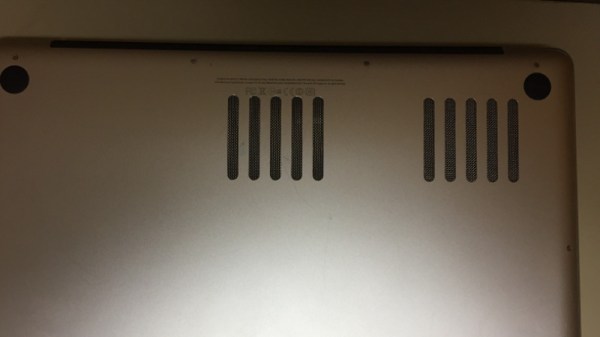
Sick of his 2011 Macbook kicking its fans into overdrive every time the temperatures started to climb, [Arthur] decided to go with the nuclear option and cut some ventilation holes into the bottom of the machine’s aluminum case. But it just so happens that he had the patience and proper tools for the job, and the final result looks good enough that you might wonder why Apple didn’t do this to begin with.

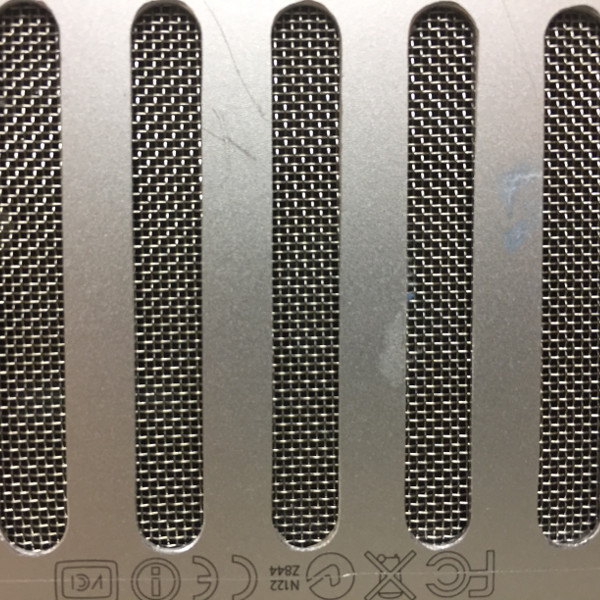
After disassembling the machine, [Arthur] used double-sided tape and a block of scrap wood to secure the Macbook’s case to the CNC, and cut out some very slick looking vents over where the internal CPU cooler sits. With the addition of some fine mesh he found on McMaster-Carr, foreign objects (and fingers) are prevented from getting into the Mac and messing up all that Cupertino engineering.

[Arthur] tells us that the internal temperature of his Macbook would hit as high as 102 °C (~215 °F) under load before his modification, which certainly doesn’t sound like something we’d want sitting in our laps. With the addition of his vents however, he’s now seeing an idle temperature of 45 °C to 60 °C, and a max of 82 °C.

In the end, [Arthur] is happy with the results of his modification, but he’d change a few things if he was to do it again. He’s somewhat concerned about the fact that the mesh he used for the grill isn’t non-conductive (he’s using shims of card stock internally to make sure it doesn’t touch anything inside), and he’d prefer the peace of mind of having used epoxy to secure it all together rather than super-glue. That said, it works and hasn’t fallen apart yet; basically the hallmarks of a successful hack.

It’s worth noting that [Arthur] is not the first person to struggle with the Macbook’s propensity for cooking itself alive. A few years back we covered another user who added vents to their Macbook, but not before they were forced to reflow the whole board because some of the solder joints gave up in the heat.

Accident Forgiveness Comes To GPLv2

Years ago, while the GPLv3 was still being drafted, I got a chance to attend a presentation by Richard Stallman. He did his whole routine as St IGNUcius, and then at the end said he would be answering questions in a separate room off to the side. While the more causal nerds shuffled out of the presentation room, I went along with a small group of free software aficionados that followed our patron saint into the inner sanctum.

When my turn came to address the free software maestro, I asked what advantages the GPLv3 would have to a lowly hacker like myself? I was familiar with the clause about “Tivoization“, the idea that any device running GPLv3 code from the manufacturer should allow the user to be able to install their own software on it, but this didn’t seem like the kind of thing most individuals would ever need to worry about. Was there something in the new version of the GPL that would make it worth adopting in personal or hobby projects?

Yes, he really dresses up like this.

Interestingly, a few years after this a GPLv2 program of mine was picked up by a manufacturer and included in one of their products (never underestimate yourself, folks). So the Tivoization clause was actually something that did apply to me in the end, but that’s not the point of this story.

Mr. Stallman responded that he believed the biggest improvement GPLv3 made over v2 for the hobbyist programmer was the idea of “forgiveness” in terms of licensing compliance. Rather than take a hard line approach like the existing version of the GPL, the new version would have grace periods for license compliance. In this way, legitimate mistakes or misunderstandings of the requirements of the GPL could be resolved more easily.

So when I read the recent announcement from Red Hat that said they would be honoring the grace period for GPLv2 projects, I was immediately interested. Will the rest of the community follow Red Hat’s lead? Will this change anyone’s mind when deciding between the GPL v2 and v3? Is this even a good idea? Join me below as I walk through these questions.

Continue reading “Accident Forgiveness Comes To GPLv2”

Bluetooth Gun Safe Cracked By Researchers

Believe it or not, there are quite a few people out there who have purchased gun safes that can be remotely unlocked by Bluetooth. Now we can understand why somebody might think this was a good idea: the convenience of being able to hit a button on your phone and have your weapon available in the heat of the moment is arguably a big selling point for people who are purchasing something like this for home defense. But those with a more technical mind will likely wonder if the inherent risks of having your firearm (or other valuables) protected by a protocol that often relies on security by obscurity outweighs the convenience of not needing to enter in a combination on the keypad.

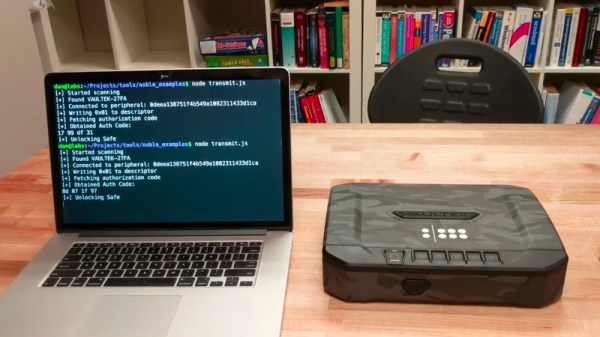
Well, you can wonder no more, as researchers at [Two Six Labs] have recently published a detailed document on how they managed to remotely unlock the Vaultek VT20i with nothing more exotic than an Ubertooth. In the end, even the Ubertooth wasn’t actually required, as this particular device turned out to be riddled with security issues.

[Two Six Labs] has not publicly released the complete source code of the software demonstrated in their YouTube video for very obvious reasons, but the page on their site does go into fantastic detail on how they uncovered the multiple vulnerabilities that allowed them to write it. Even if you’re not the kind of person who would ever need a gun safe, the information contained in their documentation about analyzing Bluetooth communications is fascinating reading.

It was discovered that the PIN for the safe was actually being transmitted by the accompanying smartphone application in plain-text, which would be bad enough normally. But after further analysis, it became clear that the safe wasn’t even bothering to check the PIN code anyway.

Scripting app interactions with ADB and Python

For extra style points, [Two Six Labs] also show a way to brute force the PIN using the Vaultek Android application by writing a Python script that punches in codes sequentially until it hits on the right one; the developers didn’t even bother to put in limits on failed attempts.

For a device that is ostensibly designed to contain a deadly weapon, the security flaws the team at [Two Six Labs] discovered are absolutely inexcusable. But there is a positive outcome, as the manufacturer has vowed to update the vulnerable safes and make a better effort in the future to more rigorously design and test their Bluetooth implementation. This is the goal of responsible disclosure, and we’re encouraged to see the manufacturer doing the right thing

The security concerns of Bluetooth controlled locks are well known, so it’s a bit disappointing that devices like this are still slipping through the cracks. We suggest you remain skeptical of any security device utilizing Bluetooth until the industry starts taking things a little more seriously.

Continue reading “Bluetooth Gun Safe Cracked By Researchers”

Laser Cutter Alignment Mod Skips Beam Combiner

A lot of the DIY laser engravers and cutters we cover here on Hackaday are made with laser diodes salvaged from Blu-ray drives and projectors, which are visible lasers in the 400 – 450nm range (appearing as violet or blue). Unfortunately there is an upper limit in terms of power on visible diode lasers, most builds max out at 5W or so. If you need more power than that, you’ll likely find yourself looking at gas laser cutters like the K40. While the K40 is a great starting point if you’re looking to get into “real” lasers, it’s a very different beast from the homebrew builds using visible lasers.

With a gas laser the beam itself is invisible, making it much more difficult to align or do test runs. One solution is to add a visible laser to the K40 which can be used to verify alignment, but making sure it’s traveling down the same path as the primary laser usually requires an expensive beam combiner. Looking to avoid this cost, [gafu] wanted to see if it was possible to simply move the visible laser into the path of the primary beam mechanically.

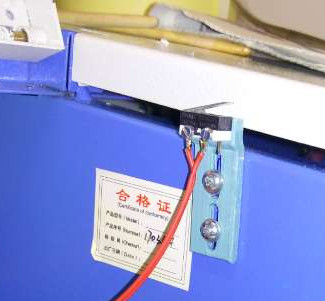
An adjustable microswitch detects when the lid has been opened.

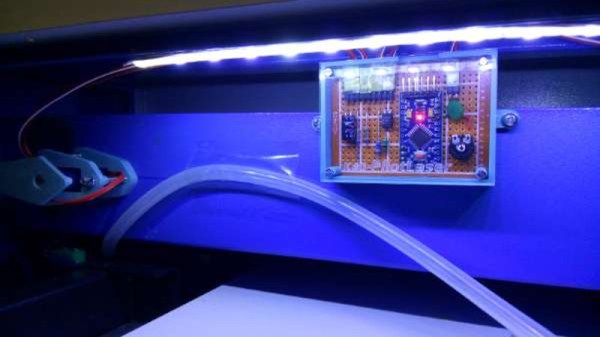
In the setup that [gafu] has come up with, a cheap laser module (the type from a handheld laser pointer) is moved into the path of the primary laser on an arm that’s actuated by a simple hobby servo. To prevent the primary and visible lasers from firing at the same time, an Arduino is used to control the servo given the current state of the K40’s lid. If the lid of the K40 is open, the primary laser is shutoff and the visible laser is rotated into position so the operator can see where the primary laser’s beam would be hitting. Once the lid is closed, the visible laser rotates out of the way and the primary is powered back up.

Running the cutting or engraving job with the lid of the K40 machine open now let’s [gafu] watch a “dry run” of the entire operation with the visible laser before finally committing to blasting the target with the full power beam.

We’ve covered many hacks and modifications for everyone’s favorite entry-level CO2 laser cutter. From replacing the controller to making it bigger, K40 owners certainly seem like a creative bunch.