Credit For Clever Corner Clamp

We love this design’s simplicity, but its mundane appearance is deceptive because a lot is going on here. [Bas van Hassel]’s clamp looks like a bench cookie or maybe a compressed hockey puck, but one pie piece-shaped quadrant extends on dovetails to form a right-angle channel, perfect for holding your ninety-degree joint while your glue dries. Opposing disc edges are flat, so your clamp won’t slip. Divots on the top and bumps on the bottom keep your stacks nice and neat when you put them away. All around, we have no trouble believing this designer has spent a lot of hours in the woodshop.

As long as your wood pieces are the same thickness, it seems like a practical use of printer filament, but if you have different sizes, you can always pull the dovetail out of its groove. Thanks to the scaling feature built into slicing programs, we expect some precision makers to utilize this in projects like dollhouses and model airplanes. If you have a high-resolution printer, you could make some miniature tools to construct a flea circus set. At that point, you may need to make some smaller clamps.

Print orientation for the puck is straightforward as it is a print-in-place design, but sometimes it isn’t always clear, so listen to those who know better and don’t be afraid of gears in your vises.




Teardown: Go Warmer USB Rechargeable Hand Heater

Under normal circumstances, if an electronic gadget in your pocket suddenly became hot to the touch, it would be cause for alarm. But not so with the Go Warmer. This lozenge shaped device is not only a USB power bank that can keep your mobile devices topped up, but is also doubles as a miniature heater that the manufacturer claims can bring its surface temperature up to 48 °C (120 °F) for several hours. You can hold in in your hand, put it in your pocket, maybe even sit on it if you’re particularly daring. The possibilities are endless, at least until the 4,000 mAh battery runs down.

For $14.99 USD, the Go Warmer certainly isn’t much of a deal when compared to other battery packs. Even if it does come with a swanky velveteen carrying pouch. But is it a good deal for one that can heat itself up without exploding? Let’s crack this metallic egg and find out.

Continue reading “Teardown: Go Warmer USB Rechargeable Hand Heater”

Peek Into This Synth’s Great Design (And Abandoned Features)

[Tommy]’s POLY555 is an analog, 20-note polyphonic synthesizer that makes heavy use of 3D printing and shows off some clever design. The POLY555, as well as [Tommy]’s earlier synth designs, are based around the 555 timer. But one 555 is one oscillator, which means only one note can be played at a time. To make the POLY555 polyphonic, [Tommy] took things to their logical extreme and simply added multiple 555s, expanding the capabilities while keeping the classic 555 synth heritage.

The real gem here is [Tommy]’s writeup. In it, he explains the various design choices and improvements that went into the POLY555, not just as an instrument, but as a kit intended to be produced and easy to assemble. Good DFM (Design For Manufacturability) takes time and effort, but pays off big time even for things made in relatively small quantities. Anything that reduces complexity, eliminates steps, or improves reliability is a change worth investigating.

For example, the volume wheel is not a thumbwheel pot. It is actually a 3D-printed piece attached to the same potentiometer that the 555s use for tuning; meaning one less part to keep track of in the bill of materials. It’s all a gold mine of tips for anyone looking at making more than just a handful of something, and a peek into the hard work that goes into designing something to be produced. [Tommy] even has a short section dedicated to abandoned or rejected ideas that didn’t make the cut, which is educational in itself. Want more? Good news! This isn’t the first time we’ve been delighted with [Tommy]’s prototyping and design discussions.

POLY555’s design files (OpenSCAD for enclosure and parts, and KiCad for schematic and PCB) as well as assembly guide are all available on GitHub, and STL files can be found on Thingiverse. [Tommy] sells partial and complete kits as well, so there’s something for everyone’s comfort level. Watch the POLY555 in action in the video, embedded below.

Continue reading “Peek Into This Synth’s Great Design (And Abandoned Features)”

Full DIY: A UNIX Clone On TTL

Making a CPU or indeed a whole computer system from scratch using discrete logic chips is by no means an unusual project, but it’s still one that requires quite a lot of technical ability and understanding of how computers work. Similarly, writing a UNIX-like operating system from scratch is something that’s been done more than once, but which definitely puts the author in an exclusive breed.  Creating a CPU and computer system from discrete logic and then writing a UNIX-like OS for it? That’s definitely something new, but here’s [RobotMan2412] with both CPU and operating system to prove it!

The GR8CPU as he calls it is an 8-bit design with a 16-bit address space, making it equivalent to a typical mid-to-late 1970s 8-bit chip. He’s on revision 3 of the processor, and even makes the bold suggestion that it might be the most complex breadboard CPU ever made. That’s impressive enough, but to add a UNIX-like operating system makes it special.

While he has a real GR8CPU, it appears he’s also written an emulator with access to a disk filesystem, and it’s on this that he shows us the OS running. Don’t expect an all-singing all-dancing desktop OS here, instead it’s a kernel and very basic command line that’s just about able to run a Hello World. The kernel is hand-coded in assembler and is about 5 kB in size.

We look forward to seeing more of this project, and hope maybe he’ll one day soon publish the source. As a reminder that this is a perfectly capable platform for the job, here’s the original UNIX running on a vintage DEC PDP7.

Arduino Micro Pushes Animal Crossing’s Buttons

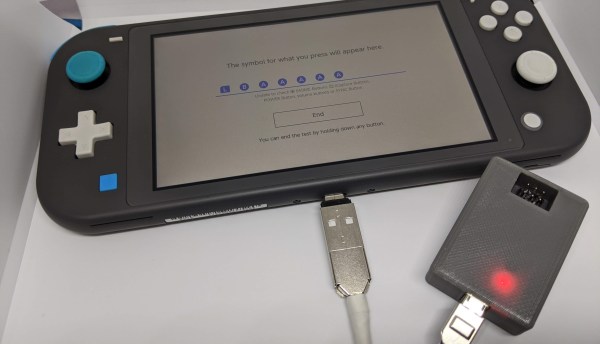
Repetitive tasks in video games often find a way of pushing our buttons. [Facelesstech] got tired of mashing “A” while catching shooting stars in Animal Crossing, so he set out to automate his problem away. After briefly considering rigging up a servo to do the work for him, he recalled a previous effort that used an Arduino Teensy to automate a bowling mini-game in Zelda: Breath of the Wild and decided to use a microcontroller to catch stars for him.

[Facelesstech] programmed an Arduino Pro Micro to fake controller button presses. It starts with a couple of presses to identify itself to the Switch, before generating an endless stream of button presses that automatically catch every shooting star. Hooking it up is easy—an on-the-go adapter allows the Switch’s USB-C port to connect directly to the Arduino’s Micro-USB port, even supplying power!

[Facelesstech] also designed a compact 3D-printed case that packages up the Arduino Pro Micro along with an ISP header for easy updating. The case even lets the Arduino’s power LED shine through so you know that it’s working!

If you, too, need to automate video game button-pushing, [Facelesstech] has kindly uploaded the source code and 3D designs for you to try. If you’d prefer something a little more low-tech, perhaps you might try a mechanical button pusher.

Continue reading “Arduino Micro Pushes Animal Crossing’s Buttons”

Laser Zap That Mosquito

When we first heard of [Ildar Rakhmatulin’s] plan to use OpenCV on a Raspberry Pi to detect mosquitos and then zap them with a 1 watt laser, we thought it was sort of humorous. However, the paper points out that 700,000 people die each year from mosquito bites — we didn’t verify that, but according to the article that’s twice the number of people murdered each year. So the little pests are pretty effective assassins.

It looks as though the machine has been built, at least in a test configuration. A galvanometer aims the death ray using mirrors, and with the low power and lossy mirrors the mosquitos can only be a small distance from the machine — about a foot.

Continue reading “Laser Zap That Mosquito”

One Ring Light To Fool Them All Into Thinking You’re Well-Rested

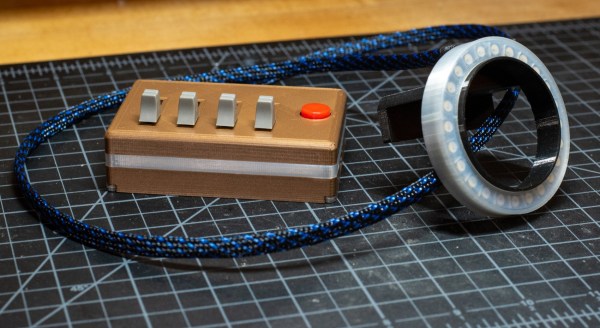
We know you’re beautiful, but maybe that cheap web camera from 2007 doesn’t always project your best image. Although web cameras are starting to come back down from the pandemic price gouging days, you could just build yourself a ring light and go from there, because better light may be all you need to look great.

Of course, this isn’t going to be cheaper than just buying a ring light, but if you already have a Circuit Playground and 3D printer lying around, you’re about halfway to owning one that’s much cooler than anything you can buy. The only other major hardware is the RGBW LED ring, the slide pots that adjust the light color, and the clicky little button that exits out of Zoom calls.

The business part is made to mount right over the camera, so the only part that has a footprint is the control box. No need to make space for a tripod or another boom. If you’re worried about staring into a bunch of lights, there’s a diffusing ring among the print files. We think this setup looks great, especially since [Southern Fried Science] built a light guide into the enclosure so those LED on the Circuit Playground don’t go to waste.

Do you just wish you had a more satisfying way to leave Zoom calls? If there’s a stud near your desk, it doesn’t get much more satisfying than a pull chain. If the only stud around is you, then use a giant mushroom button.

Via adafruit