
Old LED Light Bulbs Give Up Filaments For Spider Web Clock

We love it when something common gets put to a new and unusual use, especially when it’s one of those, “Why didn’t I think of that?” situations. This digital clock with a suspended display is just such a thing.

The common items in this case were “filaments” from LED light bulbs, those meant to mimic the look of clear-glass incandescent light bulbs. [Andypugh] had been looking at them with interest for a while, and realized they were perfect as the segments for a large digital clock. The frame of the clock was formed from bent brass U-channel and mounted to an oak base via turned stanchions. The seven-segment displays were laid out in the frame and the common anodes of the LED filaments were connected together, with the cathode for each connected to a very fine wire. Each wire was directed through a random hole in the frame and channeled down into the base, to be hooked to one of the four DS8880 VFD driver chips. The anode wires form a lacy filigree behind the segments, which catch the light and make then look a little like a spider’s web. It looks great, but nicht für der gefingerpoken – the frame is at 80 VDC to drive the LED segments. The clock is synced to the UK atomic clock with a 60-kHz radio link; see the long, painful sync process in the video below.

We like the open frame look, which we’ve seen before with an equally dangerous sculptural nixie clock. And this gives us some ideas for what to do with those filament LEDs other than turning them back into a light bulb. And if [Andy] sounds familiar, it could be because he’s appeared here before. First of all resurrecting the parts bin for an entire classic motorcycle marque, and then as the designer of SMIDSY, a robot competitor in the first incarnation of the UK Robot Wars series.

Continue reading “Old LED Light Bulbs Give Up Filaments For Spider Web Clock”
PTPM Energy Scavenger Aims For Maintenance-Free Sensor Nodes

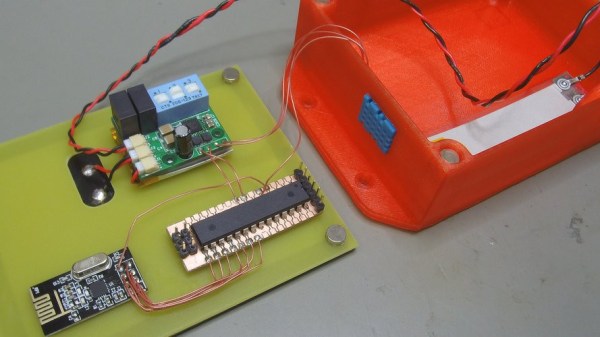
[Mile]’s PTPM Energy Scavenger takes the scavenging idea seriously and is designed to gather not only solar power but also energy from temperature differentials, vibrations, and magnetic induction. The idea is to make wireless sensor nodes that can be self-powered and require minimal maintenance. There’s more to the idea than simply doing away with batteries; if the devices are rugged and don’t need maintenance, they can be installed in locations that would otherwise be impractical or awkward. [Mile] says that goal is to reduce the most costly part of any supply chain: human labor.

The prototype is working well with solar energy and supercapacitors for energy storage, but [Mile] sees potential in harvesting other sources, such as piezoelectric energy by mounting the units to active machinery. With a selectable output voltage, optional battery for longer-term storage, and a reference design complete with enclosure, the PPTM Energy Scavenger aims to provide a robust power solution for wireless sensor platforms.

This Weekend: The Vintage Computer Festival West

This weekend it’s all going down at the Vintage Computer Museum in Mountain View, California. The Vintage Computer Festival West is happening this weekend

What’s going on this year at VCF West? Far too much. The exhibits include everything from floptical disks, a fully restored and operation PDP-11/45, home computers from the UK and Japan, typewriters converted into teletypes, a disintegrated CPU, and LISP machines. The talks are equally spectacular, with a keynote from [Tim Paterson], the creator of 86-DOS, the basis of MS-DOS. You’ll also hear about PLATO, the Internet before the Internet, PDP-1 demonstrations, and if we’re lucky they’re going to fire up the ancient IBM 1401. There will also be a vintage computer consignment, which is at least as interesting as the exhibits. The consignment is basically a museum, but you can buy the exhibits.

VCF West is happening this weekend at the Computer History Museum in Mountain View, itself a worthy destination for a day trip. For one weekend a year, though, the Computer History Museum is taken over by VCF attendees and becomes the greatest place to learn about this history of computing. They even have one of those Waymo bug cars in their autonomous vehicle exhibit.

All of this is going down this Saturday and Sunday, starting at 9am. Tickets are $20 for one day, $30 for the entire weekend, and yes, that includes admission to the Computer History Museum. Don’t miss out!

Wolfram Alpha Electronic Tips

Electronics takes a lot of math. Once you’ve mastered all the algebra and calculus, though, it is sometimes a drag to go through the motions. It also can be error-prone. But these days, you have Wolfram Alpha which will do all the work for you and very easily. I use it all the time when I’m too lazy to solve an equation or do an integral by hand. But did you know it actually has some features specifically for electronics?

If you want to do a lot with electronics — or nearly any technical field — you are going to have to learn some math and you shouldn’t just rely on tools like Wolfram to skirt understanding the math. Unfortunately, schools often teach us that the point to math is to get a correct answer. For bookkeepers and at the very final stage of engineering, that may be true. But the real value to math for engineers and scientists is to develop intuition about things. If you increase a capacitor’s value does that make its reactance go up or down? Does a little change in load resistance make a corresponding small change in power consumption or is it a lot more? So you should understand why math works. But once you do, using a tool like Wolfram can free you to focus on the abstract questions instead of the detailed “grunt work.”


Tip #1: Split Personality

Wolfram can’t seem to decide if it is a symbolic math program or a search engine. Sometimes just putting a topic name in can lead to some interesting calculations. For example, look what happens when you enter the word opamp: Continue reading “Wolfram Alpha Electronic Tips”

Friday Hack Chat: Training Robots By Touch

When it comes to training robots, you could grab a joystick or carefully program movements in code. The better way, though, is to move the robot yourself, and have the robot play back all those movements ad infinitum. This is training robots by touch, and it’s the subject of this week’s Hack Chat over on hackaday.io.

Our guest for this week’s Hack Chat will be [Kent Gilson], inventor, serial entrepreneur, and pioneer in reconfigurable computing. [Kent] is the creator of Viva, an object-oriented programming language and operating environment that harnesses the power of FPGAs into general-purpose computing He’s launched eight entrepreneurial ventures, won multiple awards, and created products used in numerous industries across the globe.

[Kent]’s claim to fame on hackaday.io is Dexter, a low-cost robotic arm with 50-micron repeatability and modular end effectors. It does this with three harmonic drives and optical encoders that give it extreme precision. The arm is also trainable, meaning that you can manually control it and play back the exact path it took. It’s training robots by touch, exactly what this Hack Chat is all about.

For this Hack Chat, we’re going to be discussing:

  • Building trainable robots
  • Developing robotics haptics
  • Training robots to manufacture
  • Heterogenous direct digital manufacturing

You are, of course, encouraged to add your own questions to the discussion. You can do that by leaving a comment on the Hack Chat Event Page and we’ll put that in the queue for the Hack Chat discussion.join-hack-chat

Our Hack Chats are live community events on the Hackaday.io Hack Chat group messaging. This week is just like any other, and we’ll be gathering ’round our video terminals at noon, Pacific, on Friday, July 27th.  Need a countdown timer? Well, here you go, mango.

Click that speech bubble to the right, and you’ll be taken directly to the Hack Chat group on Hackaday.io.

You don’t have to wait until Friday; join whenever you want and you can see what the community is talking about.

Specialized Knife Sharpener From Old Airplane

“Surely sharpening a knife can’t be that hard” one might think, as they destroy the edge on their pocket knife by flailing it wildly against a whetstone of indeterminate grain. In reality, knife sharpening is as nuanced a practice as virtually any other field, and getting a quality finish is much harder than it seems. It also gets increasingly complex with different blades, as [Turbo Conquering Mega Eagle] shows with is customized knife sharpening jig.

The hardest part in any blade sharpening is getting the proper bevel angle. A heavy angle is good for heavy-duty tools like axes, but for fine work like shaving a more sharp angle is required. Usually, a table-mounted jig is required but due to production constraints, a handheld one was used. It’s made with push rods and a cam follower from an airplane engine (parts are plentiful since this particular engine breaks all the time) and can impart very specific bevel angles on blades. For example, machetes have a heavy angle near the handle but a finer point towards the tip, and this tool helps streamline sharpening many knives quickly.

If you want to try your hand at another project that’s not as straightforward as it might seem, you might want to build a knife from scratch before you make an attempt at a sharpening tool. It’s just as nuanced a process, but with a little practice can be done with only a few tools.

Continue reading “Specialized Knife Sharpener From Old Airplane”

DefCAD Triggers HTTP 451

Depending on where you live, pointing your browser to Defcad.com yesterday may have shown you something you’d never seen before. It certainly did for me. That’s because I live in one of the two states (as of this writing) in the United States which have scrambled to block access to the online repository of firearm CAD files after they were approved for release by the US State Department.

Anyone using the internet in those states was presented with HTTP status code 451: “Unavailable For Legal Reasons”. This code was named for Ray Bradbury’s dystopian novel “Fahrenheit 451″, in which books are burned to censor the information they contain. Rather than simply returning the traditional 403 error, 451 can be used to signal that the server is willing to serve the user the information, but is being prevented from doing so by court order.

Whatever your personal feelings are on the public having unfettered access to technical information on firearms, this is still a worrying development. The First Amendment covers more than literal speech: source code and technical data is a form of expression just as much as a poem or song, and are equally protected. If the federal government believes the files that Cody Wilson’s Defense Distributed offers up are not restricted by International Traffic in Arms Regulations (ITAR), then how can a citizen of the United States not view them? The question remains unanswered and overnight a federal judge granted a restraining order to restrict the website for the remaining states.

Continue reading “DefCAD Triggers HTTP 451”