Hackaday Links: July 17, 2016

There’s going to be a new Nintendo console for Christmas! It’s the NES Classic Edition. It looks like a minified NES, with weird connectors that look like the connector for the Wii Nunchuck. There are no other details.

A site called “Motherboard” reports assembling a computer is too hard and a ‘nerve-wrecking [sic]’ process. Tip of the stovepipe to the Totalbiscuit.

When I was in elementary school, the playground had a twenty foot tall metal slide that faced South. During my time there, at least three of my classmates fell off it, and I distinctly remember the school nurse’s aid running past me on the playground with a wheelchair. There wasn’t soft mulch or the weird rubber granules under this slide – just hard, compacted dirt. This slide was awesome, even if it was torn down when I was in third grade. [Brandon Hart]’s kid’s won’t look back fondly on their youth with experiences like these; he built a water-cooled slide in his backyard. He’s getting an 80°F ΔT with a trip to Ace Hardware, probably $20 in fittings, and a drill. Neat.

This is probably better suited for an ‘Ask Hackaday’ column, but [Arsenijs] has run into a bit of a problem with his Raspberry Pi Project. He’s trying to use a planarized kernel module to obfuscate the SPI bus, but he can’t do that because of a oblivated drumble pin. He could, of course, deenumerate several of the GISP modules, but this would cause a buffer underflow and eventually wreck the entire cloudstack. I told him he should use Corrosion, but he seems dead set on his Hokey implementation. If anyone has any ideas, get the glamphs and put it on the grumbo.

The Owon SDS7102 oscilloscope is a small, cheap, two-channel scope that is impressive for its price but noisier than you would expect. This scope has been thoroughly reverse engineered, and now Linux is running on this scope. This Linux scope has a working VGA display, USB host, USB device, Flash, and working Ethernet. The entire analog front end has been reversed engineered, and somehow this is now the most open oscilloscope you can buy.

The ESP32 is Espressif’s followup to their very popular ESP8266 WiFi module. The ESP32 will be much more powerful and include Bluetooth when it’s released in August. Until then, [Pighixxx] has the complete pinout for the ESP32.

Hacklet 116 – Audio Projects

If the first circuit a hacker builds is an LED blinker, the second one has to be a noisemaker of some sort. From simple buzzers to the fabled Atari punk console, and guitar effects to digitizing circuits, hackers, makers and engineers have been building incredible audio projects for decades. This week the Hacklet covers some of the best audio projects on Hackaday.io!

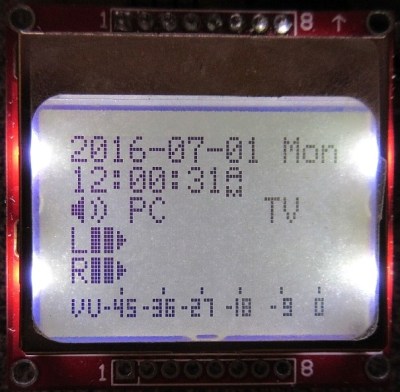
vumeterWe start with [K.C. Lee] and Automatic audio source switching. Two audio sources, one amplifier and speaker system; this is the problem [K.C. Lee] is facing. He listens to audio from his computer and TV, but doesn’t need to have both connected at the same time. Currently he’s using a DPDT switch to change inputs. Rather than manually flip the switch, [K.C. Lee] created this project to automatically swap sources for him. He’s using an STM32F030F4 ARM processor as the brains of the operation. The ADCs on the microcontroller monitor both sources and pick the currently active one. With all that processing power, and a Nokia LCD as an output, it would be a crime to not add some cool features. The source switcher also displays a spectrum analyzer, a VU meter, date, and time. It even will attenuate loud sources like webpages that start blasting audio.


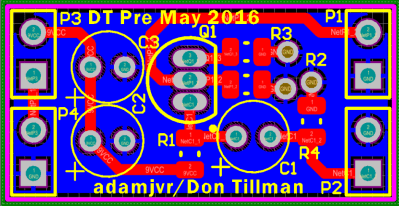
muzzNext up is [Adam Vadala-Roth] with Audio Blox: Experiments in Analog Audio Design. [Adam] has 32 projects and counting up on Hackaday.io. His interests cover everything from LEDs to 3D printing to solar to hydroponics. Audio Blox is a project he uses as his engineer’s notebook for analog audio projects. It is a great way to view a hacker figuring out what works and what doesn’t. His current project is a 4 board modular version of the Big Muff Pi guitar pedal. He’s broken this classic guitar effect down to an input board, a clipping board, a tone control, and an output stage. His PCB layouts, schematics, and explanations are always a treat to view and read!

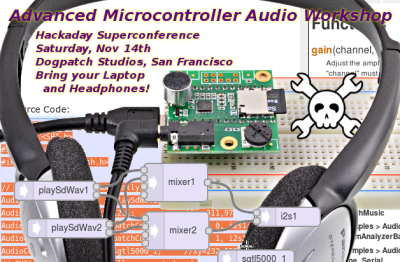
pauldioNext we have [Paul Stoffregen] with Teensy Audio Library. For those not in the know, [Paul] is the creator of the Teensy family of boards, which started as an Arduino on steroids, and has morphed into something even more powerful. This project documents the audio library [Paul] created for the Freescale/NXP ARM processor which powers the Teensy 3.1. Multiple audio files playing at once, delays, and effects, are just a few things this library can do. If you’re new to the audio library, definitely check out [Paul’s] companion project
Microcontroller Audio Workshop & HaD Supercon 2015. This project is an online version of the workshop [Paul] ran at the 2015 Hackaday Supercon in San Francisco.

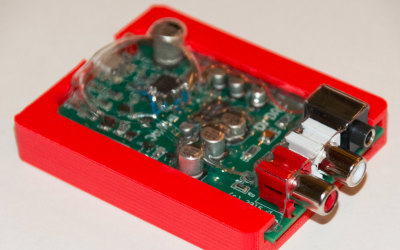
drdacFinally we have [drewrisinger] with DrDAC USB Audio DAC. DrDac is a high quality DAC board which provides a USB powered audio output for any PC. Computers these days are built down to a price. This means that lower quality audio components are often used. Couple this with the fact that computers are an electrically noisy place, and you get less than stellar audio. Good enough for the masses, but not quite up to par if you want to listen to studio quality audio. DrDAC houses a PCM2706 audio DAC and quality support components in a 3D printed case. DrDAC was inspired by [cobaltmute’s] pupDAC.

If you want to see more audio projects and hacks, check out our new audio projects list. See a project I might have missed? Don’t be shy, just drop me a message on Hackaday.io. That’s it for this week’s Hacklet, As always, see you next week. Same hack time, same hack channel, bringing you the best of Hackaday.io!

Retrotechtacular: The US Air Force Has The Biggest Fleet

When it comes to the superlatives of aviation, there are aircraft larger than the C-5 Galaxy. [Howard Hughes]’s Spruce Goose has the largest wingspan, and the Soviet and now Ukranian Antonov AN-225 Mriya has the largest cargo capacity. When it flies in the next year or so, Scaled Composites Stratolaunch – a twin-hulled beast of a plane designed to haul rockets up to 30,000 feet – will be the aircraft with the largest wingspan and the greatest cargo capacity.

These superlatives, while completely accurate, fail to realize these huge planes are one of a kind. There is no plan to build a second Stratolaunch, and the second airframe for the AN-225 is rusting away in a field. If you want to find a fleet of enormous aircraft, there’s only one contender: the C5 Galaxy, the largest plane in the US Air Force inventory.

This video, from the USAF Archives circa 1968, goes over the design, construction, and operation of the C5 Galaxy. It covers the program beginnings, the shortcomings of earlier aircraft, and – of course – completely disregards the initial problems of the C5.

Continue reading “Retrotechtacular: The US Air Force Has The Biggest Fleet” →

Code Craft – Embedding C++: Multitasking

We’re quite used to multitasking computer systems today. Our desktops run email, a couple of browsers in different workspaces, a word processor, and a few other applications, apparently all at once. Looking behind the scenes using a system monitor or task manager program reveals a multitude of other programs running in support of our activities. Of course, any given CPU is running a maximum of one program at a time. Multitasking is simply the practice of switching between active processes fast enough to give the illusion of simultaneity.

The roots of multiasking go way back. In the early days, when computers cost tons of money, the thought of an idle system was anathema. Teletype IO was slow compared to the processor, and leaving the processor waiting idle for a card reader to slurp in the next card was outrageous. The gurus of the time worked to fill that idle time with productive work. That eventually led to systems that would run multiple programs at one time, and eventually to more finely grained multitasking within a program.

Modern multitasking depends on support from the underlying API of an operating system. Each OS uses its own techniques, making it difficult to write portable code. The C++ 2011 standard increased the portability of the language by adding concurrency routines to the Standard Template Library (STL). These routines use the API of the OS. For instance, the Linux version uses the POSIX threading library, pthread. The result is a minimal, but useful, capability for building upon in later standards. The C++ 2017 standard development activities include work on parallelism and concurrency.

In this article, I’ll work through some of the facilities for and pitfalls in writing threaded code in C++.

Continue reading “Code Craft – Embedding C++: Multitasking” →

Ask Hackaday: Does Apple Know Jack About Headphones?

If you’ve watched the tech news these last few months, you probably have noticed the rumors that Apple is expected to dump the headphone jack on the upcoming iPhone 7. They’re not alone either. On the Android side, Motorola has announced the Moto Z will not have a jack. Chinese manufacturer LeEco has introduced several new phones sans phone jack. So what does this mean for all of us?

This isn’t the first time a cell phone company has tried to design out the headphone jack. Anyone remember HTC’s extUSB, which was used on the Android G1? Nokia tried it with their POP Port. Sony Ericsson’s attempt was the FastPort. Samsung tried a dizzying array of multi-pin connectors. HP/Palm used a magnetic adapter on their Veer. Apple themselves tried to reinvent the headphone jack by recessing it in the original iPhone, breaking compatibility with most of the offerings on the market. All of these manufacturers eventually went with the tried and true ⅛” headphone jack. Many of these connectors were switched over during an odd time in history where Bluetooth was overtaking wired “hands-free kits”, and phones were gaining the ability to play mp3 files.

Continue reading “Ask Hackaday: Does Apple Know Jack About Headphones?” →

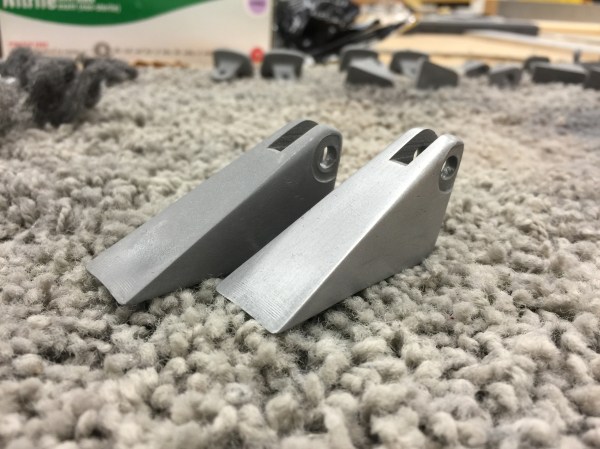
A quick brush over the part with some sand paper and it quickly transforms from obviously plastic to metallic.

Learn Resin Casting Techniques: Cold Casting

Sometimes we need the look, feel, and weight of a metal part in a project, but not the metal itself. Maybe you’re going for that retro look. Maybe you’re restoring an old radio and you have one brass piece but not another. It’s possible to get a very metal like part without all of the expense and heat required in casting or the long hours in the metal fabrication shop.

Before investing in the materials for cold casting, it’s best to have practical expectations. A cold cast part will not take a high polish very well, but for brushed and satin it can be nearly indistinguishable from a cast part. The cold cast part will have a metal weight to it, but it clinks like ceramic. It will feel cool and transfers heat fairly well, but I don’t have numbers for you. Parts made with brass, copper, and iron dust will patina accordingly. If you want them to hold a bright shine they will need to be treated with shellac or an equivalent coating afterward; luckily the thermoset resins are usually pretty inert so any coating used on metal for the same purpose will do.

It is best to think of the material as behaving more or less like a glass filled nylon such as the kind used for the casing of a power tool. It will be stiff. It will flex a relatively short distance before crazing and then cracking at the stress points. It will be significantly stronger than a 3D printed part, weaker than a pure resin part, and depending on the metal; weaker than the metal it is meant to imitate.

Continue reading “Learn Resin Casting Techniques: Cold Casting” →

Gawking Hex Files

Last time I talked about how to use AWK (or, more probably the GNU AWK known as GAWK) to process text files. You might be thinking: why did I care? Hardware hackers don’t need text files, right? Maybe they do. I want to talk about a few common cases where AWK can process things that are more up the hardware hacker’s alley.

The Simple: Data Logs

If you look around, a lot of data loggers and test instruments do produce text files. If you have a text file from your scope or a program like SIGROK, it is simple to slice and dice it with AWK. Your machines might not always put out nicely formatted text files. That’s what AWK is for.

AWK makes the default assumption that fields break on whitespace and end with line feeds. However, you can change those assumptions in lots of ways. You can set FS and RS to change the field separator and record separator, respectively. Usually, you’ll set this in the BEGIN action although you can also change it on the command line.

For example, suppose your test file uses semicolons between fields. No problem. Just set FS to “;” and you are ready to go. Setting FS to a newline will treat the entire line as a single field. Instead of delimited fields, you might also run into fixed-width fields. For a file like that, you can set FIELDWIDTHS.

If the records aren’t delimited, but a fixed length, things are a bit trickier. Some people use the Linux utility dd to break the file apart into lines by the number of bytes in each record. You can also set RS to a limited number of any character and then use the RT variable (see below) to find out what those characters were. There are other options and even ways to read multiple lines. The GAWK manual is your friend if you have these cases.

BEGIN { RS=".{10}"   # records are 10 characters
      }

   {
   $0=RT
   }

   {
   print $0  # do what you want here
   }

Once you have records and fields sorted, it is easy to do things like average values, detect values that are out of limit, and just about anything else you can think of.

Spreadsheet Data Logs

Some tools output spreadsheets. AWK isn’t great at handling spreadsheets directly. However, a spreadsheet can be saved as a CSV file and then AWK can chew those up easily. It is also an easy format to produce from an AWK file that you can then read into a spreadsheet. You can then easily produce nice graphs, if you don’t want to use GNUPlot.

Simplistically, setting FS to a comma will do the job. If all you have is numbers, this is probably enough. If you have strings, though, some programs put quotes around strings (that may contain commas or spaces). Some only put quotes around strings that have commas in them.

To work around this problem cleanly, AWK offers an alternate way to define fields. Normally, FS tells you what characters separate a field. However, you can set FPAT to define what a field looks like. In the case of CSV file, a field is any character other than a comma or a double quote and then anything up to the next double quote.

The manual has a good example:

BEGIN {
  FPAT = "([^,]+)|(\"[^\"]+\")"
  }

  {
  print "NF = ", NF
  for (i = 1; i <= NF; i++) {
  printf("$%d = <%s>\n", i, $i)
  }

This isn’t perfect. For example, escaped quotes don’t work right. Quoted text with new lines in it don’t either. The manual has some changes that remove quotes and handle empty fields, but the example above works for most common cases. Often the easiest approach is to change the delimiter in the source program to something unique, instead of a comma.

Hex Files

Another text file common in hardware circles is a hex file. That is a text file that represents the hex contents of a programmable memory (perhaps embedded in a microcontroller). There are two common formats: Intel hex files and Motorola S records. AWK can handle both, but we’ll focus on the Intel variant.

Old versions of AWK didn’t work well with hex input, so you’d have to resort to building arrays to convert hex digits to numbers. You still see that sometimes in old code or code that strives to be compatible. However, GNU AWK has the strtonum function that explicitly converts a string to a number and understands the 0x prefix. So a highly compatible two digit hex function looks like this (not including the code to initialize the hexdigit array):

function hex2dec(x) {
  return (hexdigit[substr(x,1,1)]*16)+hexdigit[substr(x,2,1)]
}

If you don’t mind requiring GAWK, it can look like this:

function hex2dec(x) {
  return strtonum("0x" x);
}

In fact, the last function is a little better (and misnamed) because it can handle any hex number regardless of length (up to whatever limit is in GAWK).

Hex output is simple since you have printf and the X format specifier is available. Below is an AWK script that chews through a hex file and provides a count of the entire file, plus shows a breakdown of the segments (that is, non-contiguous memory regions).

BEGIN { ct=0;
  adxpt=""
}


function hex4dec(y) {
  return strtonum("0x" y)
}


function hex2dec(x) {
  return strtonum("0x" x);
}

/:[[:xdigit:]][[:xdigit:]][[:xdigit:]][[:xdigit:]][[:xdigit:]][[:xdigit:]]00/ {

  ad = hex4dec(substr($0, 4, 4))
  if (ad != adxpt) {
  block[++n] = ad
  adxpt = ad;
    }
  l = hex2dec(substr($0, 2, 2))
  blockct[n] = blockct[n] + l
  adxpt = adxpt + l
  ct = ct + l
  }

END { printf("Count=%d (0x%04x) bytes\t%d (0x%04x) words\n\n", ct, ct, ct/2, ct/2)
  for (i = 1 ; i <= n ; i++) {
  printf("%04x: %d (0x%x) bytes\t", block[i], blockct[i], blockct[i])
  printf("%d (0x%x) words\n", blockct[i]/2, blockct[i]/2)
  }

}

This shows a few AWK features: the BEGIN action, user-defined functions, the use of named character classes (:xdigit: is a hex digit) and arrays (block and blockct use numeric indices even though they don’t have to). In the END action, the summary uses printf statements for both decimal and hex output.

Once you can parse a file like this, there are many things you could do with the resulting data. Here’s an example of some similar code that does a sanity check on hex files.

Binary Files

Text files are fine, but real hardware uses binary files that people (and AWK) can’t easily read, right? Well, maybe people, but AWK can read binary files in a few ways. You can use getline in the BEGIN part of the script and control how things are read directly. You can also use the RS/RT trick mentioned above to read a specific number of bytes. There are a few other AWK-only methods you can read about if you are interested.

However, the easiest way to deal with binary files in AWK is to convert them to text files using something like the od utility. This is a program available with Linux (or Cygwin, and probably other Windows toolkits) that converts a binary file to different readable formats. You probably want hex bytes, so that’s the -t x2 option (or use x4 for 16-bit words). However, the output is made for humans, not machines, so when a long run of the same output occurs, od omits them replacing all the missing lines with a single asterisk. For AWK use, you want to use the -v option to turn that behavior off. There are other options to change the output radix of the address, swap bytes, and more.

Here are a few lines from a random binary file:

0000000 d8ff e0ff 1000 464a 4649 0100 0001 0100
0000020 0100 0000 dbff 4300 5900 433d 434e 5938
0000040 484e 644e 595e 8569 90de 7a85 857a c2ff
0000060 a1cd ffde ffff ffff ffff ffff ffff ffff
0000100 ffff ffff ffff ffff ffff ffff ffff ffff
0000120 ffff ffff ffff ffff ffff 00db 0143 645e
0000140 8564 8575 90ff ff90 ffff ffff ffff ffff
0000160 ffff ffff ffff ffff ffff ffff ffff ffff
0000200 ffff ffff ffff ffff ffff ffff ffff ffff
0000220 ffff ffff ffff ffff ffff ffff ffff c0ff
0000240 1100 0108 02e0 0380 2201 0200 0111 1103
0000260 ff01 00c4 001f 0100 0105 0101 0101 0001
0000300 0000 0000 0000 0100 0302 0504 0706 0908
0000320 0b0a c4ff b500 0010 0102 0303 0402 0503
0000340 0405 0004 0100 017d 0302 0400 0511 2112
0000360 4131 1306 6151 2207 1471 8132 a191 2308

This is dead simple to parse with AWK. The address will be $1 and each field will be $2, $3, etc. You can just convert the file yourself, use a pipe in the shell, or–if you want a clean solution–have AWK run od as a subprocess. Since the input is text, all of AWK’s regular expression features still work, which is useful.

Writing binary files is easy, too, since printf can output nearly anything. An alternative is to use xxd instead of od. It can convert binary files to text, but also can do the reverse.

Full Languages

There’s an old saying that if all you have is a hammer, everything looks like a nail. I doubt that AWK is the best tool to build full languages, but it can be a component of some quick and dirty hacks. For example, the universal cross assembler uses AWK to transform assembly language files into an internal format the C preprocessor can handle

Since AWK can call out to external programs easily, it would be possible to write things that, for example, processed a text file of commands and used them to drive a robot arm. The regular expression matching makes text processing easy and external programs could actually handle the hardware interface.

awk-wolfensteinThink that’s far fetched? We’ve covered stranger AWK use cases, including a Wolfenstien-like game that uses 600 lines of AWK script (as seen to the right).

So, sure it is software, but it is a tool that has that Swiss Army knife quality that makes it a useful tool for software and hardware hackers alike. Of course, other tools like Perl, Python, and even C or C++ can do more. But often with a price in complexity and learning curve. AWK isn’t for every job, but when it works, it works well.