3D Printed Headgear Turns You Into A Sim

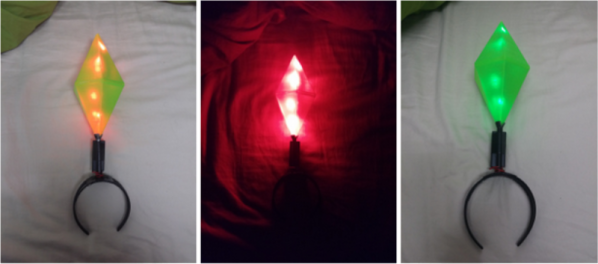
Stop what you’re doing and dust off that 3D Printer, you’re going to want this headgear for your next party. [Daniel Harari] has created the perfect start of a phenomenal The Sims costume with this Bluetooth-enabled plumb bob.

The iconic crystalline shape will be familiar to anyone ever exposed to the game. It served as a handle and indicator for each virtual character in the popular life-simulation video game. On a short build deadline (a party), [Daniel] found a model of the shape he wanted on Thingiverse. He printed it in translucent green PLA so that LEDs inside would make it glow.

A headband and an aluminum pipe connect this to the wearer. Inside the printed enclosure is a an intricately packaged set of electronics that include an Arduino pro mini, low-side transistors to control six RGB LEDs, and an HC-05 Bluetooth module to connect to his phone. Batteries were mounted on the side of the pipe but we bet a bit of head scratching could re-imaging the battery type and get it inside the enclosure as well.

[Daniel] muses about adding brainwave sensing to control the LEDs. For this build he didn’t even need to write an app; he was able to get an already available color-picker to work. We’d like to see this combined with sentiment; a concept starting to gain popularity which samples social media and ascertains mood to change the display base what is found.

You realize what’s missing from his writeup? We couldn’t find any pictures of him wearing the thing!
Wireless Trackpad Looks Like Fingernail Polish

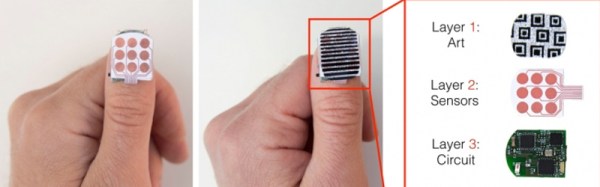
All hands are on deck over at MIT where a very handy new trackpad has been created that will be able to give users a free hand to do other tasks. The device is called the NailO and attaches to one’s thumbnail, which allows the user an easy and reportedly natural way to use a trackpad while your hands are full, dirty, or otherwise occupied.

The device reportedly works like any normal trackpad, but is about the size of a quarter and attaches to the thumbnail in such a way that it takes advantage of the natural motion of running an index finger over the thumbnail. It communicates via Bluetooth radio, and has four layers which all go hand-in-hand: an artistic covering (to replicate the look of a painted fingernail), the sensors, the circuitry, the battery, and presumably an adhesive of some sort.

Details are quite sparse, but the device is scheduled to make its debut at the Computer Human Interaction conference in Seoul, South Korea very soon. If it can be made less bulky (although it’s somewhat uncomfortable to call something smaller than a quarter “bulky”) this might be, hands down, the next greatest evolution in mouse technology since multi-touch. We have to hand it to MIT for coming up with such a unique wearable!

Wildlife Camera

Remote Controlled Wildlife Camera With Raspberry Pi

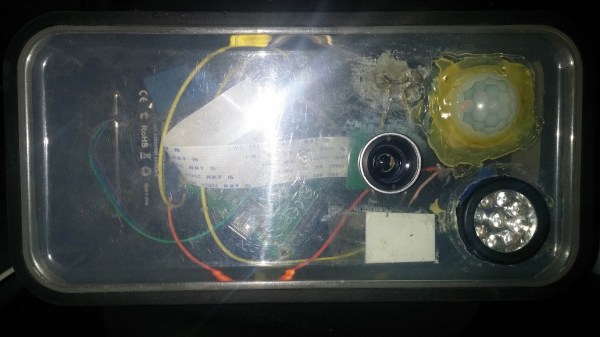
If you are interested in local wildlife, you may want to consider this wildlife camera project (Google cache). [Arnis] has been using his to film foxes and mice. The core components of this build are a Raspberry Pi and an infrared camera module specifically made for the Pi. The system runs on a 20,000 mAh battery, which [Arnis] claims results in around 18 hours of battery life.

[Arnis] appears to be using a passive infrared (PIR) sensor to detect motion. These sensors work by detecting sudden changes in the amount of ambient infrared radiation. Mammals are good sources of infrared radiation, so the sensor would work well to detect animals in the vicinity. The Pi is also hooked up to a secondary circuit consisting of a relay, a battery, and an infrared light. When it’s dark outside, [Arnis] can enable “night mode” which will turn on the infrared light. This provides some level of night vision for recording the furry critters in low light conditions.

[Arnis] is also using a Bluetooth dongle with the Pi in order to communicate with an Android phone. Using a custom Android app, he is able to connect back to the Pi and start the camera recording script. He can also use the app to sync the time on the Pi or download an updated image from the camera to ensure it is pointed in the right direction. Be sure to check out the demo video below.

If you like these wildlife cameras, you might want to check out some older projects that serve a similar purpose. Continue reading “Remote Controlled Wildlife Camera With Raspberry Pi”

bluetooth snes headphones

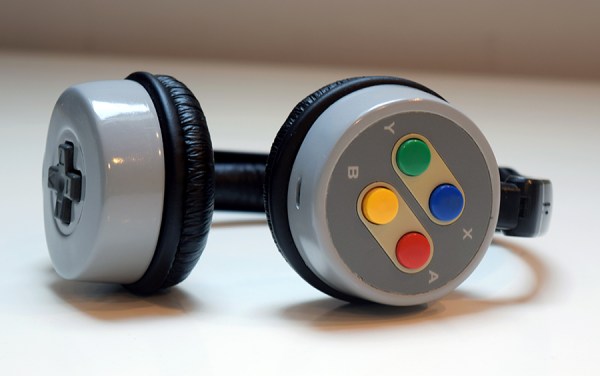
SNES Headphones Cry For Bluetooth Has Been Answered

A year and a half ago we ran a post about a SNES controller modified into a pair of headphones. They were certainly nice looking and creative headphones but the buttons, although present, were not functional. The title of the original post was (maybe antagonistically) called: ‘SNES Headphones Scream Out For Bluetooth Control‘.

Well, headphone modder [lyberty5] is back with a vengeance. He has heeded the call by building revision 2 of his SNES headphones… and guess what, they are indeed Bluetooth! Not only that, the A, B, X and Y buttons are functional this time around and have been wired up to the controls on the donor Bluetooth module.

To get this project started, the SNES controller was taken apart and the plastic housing was cut up to separate the two rounded sides. A cardboard form was glued in place so that epoxy putty could be roughly formed in order to make each part completely round. Once cured, the putty was sanded and imperfections filled with auto body filler. Holes were drilled for mounting to the headband and a slot was made for the Bluetooth modules’ USB port so the headphone can be charged. The headphones were then reassembled after a quick coat of paint in Nintendo Grey. We must say that these things look great.

If you’d like to make your own set of SNES Bluetooth Headphones, check out the build video after the break.

Continue reading “SNES Headphones Cry For Bluetooth Has Been Answered”

Calibrating The MSP430 Digitally Controlled Oscillator

The MSP430 is a popular microcontroller, and on board is a neat little clock source, a digitally controlled oscillator, or DCO. This oscillator can be used for everything from setting baud rates for a UART or for setting the clock for a VGA output.

While the DCO is precise – once you set it, it’ll keep ticking off at the correct rate – it’s not accurate. Without a bit of code, it’s difficult to set the DCO to the rate you want, and the code to set that rate will be different between different chips.

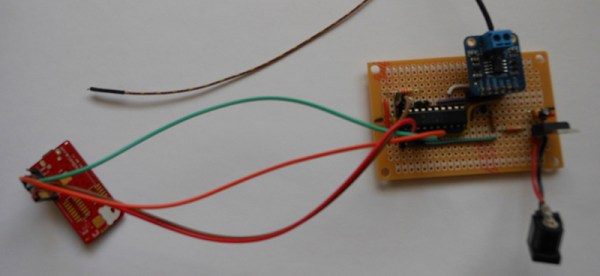
When [Mike] tried to set up a UART between an MSP430 and a Bluetooth module, he ran into a problem. Setting the MSP to the correct baud rate was difficult. Luckily, there’s a way around that.

There’s an easy way to set the DCO on the MSP programatically; just set two timers – one that interrupts every 512 cycles, with its clock source set to the DCO, and another that interrupts every 32768 cycles that gets its clock from a 32.768kHz crystal. The first timer clicks off every second, and by multiplying the first timer by 512, the real speed of the DCO can be deduced.

After playing around with this technique and testing the same code on two different chips, [Mike] found there can be a difference of almost 1MHz between the DCOs from chip to chip. That’s something that would have been helpful to know when he was playing around with VGA on the ‘430. Back then he just used a crystal.

Wireless SNES Controller

SNES Controller Modified To Be Completely Wireless

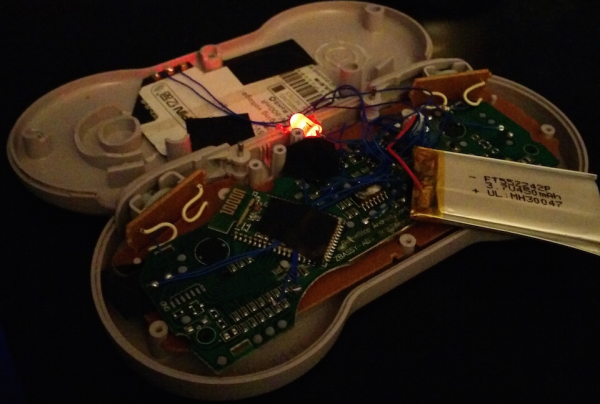
[Pat] was looking for a way to wirelessly control his Fire TV unit. He could have just went with one of many possible consumer products, but he decided to take it a step further. He modified a unit to fit inside of an original SNES controller. All of the buttons are functional, and the controller even features a wireless charger.

[Pat] started out with a Bluetooth video game controller marketed more playing video games on tablets. The original controller looked sort of like an XBox controller in shape. [Pat] tore this controller open and managed to stuff the guts into an original SNES controller. He didn’t even have to remove the original SNES PCB. [Pat] mentions that it was rather tedious to rewire all of the buttons from the original controller, but in the end it wasn’t too difficult. The only externally visible modification to the original controller is a small hole that was made for a power button.

In order to make this unit completely wireless, [Pat] also installed a Qi wireless charging module. Now, placing the controller on a charging pad will charge up the small LiPo battery in just about 45 minutes. This controller would be the perfect addition to a RetroPi or other similar project. If you’re not into Bluetooth, you can try using a Logitech receiver instead. Continue reading “SNES Controller Modified To Be Completely Wireless”

An Adventure Into Android Makes The VIC-20 Speak

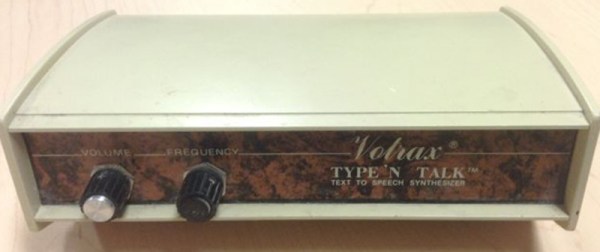
History and [Bil Herd] teaches us that Commodore begged, borrowed, or stole the engineers responsible for the Speak & Spell to add voice synthesis to a few of the computers that came after the C64. This didn’t quite work out in practice, but speech synthesis was something that was part of the Commodore scene for a long time. The Votrax Type ‘n Talk was a stand-alone speech synthesizer that plugged into the expansion port of the VIC-20. It was expensive, rare, but a few games supported it. [Jan] realized the state of speech synthesis has improved tremendously over the last 30 years, and decided to give his VIC a voice with the help of a cheap Android phone.

A few VIC-20 games, including [Scott Adams] adventure games, worked with the Votrax speech synthesizer by sending phonemes as text over the expansion port. From there, the Votrax would take care of assembling everything into something intelligible, requiring no overhead on the VIC-20. [Jan] realized since the VIC is just spitting out characters for each phoneme, he could redirect those words to a better, more modern voice synthesizer.

A small Bluetooth module was wired up to the user port on the VIC, and this module was paired with a cheap Android smartphone. The smartphone receives the serial stream from an adventure game, and speaks the descriptions of all the scenes in these classic adventure games.

It’s a unique experience judging from the video, but the same hardware and software can also be added to any program that will run on the VIC-20, C64, and C128. Video below.

Continue reading “An Adventure Into Android Makes The VIC-20 Speak”