Putting Perseverance Rover’s View Into Satellite View Context

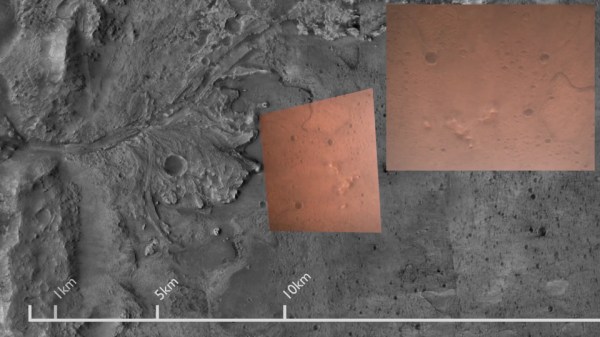
It’s always fun to look over aerial and satellite maps of places we know, seeing a perspective different from our usual ground level view. We lose that context when it’s a place we don’t know by heart. Such as, say, Mars. So [Matthew Earl] sought to give Perseverance rover’s landing video some context by projecting onto orbital imagery from ESA’s Mars Express. The resulting video (embedded below the break) is a fun watch alongside the technical writeup Reprojecting the Perseverance landing footage onto satellite imagery.

Some telemetry of rover position and orientation were transmitted live during the landing process, with the rest recorded and downloaded later. Surprisingly, none of that information was used for this project, which was based entirely on video pixels. This makes the results even more impressive and the techniques more widely applicable to other projects. The foundational piece is SIFT (Scale Invariant Feature Transform), which is one of many tools in the OpenCV toolbox. SIFT found correlations between Perseverance’s video frames and Mars Express orbital image, feeding into a processing pipeline written in Python for results rendered in Blender.

While many elements of this project sound enticing for applications in robot vision, there are a few challenges touched upon in the “Final Touches” section of the writeup. The falling heatshield interfered with automated tracking, implying this process will need help to properly understand dynamically changing environments. Furthermore, it does not seem to run fast enough for a robot’s real-time needs. But at first glance, these problems are not fundamental. They merely await some motivated people to tackle in the future.

This process bears some superficial similarities to projection mapping, which is a category of projects we’ve featured on these pages. Except everything is reversed (camera instead of video projector, etc.) making the math an entirely different can of worms. But if projection mapping sounds more to your interest, here is a starting point.

[via Dr. Tanya Harrison @TanyaOfMars]

Continue reading “Putting Perseverance Rover’s View Into Satellite View Context” →

An AI-Free Way To Catch Wildlife On Camera

Judging by the over-representation of the term “AI” in our news feeds these days, we’re clearly in the exponential phase of the artificial intelligence hype cycle, and very nearly at the dreaded “Peak of Inflated Expectations.” It seems like there’s nothing that AI can’t do, and nowhere that its principles can’t be applied to virtuous — and profitable — effect.

We don’t deny that AI has massive potential, but we strongly suspect that there will soon come a day when eyes will roll and stomachs will turn at yet another AI application that could have been addressed with something easier. An example of the simpler approach can be seen in this non-AI wildlife photo trap, cobbled together by [Sebastian] to capture pictures of some camera-shy squirrels. Rather than train an AI with gigabytes of squirrel images, he instead relies on his old Sony Alpha camera, which has a built-in WiFi. A Python script connects to the camera, which is trained on a feeder box and set to a very narrow depth of field. That makes a good percentage of the scene out of focus until a squirrel or other animal comes along looking for treats. The script detects the increased area of the scene that is now in-focus with a Laplace operator in OpenCV, and triggers the camera shutter. [Sebastian] ended up with some wonderful shots of the shy squirrels using this scheme; the video below describes the setup in more detail.

It’s not the first time we’ve seen Laplace transforms used to gauge image sharpness, of course, but we really like the approach [Sebastian] took here for its simplicity. The squirrels are cute too.

Continue reading “An AI-Free Way To Catch Wildlife On Camera” →

Real Time Object Detection For $59

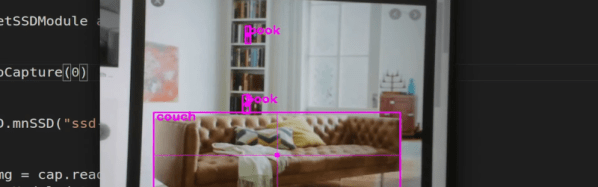
There was a time when making a machine to identify objects in a camera was difficult, even without trying to do it in real time. But now, you can do it with a Jetson Nano board for under $60. How well does it work? Watch [Murtaza’s] video below and see what you think.

The first few minutes of the video piqued our interest, and good thing, too, because the 50 lines of code get a 50-plus minute video! It is worth watching, though, because there’s a lot of good information about how to apply this technique in your own projects.

Continue reading “Real Time Object Detection For $59” →

Laser Zap That Mosquito

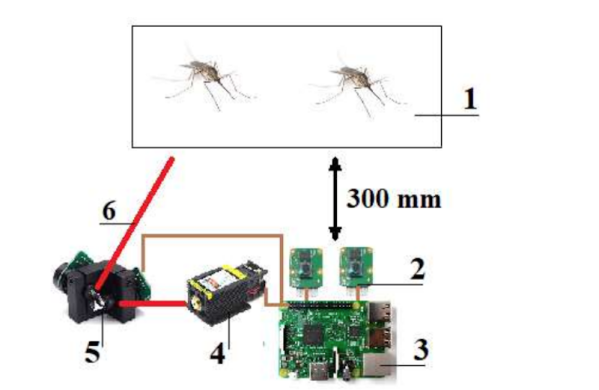
When we first heard of [Ildar Rakhmatulin’s] plan to use OpenCV on a Raspberry Pi to detect mosquitos and then zap them with a 1 watt laser, we thought it was sort of humorous. However, the paper points out that 700,000 people die each year from mosquito bites — we didn’t verify that, but according to the article that’s twice the number of people murdered each year. So the little pests are pretty effective assassins.

It looks as though the machine has been built, at least in a test configuration. A galvanometer aims the death ray using mirrors, and with the low power and lossy mirrors the mosquitos can only be a small distance from the machine — about a foot.

Continue reading “Laser Zap That Mosquito” →

OpenCV And Depth Camera Spots Weeds

Using vision technology to identify weeds in agriculture is an area of active development, and a team of researchers recently shared their method of using a combination of machine vision plus depth information to identify and map weeds with the help of OpenCV, the open-source computer vision library. Agriculture is how people get fed, and improving weed management is one of its most important challenges.

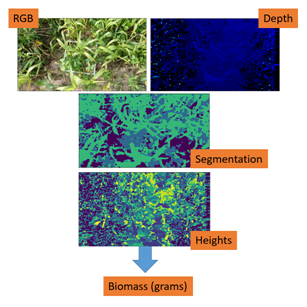
Many current efforts at weed detection and classification use fancy (and expensive) multispectral cameras, but PhenoCV-WeedCam relies primarily on an OAK-D stereo depth camera. The system is still being developed, but is somewhat further along than a proof of concept. The portable setups use a Raspberry Pi, stereo camera unit, power banks, an Android tablet for interfacing, and currently require an obedient human to move and point them.

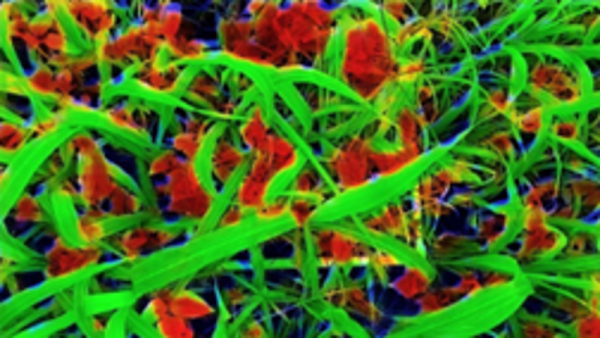
It’s an interesting peek at the kind of hands-on work that goes into data gathering for development. Armed with loads of field data from many different environments, the system can use the data to identify grasses, broad leaf plants, and soil in every image. This alone is useful, but depth information also allows the system to estimate overall plant density as well as try to determine the growth center of any particular plant. Knowing that a weed is present is one thing, but to eliminate it with precision — for example with a laser or mini weed whacker on a robot arm — knowing where the weed is actually growing from is an important detail.

PhenoCV-WeedCam (GitHub repository) is not yet capable of real-time analysis, but the results are promising and that’s the next step. The system currently must be carried by people, but could ultimately be attached to a robotic platform made specifically to traverse fields.

OpenCV Spreads Smart Camera Joy To See Ideas Come To Life

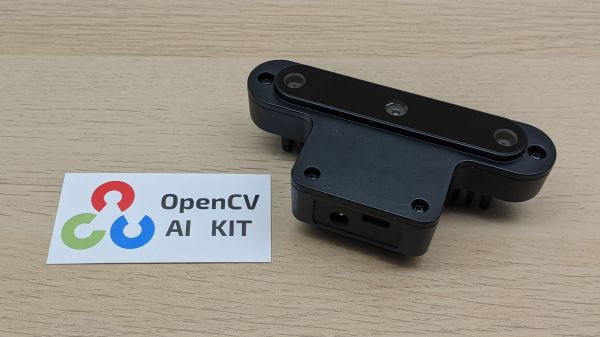
Do you have a great application for computer vision, but couldn’t spare the cost of hardware needed to build it? Or perhaps you just need a deadline to pull you away from endless doom scrolling? Either way, the OpenCV team wants you to enter their OpenCV AI Competition 2021 and they’re willing to pitch in hardware to make it happen.

This competition is part of OpenCV’s 20th anniversary celebration, and the field of machine vision has changed a lot in those two decades. OpenCV started within Intel harnessing power of their high end CPUs, but today the excitement is around specialized acceleration hardware for vision processing. Which is why OpenCV put their support and lent their name to the OpenCV AI Kit (OAK) Kickstarter we covered a few months ago. Since then, the hardware was produced and starting to arrive in project backer’s hands. (Barring pandemic-related shipping restrictions…)

This shiny new hardware is the competition’s focus. Phase one solicits team proposals for putting an OAK-D’s power to novel use. University teams may have up to ten members, general teams are limited to four. Each team’s geographic home will put them in one of six global regions. Proposals must be submitted by January 27th, 2021. By February 11th, judges will select the best twenty-five general and ten university team proposals from each region, and every member of the team gets an OAK-D unit to turn their idea into reality by phase two deadline of June 27th. That’s up to 1,200 OAK-D modules available to anyone who can convince the judges they have a great idea and they are capable of bringing it to fruition. Is that you? Of course it is!

Teams will also receive additional resources such as an allotment of cloud compute credits to train their models, and naturally all tutorials and sample code released as part of OAK Kickstarter. No explicit resource for project team organization is mentioned, but of course our own Hackaday.io is available to support you. Best of luck to everyone who enters and we look forward to seeing all the projects this contest will bring to life.

Webcam Heart Rate Monitor Brings Photoplethysmography To Your PC

It seems like within the last ten years, every other gadget to be released has some sort of heart rate monitoring capability. Most modern smartwatches can report your BPMs, and we’ve even seen some headphones with the same ability hitting the market. Most of these devices use an optical measurement method in which skin is illuminated (usually by an LED) and a sensor records changes in skin color and light absorption. This method is called Photoplethysmography (PPG), and has even been implemented (in a simple form) in smartphone apps in which the data is generated by video of your finger covering the phone camera.

The basic theory of operation here has its roots in an experiment you probably undertook as a child. Did you ever hold a flashlight up to your hand to see the light, filtered red by your blood, shine through? That’s exactly what’s happening here. One key detail that is hard to perceive when a flashlight is illuminating your entire hand, however, is that deoxygenated blood is darker in color than oxygenated blood. By observing the frequency of the light-dark color change, we can back out the heart rate.

This is exactly how [Andy Kong] approached two methods of measuring heart rate from a webcam.

Method 1: The Cover-Up

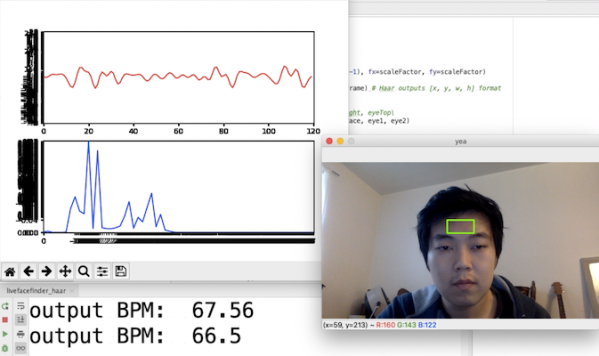
The first detection scheme [Andy] tried is what he refers to as the “phone flashlight trick”. Essentially, you cover the webcam lens entirely with your finger. Ambient light shines through your skin and produces a video stream that looks like a dark red rectangle. Though it may be imperceptible to us, the color changes ever-so-slightly as your heart beats. An FFT of the raw data gives us a heart rate that’s surprisingly accurate. [Andy] even has a live demo up that you can try for yourself (just remember to clean the smudges off your webcam afterwards).

Method 2: Remote Sensing

Now things are getting a bit more advanced. What if you don’t want to clean your webcam after each time you measure your heart rate? Well thankfully there’s a remote sensing option as well.

For this method, [Andy] is actually using OpenCV to measure the cyclical swelling and shrinking of blood vessels in your skin by measuring the color change in your face. It’s absolutely mind-blowing that this works, considering the resolution of a standard webcam. He found the most success by focusing on fleshy patches of skin right below the eyes, though he says others recommend taking a look at the forehead.

Every now and then we see something that works even though it really seems like it shouldn’t. How is a webcam sensitive enough to measure these minute changes in facial color? Why isn’t the signal uselessly noisy? This project is in good company with other neat heart rate measurement tricks we’ve seen. It’s amazing that this works at all, and even more incredible that it works so well.