Building A Metal 3D Printer With A Laser Welder

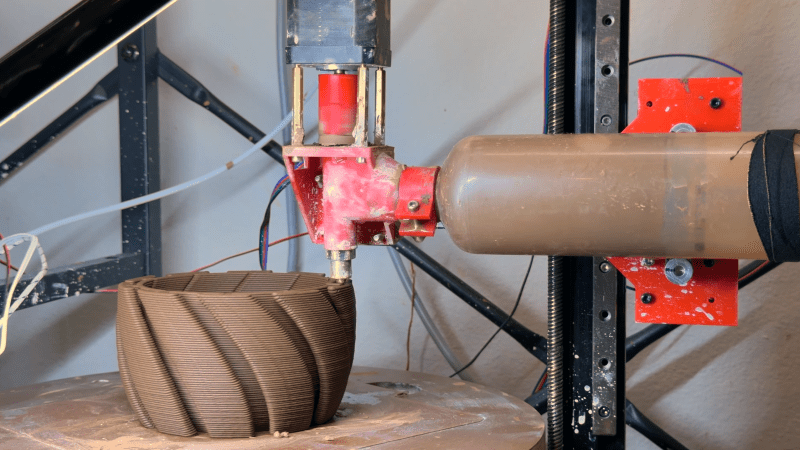
The development of cheaper, more powerful lasers has always been a cause for excitement among hackers, and fiber lasers are no exception. One of the newer tools they’ve enabled is the laser welder, which can be used to weld, cut through metal, or clean off surfaces. Or, as [Cranktown City] demonstrated, you can use one to build a metal 3D printer.

The printer’s built around a 2000-Watt fiber laser welder from Skyfire, and the motion system came from a defunct secondhand 3D printer built by an out-of-business insole printing company. The frame was reinforced with steel, the welding gun was mounted in place of the hotend, and the trigger was replaced with a CNC-controlled switch. It didn’t originally use any specific shielding gas, since the welder was supposed to perform adequately with just compressed air if high weld quality wasn’t essential.

The first few tests were promising, but did reveal quite a few problems. Heat buildup was an early issue which threatened to warp the build plate, and which eventually welded the build plate to the Z-axis gantry. Adding a strong cooling fan and putting a gap between the build plate and the gantry solved this. The wire also kept getting stuck to the build surface, which [Cranktown City] solved by pausing the wire feed and pulling it away from the part when a layer finished. Simply using compressed air led to a weak deposit that cracked easily, and while a nitrogen stream improved the print somewhat, argon shielding gas gave the best results. For his final print, [Cranktown City] made a vase. The layers were a bit crude, but better than most welder-based metal printers, and the system shows some real promise.

We’ve seen a few printers built around welders before, and a few built around lasers, but this seems to be the first to use both.

A wooden frame is shown with a scale pulling down on a 3D-printed part held in the frame. A phone on a stand is taking video of the part.

Changing Print Layer Patterns To Increase Strength

Dy default, the slicing software used for 3D printers has the printer first create the walls around the edges of a print, then goes back to deposit the infill pattern. [NeedItMakeIt], however, experimented with a different approach to line placement, and found significant strength improvements for some filaments.

The problem, as [NeedItMakeIt] identified with a thermal camera, is that laying down walls around a print gives the extruded plastic time to cool of. This means new plastic is being deposited onto an already-cooled surface, which reduces bonding strength. Instead, he used an aligned rectilinear fill pattern to print the solid parts. In this pattern, the printer is usually extruding filament right next to the filament it just deposited, which is still hot and therefore adheres better. The extrusion pattern is also aligned vertically, which might improve inter-layer bonding at the transition point.

To try it out, he printed a lever-type test piece, then recorded the amount of force it took to break a column free from the base. He tried it with a default fill pattern, aligned fill, and aligned fill with a single wall around the outside, and printed copies in PLA, plain PETG, and carbon fiber-reinforced PETG. He found that aligned fill improved strength in PLA and carbon fiber PETG, in both cases by about 46%, but led to worse performance in plain PETG. Strangely, the aligned fill with a single outside wall performed better than default for PLA, but worse than default in both forms of PETG. The takeaway seems to be that aligned fill improves layer adhesion when it’s lacking, but when adhesion is already good, as with PETG, it’s a weaker pattern overall.

Interesting, [MakeItPrintIt]’s test results fit in well with previous testing that found carbon fiber makes prints weaker. Another way to get stronger print fill patterns is with brick layers.

Continue reading “Changing Print Layer Patterns To Increase Strength”

Two very similar diffraction patterns are shown, in patterns of green dots against a blue background. The left image is labelled "Kompressions-algorithmus", and the one on the right is labelled "Licht & Zweibelzellen".

Why Diffraction Gratings Create Fourier Transforms

When last we saw [xoreaxeax], he had built a lens-less optical microscope that deduced the structure of a sample by recording the diffraction patterns formed by shining a laser beam through it. At the time, he noted that the diffraction pattern was a frequency decomposition of the specimen’s features – in other terms, a Fourier transform. Now, he’s back with an explanation of why this is, deriving equations for the Fourier transform from the first principles of diffraction (German video, but with auto-translated English subtitles. Beware: what should be “Huygens principle” is variously translated as “squirrel principle,” “principle of hearing,” and “principle of the horn”).

The first assumption was that light is a wave that can be adequately represented by a sinusoidal function. For the sake of simplicity (you’ll have to take our word for this), the formula for a sine wave was converted to a complex number in exponential form. According to the Huygens principle, when light emerges from a point in the sample, it spreads out in spherical waves, and the wave at a given point can therefore be calculated simply as a function of distance. The principle of superposition means that whenever two waves pass through the same point, the amplitude at that point is the sum of the two. Extending this summation to all the various light sources emerging from the sample resulted in an infinite integral, which simplified to a particular form of the Fourier transform.

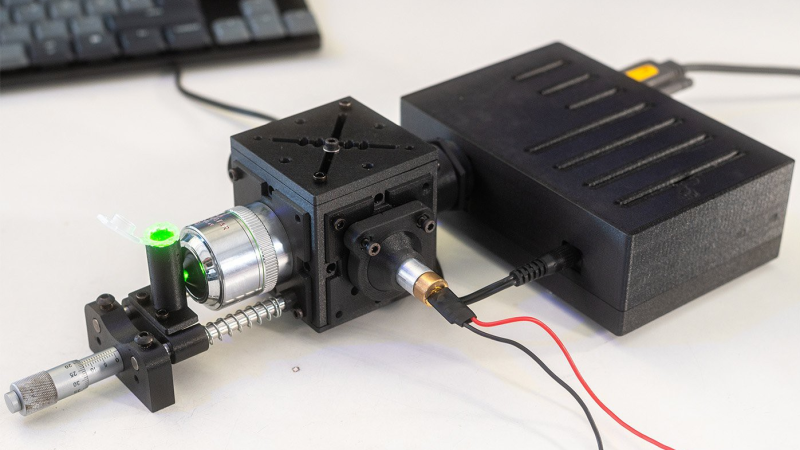
One surprising consequence of the relation is the JPEG representation of a micrograph of some onion cells. JPEG compression calculates the Fourier transform of an image and stores it as a series of sine-wave striped patterns. If one arranges tiles of these striped patterns according to stripe frequency and orientation, then shades each tile according to that pattern’s contribution to the final image, one gets a speckle pattern with a bright point in the center. This closely resembles the diffraction pattern created by shining a laser through those onion cells.

For the original experiment that generated these patterns, check out [xoreaxeax]’s original ptychographical microscope. Going in the opposite direction, researchers have also used physical structures to calculate Fourier transforms.

Continue reading “Why Diffraction Gratings Create Fourier Transforms”

The edge of a laptop is shown with a USB cable plugged into it. the other end of the cable is plugged into a Raspberry Pi Zero.

SSH Over USB On A Raspberry Pi

Setting up access to a headless Raspberry Pi is one of those tasks that should take a few minutes, but for some reason always seems to take much longer. The most common method is to configure Wi-Fi access and an SSH service on the Pi before starting it, which can go wrong in many different ways. This author, for example, recently spent a few hours failing to set up a headless Pi on a network secured with Protected EAP, and was eventually driven to using SSH over Bluetooth. This could thankfully soon be a thing of the past, as [Paul Oberosler] developed a package for SSH over USB, which is included in the latest versions of Raspberry Pi OS.

The idea behind rpi-usb-gadget is that a Raspberry Pi in gadget mode can be plugged into a host machine, which recognizes it as a network adapter. The Pi itself is presented as a host on that network, and the host machine can then SSH into it. Additionally, using Internet Connection Sharing (ICS), the Pi can use the host machine’s internet access. Gadget mode can be enabled and configured from the Raspberry Pi Imager. Setting up ICS is less plug-and-play, since an extra driver needs to be installed on Windows machines. Enabling gadget mode only lets the selected USB port work as a power input and USB network port, not as a host port for other peripherals.

An older way to get USB terminal access is using OTG mode, which we’ve seen used to simplify the configuration of a Pi as a simultaneous AP and client. If you want to set up headless access to Raspberry Pi desktop, we have a guide for that.

Thanks to [Gregg Levine] for the tip!

A pair of printed circuit boards are shown against a pink background. The right circuit board is plugged into a USB cable, and has several LED indicators on. The left board is plugged into the other at 45-degree angle, and has no visible components.

Tamper Detection With Time-Domain Reflectometry

For certain high-security devices, such as card readers, ATMs, and hardware security modules, normal physical security isn’t enough – they need to wipe out their sensitive data if someone starts drilling through the case. Such devices, therefore, often integrate circuit meshes into their cases and regularly monitor them for changes that could indicate damage. To improve the sensitivity and accuracy of such countermeasures, [Jan Sebastian Götte] and [Björn Scheuermann] recently designed a time-domain reflectometer to monitor meshes (pre-print paper).

Many meshes are made from flexible circuit boards with winding traces built into the case, so cutting or drilling into the case breaks a trace. The problem is that most common ways to detect broken traces, such as by resistance or capacitance measurements, aren’t easy to implement with both high sensitivity and low error rates. Instead, this system uses time-domain reflectometry: it sends a sharp pulse into the mesh, then times the returning echoes to create a mesh fingerprint. When the circuit is damaged, it creates an additional echo, which is detected by classifier software. If enough subsequent measurements find a significant fingerprint change, it triggers a data wipe.

The most novel aspect of this design is its affordability. An STM32G4-series microcontroller manages the timing, pulse generation, and measurement, thanks to its two fast ADCs and a high-resolution timer with sub-200 picosecond resolution. For a pulse-shaping amplifier, [Jan] and [Björn] used the high-speed amplifiers in an HDMI redriver chip, which would normally compensate for cable and connector losses. Despite its inexpensive design, the circuit was sensitive enough to detect when oscilloscope probes contacted the trace, pick up temperature changes, and even discern the tiny variations between different copies of the same mesh.

It’s not absolutely impossible for an attacker to bypass this system, nor was it intended to be, but overcoming it would take a great deal of skill and some custom equipment, such as a non-conductive drill bit. If you’re interested in seeing such a system in the real world, check out this teardown of a payment terminal. One of the same authors also previously wrote a KiCad plugin to generate anti-tamper meshes.

Thanks to [mark999] for the tip!

An aluminium top is shown spinning on a plastic disk in front of a tablet showing the text "2:07:49.5"

Self-Powered Top Spins For Hours

The meaning of Inception’s ending famously revolves around a top which spins forever in dreams, but in real life comes to a stop like any other top. Any other top, that is, except for [Aaed Musa]’s self-spinning top, which can continuously spin for about two hours before coming to a stop.

The one constraint was that every functional component had to be contained within the top’s shell, and [Aaed]’s first approach was to build a reaction wheel into the top. When a motor accelerates a weighted wheel, conservation of angular momentum applies an equal and opposite torque to the motor. The problem is that motors eventually reach a top speed and stop accelerating, which puts an end to the torque. This is known as saturation, and the only way to desaturate a reaction wheel is to slow it down, which counteracts the originally generated torque. [Aaed] originally planned to mount the motor in a one-way bearing, which would let it bleed off speed without producing torque against the rest of the top, but it was rather choppy in practice.

The solution occurred to [Aaed] while watching the aforementioned final scene, when it occurred to him that the wobbling of a top could actually generate rotation. A prototype proved that an off-center weight rotating at a constant speed did successfully spin the top by rotating the center of mass, and after that, it was a matter of incremental testing and improvement. A higher moment of inertia worked better, as did a lower center of gravity and a tip made from a hard, low-friction silicon nitride ball bearing. He made housings out of both 3D-printed plastic and CNC-milled aluminium, which each contained a tiny brushless motor, an electric speed controller, a microcontroller, and a small rechargeable lithium battery.

If you allow for external power, you can make the top itself the rotor of a motor, and drive it from a base. Alternatively, if you levitate your top in a vacuum, it could spin for longer than recorded history.

A device rather resembling a megaphone is lying on a table. The handle is made of black plastic. The horn is made of grey plastic, is hexagonal, and is not tapered. At the back of the horn is an array of silver ultrasonic transducers.

Accurately Aiming Audio With An Ultrasonic Array

When [Electron Impressions] used a powerful ultrasonic array to project a narrow beam of sound toward a target, he described it as potentially useful in getting someone’s attention from across a crowded room without disturbing other people. This is quite a courteous use compared to some of the ideas that occur to us, and particularly compared to the crowd-control applications that various militaries and police departments put directional speakers to.

Regardless of how one uses it, however, the physics behind such directional speakers is interesting. Normal speakers tend to disperse their sound widely because the size of the diaphragm is small compared to the wavelength of the sound they produce; just like light waves passing through a pinhole or thin slit, the sound waves diffract outwards in all directions from their source. Audible frequencies have wavelengths too long to make a handheld directional speaker, but ultrasonic waves are short enough to work well; [Electron Impressions] used 40 kHz, which has a wavelength of just eight millimeters. To make the output even more directional, he used an array of evenly-spaced parallel emitters, which interfere constructively to the front and destructively to the sides. Continue reading “Accurately Aiming Audio With An Ultrasonic Array”