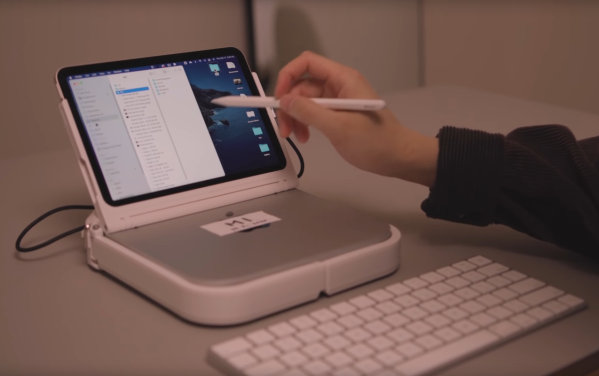
Desktop Performance In A Custom Mac Laptop

Most of us either own or have used a laptop at some point. For traveling, as a student, or even for browsing Hackaday on the couch in front of the TV, they are pretty much indispensable. They do tend to have a sharp performance reduction compared to a desktop though thanks to the thermal and battery limitations of a portable form factor. [Scott Yu-Jan] wanted to solve that in his own life by building a custom Mac laptop with none of these downsides.

Noticing that a modern iPad Mini has exactly the same width of his Mac Mini, [Scott] set about combining the two devices into a single unit that he could assemble when traveling. A 3D printed case with a traditional laptop clamshell design takes care of physically combining these two devices, and a USB-C cable between the two takes care of combining them in software thanks to Apple’s Duet program. While this has better performance than a Macbook Pro it might actually have some perks, since Apple continues to refuse to make a laptop with a touchscreen.

There are some downsides, of course. The price is higher than a comparable Macbook Pro for the iPad and Mac together, plus it doesn’t include a keyboard or mouse. It also has no battery, so it needs to be plugged in. In the follow-up video linked below, though, [Scott] notes that for him this still made sense as he uses the Mac and iPad individually already, and only works remotely at places that have power outlets readily available. For the average person, though, we might recommend something different if you really need an esoteric laptop-like machine.

Thanks to [Varun] for originally sending in this tip!

Continue reading “Desktop Performance In A Custom Mac Laptop”

OpenCV Brings Pinch To Zoom Into The Real World

Gesture controls arrived in the public consciousness a little over a decade ago as touchpads and touchscreens became more popular. The main limitation to gesture controls, a least as far as [Norbert] is concerned, is that they can only control objects in a virtual space. He was hoping to use gestures to control a real-world object instead, and created this device which uses gestures to control an actual picture.

In this unique augmented reality device, not only is the object being controlled in the real world but the gestures are being monitored there as well, thanks to a computer vision system watching his hand which is running OpenCV. The position data is fed into an algorithm which controls a physical picture mounted on a slender robotic arm. Now, when [Norbert] “pinches to zoom”, the servo attached to the picture physically brings it closer to or further from his field of view. He can also use other gestures to move the picture around.

While this gesture-controlled machine is certainly a proof-of-concept, there are plenty of other uses for gesture controls of real-world objects. Any robotics platform could benefit from an interface like this, or even something slightly more mundane like an office PowerPoint presentation. Opportunity abounds, but if you need a primer for OpenCV take a look at this build which tracks a hand in minute detail.

Continue reading “OpenCV Brings Pinch To Zoom Into The Real World”

Bike On Over To The Campground

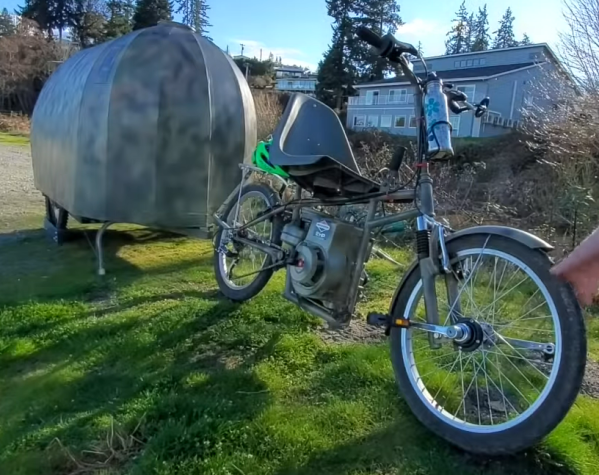
Like many of us, [Paul] enjoys occasionally hitching up his tow-behind camper and heading out to the wilderness to get away from it all at his favorite campsite. Unlike the vast majority of those who share his passion for the outdoors, though, [Paul] is hitching his camper up to a bicycle. Both the camper and the bike are custom built from the ground up, and this video shows us a little more details on [Paul]’s preferred mode of transportation.

While he is known for building custom vehicles of one sort or another, this latest one is a more traditional bicycle frame that he has modified only slightly to fit a recumbent-style seat and a small gas-powered motor. Even though the motor is decades old, it started right up and gives the power needed to pull the custom camper. [Paul] builds one-person campers like this out of corrugated plastic for durability and light weight, and this one is specifically designed for his size and sleeping style. It includes everything needed for a night under the stars, too, including a stove, storage compartments, and a few windows.

With the bike and camper combined weighing in at just over 200 pounds, the motor can be used as a pedal-assist device thanks to the clever engineering behind a front-wheel-drive pedal system on this bike. With all of that custom fabrication, [Paul] is free to head out to the wilderness without all the encumbrances (and high price) of traditional motor vehicle-based camping. For those curious about some of [Paul]’s other vehicle creations, take a look at this tiny speedboat for one.

Continue reading “Bike On Over To The Campground”

Keep Tabs On Asteroids With Asteroid Atlas

Keeping tabs on the night sky is an enjoyable way to stay connected to the stars, and astronomy can be accessible to most people with a low entry point for DIY telescopes. For those who live in areas with too much light pollution, though, cost is not the only issue facing amateur astronomers. Luckily there are more ways to observe the night sky, like with this open source software package from [elanorlutz] which keeps tabs on all known asteroids.

The software is largely based on Python and uses a number of databases from NASA to allow anyone with a computer to explore various maps of the solar system and the planetary and non-planetary bodies within it. Various trajectories can be calculated, and paths of other solar system bodies can be shown with respect to an observer in various locations. Once the calculations are made in Python it is able to export the images for use in whichever image manipulation software you prefer.

The code that [elanorlutz] has created is quite extensive and ready to use for anyone interested in tracking comets, trans-Neptunian objects, or even planets and moons from their own computer. We would imagine a tool like this would be handy for anyone with a telescope as well as it could predict locations of objects in the night sky with accuracy and then track them with the right hardware.

Talking To A Texas Instruments Calculator

Texas Instruments is a world-class semiconductors company, but unfortunately what they are best known for among the general public is dated consumer-grade calculators thanks to entrenched standardized testing. These testing standards are so entrenched, in fact, that TI has not had to update the hardware in these calculators since the early 90s. They still run their code on a Z80 microcontroller, but [Ben Heck] found himself in possession of one which has a modern ARM coprocessor in it and thus can run Python.

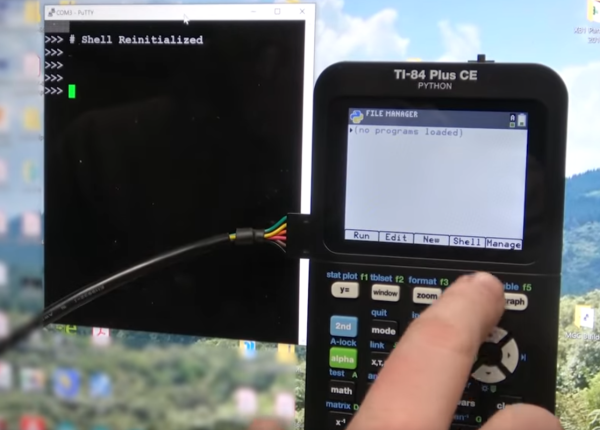
While he’s not sure exactly what implementation of Python the calculator is running, he did tear it apart to try and figure out as much as he could about what this machine is doing. The immediately noticeable difference is the ARM coprocessor that is not present in other graphing calculators. After some investigation of test points, [Ben] found that the Z80 and ARM chips are communicating with each other over twin serial lines using a very “janky” interface. Jankiness aside, eventually [Ben] was able to wire up a port to the side of the calculator which lets him use his computer to send Python commands to the device when it is in its Python programming mode.

While there are probably limited use cases for 1980s calculators to run Python programs, we can at least commend TI for attempting to modernize within its self-built standardized testing prison. Perhaps this is the starting point for someone else to figure out something more useful to put these machines to work with beyond the classroom too. We’ve already seen some TI-84s that have been modified to connect to the Internet, for example.

Thanks to [Nikša] for the tip!

Continue reading “Talking To A Texas Instruments Calculator”

Open-Source Farming Robot Now Includes Simulations

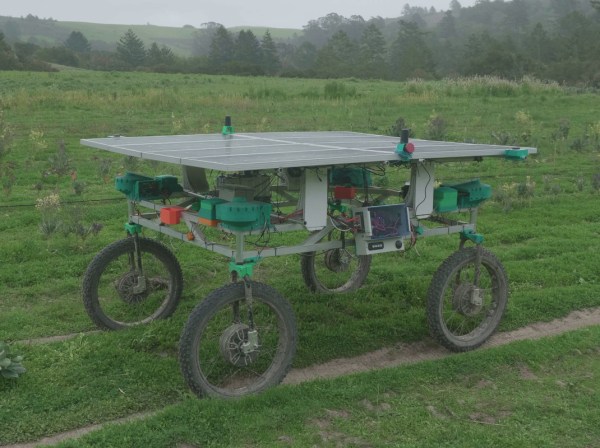
Farming is a challenge under even the best of circumstances. Almost all conventional farmers use some combination of tillers, combines, seeders and plows to help get the difficult job done, but for those like [Taylor] who do not farm large industrial monocultures, more specialized tools are needed. While we’ve featured the Acorn open source farming robot before, it’s back now with new and improved features and a simulation mode to help rapidly improve the platform’s software.

The first of the two new physical features includes a fail-safe braking system. Since the robot uses electric geared hub motors for propulsion, the braking system consists of two normally closed relays which short the motor leads in emergency situations. This makes the motors see an extremely high load and stops them from turning. The robot also has been given advanced navigation facilities so that it can follow custom complex routes. And finally, [Taylor] created a simulation mode so that the robot’s entire software stack can be run in Docker and tested inside a simulation without using the actual robot.

For farmers who are looking to buck unsustainable modern agricultural practices while maintaining profitable farms, a platform like Acorn could be invaluable. With the ability to survey, seed, harvest, and even weed, it could perform every task of larger agricultural machinery. Of course, if you want to learn more about it, you can check out our earlier feature on this futuristic farming machine.

Tracked RC Vehicle Is (Mostly) 3D Printed

While wheels might seem like a foundational technology, they do have one major flaw: they typically need maintained roads in order to work. Anyone who has experience driving a Jeep or truck off-road likely knows this first-hand. For those with extreme off-road needs the track is often employed. [Let’s Print] is working on perfecting his RC tracked vehicle to take advantage of these perks using little more than 3D printed parts and aluminum stock.

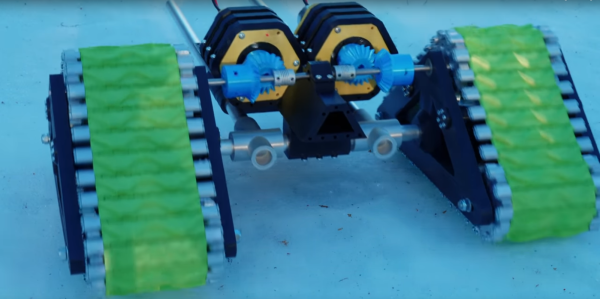
This vehicle doesn’t just include the 3D printed tracks, but an entire 3D printed gearbox and drivetrain to drive them. Each track is driven by its own DC motor coupled to a planetary gearbox to give each plenty of torque to operate in snow or mud. The gearbox is mated to a differential which currently shares a shaft, which means that steering is currently not possible. The original plan was to have each motor drive the tracks independently but a small mistake in the build meant that the shaft needed to be tied together. [Let’s Print] has several options to eventually include steering, including an articulating body or redesigning the drivetrain to be able to separate the shaft.

While this vehicle currently has no wheels in order to improve traction, [Let’s Print] does point out that a pair of wheels could complement this vehicle when he finished the back half of it since wheels have a major advantage over tracks when it comes to steering. A vehicle with both could have the advantages of both, so we’re interested to see where this build eventually goes.

Thanks to [Joonas] for the tip!

Continue reading “Tracked RC Vehicle Is (Mostly) 3D Printed”