Wireless Earbuds Charge Themselves

As more and more ports are removed from our smart devices, it seems that we have one of two options available for using peripherals: either buy a dongle to continue to use wired devices, or switch to Bluetooth and deal with perpetually maintaining batteries. If neither of these options suits you, though, there’s a third option available as [befinitiv] shows us in this build where he integrates a tiny solar panel to his earbud case to allow them to automatically charge themselves.

To start, he begins by taking apart the earbud case. For those who still haven’t tried out a set of these, they typically charge only when placed inside of their carrying case, which in his case also contains a small battery itself. Soldering wires directly to the battery allow for the battery to charge without as much electrical loss as he would have had if he had connected to the USB pins on the circuit board. Even then, the cell only generates a single volt so he needs a 5V boost converter to properly charge the battery. That came with its own problem, though, as it wouldn’t fit into the case properly. To solve that issue, he desoldered all of the components and deadbugged them together in order to fit the converter into a much smaller space without having to modify the case in any other way.

With all of that done and the small solar cell attached to the case, [befinitiv] has a smart solution to keep his wireless earbuds topped up without having to carry cables or dongles around every day. We’ve seen plenty of interesting solutions to the problem of various electronics manufacturers removing the ubiquitous 3.5 mm headphone jack too, and not all of them have dealt with this problem without certain other quirks arising as a result.

Continue reading “Wireless Earbuds Charge Themselves”

Custom RISC-V Processor Built In VHDL

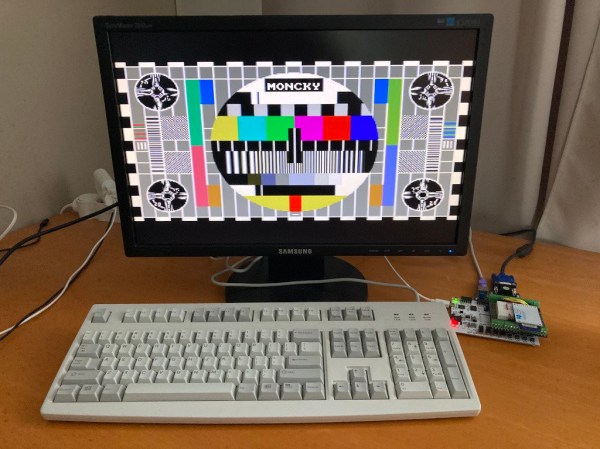
While ARM continues to make inroads into the personal computing market against traditional chip makers like Intel and AMD, it’s not a perfect architecture and does have some disadvantages. While it’s a great step on the road to software and hardware freedom, it’s not completely free as it requires a license to build. There is one completely open-source and free architecture though, known as RISC-V, and its design and philosophy allow anyone to build and experiment with it, like this build which implements a RISC-V processor in VHDL.

Since the processor is built in VHDL, a language which allows the design and simulation of integrated circuits, it is possible to download the code for the processor and then program it into virtually any FPGA. The processor itself, called NEORV32, is designed as a system-on-chip complete with GPIO capabilities and of course the full RISC-V processor implementation. The project’s creator, [Stephan], also struggled when first learning about RISC-V so he went to great lengths to make sure that this project is fully documented, easy to set up, and that it would work out-of-the-box.

Of course, since it’s completely open-source and requires no pesky licensing agreements like an ARM platform might, it is capable of being easily modified or augmented in any way that one might need. All of the code and documentation is available on the project’s GitHub page. This is the real benefit of fully open-source hardware (or software) which we can all get behind, even if there are still limited options available for RISC-V personal computers for the time being.

How does this compare to VexRISC or PicoSOC? We don’t know yet, but we’re always psyched to have choices.

Custom Instrument Cluster For Aging Car

All of the technological improvements to vehicles over the past few decades have led to cars and trucks that would seem borderline magical to anyone driving something like a Ford Pinto in the 1970s. Not only are cars much safer due to things like crumple zones, anti-lock brakes, air bags, and compulsory seat belt use, but there’s a wide array of sensors, user interfaces, and computers that also improve the driving experience. At least, until it starts wearing out. The electronic technology in our modern cars can be tricky to replace, but [Aravind] at least was able to replace part of the instrument cluster on his aging (yet still modern) Skoda and improve upon it in the process.

These cars have a recurring problem with the central part of the cluster that includes an LCD display. If replacement parts can even be found, they tend to cost a significant fraction of the value of the car, making them uneconomical for most. [Aravind] found that a 3.5″ color LCD that was already available fit perfectly in the space once the old screen was removed, so from there the next steps were to interface it to the car. These have a CAN bus separated from the main control CAN bus, and the port was easily accessible, so an Arduino with a RTC was obtained to handle the heavy lifting of interfacing with it.

Now, [Aravind] has a new LCD screen in the console that’s fully programmable and potentially longer-lasting than the factory LCD was. There’s also full documentation of the process on the project page as well, for anyone else with a Volkswagen-adjacent car from this era. Either way, it’s a much more economical approach to replacing the module than shelling out the enormous cost of OEM replacement parts. Of course, CAN bus hacks like these are often gateway projects to doing more involved CAN bus projects like turning an entire vehicle into a video game controller.

Continue reading “Custom Instrument Cluster For Aging Car”

Charger Caddy Shows What 3D Printers Were Meant For

As computers became more popular in the late 80s and into the 90s, they vastly changed their environments. Of course the technological changes were obvious, but plenty of other things changed to accommodate this new technology as well. For example, furniture started to include design elements to accommodate the desktop computer, with pass-through ports in the back of the desks to facilitate cable management. While these are less common features now there are plenty of desks still have them, this 3D printed design modernizes them in a simple yet revolutionary way.

While these ports may have originally hosted thick VGA cables, parallel printer cables (if they would fit), and other now-obsolete wiring, modern technology uses simpler, smaller solutions. This doesn’t mean that they aren’t any less in need of management, though. This print was designed to hold these smaller wires such as laptop chargers, phone chargers, and other USB cables inside the port. A cap on the top of the print keeps everything hidden until it is lifted by hand, where a cable can be selected and pulled up to the top of the desk.

While it might seem like a simple project at first, the elegance of this solution demonstrates excellent use of design principles and a knack for integrating slightly older design decisions with modern technology. If you have a 3D printer and a cable management port on your desk, the print is available on Thingiverse. Not every project needs a complicated solution to solve a problem, like this automatic solar tracker we recently saw which uses no complicated electronics or algorithms to reliably point itself at the sun.

Build A Barebones 68000

The 68000 chip was ubiquitous in the computing world well past its heyday in the 1980s. It was used as the basis for many PCs and video game consoles, and even in embedded microcontrollers. Now, one of its niche applications is learning about the internal functions of computers. 68000 builds are fairly common when building homebrew computers from scratch, but projects like these can be complicated and quickly get out of hand. This 68000 project, on the other hand, gets the job done with the absolute minimum of parts and really dives into the assembly language programming on these chips. (Google Translate from Spanish)

[osbox68] built this computer by first simulating its operation. Once he was satisfied with that, the next step was to actually build the device. Along with the MC68008 it only uses two other TTL chips, a respectable 32 kilobytes of ram, and additionally supports a serial port and an expansion bus. A few 74-series chips round out the build including a 74HC574 used for debugging support. With a custom PCB to tie everything together, it’s one of the most minimal 68000 builds we’ve seen that still includes everything needed to be completely functional.

After all, including the TTL and 74XX chips the entire circuit board only uses 10 integrated circuits and a few other passive elements for a completely functional retro computer. [osbox68] also includes complete schematics for building a PCB based on these chips to make construction that much easier. Of course, emulating an old microcontroller instead of using TTL components can save a lot of real estate on a PCB especially if you’re using something like an FPGA.

Mobile Sauna For On-The-Go Relaxation

While it might be nice to imagine owning a cabin in the woods to escape from society, complete with an outdoor sauna to take in the scenic views of nature, most of us will be satisfied with the occasional vacation to a cabin like that. For those trips, or even for long-term camping trips, [Schitzu] and a group of friends thought it would be nice to be able to ensure access to a sauna. For that, they created this mobile, timber-framed sauna that he can tow behind his car.

The sauna is built out of a combination of spruce and Douglas fir, two types of lumber with weather-resistant properties. For an additional layer of protection, the frame was varnished after assembly. The walls are filled with baked cork for insulation, and heat is provided by a small wood-fired oven placed in the corner of the sauna with a stove pipe plumbed through the roof. Performance of the sauna shows good design too, as it can heat up quickly and performs well in all of the tests so far. The final touch on the mobile sauna was to finish the roof with some solar panels in order to gather some energy for long-term camping trips and also to ensure that the roof was protected from rain and weather.

The sauna is designed for two adults to sit in, but it will also accommodate a single person to lay down and sleep (presumably when not using it as a sauna), so the entire trailer actually makes a fairly capable mobile camper too. With the addition of a panoramic window, anyone can take in the sights as well as someone with their own permanently-located sauna could, which is a win in all of our books. If you’re looking for a mobile sauna that’s a little more discrete though, be sure to check out this one which is built in the back of a white panel van.

Cloud-Based Atari Gaming

While the Google Stadia may be the latest and greatest in the realm of cloud gaming, there are plenty of other ways to experience this new style of gameplay, especially if you’re willing to go a little retro. This project, for example, takes the Atari 2600 into the cloud for a nearly-complete gaming experience that is fully hosted in a server, including the video rendering.

[Michael Kohn] created this project mostly as a way to get more familiar with Kubernetes, a piece of open-source software which helps automate and deploy container-based applications. The setup runs on two Raspberry Pi 4s which can be accessed by pointing a browser at the correct IP address on his network, or by connecting to them via VNC. From there, the emulator runs a specific game called Space Revenge, chosen for its memory requirements and its lack of encumbrance of copyrights. There are some limitations in that the emulator he’s using doesn’t implement all of the Atari controls, and that the sound isn’t available through the remote desktop setup, but it’s impressive nonetheless

[Michael] also glosses over this part, but the Atari emulator was written by him “as quickly as possible” so he could focus on the Kubernetes setup. This is impressive in its own right, and of course he goes beyond this to show exactly how to set up the cloud-based system on his GitHub page as well. He also thinks there’s potential for a system like this to run an NES setup as well. If you’re looking for something a little more modern, though, it is possible to set up a cloud-based gaming system with a Nintendo Switch as well.

Continue reading “Cloud-Based Atari Gaming”