Optics Laboratory Made From LEGO

16A lot of engineers, scientists, builders, makers, and hackers got their start as children with LEGO. Putting those bricks together, whether following the instructions or not, really brings out the imagination. It’s not surprising that some people grow up and still use LEGO in their projects, like [Steve] who has used LEGO to build an optics lab with a laser beam splitter.

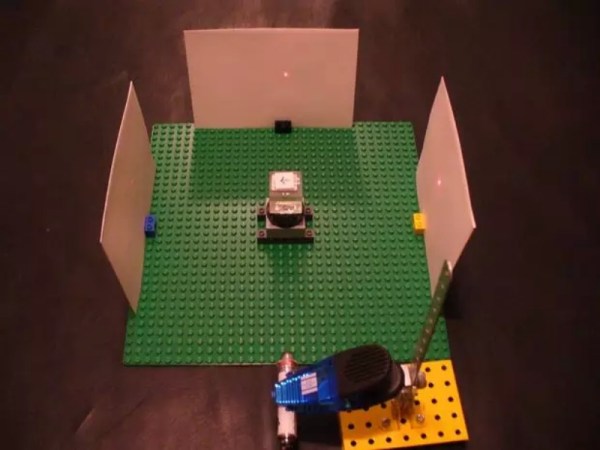
[Steve] started this project by salvaging parts from a broken computer projector. Some of the parts were scorched beyond repair, but he did find some lenses and mirrors and a mystery glass cube. It turns out that this cube is a dichroic prism which is used for combining images from the different LCD screens in the projector, but with the right LEGO bricks it can also be used for splitting a laser beam.

The cube was set on a LEGO rotating piece to demonstrate how it can split the laser at certain angles. LEGO purists might be upset at the Erector set that was snuck into this project, but this was necessary to hold up the laser pointer. This is a great use of these building blocks though, and [Steve] finally has his optics lab that he’s wanted to build for a while. If that doesn’t scratch your LEGO itch, we’ve also featured this LEGO lab which was built to measure the Planck constant.
Solar-Cell Laser Communication System

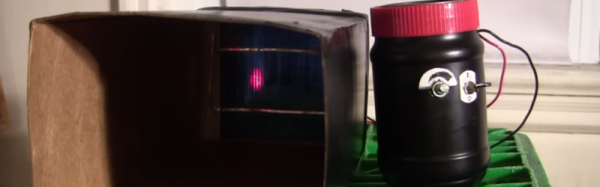
Forget the soup cans connected by a piece of string. There’s now a way to communicate wirelessly that doesn’t rely on a physical connection… or radio. It’s a communications platform that uses lasers to send data, and it’s done in a way that virtually anyone could build.

This method for sending information isn’t exactly new, but this project is one of the best we’ve seen that makes it doable for the average tinkerer. A standard microphone and audio amplifier are used to send the signals to the transmitter, which is just a typical garden-variety laser that anyone could find for a few dollars. A few LEDs prevent the laser from receiving too much power, and a solar cell at the receiving end decodes the message and outputs it through another amplifier and a speaker.

Of course you will need line-of-sight to get this communications system up and running, but as long as you have that taken care of the sky’s the limit. You can find incredibly powerful lasers lying around if you want to try to increase the communication distance, and there are surprisingly few restrictions on purchasing others that are 1W or higher. You could easily increase the range, but be careful not to set your receiving station (or any animals, plants, buildings, etc) on fire!

Continue reading “Solar-Cell Laser Communication System”

Disassembled Mouse Keeps Track Of Gas Meter

After building devices that can read his home’s electricity usage, [Dave] set out to build something that could measure the other energy source to his house: his gas line. Rather than tapping into the line and measuring the gas directly, his (much safer) method was to simply monitor the gas meter itself.

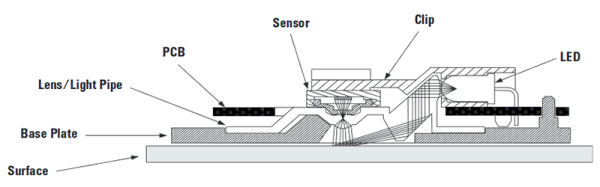
The major hurdle that [Dave] had to jump was dealing with an ancient meter with absolutely no modern electronics like some other meters have that make this job a little easier. The meter has “1985” stamped on it which might be the manufacturing date, but for this meter even assuming that it’s that new might be too generous. In any event, the only option was to build something that could physically watch the spinning dial. To accomplish this, [Dave] used the sensor from an optical mouse.

The sensor is surrounded by LEDs which illuminate the dial. When the dial passes a certain point, the sensor alerts an Arduino that one revolution has occurred. Once the Arduino has this information, the rest is a piece of cake. [Dave] used KiCad to design the PCB and also had access to a laser cutter for the enclosure. It’s a great piece of modern technology that helps integrate old analog technology into the modern world. This wasn’t [Dave]’s first energy monitoring system either; be sure to check out his electricity meter that we featured a few years ago.

KeyMouSerial Solves Your Raspberry Pi Keyboard Problems

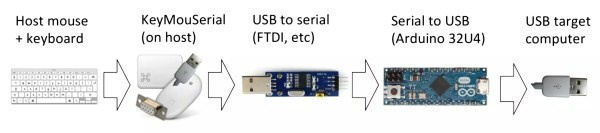
All laptops have a working keyboard and mouse built into them, the only problem is that you can’t use these tools on other computers that don’t have them. At least, until now. [Peter] has created the KeyMouSerial in order to use his laptop’s keyboard and mouse as physical devices on his Raspberry Pi, finally freeing the bonds holding our laptops’ human interface devices back.

The software for KeyMouSerial copies keystroke and mouse information and sends this out via a serial port on his laptop (using a USB to serial adapter). From there the information is translated by an Arduino into HID commands which are sent via USB to the target computer, in this case a Raspberry Pi. It’s a pretty elegant solution to carrying a bulky keyboard and mouse along just for a Raspberry Pi, or for any computer that might not have access to a network and SSH.

[Peter] has also been working on using his iPod as a serial-to-USB converter, so if you’re a Rockbox developer and want to help out then drop him a line. All of the software is available (for Windows, Mac, or Linux) including the Arduino sketch if you want to try this software out for yourself. And, if you don’t want to turn a computer into a keyboard and want to go the other direction and turn a keyboard into a computer, that is also an option.

Autonomous Drones Now Carry People

There are a handful of companies trying to build the first autonomous car, but this project makes us think that they all might be heading in the wrong direction. [Thorstin] wanted to use a quadcopter to transport people, and built a working prototype of an autonomous quadcopter-esque vehicle that is actually capable of lifting a person.

The device isn’t actually a quadcopter anymore; that wouldn’t be able to generate enough lift. It has sixteen rotors in total, making it a sexdecacopter (we suppose). This setup generates 282 pounds of static thrust, which as the video below shows, is enough to lift an average person off of the ground along with the aluminum alloy frame and all of the lithium ion batteries used to provide power to all of those motors.

With the PID control system in place, the device is ready for takeoff! We like hobby projects that suddenly become life-sized and rideable, and we hope to see this one fully autonomous at some point too. Maybe soon we’ll see people ferried from waypoint to waypoint instead of being driven around in their ground-bound autonomous cars.

Continue reading “Autonomous Drones Now Carry People”

Remove Security Issues From Untrusted USB Connections

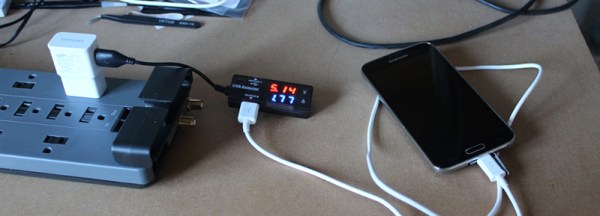
USB has become pretty “universal” nowadays, handling everything from high-speed data transfer to charging phones. There are even USB-powered lava lamps. This ubiquity doesn’t come without some costs, though. There have been many attacks on smartphones and computers which exploit the fact that USB is found pretty much everywhere, and if you want to avoid these attacks you can either give up using USB or do what [Jason] did and block the data lines on the USB port.

USB typically uses four wires: two for power and two for data. If you simply disconnect the data lines, though, the peripheral can’t negotiate with the host for more power and will limp along at 0.5 watts. However, [Jason] discovered that this negotiation takes place at a much lower data rate than normal data transfer, and was able to put a type of filter in between the host and the peripheral. The filter allows the low-frequency data transfer pass through but when a high-frequency data transfer occurs the filter blocks the communication.

[Jason] now has a device that can allow his peripherals to charge at the increased rate without having to worry about untrusted USB ports (at an airport or coffee shop, for example). This simple device could stop things like BadUSB from doing their dirty work, although whether or not it could stop something this nasty is still up in the air.

New Smartphone Case Brings Back Old Smartphone Features

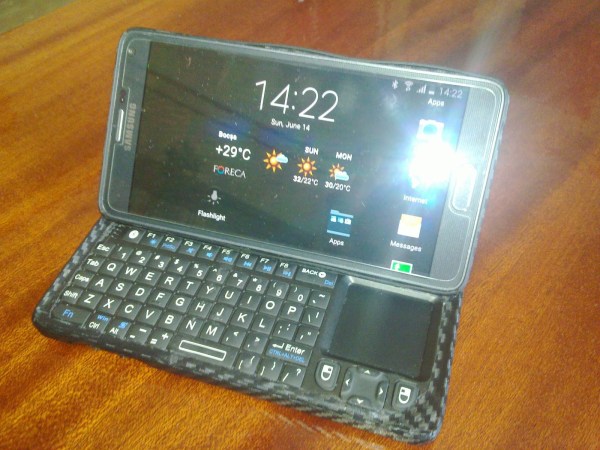
We all remember the good ol’ days when smartphones were just getting started. Realizing that we could take a fully functional computer and shove it into something the size of a phone was pretty revolutionary. Some of the early phones like the original Motorola Droid had some features that just aren’t very common today, and [liviu] set out to fix this situation by adding a sliding QWERTY keyboard to his modern smartphone.

The build started with a Samsung Galaxy Note 4 and two cases: one for the phone and one for the keyboard. [liviu] found a small phone-sized bluetooth keyboard and removed all of the unnecessary bits before shoehorning it into the case. He then built the sliding mechanism from parts out of a PC power supply and two old flip phones and then was able to piece the two halves together. Using the two flip phone hinges gave this case the additional feature of being able to flip up after sliding out. The result is a modern smartphone with a fantastic and classic smartphone twist that looks very useful.

We’ve featured projects that give new life to old smartphones, but this might be the first to give old life to a new smartphone. We wouldn’t mind seeing more flagship phones that come with these features, but [liviu] has done a great job of making up for the manufacturers’ shortcomings!

Continue reading “New Smartphone Case Brings Back Old Smartphone Features”