Walk Your Pet Robot

Anyone who’s ever tried to build a bipedal robot will quickly start pulling their own hair out. There are usually a lot of servos involved, and controlling them all in a cohesive way is frustrating to say the least. [Mark] had this problem while trying to get his robot to dance, and to solve it he built a control system for a simple bipedal robot that helps solve this problem.

[Mark]’s robot has six servo motors per leg, for a total of 12 degrees of freedom. Commands are sent to the robot with an RC radio, and the control board that he built, called the Smart Servo Controller, receives the signals and controls the servos appropriately. There are 14 outputs for servos, operating at 12 bits and 50 Hz each, as well as 8 input channels. The servo controller can be programmed on a computer with user-selectable curves for various behaviors for each of the servos on the project. This eliminates the need to write cumbersome programs for simple robot movements, and it looks like it does a pretty good job!

Full disclosure: [Mark] currently has this project up on Kickstarter, but it is a unique take on complex robot control that could help out in a lot of different ways. Since you don’t need to code anything, it could lower the entry barrier for this type of project, possibly opening it up to kids or school projects. Beyond that, even veterans of these types of projects could benefit by not having to do as much brute-force work to get their creations up and moving around!

Continue reading “Walk Your Pet Robot”

Vintage Stereo Reborn With All The Bells And Whistles

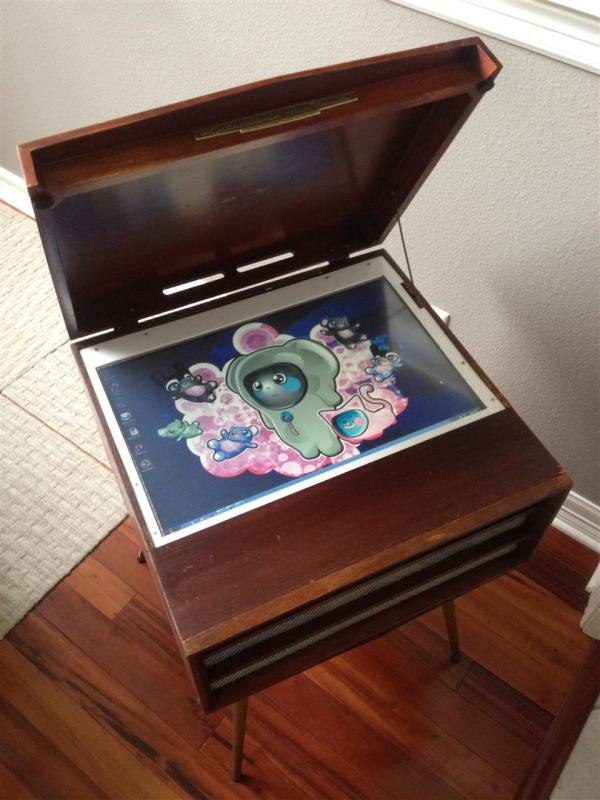
We always like seeing projects that salvage a classic piece of technology, and this one doesn’t disappoint. It’s a vintage kiosk- or console-style stereo, repurposed with every useful feature imaginable, but still made to look original. Until you open the lid, that is.

[Julian] has been hard at work on rebuilding this 1957 RCA stereo, and since he’s no stranger to these types of rebuilds, the results are pretty impressive. Underneath the hood is a 22″ touchscreen running Windows 7 and a Lepai amplifier. The controls for the stereo were placed towards the back, along with USB ports and an RJ45 connector for the computer.

The speakers in the stereo also needed to be replaced. For this, [Julian] used a set of Dayton speakers that worked well enough for this application. After mounting the speakers and all the other hardware in the unit, [Julian] noted that while it isn’t an audiophile’s dream stereo, it was nice to have all of these parts integrated together into something that looks nice. We’d have to agree!

There are a lot of rejuvenated antique stereos around too, like this Bluetooth-enabled tube amp radio, or this Soviet-era handheld, or even this slightly more modern stereo. There’s just something classy about having a vintage-looking thing spruced up with modern technology!

It’s A Sega It’s A Nintendo! It’s… Unique!

Before the days of the RetroPie project, video game clones were all the rage. Early video game systems were relatively easy to duplicate and, as a result, many third-party consoles that could play official games were fairly common. [19RSN007] was recently handed one of these clones, and he took some pretty great strides to get this device working again.

The device in question looks like a Sega Genesis, at least until you look closely. The cartridge slot isn’t quite right and the buttons are also a little bit amiss. It turns out this is a Famicom (NES) clone that just looks like a Sega… and it’s in a terrible state. After a little bit of cleaning, the device still wasn’t producing any good video, and a closer inspection revealed that the NOAC (NES-on-a-Chip) wasn’t working.

Luckily, [19RSN007] had a spare chip and was able to swap it out. The fun didn’t stop there though, as he had to go about reverse-engineering this chip pin-by-pin until he got everything sorted out. His work has paid off though, and now he has a video game system that will thoroughly confuse anyone who happens to glance at it. He’s done a few other clone repairs as well which are worth checking out, and if you need to make your own NES cartridges as well, we’ve got you covered there, too.

King Of Clever Reads 4-Pin Rotary Encoder With One Analog Pin

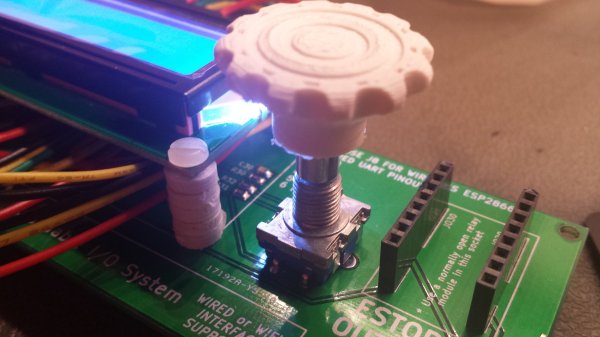
Rotary encoders are pretty interesting pieces of technology. They’re a solid way to accurately measure rotation including the direction. [David] recently wrote some software to handle these input devices, but unlike everyone else, his application can get by on only one microcontroller pin.

Most people will use three pins to handle a rotary encoder with a microcontroller: one to handle the switch and two to handle the quadrature inputs. With only one pin left available on his project [David] had to look for another solution, and he focused on the principle that the encoder pins behaved in very specific ways when turning the shaft. He designed a circuit that generates an analog voltage based on the state of those pins. He also wrote a program that can recognize the new analog patterns produced by his rotary encoder and his new circuit.

If you’ve been stuck on a project that uses a rotary encoder because you’ve run out of pins, this novel approach may help you get un-stuck. It’s a pretty impressive feat of circuit design to boot. Just think of how many other projects use these types of input devices and could benefit from it!

[via Hackaday.io Project Page go give it a Skull!]

Bringing A Century Stereo Into The 21st Century

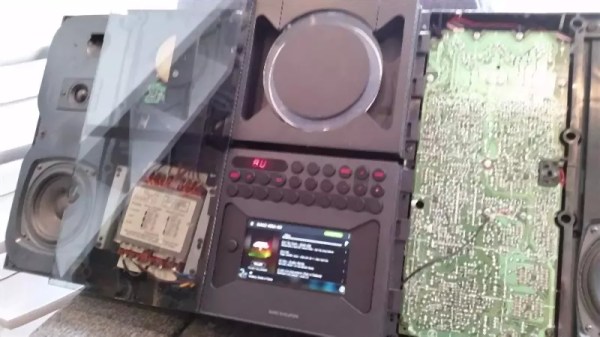
Way back in the previous century, people used to use magnetized strips of tape to play music. It might be hard to believe in today’s digital world, but these “cassette” tapes were once all the rage. [Steve] aka [pinter75] recently found a Bang & Olufsen stereo with this exact type of antequated audio playback device, and decided to upgrade it with something a little more modern.

Once the unit arrived from eBay and got an electronic tune-up, [pinter75] grabbed a Galaxy S3 out of his parts drawer and got to work installing it in the old cassette deck location. He used a laser cutter to make a faceplate for the phone so it could be easily installed (and removed if he decides to put the tape deck back in the future).

The next step was wiring up power and soldering the audio output directly to the AUX pins on the stereo. Once everything was buttoned up [pinter75] found that everything worked perfectly, and mounted the stereo prominently on his wall. It’s always great when equipment like this is upgraded and repaired rather than thrown out.

Googly Eyes Follow You Around The Room

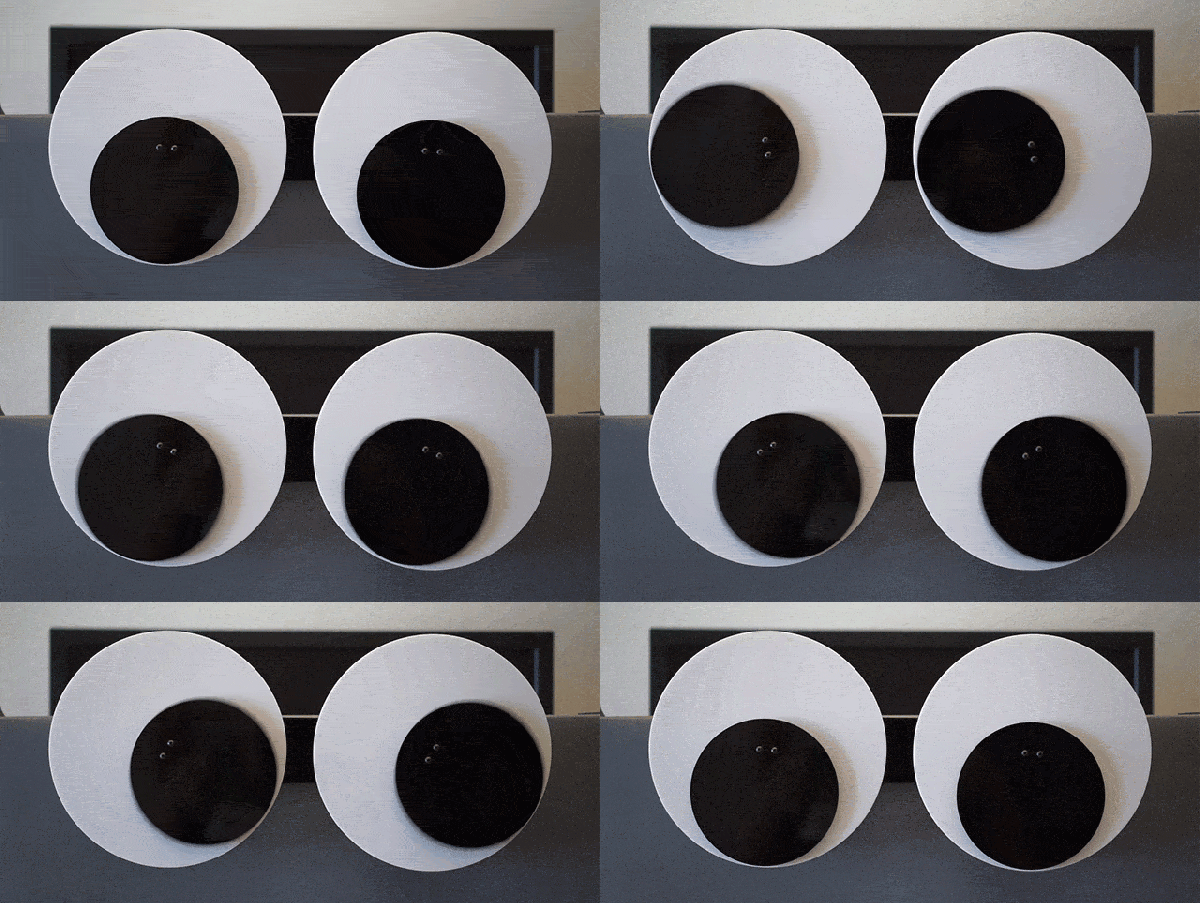
If you’re looking to build the next creepy Halloween decoration or simply thinking about trying out OpenCV for the first time, this next project will have you covered. [Glen] made a pair of giant googly eyes that follow you around the room using some servos and some very powerful software.

The project was documented in three parts. In Part 1, [Glen] models and builds the eyes themselves, including installing the servo motors that will eventually move them around. The second part involves an Arduino and power supply that will control the servos, and the third part goes over using OpenCV to track faces.

This part of the project is arguably the most interesting if you’re new to OpenCV; [Glen] uses this software package to recognize different faces. From there, the computer picks out the most prominent face and sends commands to the Arduino to move the eyes to the appropriate position. The project goes into great detail, from Arduino code to installing Ubuntu to running OpenCV for the first time!

We’ve featured some of [Glen]’s projects before, like his FPGA-driven LED wall, and it’s good to see he’s still making great things!

Continue reading “Googly Eyes Follow You Around The Room”

Transparent Alarm Clock Runs Linux

[Benoit] was using an extremely old alarm clock which normally ran on mains power, and he plugged it in to his computer’s UPS to keep it operational during power outages. He noticed that when the UPS switched on that the clock would run fast, though, and apparently it was keeping time by watching the power system frequency. To solve this problem he created his own feature-dense clock which runs Linux.

This alarm clock has everything: seven-segment displays housed in clear epoxy, a touch interface, battery backup, the ability to retrieve the time from an NTP server, and a web interface to change the clock’s settings over the network. That was a large part of [Benoit]’s decision to have the clock run Linux; the network capabilities add a lot of functionality to the clock like the ability to send commands to other devices at particular times. The clock runs on an Aria G25 SOM and has a custom case that looks very professional.

We’re suckers for a high-quality clock builds here, and [Benoit]’s most recent project hits all of our buttons. Even though it doesn’t currently drive people insane or tell confusing time, the Linux and networking capabilities could certainly open up options!