[Ben Krasnow] Looks Inside Film Camera Date Stamping

Honestly, we never wondered how those old film cameras used to put the date stamp in the lower right-hand corner of the frame. Luckily, [Ben Krasnow] does not suffer from this deplorable lack of curiosity, and his video teardown of a date-stamping film camera back (embedded below) not only answers the question, but provides a useful lesson in value engineering.

For the likely fair fraction of the audience who has never taken a photo on film before, cheap 35-mm cameras were once a big thing. They were really all one had for family snapshots and the like unless you wanted to invest in single-lens reflex cameras and all the lenses and accessories. They were miles better than earlier cartridge cameras like the 110 or – shudder – Disc film, and the cameras started getting some neat electronic features too. One was the little red-orange date stamp, which from the color we – and [Ben] assumed was some sort of LED pressed up against the film, but it ends up being much cooler than that.

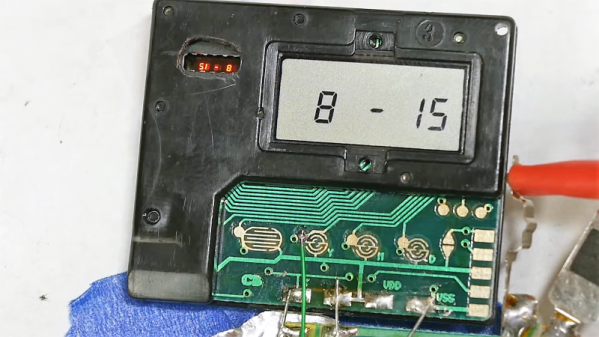
Digging into the back of an old camera, [Ben] found that there’s actually a tiny projector that uses a mirror to fold the optical path between the film and a grain-of-wheat incandescent bulb. An LCD filter sits in the optical path, but because it’s not exactly on the plane of the film, it actually has to project the image onto the film. The incandescent bulb acts as a point source and the mirror makes the optical path long enough that the date stamp image appears sharp on the film. It’s cheap, readily adapted to other cameras, and reliable.

Teardowns like this aren’t fodder for [Ben]’s usual video fare, which tends more toward homemade CT scanners and Apollo-grade electroluminescent displays, but this was informative and interesting, too.

Continue reading “[Ben Krasnow] Looks Inside Film Camera Date Stamping”

Hacking Diabetes Hack Chat

Join us on Wednesday, October 16 at noon Pacific for the Hacking Diabetes Hack Chat with Dana Lewis!

When your child is newly diagnosed with Type 1 diabetes (T1D), everyone is quick to point out, “It’s a great time to be a diabetic.” To some degree, that’s true; thanks to genetically engineered insulin, more frequent or even continuous glucose monitoring (CGM), and insulin infusion pumps, diabetics can now avoid many of the truly terrifying complications of a life lived with chronically elevated blood glucose, like heart disease, kidney failure, blindness, and amputations.

Despite these advances, managing T1D can be an overwhelming task. Every bite of food, every minute of exercise, and every metabolic challenge has to be factored into the calculations for how much insulin to take. Diabetics learn to “think like a pancreas,” but it’s never good enough, and the long-promised day of a true artificial pancreas always seems to remain five years in the future.

Dana Lewis is one diabetic who decided not to wait. After realizing that she could get data from her CGM, she built a system to allow friends and family to monitor her blood glucose readings remotely. With the addition of a Raspberry Pi and some predictive algorithms, she later built an open-source artificial pancreas, which she uses every day. And now she’s helping others take control of their diabetes and build their own devices through OpenAPS.org.

Join us on the Hack Chat as Dana drops by to discuss OpenAPS and her artificial pancreas. We’ll find out what her background is – spoiler alert: she wasn’t a hacker when she started this – what challenges she faced, the state of the OpenAPS project, and where she sees the artificial pancreas going.

join-hack-chatOur Hack Chats are live community events in the Hackaday.io Hack Chat group messaging. This week we’ll be sitting down on Wednesday, October 16 at 12:00 PM Pacific time. If time zones have got you down, we have a handy time zone converter.

Click that speech bubble to the right, and you’ll be taken directly to the Hack Chat group on Hackaday.io. You don’t have to wait until Wednesday; join whenever you want and you can see what the community is talking about.

[Dana Lewis image source: GeekWire]

Continue reading “Hacking Diabetes Hack Chat”

Gutted Hoverboard Becomes Formidable Track-Drive Robot

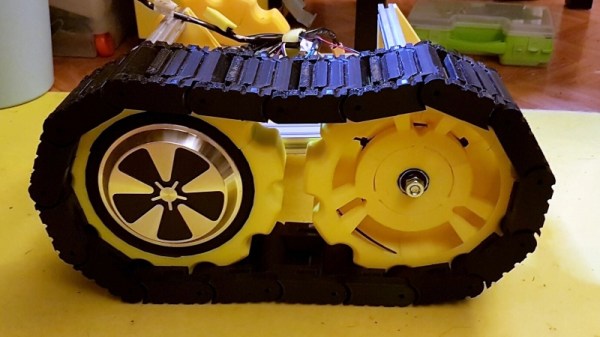
When “hoverboards” first came out, you may have been as disappointed as we were that they did not even remotely fulfill the promises of Back to the Future II. Nothing more than a fancified skateboard, hoverboards are not exactly groundbreaking technology. That doesn’t mean they’re not useful platforms for hacking, though, as this hoverboard to track-propelled robot tank conversion proves.

Most of the BOM for this build came from the junk bin – aluminum extrusions, brackets, and even parts cannibalized from a 3D-printer. But as [pasoftdev] points out, the new-in-box hoverboard was the real treasure trove of components. The motors, the control and driver electronics, and the big, beefy battery were all harvested and mounted to the frame. To turn the wheels into tracks, [pasoftdev] printed some sprockets to fit around the original tires. The tracks were printed in sections and screwed to the wheels. Idlers were printed in sections too, using central hubs and a clever method for connecting everything together into a sturdy wheel. Printed tank tread links finished the rolling gear eventually; each of the 34 pieces took almost five hours to print. The dedication paid off, though, as the 15-kg tank is pretty powerful; the brief video below shows it towing an office chair around without any problems.

We noticed that [pasoftdev] found the assembly of the tread links a bit problematic. These 3D-printed links that are joined by Airsoft BBs might make things a little easier next time.

Continue reading “Gutted Hoverboard Becomes Formidable Track-Drive Robot”

Hackaday Links Column Banner

Hackaday Links: October 13, 2019

Trouble in the Golden State this week, as parts of California were subjected to planned blackouts. Intended to prevent a repeat of last year’s deadly wildfires, which were tied in part to defective electrical distribution equipment, the blackouts could plunge millions in the counties surrounding Sacramento into the dark for days. Schools have canceled classes, the few stores that are open are taking cash only, and hospitals are running on generators. It seems a drastic move for PG&E, the utility that promptly went into bankruptcy after being blamed for last year’s fires, but it has the support of the governor, so the plan is likely to continue as long as the winds do. One group is not likely to complain, though;  California amateur radio operators must be enjoying a greatly decreased noise floor in the blackout areas, thanks to the loss of millions of switch-mode power supplies and their RF noise.

Good news, bad news for Fusion 360 users. Autodesk, the company behind the popular and remarkably capable CAD/CAM/CAE package, has announced changes to its licensing scheme, which went into effect this week. Users no longer have to pay for the “Ultimate” license tier to get goodies like 5-axis machining and generative design tools, as all capabilities are now included in the single paid version of Fusion 360. That’s good because plenty of users were unwilling to bump their $310 annual “Standard” license fee up to $1535 to get those features, but it’s bad because now the annual rate goes to $495. In a nice nod to the current userbase, those currently on the Standard license, as well as early adopters, will get to keep the $310 annual rate as long as they renew, and The $495 pricing tier went into effect in November of 2018, while anyone still on the $310 annual price was grandfathered in (and will remain to be). At that time there was still a $1535 tier called Ultimate, whose price will now be going away but the features remain in the $495 tier which is now the only pricing option for Fusion 360. Ultimate users will see a $1040 price drop. As for the current base of freeloaders like yours truly, fear not: Fusion 360 is still free for personal, non-commercial use. No generative design or tech support for us, though. (Editor’s Note: This paragraph was updated on 10/14/2019 to clarify the tier changes after Autodesk reached out to Hackaday via email.)

You might have had a bad day at the bench, but was it as bad as Román’s? He tipped us off to his nightmare of running into defective Wemos D1 boards – a lot of them. The 50 boards were to satisfy an order of data loggers for a customer, but all the boards seemed caught in an endless reboot loop when plugged into a USB port for programming. He changed PCs, changed cables, but nothing worked to stop the cycle except for one thing: touching the metal case of the module. His write up goes through all the dead-ends he went down to fix the problem, which ended up being a capacitor between the antenna and ground. Was it supposed to be there? Who knows, because once that cap was removed, the boards worked fine. Hats off to Román for troubleshooting this and sharing the results with us.

Ever since giving up their “Don’t be evil” schtick, Google seems to have really embraced the alternative. Now they’re in trouble for targeting the homeless in their quest for facial recognition data. The “volunteer research studies” consisted of playing what Google contractors were trained to describe as a “mini-game” on a modified smartphone, which captured video of the player’s face. Participants were compensated with $5 Starbucks gift cards but were not told that video was being captured, and if asked, contractors were allegedly trained to lie about that. Contractors were also allegedly trained to seek out people with dark skin, ostensibly to improve facial recognition algorithms that notoriously have a hard time with darker complexions. To be fair, the homeless were not exclusively targeted; college students were also given gift cards in exchange for their facial data.

For most of us, 3D-printing is a hobby, or at least in service of other hobbies. Few of us make a living at it, but professionals who do are often a great source of tips and tricks. One such pro is industrial designer Eric Strebel, who recently posted a video of his 3D-printing pro-tips. A lot of it is concerned with post-processing prints, like using a cake decorator’s spatula to pry prints off the bed, or the use of card scrapers and dental chisels to clean up prints. But the money tip from this video is the rolling cart he made for his Ultimaker. With the printer on top and storage below, it’s a great way to free up some bench space.

And finally, have you ever wondered how we hackers will rebuild society once the apocalypse hits and mutant zombie biker gangs roam the Earth? If so, then you need to check out Collapse OS, the operating system for an uncertain future. Designed to be as self-contained as possible, Collapse OS is intended to run on “field expedient” computers, cobbled together from whatever e-waste can be scrounged, as long as it includes a Z80 microprocessor. The OS has been tested on an RC2014 and a Sega Master System so far, but keep an eye out for TRS-80s, Kaypros, and the odd TI-84 graphing calculator as you pick through the remains of civilization.

Nixie Clock Failure Analysis, [Dalibor Farný] Style

We’ve become sadly accustomed to consumer devices that seem to give up the ghost right after the warranty period expires. And even when we get “lucky” and the device fails while it’s still covered, chances are that there will be no attempt to repair it; the unit will be replaced with a new one, and the failed one will get pitched in the e-waste bin.

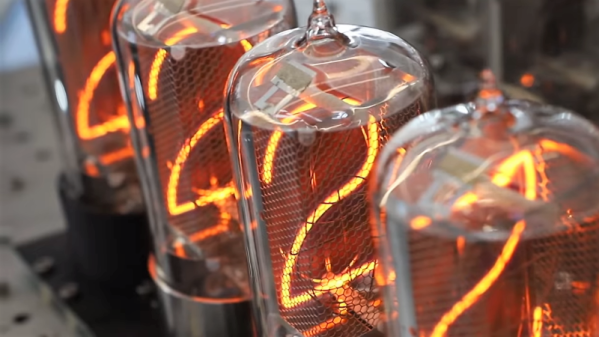
Not every manufacturer takes this approach, however. When premium quality is the keystone of your brand, you need to take field failures seriously. [Dalibor Farný], maker of high-end Nixie tubes and the sleek, sophisticated clocks they plug into, realizes this, and a new video goes into depth about the process he uses to diagnose issues and prevent them in the future.

One clock with a digit stuck off was traced to via failure by barrel fatigue, or the board material cracking inside the via hole and breaking the plated-through copper. This prompted a board redesign to increase the diameter of all the vias, eliminating that failure mode. Another clock had a digit stuck on, which ended up being a short to ground caused by pin misalignment; when the tube was plugged in, the pins slipped and scraped some solder off the socket and onto the ground plane of the board. That resulted in another redesign that not only fixed the problem by eliminating the ground plane on the upper side of the board, but also improved the aesthetics of the board dramatically.

As with all things [Dalibor], the video is a feast for the eyes with the warm orange glow in the polished glass and chrome tubes contrasting with the bead-blasted aluminum chassis. If you haven’t watched the “making of” video yet, you’ve got to check that out too.

Continue reading “Nixie Clock Failure Analysis, [Dalibor Farný] Style”

Fail Of The Week: How Not To Re-Reflow

There’s no question that surface-mount technology has been a game-changer for PCB design. It means easier automated component placement and soldering, and it’s a big reason why electronics have gotten so cheap. It’s not without problems, though, particularly when you have no choice but to include through-hole components on your SMT boards.

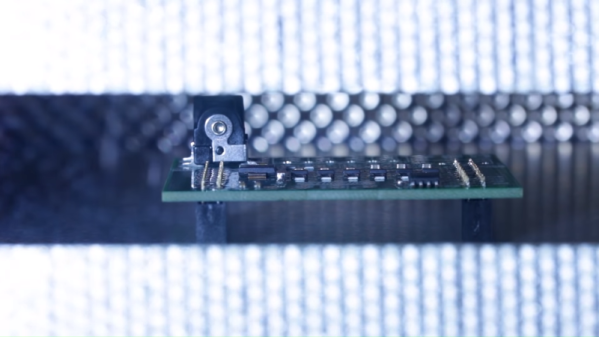
[James Clough] ran into this problem recently, and he tried to solve it by reflowing through-hole connectors onto assembled SMT boards. The boards are part of his electronic lead screw project, an accessory for lathes that makes threading operations easier and more flexible. We covered the proof-of-concept for the project; he’s come a long way since then and is almost ready to start offering the ELS for sale. The PCBs were partially assembled by the board vendor, leaving off a couple of through-hole connectors and the power jack. [James]’ thought was to run the boards back through his reflow oven to add the connectors, so he tried a few experiments first on the non-reflow rated connectors. The Phoenix-style connectors discolored and changed dimensionally after a trip through the oven, and the plastic on the pin headers loosened its grip on the pins. The female header socket and the power jack fared better, so he tried reflowing them, but it didn’t work out too well, at least for the headers. He blames poor heat conduction due to the lack of contact between the board and the reflow oven plate, and we agree; perhaps an aluminum block milled to fit snugly between the header sockets would help.

Hats off to [James] for trying to save his future customers a few steps on assembly, but it’s pretty clear there are no good shortcuts here. And we highly recommend the electronic leadscrew playlist to anyone interested in the convergence of machine tools and electronics.

Continue reading “Fail Of The Week: How Not To Re-Reflow”

Turning Old Toggle Switches Into Retro-Tech Showpieces

While those of us in the hacking community usually focus on making new things, there’s plenty to be said for restoring old stuff. Finding a piece of hardware and making it look and work like new can be immensely satisfying, and dozens of YouTube channels and blogs exist merely to feed the need for more restoration content.

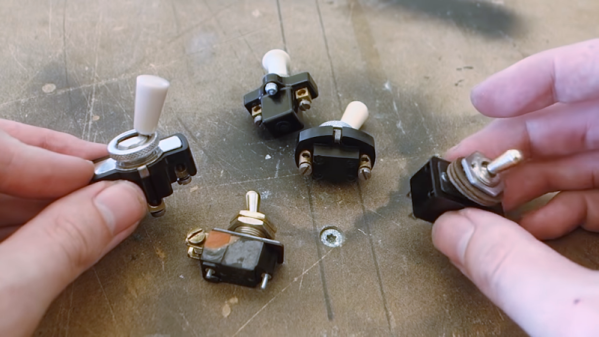
The aptly named [Switch and Lever] has been riding the retro wave for a while, and his video on restoring and repairing vintage toggle switches shows that he has picked up a trick or two worth sharing. The switches are all flea market finds, chunky beasts that have all seen better days. But old parts were built to last, and they proved sturdy enough to withstand the first step in any restoration: disassembly. Most of the switches were easily pried open, but a couple needed rivets drilled out first. The ensuing cleaning and polishing steps were pretty basic, although we liked the tips about the micromesh abrasives and the polishing compound. Another great tip was using phenolic resin PCBs as repair material for broken Bakelite bodies; they’re chemically similar, and while they may not match the original exactly, they make for a great repair when teamed up with CA glue and baking soda as a filler.

3D-printed repairs would work too, but there’s something satisfying about keeping things historically consistent. Celebrating engineering history is really what restorations like these are all about, after all. And even if you’re building something new, you can make it look retro cool with these acid-etched brass plaques that [Switch and Lever] also makes.

Continue reading “Turning Old Toggle Switches Into Retro-Tech Showpieces”