The 3D Printing Dream Is Still Alive At 2019’s Midwest RepRap Festival

3D Printers have been in the hands of hackers for well over ten years, but the dream is far from over and certainly not overslept. This year’s Midwest RepRap Festival is a testament to the still-growing excitement, and world where 3D printing is alive and kicking on the next level.

This past weekend, I took up my friend [Eric’s] advice to come down and participate firsthand, and I was simply blown away. Not only did we witness the largest number of attendees to date, MRRF 2019 spilled into not one but two conference halls at the Goshen Fairgrounds.

In what follows, I tell my tale of the times. Continue reading “The 3D Printing Dream Is Still Alive At 2019’s Midwest RepRap Festival”

Autodesk Fusion 360 Hack Chat

Join us Wednesday at noon Pacific time for the Autodesk Fusion 360 Hack Chat!

Most of us have a collection of tools that we use for the various mechanical, electronic, and manufacturing tasks we face daily. But if you were asked to name one tool that stretches across all these spaces, Autodesk Fusion 360 would certainly spring to mind. Everyone from casual designers of 3D-printed widgets to commercial CNC machine shops use it as an end to end design solution, and anyone who has used it over the last year or so knows that the feature set in Fusion is expanding rapidly.

Matt, who goes by technolomaniac on Hackaday.io, is Director of Product Development for EAGLE, Tinkercad, and Fusion 360 at Autodesk. He’ll drop by the Hack Chat this week to discuss your questions about:

  • All the Autodesk design software components, from EAGLE to Fusion and beyond
  • Future plans for an EAGLE-Fusion integration
  • Support for manufacturing, including additive, CNC, and even mold making
  • Will there ever be “one design tool to rule them all?”

You are, of course, encouraged to add your own questions to the discussion. You can do that by leaving a comment on the Autodesk Fusion 360 Hack Chat page and we’ll put that in the queue for the Hack Chat discussion.

join-hack-chatOur Hack Chats are live community events in the Hackaday.io Hack Chat group messaging. This week we’ll be sitting down on Wednesday, April 10, at noon, Pacific time. If time zones have got you down, we have a handy time zone converter.

Click that speech bubble to the right, and you’ll be taken directly to the Hack Chat group on Hackaday.io. You don’t have to wait until Wednesday; join whenever you want and you can see what the community is talking about.

Vintage Print Processor Fixed With 3D Printing

If you don’t know what a print processor is, don’t feel bad. There’s precious few people out there still running home darkrooms, and the equipment used for DIY film development is about as niche as it gets today. For those looking to put together their own darkroom in 2019, buying second hand hardware and figuring out how to fix it on your own is the name of the game, as [Austin Robert Hermann] found out when he recently purchased a Durst Printo Print Processor on eBay.

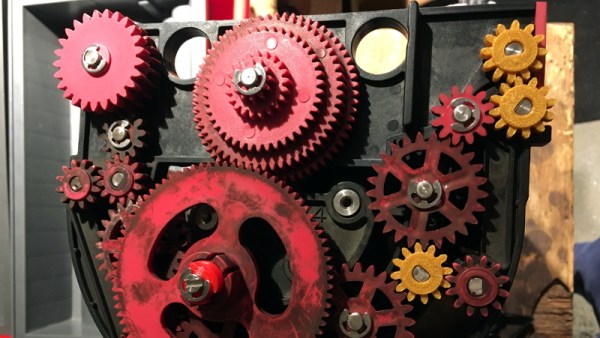
The auction said the hardware was in working order, but despite the fact that nobody would ever lie on the Internet, it ended up being in quite poor condition. Many of the gears in the machine were broken, and some were simply missing. The company no longer supports these 1990’s era machines, and the replacement parts available online were predictably expensive. [Austin] determined his best course of action was to try his hand at modeling the necessary gears and having them 3D printed; two things he had no previous experience with.

Luckily for [Austin], many of the gears in the Printo appeared to be identical. That meant he had several intact examples to base his 3D models on, and with some educated guesses, was able to determine what the missing gears would have looked like. Coming from an animation background, he ended up using Cinema 4D to model his replacement parts; which certainly wouldn’t have been our first choice, but there’s something to be said for using what you’re comfortable with. Software selection not withstanding, he was able to produce some valid STLs which he had printed locally in PLA using an online service.

Interestingly, this is a story we’ve seen play out several times already. Gears break and wear down, and for vintage hardware, that can be a serious problem. But if you’ve got a couple intact gears to go by, producing replacements even on an entry level desktop 3D printer is now a viable option to keep these classic machines running.

Brain Hacking With Entrainment

Can you electronically enhance your brain? I’m not talking about surgically turning into a Borg. But are there electronic methods that can improve various functions of your brain? Fans of brainwave entrainment say yes.

There was an old recruiting ad for electrical engineers that started with the headline: The best electronic brains are still human. While it is true that even a toddler can do things our best computers struggle with, it is easy to feel a little inadequate compared to some of our modern electronic brains. Then again, your brain is an electronic device of sorts. While we don’t understand everything about how it works, there are definitely electric signals going between neurons. And where there are electric signals there are ways to measure them.

The tool for measuring electric signals in the brain is an EEG (electroencephalograph). While you can’t use an EEG to read your mind, exactly, it can tell you some pretty interesting information, such as when you are relaxed or concentrating. At its most basic we’ve seen toys and simple hobby projects that purport to be “mind controlled” but only at an incredibly rudimentary level.

Brainwave entrainment is a hypothesis that sending low frequency waves to your brain can give your mind a nudge and sync up brain activity with the equipment measuring it. The ability to synchronize with the brain could yield much better measurements for a meaningful interface between modern electronics and electric storm of thought happening in your head.

Continue reading “Brain Hacking With Entrainment”

Give Your Raspberry Pi SD Card A Break: Log To RAM

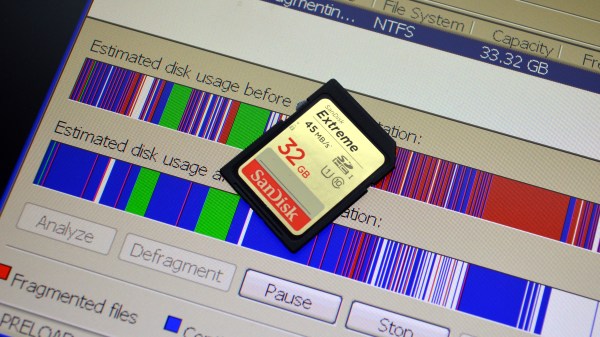
The fragility of SD cards is the weak link in the Raspberry Pi ecosystem. Most of us seem to have at least one Pi tucked away somewhere, running a Magic Mirror, driving security cameras, or even taking care of a media library. But chances are, that Pi is writing lots and lots of log files. Logging is good — it helps when tracking down issues — but uncontrolled logging can lead to problems down the road with the Pi’s SD card.

[Erich Styger] has a neat way to avoid SD card logging issues on Raspberry Pi, he calls it a solution to reduce “thrashing” of the SD card. The problem is that flash memory segments wear out after a fairly low number of erase cycles, and the SD card’s wear-leveling algorithm will eventually cordon off enough of the card to cause file system issues. His “Log2Ram” is a simple Unix shell script that sets up a mount point for logging in RAM rather than on the SD card.

The idea is that any application or service sending log entries to /var/log will actually be writing them to virtual log files, which won’t rack up any activity on the SD card. Every hour, a cron job sweeps the virtual logs out to the SD card, greatly reducing its wear. There’s still a chance to lose logging data before it’s swept to disk, but if you have relatively stable system it’s a small price to pay for the long-term health of a Pi that’s out of sight and out of mind.

One thing we really like about [Erich]’s project is that it’s a great example of shell scripting and Linux admin concepts. If you need more information on such things, check out [Al Williams’] Linux-Fu series. It goes back quite a way, so settle in for some good binge reading.

Fooling Fingerprint Scanners With A Resin Printer

Biometrics have often been used as a form of access control. While this was initially limited to bank vaults in Hollywood movies, it’s now common to see such features on many laptops and smartphones. Despite the laundry list of reasons why this is a bad idea, the technology continues to grow in popularity. [darkshark] has shown us an easy exploit, using a 3D printer to fool the Galaxy S10’s fingerprint scanner.

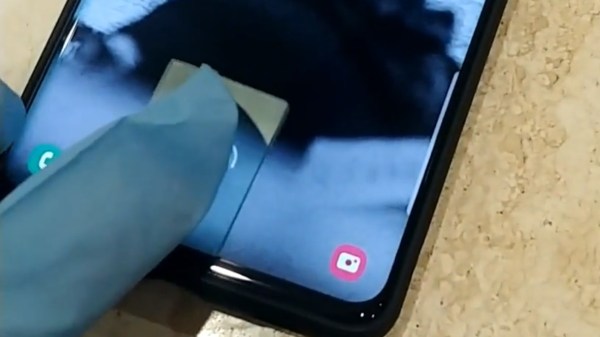
The Galaxy S10 is interesting for its use of an ultrasonic fingerprint sensor, which continues to push to hardware development of phones minimal-to-no bezels by placing the sensor below the screen. The sensor is looking for the depth of the ridges of your fingerprint, while the touchscreen verifies the capacitive presence of your meaty digit. This hack satisfies both of those checks.

[darkshark] starts with a photograph of a fingerprint on a wineglass. This is then manipulated in Photoshop, before being used to create geometry in 3DSMAX to replicate the original finger. After making the part on an AnyCubic Photon LCD resin printer, the faux-finger pad is able to successfully unlock the phone by placing the print on the glass and touching your finger on top of it.ster

[darkshark] notes that the fingerprint was harvested at close range, but a camera with the right lenses could capture similar detail at a distance. The other thing to note is that if your phone is stolen, it’s likely covered in greasy fingerprints anyway. As usual, it serves as an excellent reminder that fingerprints are not passwords, and should not be treated as such. If you need to brush up on the fundamentals, we’ve got a great primer on how fingerprint scanners work, and another on why using fingerprints for security is a bad plan.

[via reddit, thanks to TheEngineer for the tip!]

Get Great 3D Scans With Open Photogrammetry

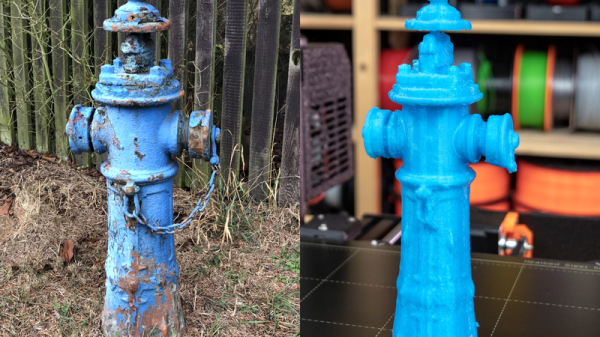
Not long ago, photogrammetry — the process of stitching multiple photographs taken from different angles into a 3D whole — was hard stuff. Nowadays, it’s easy. [Mikolas Zuza] over at Prusa Printers, has a guide showing off cutting edge open-source software that’s not only more powerful, but also easier to use. They’ve also produced a video, which we’ve embedded below.

Basically, this is a guide to using Meshroom, which is based on the AliceVision photogrammetry framework. AliceVision is a research platform, so it’s got tremendous capability but doesn’t necessarily focus on the user experience. Enter Meshroom, which makes that power accessible.

Meshroom does all sorts of cool tricks, like showing you how the 3D reconstruction looks as you add more images to the dataset, so that you’ll know where to take the next photo to fill in incomplete patches. It can also reconstruct from video, say if you just walked around the object with a camera running.

The final render is computationally intensive, but AliceVision makes good use of a CUDA on Nvidia graphics cards, so you can cut your overnight renders down to a few hours if you’ve got the right hardware. But even if you have to wait for the results, they’re truly impressive. And best of all, you can get started building up your 3D model library using nothing more than that phone in your pocket.

If you want to know how to use the models that come out of photogrammetry, check out [Eric Strebel]’s video. And if all of this high-tech software foolery is too much for you, try a milk-based 3D scanner.

Continue reading “Get Great 3D Scans With Open Photogrammetry”