Cheap Front Panels With Dibond Aluminium

The production capability available to the individual hacker today is really quite incredible. Even a low-end laser engraver can etch your PCBs, and it doesn’t take a top of the line 3D printer to knock out a nice looking enclosure. With the wide availability of these (relatively) cheap machines, the home builder can churn out a very impressive one-off device on a fairly meager budget. Even low volume production isn’t entirely out of the question. But there’s still one element to a professional looking device that remains frustratingly difficult: a good looking front panel.

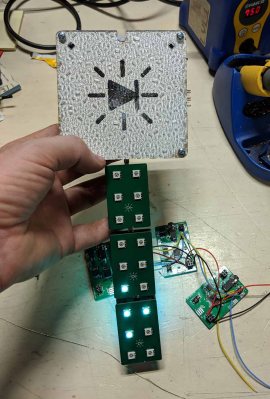
Now if your laser is strong enough to engrave (and ideally cut) aluminum sheets, then you’ve largely solved this problem. But for those of us who are plodding along with a cheap imported diode laser, getting text and images onto a piece of metal can be rather tricky. On Hackaday.io, [oaox] has demonstrated a cost effective way to create metal front panels for your devices using a print service that offers Dibond aluminum. Consisting of two thin layers of aluminum with a solid polyethylene core, this composite material was designed specifically for signage. Through various online services, you can have whatever you wish printed on a sheet of pre-cut Dibond without spending a lot of money.

As explained by [oaox], the first step is putting together the image you’ll send off to the printer using a software package like Inkscape. The key is to properly define the size of the Dibond plate in your software and work within those confines, otherwise the layout might not look how you expected once the finish piece gets back to you. It’s also important to avoid lossy compression formats like JPEG when sending the file out for production, as it can turn text into a mushy mess.

When you get the sheet back, all you need to do is put your holes in it. Thanks to the plastic core, Dibond is fairly easy to cut and drill as long as you take your time. [oaox] used a step drill for the holes, and a small coping saw for the larger openings. The final result looks great, and required very little effort in the grand scheme of things.

But how much does it cost? Looking around online, we were quoted prices as low as $7 USD to do a full-color 4×4 inch Dibond panel, and one site offered a 12×12 panel for $20. For a small production run, you could fit several copies of the graphics onto one larger panel and cut them out with a bandsaw; that could drop the per-unit price to only a couple bucks.

We’ve seen some clever attempts at professional looking front panels, from inkjet printing on transparencies to taking the nuclear option and laser cutting thin plywood. This is one of those issues the community has been struggling with for years, but at least it looks like we’re finally getting some decent options.

Silicon Bugs In The FTDI FT232R, And A Tidy RF VCO Project

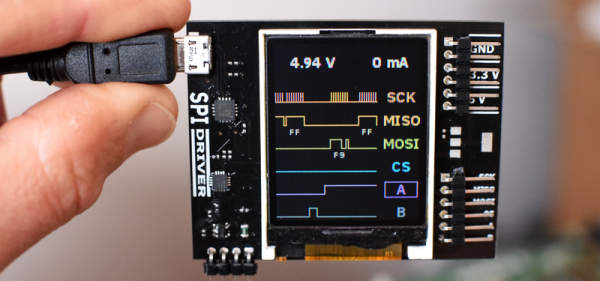
[Scott Harden] wrote in to tell us of some success he’s having using the FT232 chip to speak SPI directly from his laptop to a AD98850 digital signal generator. At least that was his destination. But as so often in life, more than half the fun was getting there, finding some still-unsolved silicon bugs, and (after simply swapping chips for one that works) potting it with hot glue, putting it in a nice box, and putting it up on the shelf.

In principle, the FTDI FT232 series of chips has a bit-bang mode that allows you to control the individual pins from a fairly simple API on your target computer, using their drivers and without installing anything on basically any platform. We wrote this feature up way back in 2009, and [Scott] was asking himself why he doesn’t see more hacks taking advantage of bit-bang mode.

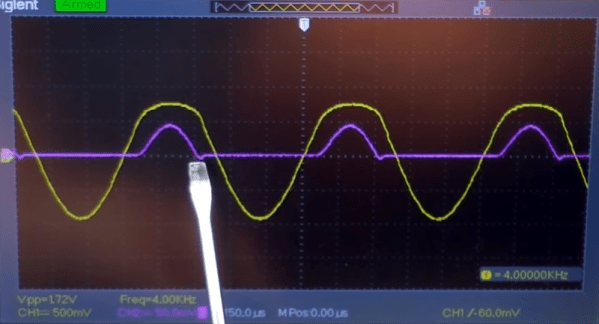
“Square” waves

Then he answered his own question the hard way, by spending hours “debugging” his code until he stumbled on the FTDI errata note (PDF), where they admit that bit-bang mode doesn’t get timings right at all on the FT232R and FT232RL parts. FTDI has made claims that they fixed the bug in subsequent chip revisions, but the community has not been able to confirm it. If you want to use bit-bang mode, which is plenty cool, steer clear of the FT232R chips — the ones found in the ever-popular FTDI cables and many adapter dongles.

The good news here is twofold. First, now you know. Second, bit-bang mode is tremendously useful and it works with other chips from the vendor. Particularly, the FT232H and FT230X chips work just fine, among others. And [Scott] got his command-line controlled digital VCO up and running. All’s well that ends well?

We’ll wrap up with questions for the comment section. Do other manufacturers’ cheap USB-serial chips have an easily accessible bit-bang mode? Are any of you using USB bit-bang anyway? If so, what for?

General Purpose I/O: How To Get More

The first program anyone writes for a microcontroller is the blinking LED which involves toggling a general-purpose input/output (GPIO) on and off. Consequently, the same GPIO can be used to read digital bits as well. A traditional microcontroller like the 8051 is available in DIP packages ranging from 20 pins to 40 pins. Some trade the number of GPIOs for compactness while other devices offer a larger number of GPIOs at the cost of complexity in fitting the part into your design. In this article, we take a quick look at applications that require a larger number of GPIOs and traditional solutions for the problem.

A GPIO is a generic pin on an integrated circuit or computer board whose behavior, including whether it is an input or output pin, is controllable by the user at runtime. See the internal diagram of the GPIO circuit for the ATmega328 for reference.

Simply put, each GPIO has a latch connected to a drive circuit with transistors for the output part and another latch for the input part. In the case of the ATmega328, there is a direction register as well, whereas, in the case of the 8051, the output register serves as the direction register where writing a 1 to it sets it in output mode.

The important thing to note here is that since all the circuits are on the same piece of silicon, the operations are relatively fast. Having all the latches and registers on the same bus means it takes just one instruction to write or read a byte from any GPIO register.
Continue reading “General Purpose I/O: How To Get More”

3D Print A Remote Control Flame Thrower

We all have a weakness for a good flamethrower project, but sometimes they can look a little hairy, even if losing hairs to them seems to be the order of the day. [Hyper_Ion] has a ‘thrower that might satisfy the need for fire among the cautious though, because he’s created a remote control flamethrower.

Fuel for the flames is provided from a butane canister held within a 3D-printed frame, and is delivered via a piece of copper tube to a welding nozzle. A plunger beneath the can is connected to a rack-and-pinion driven by a servo, connected to a straightforward radio control receiver. The position of the can is adjusted until there is just enough gas to sustain a pilot flame at the nozzle, and a command to the servo releases a burst of gas that results in a satisfying puff of fire.

This is more of a static stage effect than the wearable flamethrowers or flamethrower guitar projects we’ve seen in the past, but it is no less a neat project. And unlike many other flamethrowers, it’s simple to build. We have to deliver the usual exhortation though: take care with your fire, we’d prefer not to be writing either obituaries of Fail Of The Week posts about smoking ruins.

A Close Eye On Power Exposes Private Keys

Hardware wallets are devices used exclusively to store the highly sensitive cryptographic information that authenticates cryptocurrency transactions. They are useful if one is worried about the compromise of a general purpose computer leading to the loss of such secrets (and thus loss of the funds the secrets identify). The idea is to move the critical data away from a more vulnerable network-connected machine and onto a device without a network connection that is unable to run other software. When designing a security focused hardware devices like hardware wallets it’s important to consider what threats need to be protected against. More sophisticated threats warrant more sophisticated defenses and at the extreme end these precautions can become highly involved. In 2015 when [Jochen] took a look around his TREZOR hardware wallet he discovered that maybe all the precautions hadn’t been considered.

Continue reading “A Close Eye On Power Exposes Private Keys”

Marvel At Soviet-era Smart Display’s Tiny Size

The Soviet-era 490IP1 LED. The digit is a mere 2.5 mm in height. Pictured with the Texas Instruments TIL306. [image: industrialalchemy.org]
It’s easy to assume that older components will be less integrated and bulkier than we might otherwise expect. Then something seems ahead of its time, like the teeny-tiny 490IP1 LED which was produced in the former Soviet Union. [AnubisTTP] obtained and shared images of this tiny integrated single digit LED display in which the number measures a scant 2.5 mm tall; in production it was made easier to read with an external bubble lens magnifier clipped to the outside. The red brick the 490IP1 is pictured with is the Texas Instruments TIL306, a relatively normal sized DIP component with similar functionality.

The 490IP1 is called an intelligent LED display because the package contains a decade counter and driver circuitry for the integrated seven-segment LED digit, complete with a carry signal that meant multiple displays could be chained together. It is notable not just due to its size, but because the glass cover makes it easy to see the die inside, as well as the wire-bonded pads.

It’s always fascinating to see glimpses of the development path that display technologies took. It’s easy to take a lot of it for granted today, but back before technology was where it is now, all sorts of things were tried. Examples we’ve seen in the past include the fantastic (and enormous) Eidophor projector which worked by drawing images onto a rotating disk of oil with an electron gun. On the smaller end of things, the Sphericular display used optics and image masks to wring a compact 0-9 numerical display out of only a few lamps at the back of a box.

Magnetic Spheres Line Up For Rotary Encoder Duty

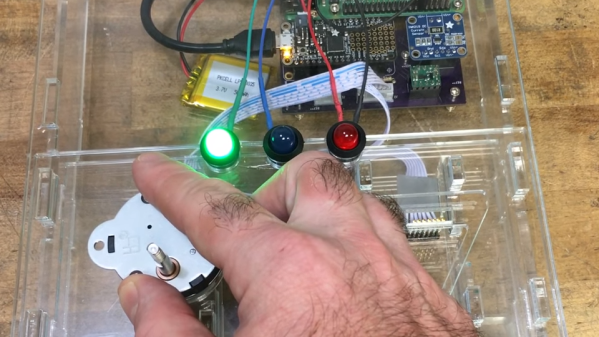
When it comes to rotary encoders, there are plenty of options. Most of them involve putting a credit card number into an online vendor’s website, though, and that’s sometimes just not in the cards. In that case building your own, like this encoder using magnetic spheres, is a pretty cool way to go too.

If he’d had less time to spare, we imagine [Antonio Ospite] would have gone for a commercial solution rather than building an encoder from scratch. Then again, he says his application had noise considerations, so maybe this was the best solution overall. He had some latching Hall effect sensors lying around, but lacked the ring magnet that is usually used with such sensors in magnetic encoders. But luckily, he had a mess of magnetic spheres, each 5 mm in diameter. Lined up in a circle around a knob made from a CD spindle, the spheres oriented themselves with alternating poles, which is just what the Hall sensors want to see. The sensors were arranged so the pulses are 90° apart, and can resolve 4.29° steps. Check out the video below to watch it work.

Small, cheap and effective are always good things. But magnets aren’t the only thing behind homebrew rotary encoders. A couple of microswitches might do in a pinch, or maybe even scrapped hard drives would suffice.

Continue reading “Magnetic Spheres Line Up For Rotary Encoder Duty”