IPv6 Christmas Display Uses 75 Internet’s Worth Of Addresses

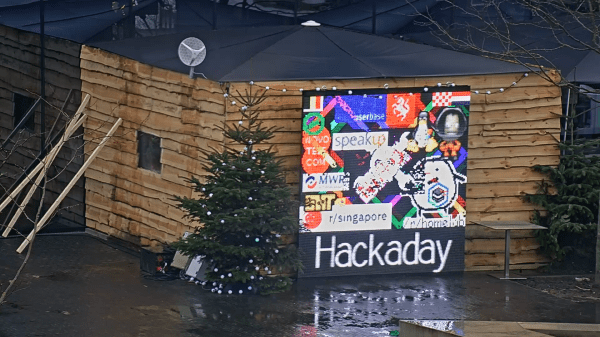
We’ve seen internet-enabled holiday displays before, and we know IPv6 offers much more space than the older IPv4 addressing scheme that most of us still use today, but the two have never been more spectacularly demonstrated than at jinglepings.com. The live video stream shows an Internet-connected Christmas tree and an LED display wall that you can control by sending IPv6 ICMP echo request messages, more commonly known as pings.

Reading the page, you quickly parse the fact that there are three ways to control the tree. First, you can type a message in the box and press send – this message gets displayed on the crawl at the bottom of the LED screen.  Second, you can light up the tree by sending a ping to the IPv6 address 2001:4c08:2028:2019::RR:GG:BB, where RR, GG, and BB are 8-bit hex values for red, green, and blue. This is a neat abuse of the IPv6 address space, in that the tree has 224 (around 16.8 million) IPv6 addresses, one for each color you can set. We were impressed by this brute-force use of address space, at least until we read on a little further.

You can also make your own drawings on the LED wall, again by sending pings. In this case, the address to set a pixel to a particular color is: 2001:4c08:2028:X:Y:RR:GG:BB, where X and Y are the pixel coordinates. This seems easy enough: to set pixel (10, 11) to magenta, the RGB value (0xFF, 0x00, 0xFF), you’d simply ping the IPv6 address 2001:4c08:2028:10:11:FF:00:FF. Having  an array of addressable LEDs is commonplace in hacker circles today, although each of them having their own live IPv6 address on the Internet seems a little excessive at first. Then it hits you – each LED has an IPv6 address for every possible color, just like the tree: 16.8 million addresses for each LED. The LED display is 160×120 pixels in size, so the total number of IPv6 addresses used is 160x120x224, which is 75 times larger than all possible IPv4 addresses!  This is a hack of monstrous proportions, and we love it.

In case you’re not running IPv6 yet, we’ve got you covered. To send individual pings using your browser, you can use a site like Ipv6now. If you want to send pixels to the display wall, you’re better off using a 6in4 tunnel that lets you access IPv6 sites using your current IPv4 connectivity.  Hurricane Electric offers a free 6in4 tunnel service that we’ve found useful. Then it’s just a matter of writing some code to send pixel values as pings.  The python scapy module is perfect for this sort of thing. But, first you’ll have to fill out the form on jinglepings.com and wait to get your IPv6 address whitelisted before you can draw on the display; evidently the usual bad actors have found the site and started drawing inappropriate things.

If you think this use of addresses seems wasteful, you needn’t worry. There are around 3.4×1038 IPv6 addresses, enough for 1027 such displays. We’re going to go out on a limb here and say it: nobody will ever need more than 2128 IP addresses.

If you’re looking to build an LED holiday display on a smaller budget, check out this one that re-purposes normal LED strings.

Thanks to [Ward] for the tip!

LEDs And Pi Let You Virtually Decorate This Online Christmas Tree

Anyone who has decorated a Christmas tree knows that the lights are what really make the look. But no matter how many strings you wrap around it, there never seems to be enough. Plus the standard sets either sit there and do nothing, or just blink on and off at regular intervals. Yawn.

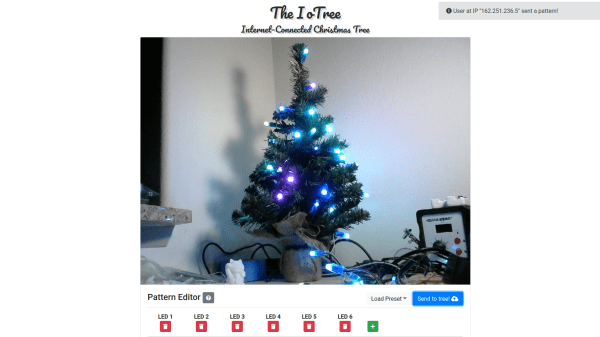
But hackers aim higher, and [leo.currie]’s interactive “paintable” Christmas tree takes the lighting game a step beyond. The standard light strings are replaced with strings of WS2811 RGB LEDs which are wired to an ESP8266. A camera connected to a Raspberry Pi is setup up to stream images of the tree to all and sundry on the Interwebz, but with a special twist: it also creates a map of every light on the tree. That allows the lights to be controlled individually in response to user inputs on a web page hosted on the Pi. The upshot is that you can paint the tree with any color you like in real time, or upload various animated GIFs to display on the tree. You can play with the tree directly, or watch a replay on the video below when that Pi inevitably gets hugged to death.

Imagine the possibilities with this. Why not hang a lot of LED strings vertically from the eaves of your house and make a huge, low-resolution display? We’ve featured plenty of large, interactive LED Christmas displays before, and we’d love to see what you come up with.

Continue reading “LEDs And Pi Let You Virtually Decorate This Online Christmas Tree”

A Perfectly Orderly Way To Manage Your Time

[Paul Gallagher] has spent years separating his tasks into carefully measured out blocks, a method of time management known as the Pomodoro Technique. If that’s not enough proof that he’s considerably more organized and structured than the average hacker, you only need to take a look at this gorgeous Pomodoro Timer he’s entered into the Circuit Sculpture Contest. Just don’t be surprised if you suddenly feel like your own time management skills aren’t cutting it.

While [Paul] has traditionally just kept mental note of the hour-long blocks of time he breaks his work into, he thought it was about time he put together a dedicated timer to make sure he’s running on schedule. Of course he could have used a commercially available timer or an application on his phone, but he wanted to make something that was simple and didn’t cause any distractions. A timer that was easy to start, reliable, and didn’t do anything extraneous. We’re not sure if looking like the product of a more advanced civilization was part of his official list of goals, but he managed to achieve it in any event.

The timer is broken up into two principle parts: the lower section which has the controls, USB port, a handful of passive components, and an ATmega328 microcontroller, and the top section which makes up the three digit LED display. The two sections are connected by a header on the rear side which makes it easy for [Paul] to take the timer apart if he needs to get back into it for any reason. Notably absent in the design is a RTC; the relatively short duration of the timer (up to a maximum of 95 minutes) means the ATmega328 can be trusted to keep track of the elapsed time itself with an acceptable amount of drift.

The display side of the timer is really a sight to behold, with the legs of each LED soldered to a pair of carefully bent copper wires so they match the angle of the front panel. The associated resistors have been artfully snipped so that their bodies sit flat on the PCB while their leads reach out to the perfect length. It looks like a maintenance nightmare in there, but we love it anyway.

As we near the half-way mark of the Circuit Sculpture Contest, there’s still plenty of time to submit your own piece of functional art. If you’ve got a project that eschews the printed circuit board for a chance to bare it all, write it up on Hackaday.io and be sure to send it in before the January 8th, 2019 deadline.

Continue reading “A Perfectly Orderly Way To Manage Your Time”

Epoxy Too Thin? Use Wood Flour As A Thixotropic Filler

The world of glues is wide and varied, and it pays to use the right glue for the job. When [Eric] needed to stick a wide and flat 3D printed mount onto the back of a PCB that had been weatherproofed with an uneven epoxy coating, he needed a gap-filling adhesive that would bond to both surfaces. It seemed like a job for the hot glue gun, but the surface was a bit larger than [Eric] was comfortable using with hot glue for. The larger the surface to be glued, the harder it is to do the whole thing before hot glue cools too much to bond properly.

What [Eric] really wanted to use was a high quality two-part epoxy that he already had on hand, but the stuff was too runny to work properly for this application. His solution was to thicken it with a thixotropic filler, which yields a mixture that is akin to peanut butter: sticky, easily spread to where it’s needed, but otherwise stays in place without dripping or sagging and doesn’t affect bonding.

3D printed pad stuck to back of PCB with thickened epoxy.

Common thixotropic fillers include ground silica or plastic fibers, but [Eric]’s choice was wood flour. Wood flour is really just very fine sawdust, and easily obtained from the bag on his orbital sander. Simply mix up a batch of thin two-part epoxy and stir in some wood flour until the sticky mixture holds its shape. Apply as needed, and allow it to cure.

Thanks to this, [Eric] was able to securely glue a 3D printed pad to the back of his animated LED snowflakes to help mount them in tricky spots. Whether for small projects or huge installations, LEDs, PCBs, and snowflakes are a good combination.

We’re Dreaming Of A Circuit Sculpture Christmas

Whether or not you chose to believe our claim that we planned it this way, the holidays happen to fall right smack in the middle of our ongoing Circuit Sculpture Contest, which challenges hackers to build circuits that double as bona fide works of art. It’s become almost too easy to spin up your own PCB, so why not try your hand at building in three dimensions and without a net? The holidays are a perfect time for it as it’s not only a reprieve from the work, school, or forced labor camp that usually ties up our waking hours, but can also be a source of inspiration.

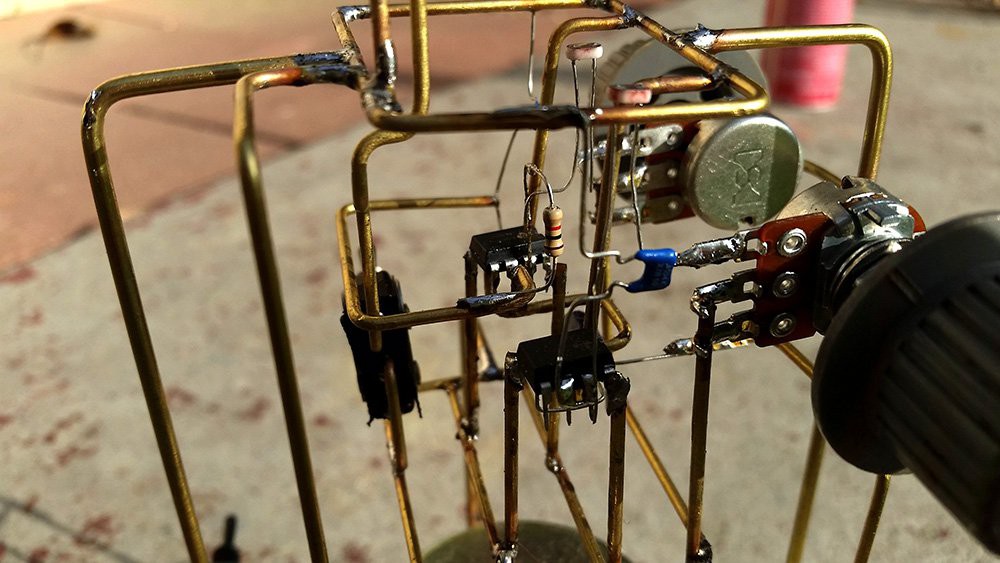
Case in point, this festive LED Christmas tree entry that comes our way courtesy of [Vincent Mkes]. This one really has it all: a recognizable theme, fantastic wire work, copious amounts of LEDs, and in a touch that is sure to delight even the electronics Scrooges amongst our readership, he does it all with the venerable 555 timer. It’s really what the Circuit Sculpture Contest is all about: taking a circuit that might otherwise be pretty ordinary and turning it into something truly unique.

The astute Hackaday reader (as if there was any other type) will likely notice there are actually two NE555 timers under the tree, each blinking their respective bank of LEDs at a different frequency. This makes the final result a bit more vibrant, and through some last-minute revisions, [Vincent] was able to hook them both up to a single power supply to really capture the minimalist spirit of the Contest.

As an early Christmas gift to us all, [Vincent] has done an excellent job documenting this build so anyone who wishes to infuse their end of year party with a little diode-driven holiday cheer can follow along. He’s included build instructions as well as diagrams of the circuit, though we encourage anyone looking to make one of their own to experiment a bit and put their own spin on it. After all, this is supposed to be art.

There’s still plenty of time to get your own entry into the Circuit Sculpture Contest, Yule-related or otherwise. Just document your build on Hackaday.io and submit it before the January 8th, 2019 deadline. Remember that entries can’t just look cool, they still need to be functional. Words to live by in general, but doubly important when they’re the rules of a contest.

Reflex Trainer Puts Athletes To The Test

Being a top athlete in this modern age is a full-time job. No longer do athletes simply practice at their nominated sport of choice. They undergo strength training, full nutritional programs, cardio, and even reflex training.

Reflex training involves a series of nodes that an athlete must identify when lit up, and touch them to switch them off. By triggering them in a fast sequence, the athlete must work hard to both identify the lit node and then move to switch it off. TrainerLights is just such a system, built around the NodeMCU platform.

The system consists of a minimum of four lights – one acting as a server, the others as nodes. The lights each contain a nodeMCU board which communicates over WiFi, while the server has an additional board – acting as a WiFi hotspot that controls the system.

With the lights switched on, the coach connects to the server with a smartphone, and configures the lighting sequence and timings depending on the desired excercise regime. The server then communicates with the lighting nodes, which light their LEDs  at specified intervals. The athlete must clear the lights by swiping at the nodes, which detect the athlete’s hand via an ultrasonic proximity sensor. The sensitivity is configurable, to allow the system to trigger from a distant wave or a direct touch from the athlete. This allows a variety of training uses, from tennis to taekwondo.

With a 3D printed case and parts readily available from any good maker supplier, it’s a project you could tackle in a weekend to add to your own training regime.

We see plenty of athletic hacks in these parts – like this line-following robot for training sprinters. Video after the break.

[Thanks to Baldpower for the tip!]

Continue reading “Reflex Trainer Puts Athletes To The Test”

Let’s Look At Some Cool Old LEDs

LEDs are now a mature technology, with all manner of colors and flavors available. However, back in the 1970s, it was early days for this fledgling display tech, and things looked very different. [IMSAI Guy] happened to work at the optoelectronics division of Hewlett-Packard during their development of LED displays, and has a handful of prototypes from those heady days.

The video is a great look at not only vintage display hardware, but also rarely seen prototypes that seldom left the HP offices. Matrix, 7-segment and even 16-segment devices are all in attendance here. There’s great macro photography of the packages, including the now-forgotten bubble displays as well as hermetically sealed glass packages. The parts all have a uniquely 1970s look, drenched in gold plating and otherwise just looking very expensive.

The followup video breaks out the microscope and powers up the displays. [IMSAI Guy] shares some useful tips on how to best tinker with unknown LED parts, as well as knowledge about the chemical compounds and manufacturing processes involved in LED production. If you don’t know your III-V compounds from your II-VI compounds, prepare to learn.

It’s always interesting to take a look back, and even better to get a peek at the experiments of engineers of the past.

If you’re wondering about applications of this hardware, we’ve seen messageboards and watches before. Video after the break.

Continue reading “Let’s Look At Some Cool Old LEDs”