Ebike Charges In The Sun

Ebikes are slowly taking the place of many cars, especially for short trips. Most ebikes can take riders at least 16 kilometers (10 miles) without too much effort, at a cost that’s often a single-digit percentage of what the same trip would have been with an internal combustion engine. If you’re interested in dropping the costs of your ebike trips even further, or eliminating it entirely, take a look at this small ebike with integrated solar panels.

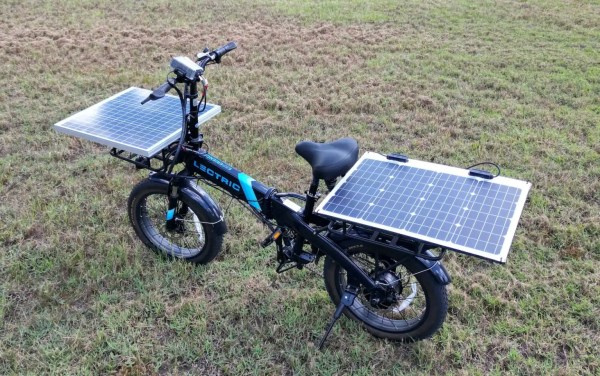
While any battery can be charged with a sufficiently large array of solar panels and the correct electronics to match the two systems together, this bike has a key that sets it apart from most others: it can charge while it is being used to power the bike. Most ebikes don’t have charging enabled during rides, so if you want to use the sun while riding to extend the range of the bike you’ll need to find one like this. This bike uses two 50 W panels on the two cargo areas of the bike, attached to a 400 W MPPT charge controller. The Lectric XP 2.0 ebike has a motor with a peak rating of 850 W, but in a low pedal-assist mode the solar panels likely output a significant fraction of the energy used by the electric drivetrain.

Even if the panels don’t provide the full amount of energy needed for riding around, the project’s creator [Micah] lives in Florida, so just setting the bike outside in the sun for six to eight hours is enough to replenish most of the battery’s charge. It’s probably not going to win any solar-powered bike races anytime soon, but for an efficient, quick bike to ride around town it’s not too shabby.

Organizational Inspiration From The Discount Tool Company

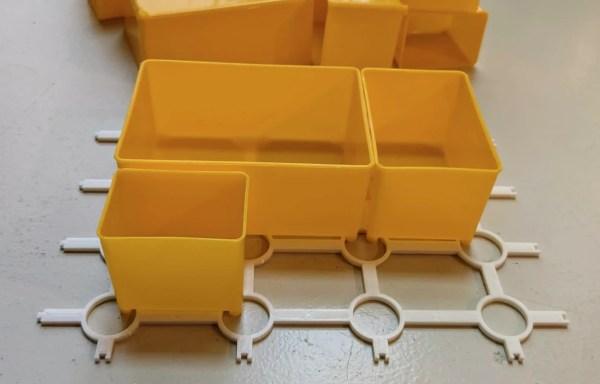
When in need of any tool to get a job done quickly, or only for a small number of times, it’s great to have a local “discount tool” company locally for some working, yet often low-quality solution to whatever problem might arise. While there are some gems, most of these tools won’t last through heavy, sustained use like their more expensive counterparts will. On the other hand, there are other things to be had at these discount shops, such as inspiration for tackling a storage problem.

This particular storage system comes from Harbor Freight, and uses a set linked crosshairs, the center of which is hollowed out. A set of movable compartments sits on top with feet that can interlock inside the crosshairs. This allows much more efficient use of space within the toolboxes, but [Alan] wanted it to be useful for more that that. He designed and implemented the Storage Case Base Template (SCBT) which allows for a container of any size to be fitted with a similar crosshair network.

With this non-proprietary system implemented and printed, the original goal of reducing the clutter in [Alan]’s workspace was accomplished. The 3D printing files can be modified easily for any space, and are available both on Thingiverse and Printables. For some other ways of packing a lot into a small space, we featured this tiny workshop a while back that’s packed with storage hacks.

Printed Axial Generator Is Turned By Hand

While desktop 3D printing is an incredible technology, it’s got some pretty clear limitations. Plastic parts can be produced quickly in a 3D printer but can be more expensive or take longer to make than parts from materials like wood. Plastic parts can also be weaker than materials like metal. If a 3D printer is all you have on hand, though, you can often make some design choices that improve the performance of a plastic part over other materials. That’s what [1970sWizard] did to make this axial hand-cranked generator.

Besides a few pieces of off-the-shelf hardware and the wire and magnets, the entire generator is printed. The actual generator is made from coils of wire with exposed leads which snap into a plastic disc which acts as the generator’s stator. The magnets also snap into a separate disc which is the rotor of the generator and is attached to the drivetrain, with no glue or fasteners required. A series of gears on two other axes convert the torque from the hand crank into the high speed necessary to get usable electricity out of the generator.

The separate gear shafts were necessary to keep from needing a drillpress, which would have allowed fewer axes to be used. This entire machine can be built almost entirely with a desktop 3D printer, though, which was one of the design goals. While it’s largely a proof-of-concept, the machine does generate about 100 mW of power which is enough to slowly charge USB devices, power lights, or provide other sources of very small amounts of energy. If you do have access to some metalworking tools, though, take a look at this hand-cranked emergency generator.

Continue reading “Printed Axial Generator Is Turned By Hand”

A Simple Stove, Built For Beans

Sitting around a campfire or fireplace is an aesthetically pleasing experience in most situations, and can even provide some warmth. But unless you have a modern wood-burning appliance, it’s likely that most of the energy available in the biomass is escaping as un-burned vapors. Surprisingly, solving this problem is almost as easy as buying a can of beans at the store, and the result is a very efficient stove which can be used for heat in a pinch.

[Robert] is demonstrating this gasifier stove, not with beans but using both a can of peas and a larger can of potatoes. Various holes are drilled in each can in a specific pattern, and then the smaller pea can is fitted inside the larger potato can. Once a fire is going, the holes allow for air to flow in a way which traps the escaping un-burned vapors from the fuel and burns them as they flow through the contraption. No moving parts are required; this is all powered by the natural airflow that’s produced by the heat of the fire.

The result of a build like this is not only a stove which can extract a much higher percentage of the available fuel, but also quires much less fuel for a given amount of heat, and produces a much cleaner, less smokey fire. [Robert] also added a screen mantle which allows for this to be used more as a heat source, but similar builds can also be used just as effectively for cooking, too.

Continue reading “A Simple Stove, Built For Beans”

USB Power Isolator Keeps Smoke In

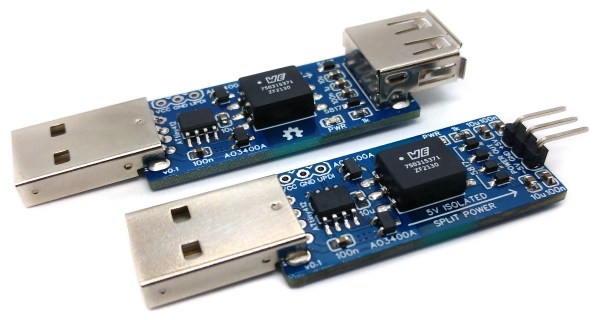
Anyone who’s done an electronics project knows the most important part of any good design is making sure to keep the magic smoke inside of all of the components. There are a lot of ways to make sure the smoke stays in there, but one of the most important is making sure that the power supply is isolated. If you’re using a USB port on a computer as your power source, though, it can be a little more complicated to isolate it from the computer.

The power supply is based around a small transformer with a set of diodes to act as a rectifier. Of course, while a transformer is great at isolating power supplies, it isn’t much good at DC. That’s what the ATtiny microcontroller is for. It handles the high-speed switching of the MOSFETs, which drive the transformer and handle some power regulation. There are two different power supplies created as part of this project as well — the first generates +5V much like a normal USB plug would have, and the other creates both +5V and -5V. It will be important not to mix these two up, or that tricky blue smoke may escape.

The project page goes into extensive details on the operation of the device, so if electrical theory is of interest, this will definitely be worth a read. Isolating a valuable computer from a prototype circuit is certainly important, but if you’re looking for a way to isolate a complete USB connection, look at this build which includes isolation for a USB to FTDI adapter.

A Raspberry Pi Phone For The Modern Era

While it might seem like mobile phones are special devices, both in their ease of use and in their ubiquity in the modern culture, they are essentially nothing more than small form-factor computers with an extra radio and a few specific pieces of software to run. In theory, as long as you can find that software (and you pay for a service plan of some sort) you can get any computer to work as a phone. So naturally, the Raspberry Pi was turned into one.

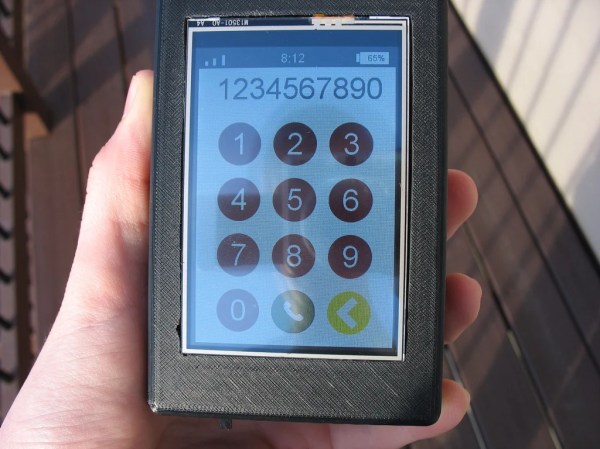
[asherdundas], the phone’s creator, actually found a prior build based around the Raspberry Pi before starting this one. The problem was that it was built nearly a decade ago, and hadn’t been updated since. This build brings some modernization to the antiquated Pi phone, and starts with a 3D printed case. It also houses a touchscreen and a GSM antenna to connect to the cell network. With some other odds and ends, like a speaker and microphone, plus a battery and the software to tie it all together, a modern functional Raspberry Pi phone was created, with some extra details available on the project page.

The phone has the expected features — including calling, texting, and even a camera. A small WiFi USB dongle allows it to connect to the Internet too, allowing it to do all of the internet browsing a modern smartphone might want to do. The only thing that it might be pretty difficult to do is install Android apps, and although there are ways to get Android apps working in Linux, it’s not always strictly necessary to have this functionality.

Ceiling Fan Adds CO2 Sensor

Ceiling fans seem to be an oft-misunderstood or overlooked household appliance. As such, they seem to have missed a lot of the IoT wave. Sure, you can get smart controllers for them to plug into your home automation system of choice, but these mostly rely on temperature sensors, simple timers, or voice commands. There’s a lot more to a ceiling fan than maintaining a comfortable temperature, as [EJ] demonstrates with this smarter ceiling fan build.

A big part of the job of a ceiling fan is to improve air circulation, which can help a room from feeling “stuffy”. This feeling is usually caused by excess CO2 as a result of respiration in an area where the air is not moving enough to exhaust this gas. Not only does [EJ]’s controller make use of a temperature monitor for controlling the fan automatically, but there is also a CO2 sensor integrated to improve this aspect of air quality when needed.

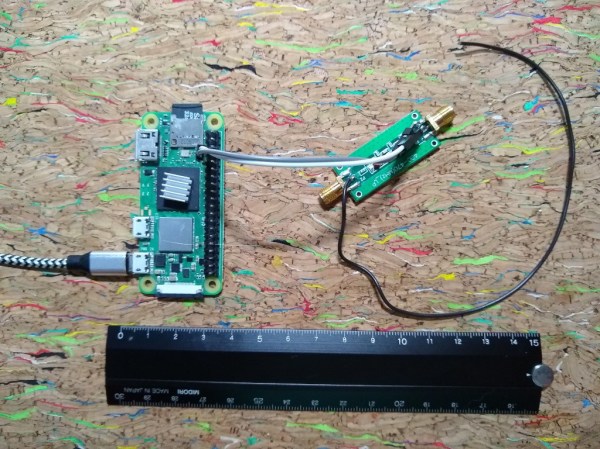
The entire build is based on a Raspberry Pi Zero, and nothing needed to be changed about the ceiling fan itself for this added functionality because it already included a radio-based remote control. With some monitoring of the signals produced by the remote, the Raspberry Pi was programmed to mimic these commands when the surrounding sensors captured a condition where [EJ] would want the fan on. There’s also a manual control button as well, so the fan control is not entirely in the hands of the computer.

For a little more detailed information about this build, there’s a separate project page which details a lot of the information about the RF waveform capturing and recreation. And, if you want to take your fan to the next level, take a look at this one which focuses on building a smartphone app to control the fan instead.