DIY Ergonomic Game Pad Lends A Hand

Does it seem like everyone you game against can do everything faster than you? Chances are good that they have some kind of dedicated game pad or macro pad with a bunch of custom shortcuts. If you can’t beat ’em, join ’em, but why buy one when you can build your own? [lordofthedum] did the smart thing when they built their own version of the Azeron game pad, which is an outrageously expensive but ergonomic and cool-looking macro pad that reminds us of the DataHand ergonomic keyboard.

Each finger hovers over a C-shaped group of three switches — one actuates by moving the finger forward, another by moving backward, and the third by pushing down like a regular button. The thumb gets a 4-way joystick. All of these inputs are wired up to an Arduino Pro Micro, which has sort of become the standard for DIY macro pads and keyboards. We think this looks fantastic, and really raises the bar for DIY macro pads.

Need a few more keys, but still want a thumb joystick? Check out the smooth and sweet Sherbet game pad.

Inputs Of Interest: BIGtrack Mouse Might Make You Squeal

You know me, I like to get my feet involved when I use my computer, which happens pretty much all day every day at this point. My cache of pedal inputs keeps growing like mushrooms in the darkness under my desk: every upper case letter in this post and dozens more have been capitalized with a shift pedal!

Naturally, I’ve thought about what it might be like to mouse with my toes. The more time I can spend with both hands on the keyboard, the better. I started sniffing around for foot-sized trackball candidates, thinking maybe I could just build one with regular mouse guts. Then I found a 15-year-old Golden Tee home edition console at a thrift store. It has a large ball and four buttons, so it seemed ripe for turning into a mouse as-is, or just stealing the ball to build my own. So far, that hasn’t happened, though I did solder a bunch of wires for testing out the controls. Continue reading “Inputs Of Interest: BIGtrack Mouse Might Make You Squeal”

Adding MIDI To A Mini Synth Is Easy As Pi

There are a handful of relatively dirt cheap synths out there like the KORG Monotron, but many of them use ribbon controllers that aren’t very precise.  Ribbon controllers basically slide pots that you operate with your finger or a stylus.  They’re painted to look like piano keys in order to show you approximately where the notes are supposed to be. The Stylophone is another extremely affordable synth that does even less as a synthesizer and uses this type of input. It’s a fun input if you don’t mind imprecision, but can be annoying otherwise.

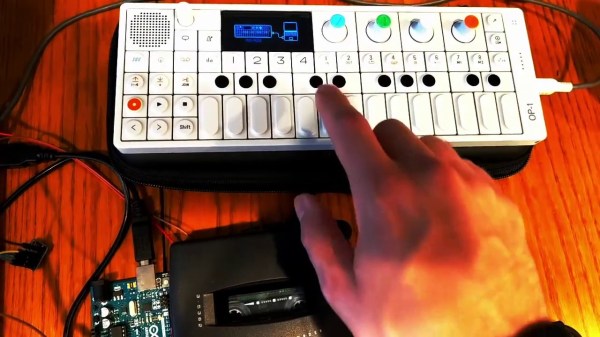
[schollz] isn’t satisfied to synth this way, so they added MIDI input to their KORG Monotron using a Raspberry Pi and a DAC. Fortunately, the Monotron is quite the hackable little synth, with nice, big, labelled pads on the PCB.

All it really took was a couple of solder joints in the right places, plus a clever Python script. The script listens for MIDI input from a keyboard, and then controls an MCP4725 DAC, which sends voltages to the Monotron. [schollz] wrote a tuning function that computes the FFT of the MIDI tones to find the fundamental frequencies of each to send along to the Monotron. Check it out after the break.

If liquid control is what you’re after but all you have is a keyboard, try making your own ribbon controller.

Continue reading “Adding MIDI To A Mini Synth Is Easy As Pi”

Circuit Board Origami Puts You Face-to-Face With Low-Poly Electronics

Paper craft has been around almost as long as paper itself. It’s fun to mimic paper craft and origami with low-poly 3D prints, and [Stephen Hawes] wondered whether it could be done with copper-clad PCBs. Two years after the question arose, we have the answer in the form of a fantastical mask with light-up eyes. Check it out in the video below.

[Stephen] started with a model (Update: [kongorilla]’s 2012 low poly mask model from back in 2012 was the starting point for this hack) from the papercraft program Pepakura Designer, then milled out dozens of boards. Only a few of them support circuitry, but it was still quite the time-consuming process. The ATmega32U4 on the forehead along with the fold-traversing circuitry serve to light up the WS2812B eyes. Power runs up the copper tube, which doubles as a handy mounting rod to connect to the 3D printed base.

Continue reading “Circuit Board Origami Puts You Face-to-Face With Low-Poly Electronics”

Finally, A Differently Useless Machine

Traditionally, the useless machine is a simple one that invites passersby to switch it on. When they do, the machine somehow, some way, turns itself off; usually with a finger or finger-like object that comes out from the box in what feels like an annoyed fashion. Honestly, that’s probably part of what drives people to turn them on over and over again.

But [Bart Blankendaal] has managed to turn the useless machine on its head. When this machine is switched to the on position, unseen forces inside the box will spin the toggle switch around 180° to the off position.

What’s really happening is that an Arduino is getting a signal from the toggle switch, and is then rotating it on a ball bearing with a stepper motor driven through an H-bridge.

It shouldn’t be too hard to make one of these yourself, given that [Bart] has provided the schematic and STLs. If we weren’t living in such touchy times, we might suggest building one of these into your Halloween candy distribution scheme somehow. Sell the switch as one that turns on a candy dispenser, and then actually dispense it after three or five tries.

Many see useless machines as tangible examples of existential quandary. Here is one that takes that sentiment a bit further by snuffing out a candle.

Continue reading “Finally, A Differently Useless Machine”

E-Textile Tools Get The Multimeter Hookup

[Irene Posch] has done some incredible work with knitted, crocheted, and fabric circuits — check out the crocheted ALUs and embroidered computer for starters. Now, it seems [Irene] is building up a how-to catalog of e-textile tools that can be easily connected to a multimeter.

So far, this toolbox includes a seam ripper and a crochet hook. The concept is similar for both — print out a handle and connect the tool to a banana jack that can then be connected to a multimeter. The crochet hook is simple: just print out the handle, jam the hook in one end, and stick a mini banana jack in the other end. They’re designed to butt up against each other and make a connection without wires.

Building the ripper takes a bit more effort. There’s another printed handle involved, but you must first free the seam ripper from its stock plastic handle and solder a wire to it. Then twist the other end of the wire around a banana jack and and put that in the other end of the handle.

It’s great to see a little bit insight into the troubleshooting tools of e-textiles, especially because they are all-around fiddly. It all starts with a circuit, so why not do your prototyping with a thread-friendly breadboard?

Wooden Disc Player Translates Binary Back Into Text

[jbumstead] used MATLAB to convert the text messages into binary to be cut out of the disk.
[jbumstead] wanted to demonstrate the idea of information-storing devices such as LPs, CDs, and old hard drives. What he came up with lies directly at the intersection of art and technology: an intricately-built machine that plays beautiful collaged wooden disks. Much like the media that inspired the Wooden Disk Player, it uses a laser to read encoded data, which in this case is short bits of text like “Don’t Panic”.

These snippets are stored in binary and read by a laser and photodiode pair that looks for holes and not-holes in the disk. The message is then sent to an Arduino Nano, which translates it into English and scrolls the text on an LED matrix. For extra fun, the Nano plays a MIDI note every time it reads a 1, and you can see the laser reading the disk through a protective acrylic shield.

Though the end result is fantastic, [jbumstead] had plenty of issues along the way which are explored in the build video after the break. We love it when people show us their mistakes, because it happens to all of us and we shouldn’t ever let it tell us to stop hacking.

If anyone knows their way around lasers, it’s [jbumstead]. We loved playing their laser harp at Supercon!

Continue reading “Wooden Disc Player Translates Binary Back Into Text”