Battery-Powered Watering Timer Converted To Solar On The Cheap

Watering the garden or the lawn is one of those springtime chores that is way more appealing early in the season than later. As the growing season grinds along, a chore that seemed life-giving and satisfying becomes, well, just another chore, and plants often suffer for it.

Automating the watering task can be as simple as buying a little electronic timer valve that turns on the flow at the appointed times. [A1ronzo] converted his water hose timer to solar power. Most such timers are very similar, with a solenoid-operated pilot valve in line with the water supply and an electronic timer of some sort. The whole thing is quite capable of running on a pair of AA batteries, but rather than wasting money on new batteries several times a season, he slipped a LiPo pack and a charge controller into the battery case slot and connected a small solar panel to the top of the controller.

The LiPo is a nominal 3.7-volt pack, so he did a little testing to make sure the timer would be OK with the higher voltage. The solar panel sits on top of the case, and the whole thing should last for years. And bonus points for never having to replace a timer that you put away at the end of the season with batteries still in it, only to have them leak. Ask us how we know.

Like the best of hacks, this one is quick, easy and cheap — $15 in parts, aside from the timer. There are more complicated irrigation solutions, of course, one of which even won the Hackaday Prize once upon a time. But this one has us ordering parts to build our own right now.

A Vacuum Tube And Barbecue Lighter X-Ray Generator

A certain subset of readers will remember a time when common knowledge held that sitting too close to the TV put you in mortal peril. We were warned to stay at least six feet back to avoid the X-rays supposedly pouring forth from the screen. Nobody but our moms believed it, so there we sat, transfixed and mere inches from the Radiation King, working on our tans as we caught up on the latest cartoons. We all grew up mostly OK, so it must have been a hoax.

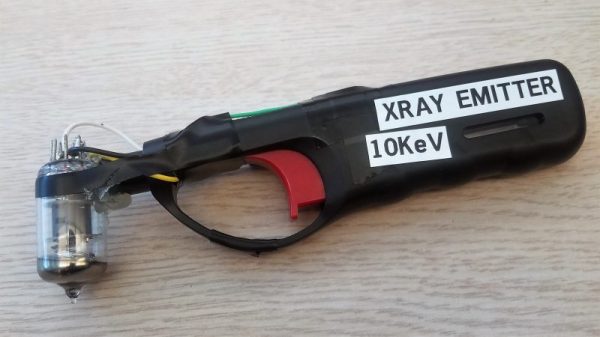
Or was it? It turns out that getting X-rays from vacuum tubes is possible, at least if this barbecue lighter turned X-ray machine is legit. [GH] built it after playing with some 6J1 rectifier tubes and a 20-kV power supply yanked from an old TV, specifically to generate X-rays. It turned out that applying current between the filament and the plate made a Geiger counter click, so to simplify the build, the big power supply was replaced with the piezoelectric guts from a lighter. That worked too, but not for long — the tube was acting as a capacitor, storing up charge each time the trigger on the lighter was pulled, eventually discharging through and destroying the crystal. A high-voltage diode from a microwave oven in series with the crystal as a snubber fixed the problem, and now X-rays are as easy as lighting a grill.

We have to say we’re a wee bit skeptical here, and would love to see a video of a test. But the principle is sound, and if it works it’d be a great way to test all those homebrew Geiger counters we’ve featured, like this tiny battery-powered one, or this one based on the venerable 555 timer chip.

Stylish Business Card With A Stylophone Built In

If you’re in the electronics business, PCB business cards seem like a natural fit. They may be impractical and expensive, but they can really set you apart from that boring paper card from Vistaprint crowd. But they need to make sense for what you do, so for a musician and MIDI pro, this MIDI-controller stylophone business card is a real eye- and ear-catcher.

This business card is an idea that [Mitxela] has been kicking around for a while, and he even built a prototype a couple of years ago. The homebrew card, made using the spray paint, laser etching, and ferric chloride method, worked well enough as a proof of concept, but it was a little rough around the edges and needed the professional touch of a PCB fabricator. We’ve got to say that the finished cards are pretty darn sexy, with the black resist contrasting nicely against the gold-immersion pads. He selected a 1-mm thick board and made the USB connector as a separate small board; snapped off of the main board and reflowed back on, it builds up the edge connector to the proper thickness. The parts count is low — just an ATtiny85 and a resistor ladder to encode each key, with a simple jumper used as the stylus. The device itself is just a MIDI controller and makes no music on its own, but we still think this is a pretty creative way to hang out a shingle.

[Mitxela] has quite a few interesting builds, and is no stranger to our pages. Check out his recent servo-plucked MIDI music box, or these amazing miniature LED earrings.

Continue reading “Stylish Business Card With A Stylophone Built In”

Is That A Tweet On Your Belt Buckle Or Are You Just Happy To See Me?

What a time to be alive! The range of things you never knew you needed but absolutely must have expands at a breakneck pace, such that it’s now possible to pick up a belt buckle with an embedded LED matrix to scroll messages. We have no idea what the use case for something like this is, but some people will buy anything.

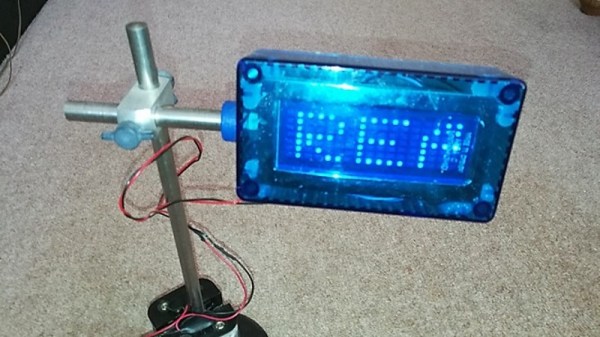
One such person was a friend of [Brian Moreau], who doubled down after being gifted the glowing bauble by turning it into a WiFi enabled Tweet-scrolling belt buckle. It appears to be a just for fun project, and to be honest one would need a heck of a belt for the buckle after his mods. He added an ESP8266 to take care of monitoring his Twitter account and driving the display on the belt buckle, a non-trivial task given that the thing is programmed with only two buttons that scroll through characters to compose a message. The microcontroller might have fit inside the original buckle or only added a little to its bulk, but [Brian] decided to replace the two coin cells powering it with an external 6-volt battery pack. That required a buck converter to power the ESP, so the whole thing ended up being thrown in a case and acting more like a neat display than a flashy fashion statement.

We’d bet some tradeoffs could be made to reduce the bulk and get that buckle back where it belongs, though. Once it does, maybe it’ll be part of a complete LED-laden ensemble, from head to toe.

The Aluminum Wiring Fiasco

Someone who decides to build a house faces a daunting task. It’s hard enough to act as the general contractor for someone else, but when you decide to build your own house, as my parents did in the early 1970s, it’s even tougher. There are a million decisions to make in an information-poor and rapidly changing environment, and one wrong step can literally cast in stone something you’ll have to live with forever. Add in the shoestring budget that my folks had to work with, and it’s a wonder they were able to succeed as well as they did.

It was a close call in a few spots, though. I can recall my dad agonizing over the wiring for the house. It would have been far cheaper to go with aluminum wiring, with the price of copper wire having recently skyrocketed. He bit the bullet and had the electrician install copper instead, which ended up being a wise choice, as houses that had succumbed to the siren call of cheaper wiring would start burning down all over the United States soon thereafter.

What happened in the late 60s and early 70s in the residential and commercial electrical trades was an expensive and in some cases tragic lesson in failure engineering. Let’s take a look at how it all happened.

Continue reading “The Aluminum Wiring Fiasco”

Crawling A Dungeon, 64 Pixels At A Time

The trend in video games is toward not being able to differentiate them from live-action theatrical releases, and games studios are getting hard to tell from movie studios. But quality graphics don’t always translate into quality gameplay, and a lot can be accomplished with minimalist graphics. Turn the clock back a few decades and think about the quarters sucked up by classics like Pac-Man, Space Invaders, and even Pong if you have any doubts about that.

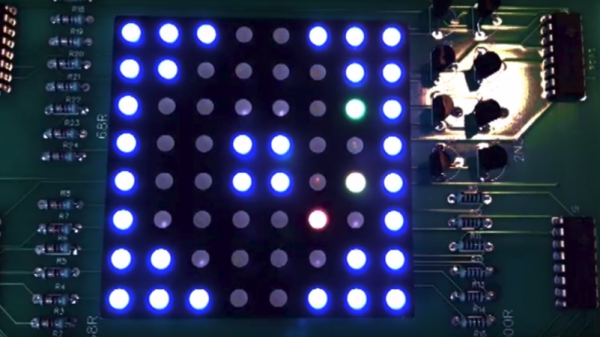
But even Pong had more than 64 pixels to work with, which is why this dungeon-crawler game on an 8×8 RGB matrix is so intriguing. You might think [Stolistic]’s game would be as simple as possible but think again. The video below shows it in action, and while new users will need a little help figuring out what the various colors mean, the game is remarkably engaging. The structure of the dungeon is random with multiple levels to unlock via the contents of power-up chests, and there are mobs to battle in a zoomed-in display. The game runs on an Arduino Uno and the matrix is driven by a bunch of 74HC595 shift registers.

It’s fun to see what can be accomplished with as little as possible. Looking for more low-res goodness? Check out this minimalist animated display, or a Geiger counter with a matrix display.

Continue reading “Crawling A Dungeon, 64 Pixels At A Time”

Low-Cost Eye Tracking With Webcams And Open-Source Software

“What are you looking at?” Said the wrong way, those can be fighting words. But in fields as diverse as psychological research and user experience testing, knowing what people are looking at in real-time can be invaluable. Eye-tracking software does this, but generally at a cost that keeps it out of the hands of the home gamer.

Or it used to. With hacked $20 webcams, this open source eye tracker will let you watch how someone is processing what they see. But [John Evans]’ Hackaday Prize entry is more than that. Most of the detail is in the video below, a good chunk of which [John] uses to extol the virtues of the camera he uses for his eye tracker, a Logitech C270. And rightly so — the cheap and easily sourced camera has remarkable macro capabilities right out of the box, a key feature for a camera that’s going to be trained on an eyeball a few millimeters away. Still, [John] provides STL files for mounts that snap to the torn-down camera PCB, in case other focal lengths are needed.

The meat of the project is his Jevons Camera Viewer, an app he wrote to control and view two cameras at once. Originally for a pick and place, the software can be used to coordinate the views of two goggle-mounted cameras, one looking out and one focused on the user’s eye. Reflections from the camera LED are picked up and used to judge the angle of the eye, with an overlay applied to the other camera’s view to show where the user is looking. It seems quite accurate, and plenty fast to boot.

We think this is a great project, like so many others in the first round of the 2018 Hackaday Prize. Can you think of an awesome project based on eye tracking? Here’s your chance to get going on the cheap.

Continue reading “Low-Cost Eye Tracking With Webcams And Open-Source Software”