Developing An Open Source Electronics Trainer

It’s a safe bet that most Hackaday reader’s interest in electronics started at a young age, and that their early forays into the world of hardware hacking likely involved some form of “playground” kit. As long as you didn’t lose any of the components, these kits promised the user that hundreds of possible projects were just a few jumper wires away. Extra points awarded for when you decide to toss away the manual and fly solo.

While there’s still no shortage of such products on the market, [Josh Kittle] felt the concept could do with a freshening up. His open hardware “Microcontroller Trainer” harkens back to those old multi-kits, but adds in the sort of high-tech gadgetry that makes the modern DIY world go round.

It’s still got the traditional layout: a center mounted breadboard surrounded by an array of LEDs, a handful of buttons, and a pair of potentiometers. But there’s also sockets for the Raspberry Pi, ESP8266, ESP32, and Arduino. Plus a few of their most popular friends to keep them company: a .96″ OLED, 2.4″ Touch TFT, and a BC05 Bluetooth module.

Originally [Josh] created this design to help clean up his own workspace, figuring he could just put his most used components on a single compact board. But as you might expect, others expressed interest in the concept. Now he’s producing them as kits, and even working his way towards a third hardware revision that adds features such as an integrated 18650 battery for portable use.

While electronics kits that have you build a functional device are a great way to learn the ropes, we’re always glad to see fresh takes on the classic electronic “playground” concept.

Official Teardown Gives Unexpected Look Into PS5

With Sony and Microsoft still a month away from the public release of their next-generation game consoles, you’d expect technical details of their respective systems to still be under a veil of secrecy. But both companies look to be taking things a bit differently this generation, as it becomes increasingly clear that modern consumers are interested in what makes their devices tick. Today, Sony really threw down the gauntlet by beating the tech media to the punch and posting their own in-depth teardown on the new PlayStation 5.

Unsurprisingly, the video after the break is almost entirely in Japanese. But even if you don’t know the language, there’s plenty of interesting details to be had. For one thing, the heatsink and fan that cools the PS5’s AMD CPU and GPU are collectively so massive that they appear to take up most of the console’s internal volume.

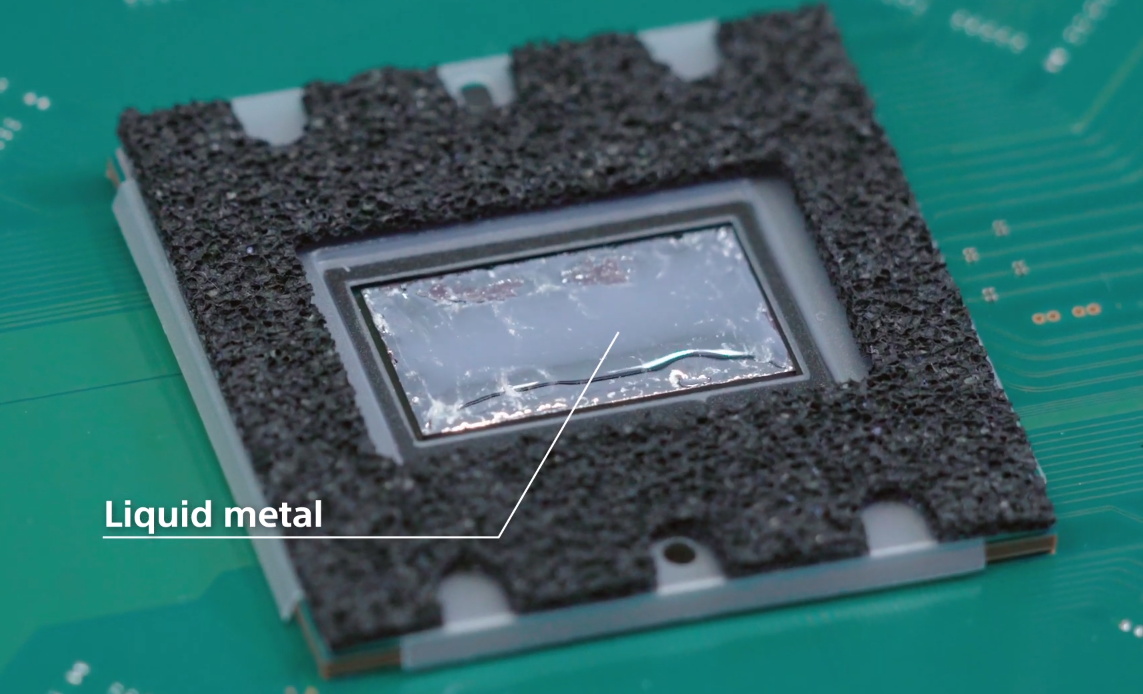
In fact, the heatsink itself is so large that the motherboard is actually mounted to it instead of the other way around. So if you want to take out the board, you have to unbolt it from the heatsink and remove it first. In the process you’ll expose the unique liquid metal thermal compound that Sony apparently developed specifically for this application. Good luck to you if any dust gets in that expensive-looking goop.

It’s also interesting to note that, unlike the previous two generations of Sony consoles, the PS5 has no discrete hard drive. Instead, onboard flash with a custom controller is used to provide 825 GB of storage for software. Hopefully Sony has put the requisite amount of R&D into their wear leveling, as a shot flash chip will mean a whole new motherboard. That said, gamers with extensive collections will be happy to see there appears to be an expansion bay where you can install your own M.2 drive.

Between this and the recent PS4 assembly line tour, it’s refreshing to see a company like Sony be a bit more transparent. After years of adversarial treatment from the tech giants, we’d almost forgotten that the customer is supposed to be king. Continue reading “Official Teardown Gives Unexpected Look Into PS5”

Aruna: An Open Source ROV For Affordable Research

Underwater exploration and research can be exceedingly dangerous, which is why remotely operated vehicles (ROVs) are so commonly used. Operators can remotely command these small submersibles to capture images or collect samples at depths which would otherwise be unreachable. Unfortunately, such technology comes at a considerable price.

Believing that the high cost of commercial ROVs is a hindrance to aquatic conservation efforts, [Noeël Moeskops] has been developing an open source modular ROV he calls Aruna. Constructed largely from off-the-shelf components and 3D-printed parts, the Aruna promises to be far more affordable than anything currently on the market. Hopefully cheap enough to allow local governments and even citizens to conduct their own underwater research and observations.

More than just the ROV itself, Aruna represents an entire system for developing modular underwater vehicles. Whether you decide to build the boilerplate ROV documented and tested by [Noeël], or implement individual components into your own design, the project is a valuable source of hardware and software information for anyone interested in DIY underwater robotics.

Continue reading “Aruna: An Open Source ROV For Affordable Research”

NVIDIA Announces $59 Jetson Nano 2GB, A Single Board Computer With Makers In Mind

NVIDIA kicked off their line of GPU-accelerated single board computers back in 2014 with the Jetson TK1, a $200 USD development system for those looking to get involved with the burgeoning world of so-called “edge computing”. It was designed to put high performance computing in a small and energy efficient enough package that it could be integrated directly into products, rather than connecting to a data center half-way across the world.

The TK1 was an impressive piece of hardware, but not something the hacker and maker community was necessarily interested in. For one thing, it was fairly expensive. But perhaps more importantly, it was clearly geared more towards industry types than consumers. We did see the occasional project using the TK1 and the subsequent TX1 and TX2 boards, but they were few and far between.

Then came the Jetson Nano. Its 128 core Maxwell CPU still packed plenty of power and was fully compatible with NVIDIA’s CUDA architecture, but its smaller size and $99 price tag made it far more attractive for hobbyists. According to the company’s own figures, the number of active Jetson developers has more than tripled since the Nano’s introduction in March of 2019. With the platform accessible to a larger and more diverse group of users, new and innovative applications for machine learning started pouring in.

Cutting the price of the entry level Jetson hardware in half was clearly a step in the right direction, but NVIDIA wanted to bring even more developers into the fray. So why not see if lightning can strike twice? Today they’ve officially announced that the new Jetson Nano 2GB will go on sale later this month for just $59. Let’s take a close look at this new iteration of the Nano to see what’s changed (and what hasn’t) from last year’s model.

Continue reading “NVIDIA Announces $59 Jetson Nano 2GB, A Single Board Computer With Makers In Mind”

Porting QMK To A Cheap Mechanical Keyboard

Over the last couple of years, we’ve seen an incredible number of DIY keyboard builds come our way. Some have had their switches nestled into laser-cut aluminum and others 3D printed plastic. They may be soldered together on a custom PCB, or meticulously hand-wired. But however they were built, they almost all shared one thing in common: they ran some variant of the open source QMK keyboard firmware.

But what if you just want to run an open firmware on the keyboard you picked up for $50 bucks on Amazon? That’s exactly where [Stephen Peery] found himself nine months ago with this DK63 gaming keyboard. Since so many of these small RGB LED mechanical keyboards are very similar to existing open source designs, he wondered what it would take to blow out the original firmware and replace it with a build of QMK.

While [Stephen] doesn’t have everything working 100% yet, he’s nearly reached the end of his epic reverse engineering journey. The first step was tearing apart the keyboard and identifying all the components it used, then pulling the original firmware out of the updater. From there, between Ghidra and Serial Wire Debug, he was able to figure out most of what the stock firmware was doing so he could replicate it in QMK.

According to his README, the RGB LEDs and Bluetooth functionality don’t currently work, but other than that it seems QMK is up and running. If you’re OK with those concessions, he has information on the page about flashing his build of QMK to the stock DK63 with the ST-Link V2 so you can give it a shot. Though you do so at your own risk; we wouldn’t recommend doing this on your only keyboard.

We’ve seen commercially manufactured keyboards running QMK before, but it usually involves completely replacing the original controller with new electronics. That [Stephen] got this all working on stock hardware so other owners can follow in his footsteps is really a considerable accomplishment.

[Thanks to Baldpower for the tip.]

The Amazing Technicolor Parts Organizer

It wouldn’t be much of an exaggeration to say that anyone reading these words has struggled at one time or another to keep an ever growing collection of electronic bits and bobs from descending into absolute chaos. Tossing them all into plastic bins is at least a start down the road to long-term organization, but they still needed to be sorted and inventoried if you want to avoid the wasted time and money of buying parts you forgot you already had.

For his latest project, [Zack Freedman] decided to finally tackle the personal parts collection that he’s ended up lugging around for the last several years. The first half of the battle was just figuring out what he actually had, what he was likely to need down the line, and getting it all sorted out so he didn’t have to keep rummaging through a big pile to find what he needed. But it’s not enough to get organized, you also need to stay organized.

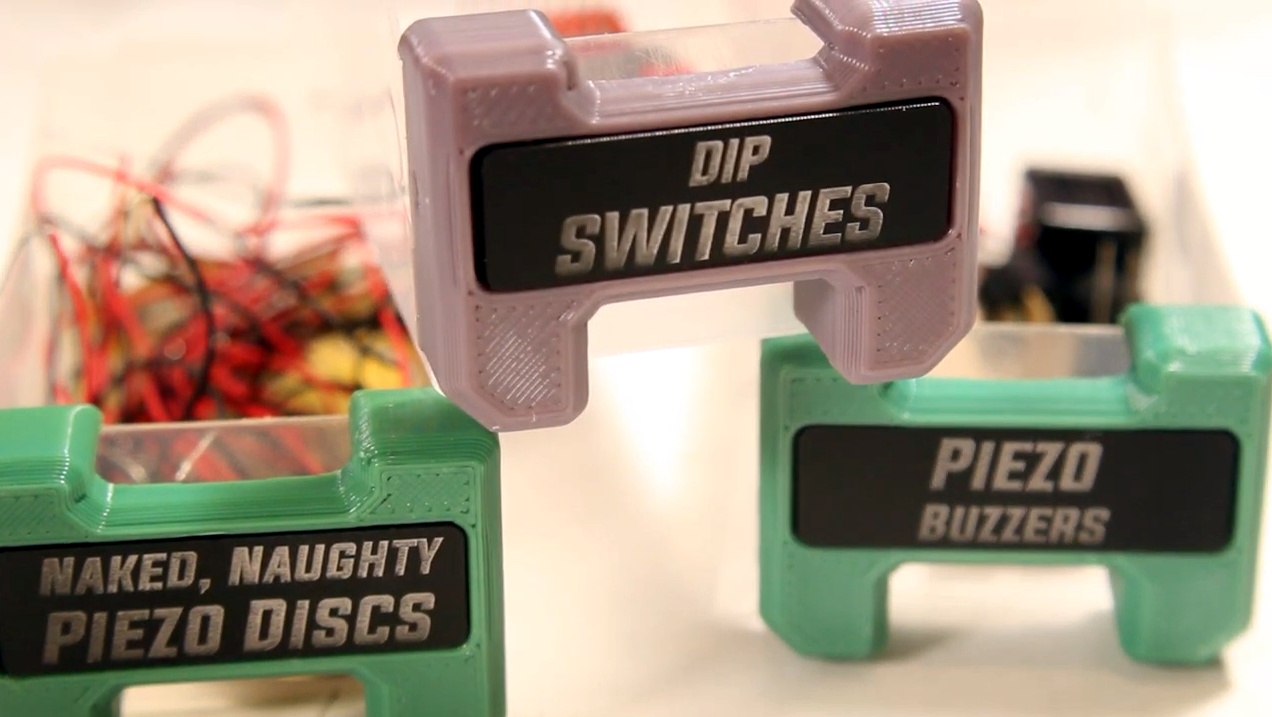
Which is why he then turned his attention to how all these newly sorted components would actually be stored going forward. He already had a trio of Harbor Freight bin organizers, but as one expects from that fine retailer, they were only marginally suitable for the task at hand. So [Zack] designed a 3D printed faceplate that could snap onto the original plastic bin. The new fronts made them easier to grab and featured an opening to accept a laser-etched plastic label.

To give them a little visual flair, he decided to print the faceplates using rainbow gradient filament. To prevent them from being random colors, he used the relatively obscure sequential slicing option so his Prusa i3 would print each faceplate in its entirety before moving over to the next one on the bed. This took far longer than doing them in parallel (especially since he had access to multiple printers), but makes for a much nicer aesthetic as the color smoothly transitions between each bin on the wall. It also has a practical benefit, as you can tell at a glance if any of the bins have found themselves in the wrong spot.

If you really want to go off the deep end, we’ve seen hackers light individual bins with RGB LEDs tied into a searchable inventory system. But for most hobbyists, simply learning when to purge would be more practical.

Continue reading “The Amazing Technicolor Parts Organizer”

Voice Controlled RGB LEDs Go Big

When we see RGB LEDs used in a project, they’re often used more for aesthetic purposes than as a practical source of light. It’s an easy way to throw some color around, but certainly not the sort of thing you’d try to light up anything larger than a desk with. Apparently nobody explained the rules to [Brian Harms] before he built Light[s]well.

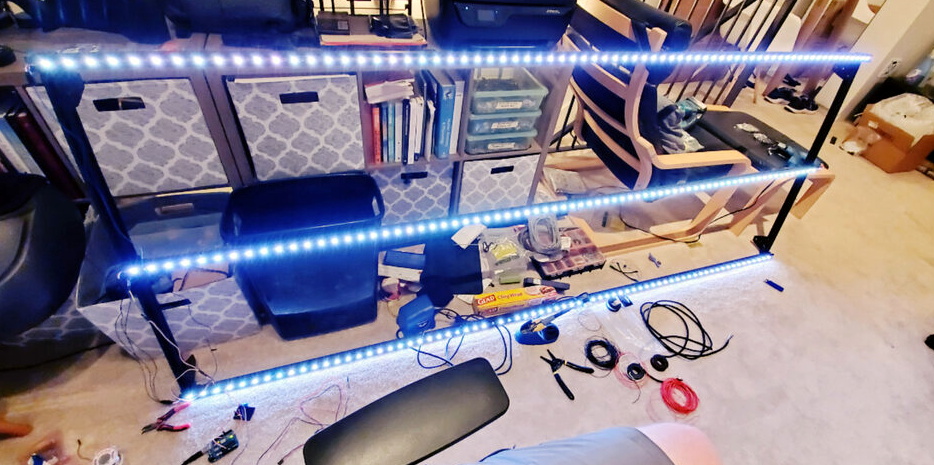
Believe it or not, this supersized light installation doesn’t use any exotic hardware you aren’t already familiar with. Fundamentally, what we’re looking at is a WiFi enabled Arduino MKR1000 driving strips of NeoPixel LEDs. It’s just on a far larger scale than we’re used to, with a massive 4 x 8 aluminum extrusion frame suspended over the living room.

Onto that frame, [Brian] has mounted an undulating diffuser made of 74 pieces of laser-cut cardstock. Invoking ideas of waves or clouds, the light looks like its of natural or even biological origin while at the same time having a distinctively otherworldly quality to it.

The effect is even more pronounced when the RGB LEDs kick in, thanks to the smooth transitions between colors. In the video after the break, you can see Light[s]well work its way from bright white to an animated rainbow. As an added touch, he added Alexa voice control through Arduino’s IoT Cloud service.

While LED home lighting is increasingly becoming the norm, projects like Light[s]well remind us that we aren’t really embracing the possibilities offered by the technology. The industry has tried so hard to make LEDs fit into the traditional role of incandescent bulbs, but perhaps its time to rethink things.

Continue reading “Voice Controlled RGB LEDs Go Big”