Open Source Tricorder Is In It For The Science

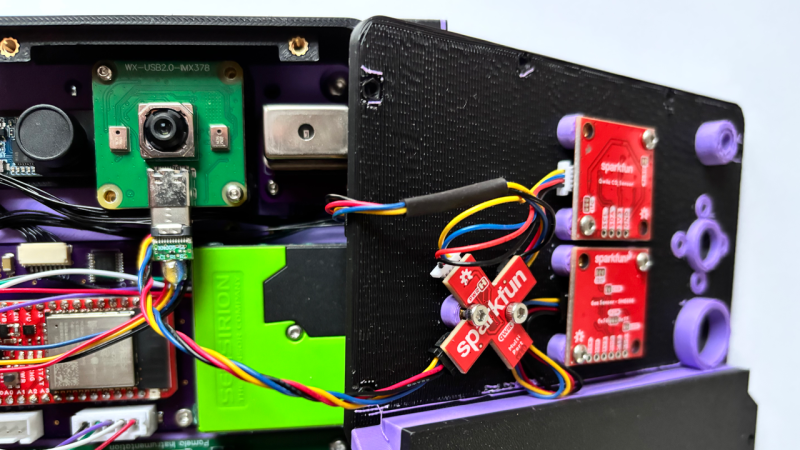
If you’re reading Hackaday there’s pretty good odds you’re at least somewhat fond of Star Trek. We’d bet good money most of you would quit your jobs today if a Starfleet recruiter showed up. That’s something you’d have in common with [PeterAJansen], who has been working for over a decade now to create something worthy of being called a tricorder. If his latest iteration, the Open Source Science Tricorder Cyberdeck, isn’t there yet, it’s pretty darn close.
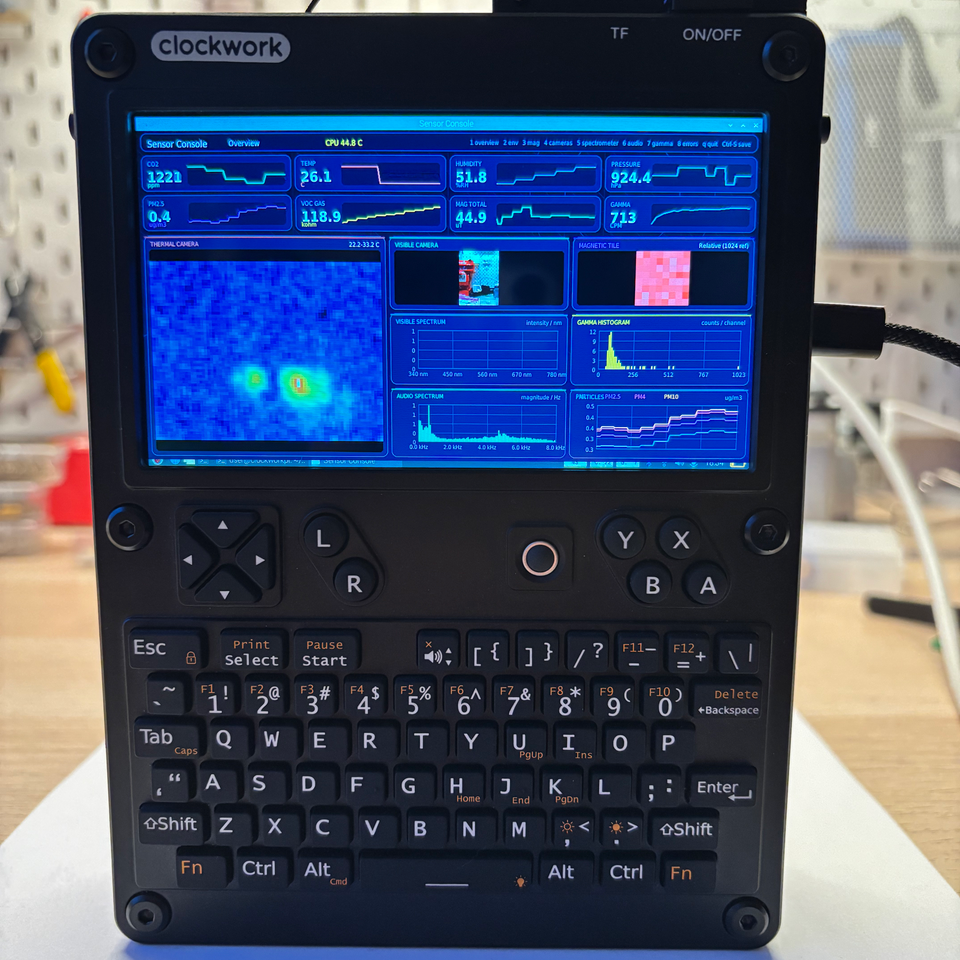
Frankly, it looks more usable than Roddenberry’s version.

The “tri” in tricorder means three, but this device has more than three instruments– so did the ones on the show, come to think of it. You won’t be scanning for veteron radiation with this, but you do get a scintillation crystal to get a spectroscopic analysis of beta- or gamma-ray sources; there’s also a visible light spectrometer, thermal camera, and magnetic field camera along with a standard magnetometer and the usual environmental sensors to give you temperature, pressure, and humidity, plus particulate, VOC and CO2 concentration. Enough to explore an alien planet? That’s hard to say, but it seems like enough to explore this one.

The device is based around a Clockwork Pi uConsole, which takes care of the form-factor: a slabtop with a QWERTY keyboard and an IPS display in a nice screen, and a Compute Module 5 to crunch all that data. It might not be quite as stylish as the folding units seen on-screen in Star Trek, but it seems like an eminently practical form factor. There are videos of it in operation as well as being assembled on the GitHub repository,  where you can get all the details needed to make your own. It is the Open Source Science Tricorder, after all.

This isn’t the first project we’ve seen chasing tricorder glory, but many of the others were more interested in screen accuracy than science. [Peter]’s earlier “arducorder” was a very notable exception to that trend.

Thanks to [MarcCote] for the tip! If your scanners pick up something interesting in cyberspace, remember our hailing frequencies are always open. 
Electromechanical TV Goes 3D With This Light-field Display

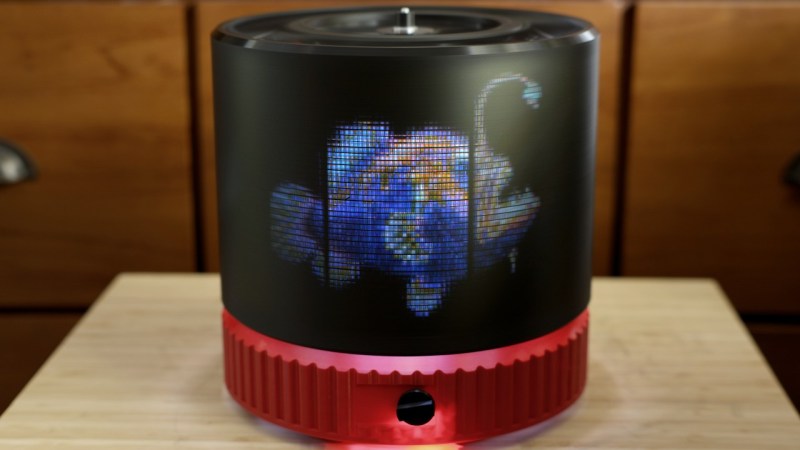
A mechanical TV — the kind that makes an image with a Nipkow disk and a single lamp with some help from persistence of vision — is easy enough to wrap your head around. Moving that technique into the third dimension, though? That’s a bit of a head scratcher. Luckily for us [AncientJames] provides a simple visual explanation for how the magic happens.

Instead of a disk doing a raster scan of the display, he’s using a rapidly-spinning drum with holes in it. In place of a single lamp, he’s got an array of LED matrix displays, each 32 pixels by 64 pixels in resolution. The trick is splitting the model up into a light field, so each hole projects its own image of the object at the proper angle.

In this demo there are three matrix displays, though that does limit the viewing angle as they’re arranged as one half of a hexagonal prism — you’d need more screens to get a full 360. The effective resolution through the drum is only about 100 pixels by 48 pixels per eye, but that’s still enough to play DOOM with.

This isn’t the first time this particular [Ancient] has got DOOM going on a volumetric display, and based on previous results, it probably won’t be the last time either. This implementation, which keeps the displays stationary and does not require a pricey laser projector, looks the most accessible to us, as long as you watch your fingers.

Continue reading “Electromechanical TV Goes 3D With This Light-field Display” →

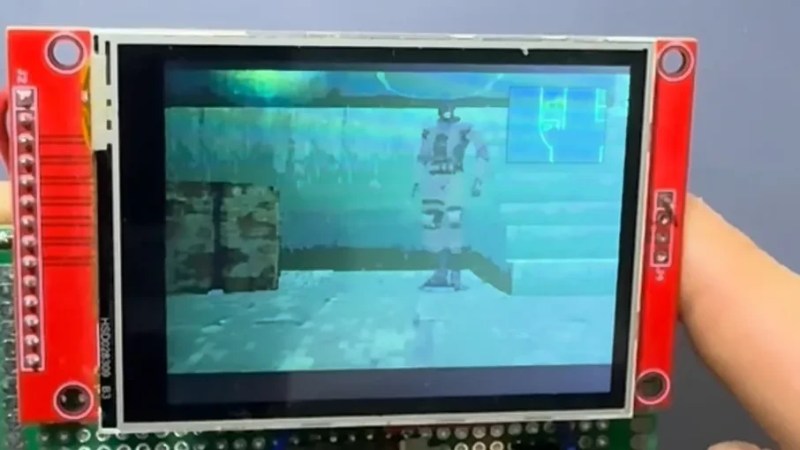
The many polygons of Solid Snake on an ESP-driven LCD

Metal Gear Solid Moves From PlayStation To ESP32

If you haven’t heard of Metal Gear, you probably haven’t played video games these last few decades. The original Metal Gear dates back to 1987 and launched on the MSX, but the real rise to fame probably started with Metal Gear Solid on the original PlayStation in 1998. What needed a hefty console in 1998 can comfortably fit on a microcontroller in 2026, though, as [David Montero Crespo] demonstrates with his port of MGS to the ESP32-S3.

[David] is — as we always are — standing on the shoulders of giants with this hack. Most specifically, the project relies entirely on the [FoxdieTeam] MGS Reversing decompliation project. Of course what one team decompiles, another can recompile, and in this case [David] chose to recompile the game for Expressif’s exceptional ESP32. It wasn’t quite as easy as just forking the repo and compiling with the ESP32 as a target though, as the blog post explains.

We won’t spoil it, but [David] did have to make some changes to account for the different quirks the MIPS processor in the PlayStation has compared to the Xtensa cores on the microcontroller. Then to make it playable, he put the ESP32-S3 module onto some perfboard with an analog stick from a drone controller, an ILI9341 LCD panel, and a resistor ladder to run the buttons for a barebones handheld.

Fans of MSG and its many sequels may appreciate this replica of the codex communicator. Fans of the ESP32 may remember the Wipeout clone we featured earlier, which already proved the popular microcontroller could handle PlayStation-level graphics. If you were hoping for actual solid metal gears, you can cut your own at home.

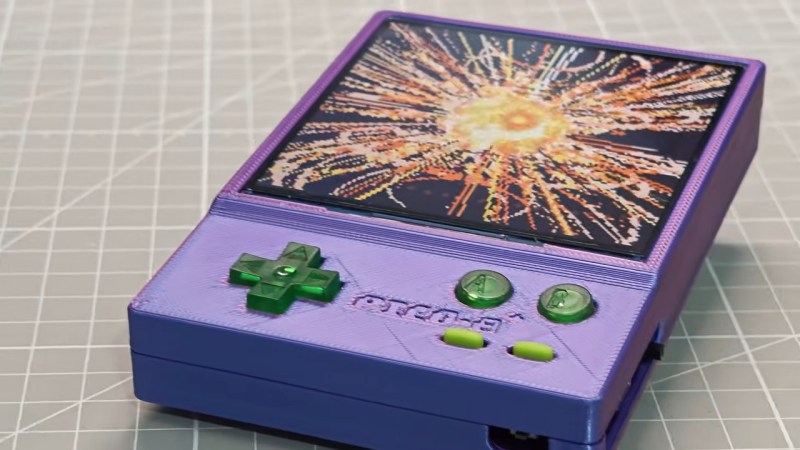
a beauty shot of the 3D-printed version

This PICO-8 Handheld Is No Fantasy

The PICO-8 is what is known as a ‘fantasy console’– you can program it, and there are oodles of games, but it’s not actually the 8-bit console it pretends to be. It’s a virtual machine, one that can run on top of any modern OS. When [UncleStem] got into PICO-8, he decided that he liked the PICO-8’s portability, he wanted a different kind of portability– so he took the ‘fantasy’ out of ‘fantasy console’ with his GameBoy-esqe handheld build, the build/dev video of which is embedded below.

At its core, it’s a Raspberry Pi Zero2W. That’s rather overkill for an 8-bit virtual machine, but it’s what he had on hand, and it makes for an easy build. The real hero of the build is the 720 by 720 pixel IPS display that matches the PICO-8’s square aspect ratio and takes up most of the real estate on the handheld. Even better, it has HDMI in and sound support, so with some buttons and a battery the hardware is all there after [UncleStem] designs a handsome 3D printed case, and also has a go milling it out of aluminum before giving up and having a pro do it.

Since it’s so easy to do these days, everything lives on a custom PCB from his sponsor that gives the handheld good mechanical stability. He’s also using the full-colour silkscreen option to make a very pretty PCB. If that part of the project appeals, we’ve covered guides to PCB art before. He’s shared the PCB and everything else he can on a google drive, though note that the fantasy console itself is not open source, and would need purchased to finish the project.

Oddly enough, this is not the first handheld we’ve seen based on the PICO-8. That would be this project that uses a single-button camcorder form-factor. As unique as that is, this project has the benefit of working with the whole library of PICO-8 games.

Continue reading “This PICO-8 Handheld Is No Fantasy” →

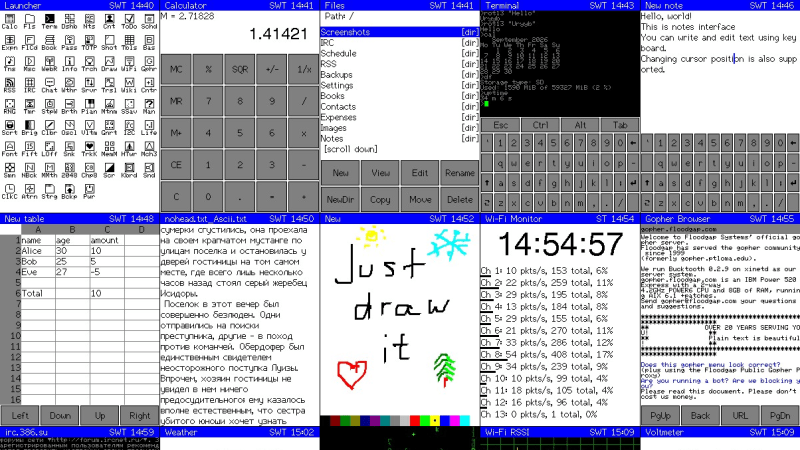
A grid of screenshots of various applications on the CYD PDA

Cheap Yellow Display Dreams Of PDA

Everybody loves the Cheap Yellow Display (CYD) ESP32 dev boards, so why not treat yours to a little PDA? That’s right: turn it into a Portable Digital Assistant and relive the glory days of Palm with this project from [sau412].

For those readers who are too young to remember, a PDA was basically a phoneless and cameraless smart-phone, and devices running Palm Corporation’s Palm OS ruled the roost for most of the 90s and early 2000s. [sau412] hasn’t written an emulator or port of Palm OS; rather he’s created his own firmware for the ESP32-based CYD that is inspired by the PDAs of yore, and has many features you’d have expected back in the day. That includes a Gopher browser, to let you check out the undying alternative to the World Wide Web. There isn’t a general-purpose web browser, but there are RSS and Wikipedia readers, and what else do you need? At least you won’t end up doomscrolling.

There are also a passel of games and a BASIC interpreter, and the usual practical things like a calendar, calculator and contact list. Everything from ebook readers to translators, all of it by [sau421]. If you’ve got a CYD kicking around, you could do worse than give it a little PDA. Using the web-based flasher, we had it up and running in five minutes or so, but without an SD card we couldn’t test all the apps.

This is hardly the first ESP32 PDA that we’ve featured, but leaning into the CYD means it’s the simplest project to replicate.  If you’re jonesing for the original Palm OS experience on more modern hardware, Pumpkin OS can get you going on x86 or ARM.

FPGA For All — CERN Releases “colibri” VHDL Library

Since you’re reading Hackaday, we’re pretty sure CERN needs no introduction, so we’ll get right to it– they’re giving back again, this time with a VHDL library called “colibri” containing over 100 components, functions, and procedures to help jumpstart your next FPGA project.

Like a lot of what CERN gives away under its CERN Open Hardware Licence, this library and the functions in it were developed in house to make CERN run better– specifically to streamline the development of gateway devices. As you might imagine, with the prodigious amount of data CERN’s various experiments spit out, FPGAs have become a key part of many of them. The best part is that because the fine folks at CERN don’t want to get locked in, everything here is vendor-independent and has been tested on multiple platforms. Speaking of tested, you get self-checking testbenches in there to make sure everything’s working, and there’s even formal verification, at least for some things. We’ve seen formal verification in software compilers, but its not common in the FPGA world. The whole thing is on GitLab if you want to take a look.

While CERN’s library might not have much to help you make a ternary processor or bus controller with everyone’s favourite programmable silicon, much like software libraries you can save some time at least not implementing say, SPI or i2c– both of which are in colibri, along with a whole lot more.

Thanks to [Alberto Perro] for the tip!

Modern USB Controllers On Win98 (and Up)

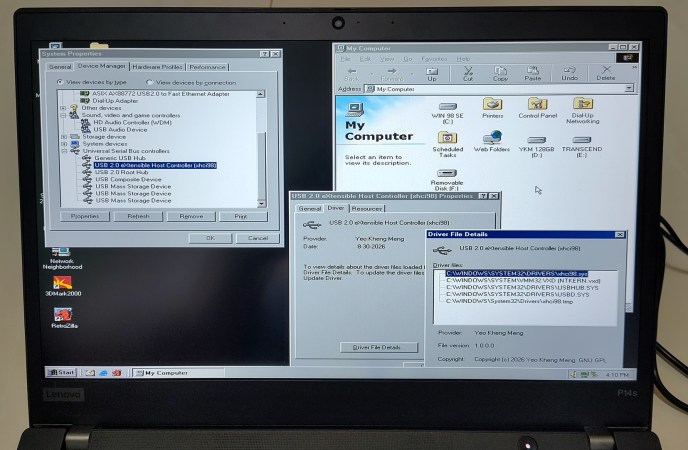
[Yeo Kheng Meng] has a problem: he likes Windows 98, but he also likes his 2020 ThinkPad, which only has an xHCI USB controller– you know, the kind needed for USB 3.0, something that post-dates Windows 98 by a full decade. Drivers? Finding none existed, he decided to do it himself, or at least guide the process of using  LLMs to produce drivers for Windows 98 and up.

Some of you just stopped reading, but can you blame him for making a demonic pact for this project? Driver development isn’t really a one-man show, especially as a part-time hobby project you’re not sure anyone else will ever use. If you do want to use it, you can find the code on GitHub.

It does work, though, he admits it might be buggy. Unlike purely vibe-coded projects, [Meng] intends to address bugs put forth in the repo, at least. If you want to know how he did it, check out the link to [Meng]’s blog– which is human-authored, we can tell– and the videos embedded therein. He demonstrates it working on a 2020 ThinkPad, which should be usable even with Windows 11, and another model from 2016– neither of which have any old-style USB ports. Older laptops might, while any desktop can just use a PCI card with a USB2.0 controller– or you can do like [Meng] did prior to this project, and use the PCI card via adapters. 

[Yeo Kheng Meng] evidently gets as much of a kick out of joining old and new as we do, like running DOS a modern ThinkPad X13, and running Slack on Windows 3.11 For Workgroups on a slightly-less-modern but still 21st Century Thinkpad T400.