Making Music With A Go Board Step Sequencer

Ever wonder what your favorite board game sounds like? Neither did we. Thankfully [Sara Adkins] did, and created a step sequencer called Let’s Go that uses the classic board game Go as input.

In the game Go, two players place black and white tokens on a grid, vying for control of the board. As the game progresses, the configuration of game pieces gets more complex and coincidentally begins to resemble Conway’s Game of Life (or a weird QR Code). Sara saw music in the evolving arrangement of circles and transformed the ancient board game into a modern instrument so others could hear it too.

To an observer, [Sara’s] adaptation looks fairly indistinguishable from the version played in China 2,500 years ago — with the exception of an overhead webcam and nearby laptop, of course. The laptop uses OpenCV to digitize the board layout. It feeds that information via Open Sound Control (OSC) into popular music creation software Max MSP (though an open-source version could probably be implemented in Pure Data), where it’s used to control a step sequencer. Each row on the board represents an instrumental voice (melodic for white pieces, percussive for black ones), and each column corresponds to a beat.

Every new game is a new piece of music that starts out simple and gradually increases in complexity. The music evolves with the board, and adds a new dimension for players to interact with the game. If you want to try it out yourself, [Sara] has the project fully documented on her website, and all of the code is available on GitHub. Now we’re just left wondering what other games sound like — [tinkartank] already answered that question for chess, but what about Settlers of Catan?

Continue reading “Making Music With A Go Board Step Sequencer”
Xbox Controller Gets Snap On Joystick From Clever 3D-Printed Design

Ball and socket linkages make for smooth operation.

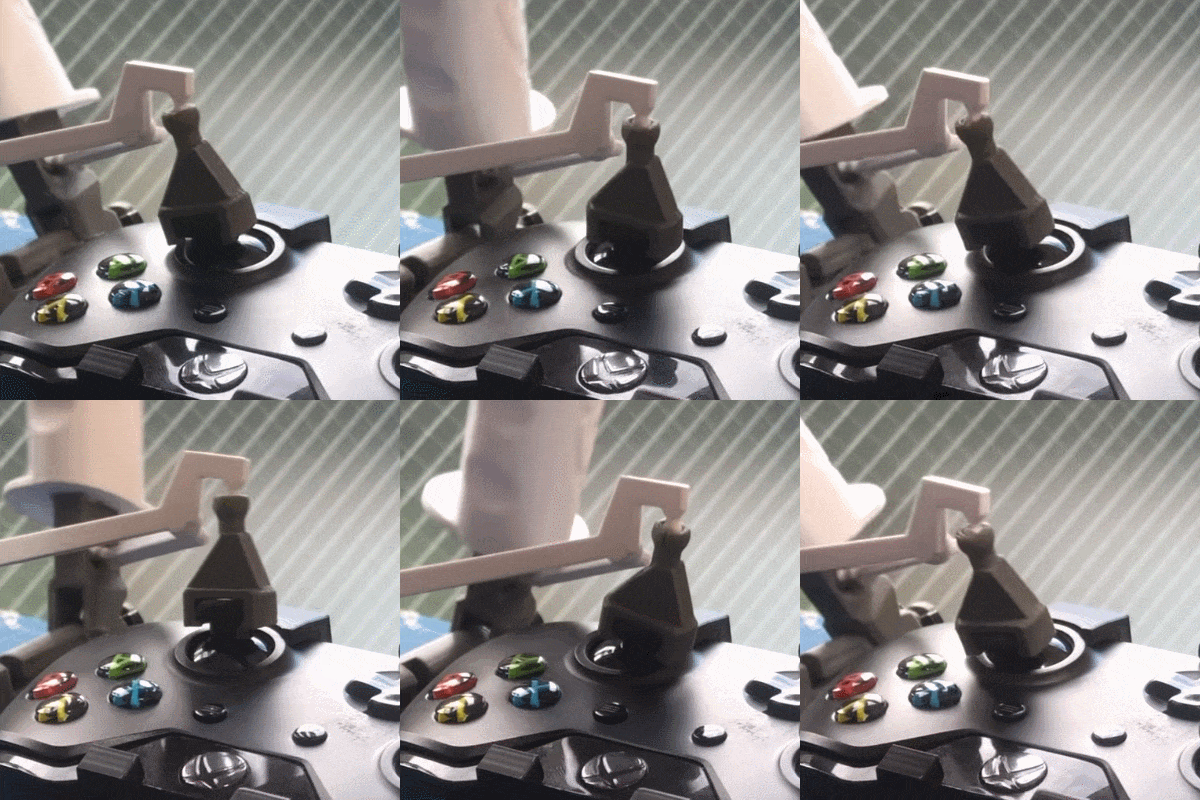
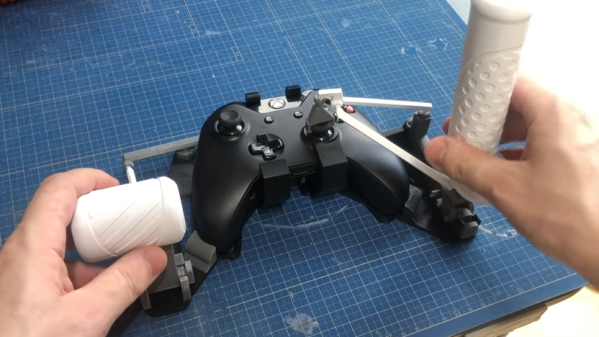
People making DIY controls to enhance flight simulators is a vibrant niche of engineering and hackery, and it sure looks like Microsoft Flight Simulator is doing its part to keep the scene lively. [Akaki Kuumeri]’s latest project turns an Xbox One gamepad into a throttle-and-stick combo that consists entirely of 3D printed parts that snap together without a screw in sight. Bummed out by sold-out joysticks, or just curious? The slick-looking HOTAS (hands on throttle and stick) assembly is only a 3D printer and an afternoon away. There’s even a provision to add elastic to increase spring tension if desired.

The design looks great, and the linkages in particular look very well thought-out. Ball and socket joints smoothly transfer motion from one joystick to the other, and [Akaki] says the linkages accurately transmit motion with very little slop.

There is a video to go with the design (YouTube link, embedded below) and it may seem like it’s wrapping up near the 9 minute mark, but do not stop watching because that’s when [Akaki] begins to go into hacker-salient details about of how he designed the device and what kinds of issues he ran into while doing so. For example, he says Fusion 360 doesn’t simulate ball and socket joints well, so he had to resort to printing a bunch of prototypes to iterate until he found the right ones. Also, the cradle that holds the Xbox controller was far more difficult to design than expected, because while Valve might provide accurate CAD models of their controllers, there was no such resource for the Xbox ones. You can watch the whole video, embedded below.

Continue reading “Xbox Controller Gets Snap On Joystick From Clever 3D-Printed Design”

Digital Cribbage Board Saves Scores, Marriage

When [ccooper] told his parents he was gonna start up his electronics habit again, the last thing he expected was to save his parents’ marriage in the process. But as soon as he dropped this news, they made a special request: build us something to replace the multi-purpose manual cribbage board. It’s too ambiguous and starts too many arguments.

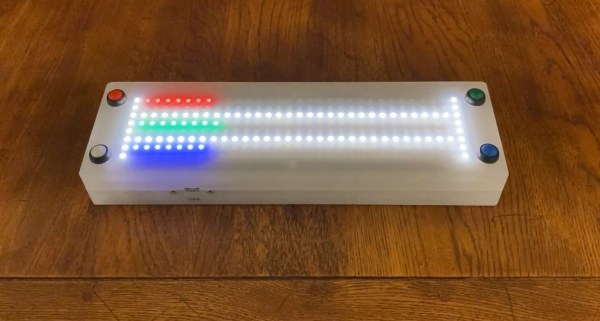
Cribbage is a card game that involves scoring based on hands. Traditionally, the score is kept with pegs on a wooden board with two or three sets of 60 holes. To build a digital cribbage board, [ccooper] decided to represent the positions on a field made from chained-together RGBW matrices.

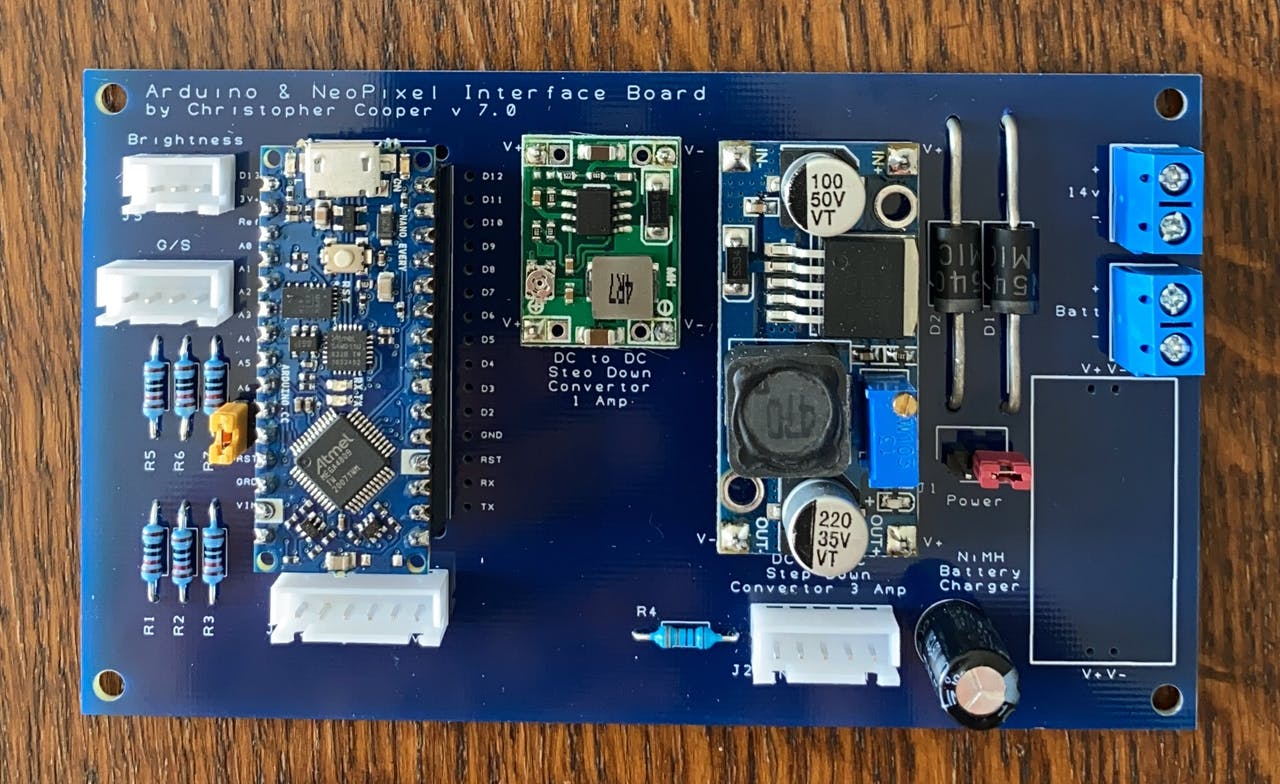
These four matrices are run by an Arduino Nano Every and will display one of three scoring schemes that the parents usually play. A set of eight AA batteries ensures that Mum and Dad can play out in bright daylight and still see the LEDs. You can see how the brightness rivals the sun in the demo after the break. The code and Gerber files for the custom board are there if you want to make one for yourself, or know of another marriage that needs saving.

Every game deserves tidy record-keeping. If you’re more the RPG type, check out this amazing stat tracker made of stacked-up FR4 boards.

Continue reading “Digital Cribbage Board Saves Scores, Marriage”

The Most Expensive D20 You’ll See Today

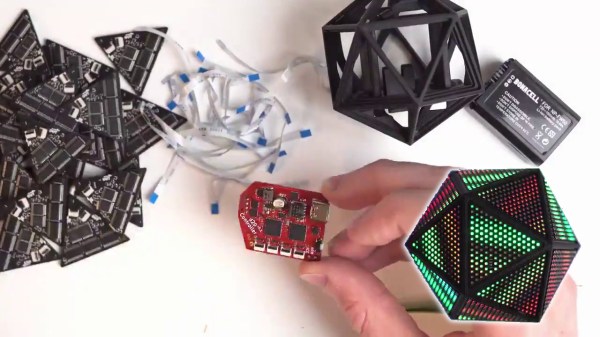
Roll your negotiation skill, because this d20 is a hefty one. The Tweet is also below. We are charmed by [Greg Davill]’s twenty-sided LED contraption, but what do we call it? Is it a device? A sculpture? A die? Even though “d20” is right on his custom controller PCB, we don’t think this will grace the table at the next elf campaign since it is rather like taking a Rolls Royce to the grocery store. Our builder estimates the price tag at $350 USD and that includes twenty custom PCB light panels with their components, a controller board, one battery pack, and the 3D printed chassis that has to friction-fit the light faces.

Power and communication for all the panels rely on twenty ribbon cables daisy-chained throughout the printed scaffolding, which you can see in the picture above. [Greg] made a six-sided LED cube last year, and there are more details for it, but we suspect he learned his lesson about soldering thousands of lights by hand. There are one-hundred-twenty LEDs per panel, times twenty, that is over two-thousand blinkenlights. We don’t yet have specs on the controller, but last time he used a SAMD51 processor to support over three-thousand lights. We don’t know where he’ll go next, but we’re game if he wants to make a chandelier for Hackaday’s secret underground lair.

(Editor’s Note: If you were at Supercon last year, and you got to play with this thing in the flesh, it’s worth it!)

Continue reading “The Most Expensive D20 You’ll See Today”

Peripheral Doesn’t Need Deskspace

Some of us are suckers for new hardware. There’s absolutely nothing shameful about a drawer overflowing with gamepads, roll-up keyboards, and those funny-shaped ergonomic mice. MyTeleTouch won’t sate your itch for new hardware because [Dimitar Danailov] didn’t design hardware you hold, because it uses your phone as a catch-all Human Interface Device, HID. A dongle plugs into a standard USB port, and your Android phone can emulate a USB keyboard, mouse, or gamepad over Bluetooth.

Chances are high that you already set up your primary computer with your favorite hardware, but we think we’ve found a practical slant for a minimalist accessory. Remember the last time you booted an obsolete Windows desktop and dug out an old mouse with a questionable USB plug? How long have you poked around the bottom of a moving box trying to find a proprietary wireless keyboard dongle, when you just wanted to type a password on your smart TV? What about RetroPi and a game controller? MyTeleTouch isn’t going to transform your daily experience, but it’ll be there when you don’t want to carry a full-size keyboard down three flights of stairs to press {ENTER} on a machine that spontaneously forgot it has a touch screen. If you don’t have opportunities to play the hero very often, you can choose to play the villain. Hide this in a coworker’s USB port, and while they think you’re sending a text message, you could be fiddling with their cursor.

We enjoy a good prank that everyone can laugh off, and we love little keyboards and this one raises the (space) bar.

Continue reading “Peripheral Doesn’t Need Deskspace”

Game Boy Plays Forever

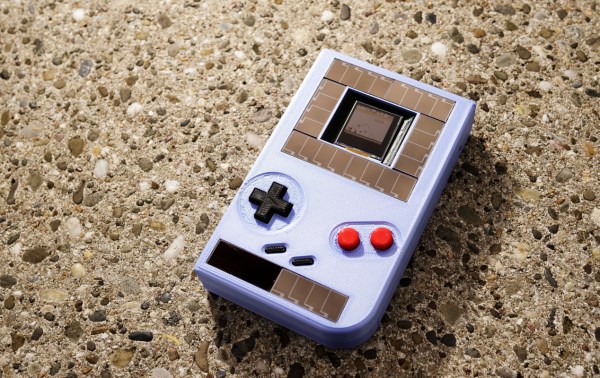
For those of us old enough to experience it first hand, the original Game Boy was pretty incredible, but did have one major downside: battery consumption. In the 90s rechargeable batteries weren’t common, which led to most of us playing our handhelds beside power outlets. Some modern takes on the classic Game Boy address these concerns with modern hardware, but this group from the Delft University of Technology and Northwestern has created a Game Boy clone that doesn’t need any batteries at all, even though it can play games indefinitely.

This build was a proof-of-concept for something called “intermittent computing” which allows a computer to remain in a state of processing limbo until it gets enough energy to perform the next computation. The Game Boy clone, fully compatible with the original Game Boy hardware, is equipped with many tiny solar panels which can harvest energy and is able to halt itself and store its state in nonvolatile memory if it detects that there isn’t enough energy available to continue. This means that Super Mario Land isn’t exactly playable, but other games that aren’t as action-packed can be enjoyed with very little impact in gameplay.

The researchers note that it’ll be a long time before their energy-aware platform becomes commonplace in devices and replaces batteries, but they do think that internet-connected devices that don’t need to be constantly running or powered up would be a good start. There are already some low-powered options available that can keep their displays active when everything else is off, so hopefully we will see even more energy-efficient options in the near future.

Thanks to [Sascho] for the tip!

Continue reading “Game Boy Plays Forever”

3D-Printed Flight Controls Use Magnets For Enhanced Flight Simulator 2020 Experience

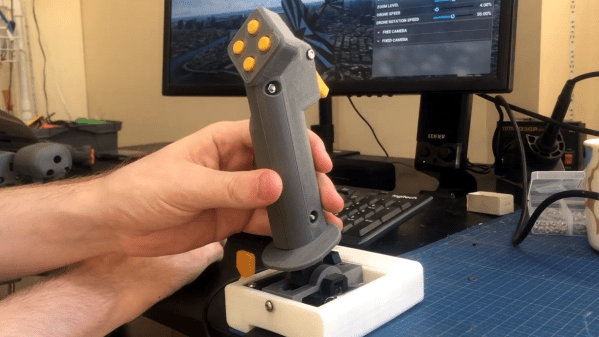
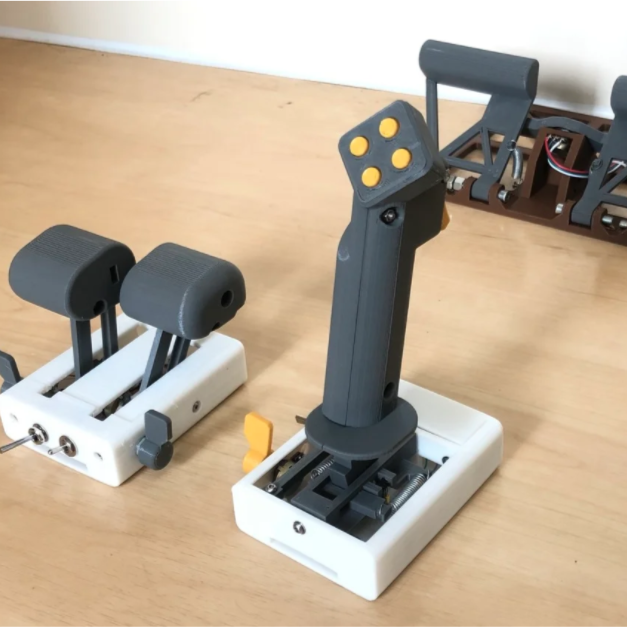
We have seen quite a few DIY joystick designs that use Hall effect sensors, but [Akaki Kuumeri]’s controller designs (YouTube video, embedded below) really make the most of 3D printing to avoid the need for any other type of fabrication. He’s been busy using them to enhance his Microsoft Flight Simulator 2020 experience, and shares not just his joystick design, but makes it a three-pack with designs for throttle and pedals as well.

Hall effect sensors output a voltage that varies in proportion to the presence of a magnetic field, which is typically provided by a nearby magnet. By mounting sensors and magnets in a way that varies the distance between them depending on how a control is moved, position can be sensed and communicated to a host computer.

In [Akaki]’s case, that communication is done with an Arduino Pro Micro (with ATmega32U4) whose built-in USB support allows it to be configured and recognized as a USB input device. The rest is just tweaking the physical layouts and getting spring or elastic tension right. You can see it all work in the video below.

Continue reading “3D-Printed Flight Controls Use Magnets For Enhanced Flight Simulator 2020 Experience”