Minimalist Timer Counts Down With LED Matrix

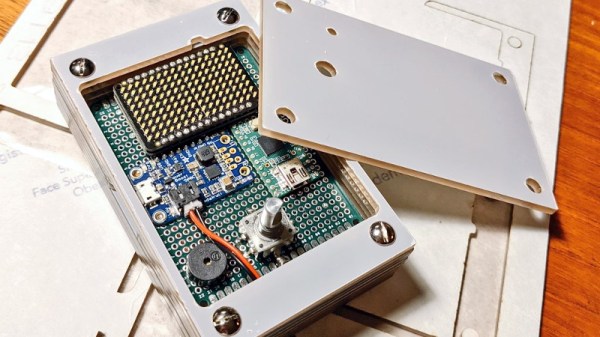
Looking for something with a bit more style than the traditional kitchen timer, [Martin Jonasson] decided to take the last couple of months to design and build his own take on the idea using a rotary encoder, 16×9 LED matrix, and a Teensy 2.0 microcontroller. Were there better things he could have spent that time on? Possibly. But you probably wouldn’t have been reading it about it here, so we won’t trouble ourselves with such thoughts.

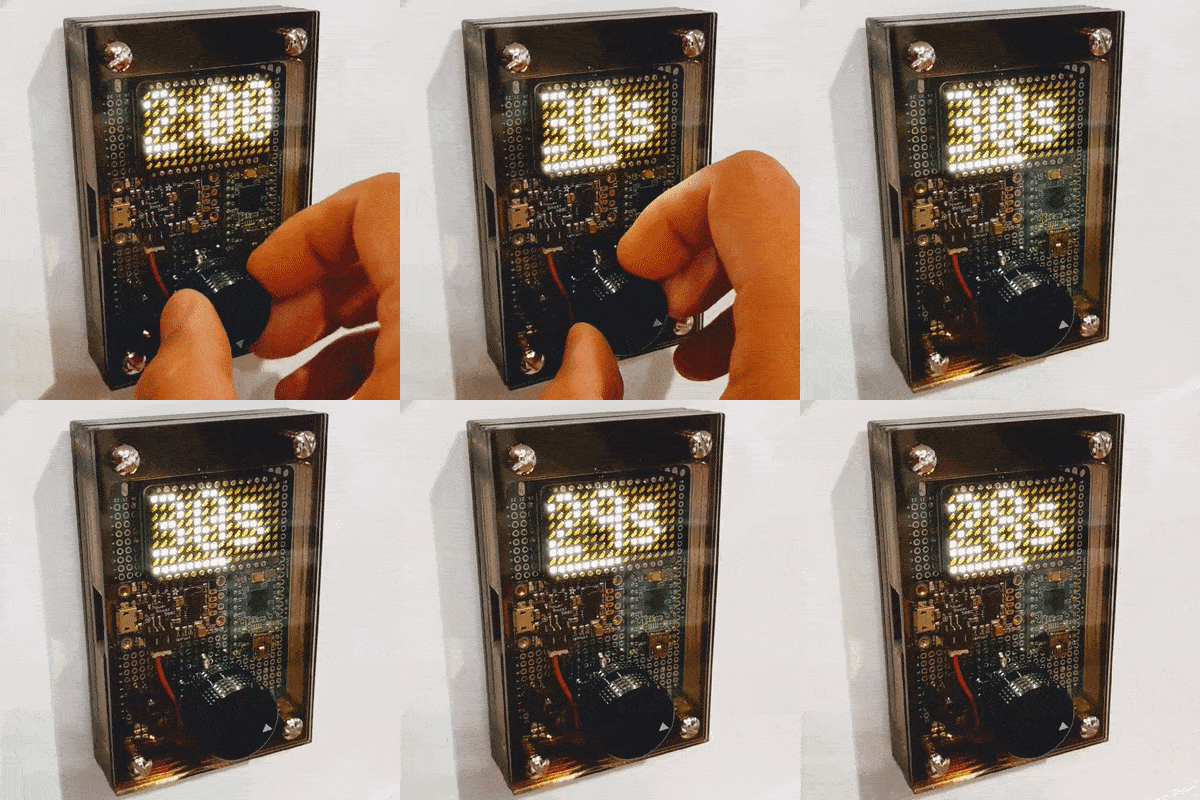
Put together on a piece of perfboard, the handwired circuit also includes an Adafruit PowerBoost 500 Charger, a 3.7 V 2500 mAh LiPo battery, a IS31FL3731 Charlieplexed PWM LED driver, and a piezo buzzer. The top of the rotary encoder has been capped off with a sold metal knob, which combined with the enclosure made of stacked laser cut 3 mm acrylic sheets, really gives the device a very sleek and classy look.

While the hardware is quite nice, it’s the software that really pulls this whole project together. A game developer by trade, [Martin] went all in on the timer’s GPLv3 licensed firmware. From using the toneAC library to play melodies at the end of the countdown, to the custom fonts and the code that pauses the timer while the user is spinning the knob, there’s plenty of little touches that should make the timer a joy to use. We’ve seen some unique kitchen timers over the years, but the attention to detail put into this build really raises the bar.

[Martin] has provided everything you need to create your own version of his timer, including the SVG file for the laser cut case. While not strictly required, coming up with a custom PCB for this project would be a nice touch, should you want to put your own spin on it.

[Thanks to Tom for the tip.]

Cast-in-Concrete Clock Upgraded After Thirteen Years

Proving that an old design cast in concrete can indeed be changed, [Hans Jørgen Grimstad] has revisited his Nixie clock from 2008, cleaned up the electronics and packaging, and turned it into a kit. Not that he has plans to enter the kit-making business, but he just thought it would be fun to learn how to make kits. In the video below the break, he’s a bit embarrassed to reveal the inside of his first Nixie clock design, housed in a cast-concrete electronics enclosure. Although it still works, the internal wiring is a flaky, untidy, and perhaps a bit dangerous.

But [Hans] has improved his game over the years, making a number of different clock designs. The latest incarnation is pleasant to look at, built on a PCB which is visible inside a custom acrylic case. Three versions are available to support different types of tubes. The documentation he prepared for the project and the kit is very thorough. He walks you through the unboxing and assembly process in the videos below. Firmware is in C, and runs on a Raspberry Pi Zero W. If you are interesting in making electronics kits, [Hans]’s project would be a good example to follow.

All the necessary information to build the clock is published on the project’s GitHub repository. If you’re looking for enclosure ideas other than concrete or acrylic sheet, check out this write-up on hand-forging artistic Nixie clock enclosures.

Continue reading “Cast-in-Concrete Clock Upgraded After Thirteen Years”

Small low-cost CNC mill with rotary tool

Minimal Mill: The Minamil

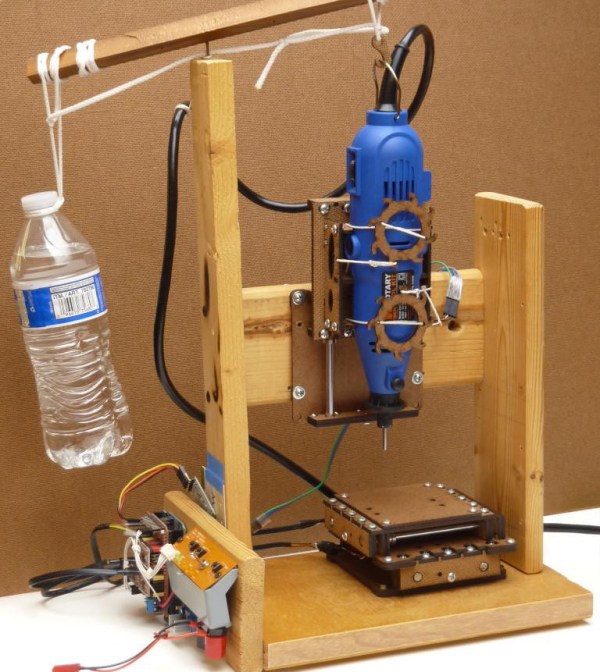
Having a few machine tools at one’s disposal is a luxury that not many of us are afforded, and often an expensive one at that. It is something that a large percentage of us may dream about, though, and with some commonly available tools and inexpensive electronics a few people have put together some very inexpensive CNC machines. The latest is the Minamil, which uses a rotary tool and straps it to an economical frame in order to get a functional CNC mill setup working.

This project boasts impressively low costs at around $15 per axis. Each axis uses readily available parts such as bearings and threaded rods that are readily installed in the mill, and for a cutting head the build is based on a Dremel-like rotary tool that has a similarly low price tag. Let’s not ignore the essentially free counterweight that is used.

For control, an Arduino with a CNC shield powers the three-axis device which is likely the bulk of the cost of this project. [Paul McClay] also points out that a lot of the material he needed for this build can be salvaged from things like old printers, so the $45 price tag is a ceiling, not a floor.

The Minamil has been demonstrated milling a wide variety of materials with excellent precision. Both acrylic and aluminum are able to be worked with this machine, but [Paul] also demonstrates it in its capacity to mill PCBs. It does have some limitations but for the price it seems that this mill can’t be beat, even compared to his previous CNC build which repurposed old CD drives.

Math, Optics, And CNC Combine To Hide Secret Images In Acrylic

Magic mirrors, with an LCD panel hidden behind a partially reflectively mirror, are popular for a reason — they’re a good-looking way to display useful information. A “Magic Window,” however, is an entirely different thing — and from the look of it, a far cooler one.

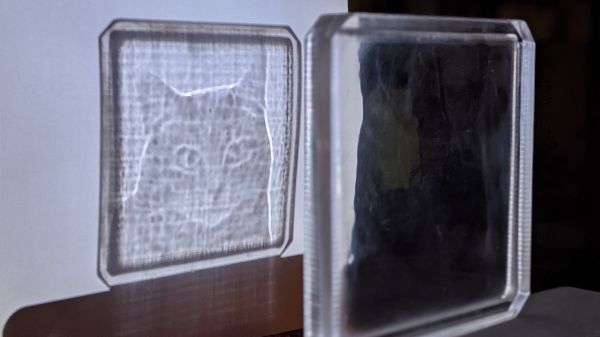
If you’ve never seen a Magic Window before, don’t worry — it’s partially because you’re not supposed to see it. A Magic Window appears to be a clear piece of glass or plastic, one with a bit of a wave in it that causes some distortion when looking through it. But as [Matt Ferraro] explains, the distortion encodes a hidden image, visible only when light passes through the window. It looks a bit like a lithophane, but it’s projected rather than reflected, and it relies on an optical phenomenon known as caustics. If you’ve ever seen the bright and dark patches cast on the bottom of a swimming pool when sunlight hits the surface, you’ve seen caustics.

As for how to hide an image in a clear window, let’s just say it takes some doing. And some math; Snell’s Law, Fermat’s Theorem, Poisson’s Equation — all these and more are mentioned by [Matt] by way of explanation. The short story is that an image is morphed in software, normalized, and converted into a heightmap that’s used to generate a toolpath for a CNC router. The design is carved into a sheet of acrylic by the router and polished back to clarity with a succession of sandpaper grits. The wavy window is then ready to cast its hidden shadow.

Honestly, the results are amazing, and we marvel at the skills needed to pull this off. Or more correctly, that [Matt] was able to make the process simple enough for anyone to try.

Continue reading “Math, Optics, And CNC Combine To Hide Secret Images In Acrylic”

How To Build With Acrylic Using The Tools You Have

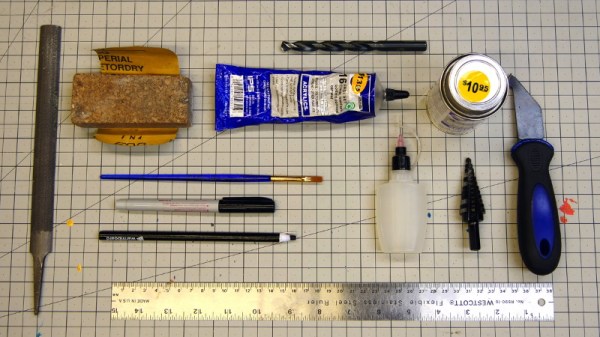
In a perfect world, we’d all have laser cutters and could pop intricate designs out of acrylic sheets with just a few clicks of the mouse. But in reality, most of us have to make do with the pedestrian tools we have at hand. For many, that might even mean everything has to be done by hand. Luckily, [Eric Strebel] has been working on a series of videos that cover how you can make professional looking parts out of acrylic using a wide array of common tools.

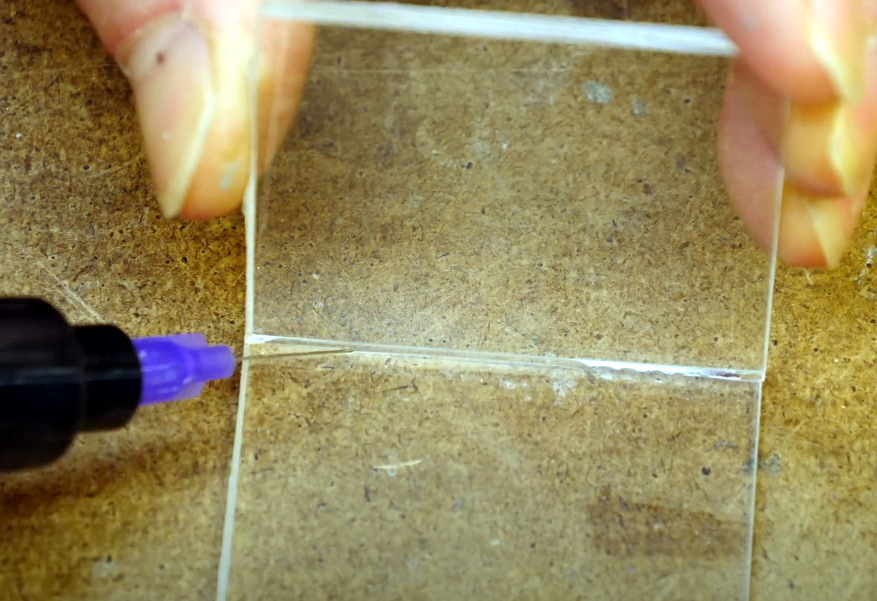
Solvent welding hand-cut pieces of acrylic.

The first video demonstrates how a simple cube can be constructed by a band saw, a table saw, and if need be, with hand tools. You might think the two power saws would have similar results, but as [Eric] explains, the table saw ends up being far more accurate and requires less post-processing to get a smooth edge. Ideally you’d run the cut pieces through a router to bevel them, but that’s a tall order for many home gamers.

As for the hand tool approach, scoring and snapping the sheets ends up making a surprisingly clean break that can actually be cleaner than the edge you’d get with a power tool. No matter how you cut them, [Eric] shows the proper way to apply the water-like solvent to your acrylic pieces to create a strong and visually attractive bond.

The next video in the series covers more advanced techniques that can still be pulled off without a top-of-the-line workshop. Sure the water-cooled acrylic bender he has is pretty slick, but if you can’t afford the $100 USD gadget, he shows you how to get similar results with an old toaster oven that you can pick up from the thrift store or even the side of the road. With some hand-made jigs and molds, you can warp and flex the heated plastic into whatever shape your project needs. Combining the tips from both videos, you might be surprised at what can be created with little more than a ruler, some hot air, and the appropriate techniques.

These are just the latest in a long line of fantastic videos that [Eric Strebel] has produced about at-home design and fabrication. Whether its making a two part silicone mold or creating functional prototypes out of foam board, there’s an excellent chance that he’s covered a topic you’ve wanted to learn more about.

Continue reading “How To Build With Acrylic Using The Tools You Have”

Flexible Prototyping For E-Textiles That Doesn’t Cost An Arm And A Leg

Let’s face it: pretty much everything about e-textiles is fiddly. If wearables were easy, more people would probably work in that space. But whereas most circuit prototyping is done in two dimensions, the prototyping of wearables requires thinking and planning in 3D. On top of that, you have to figure out how much conductive thread you need, and that stuff’s not cheap.

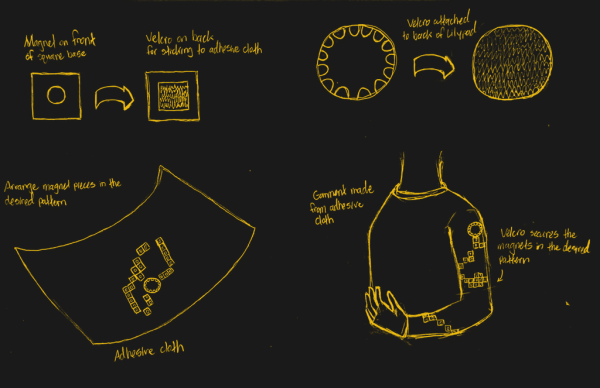
[alch_emist] has a method for arranging circuits in 3D space that addresses the harsh realities of trying to prototype wearables. There’s that whole gravity thing to deal with, and then of course there are no straight lines anywhere on the human body. So here’s how it works: [alch_emist] made a bunch of reusable tie points designed to work with an adhesive substrate such as felt. They laser-cut a set of acrylic squares and drilled a hole in each one to accommodate a neodymium magnet. On the back of each square is a small piece of the hook side of hook-and-loop tape, which makes the tie points stay put on the felt, but rearrange easily.

We love the idea of prototyping with felt because it’s such a cheap and versatile fabric, and because you can easily wrap it around your arm or leg and see how the circuit will move when you do.

Not quite to this planning stage of your next wearable project? Magnets and conductive thread play just as well together in 2D.

Digital X-Ray Scanner Teardown Yields Bounty Of Engineering Goodies

We’ll just go ahead and say it right up front: we love teardowns. Ripping into old gear and seeing how engineers solved problems — or didn’t — is endlessly fascinating, even for everyday devices like printers and radios. But where teardowns really get interesting is when the target is something so odd and so specialized that you wouldn’t normally expect to get a peek at the outside, let alone tramp through its guts.

[Mads Barnkob] happened upon one such item, a Fujifilm FCR XG-1 digital radiography scanner. The once expensive and still very heavy piece of medical equipment was sort of a “digital film system” that a practitioner could use to replace the old-fashioned silver-based films used in radiography, without going all-in on a completely new digital X-ray suite. It’s a complex piece of equipment, the engineering of which yields a lot of extremely interesting details.

The video below is the third part of [Mads]’ series, where he zeroes in on the object of his desire: the machine’s photomultiplier tube. The stuff that surrounds the tube, though, is the real star, at least to us; that bent acrylic light pipe alone is worth the price of admission. Previous videos focused on the laser scanner unit inside the machine, as well as the mechatronics needed to transport the imaging plates and scan them. The video below also shows experiments with the PM tube, which when coupled with a block of scintillating plastic worked as a great radiation detector.

We’ve covered a bit about the making of X-rays before, and a few of the sensors used to detect them too. We’ve also featured a few interesting X-ray looks inside of tech, from a Starlink dish to knock-off adapters.

Continue reading “Digital X-Ray Scanner Teardown Yields Bounty Of Engineering Goodies”