Litter Basket Automation

Sometimes the technology part of a project isn’t the hard part. It is having an idea for something both useful and doable. Sure, a robot butler that would do your cleaning and laundry would be useful, but might be out of reach for most of us. On the other hand, there’s only so many use cases for another blinking LED.

[Martinhui] knows how to use an ultrasonic sensor with an Arduino. Driving a motor isn’t that hard, either. The question is: what do you do with that? [Martin’s] answer: Automate a trash can. You can see a video of the result, below.

Continue reading “Litter Basket Automation”

Primer On Servos Hits All The Basics

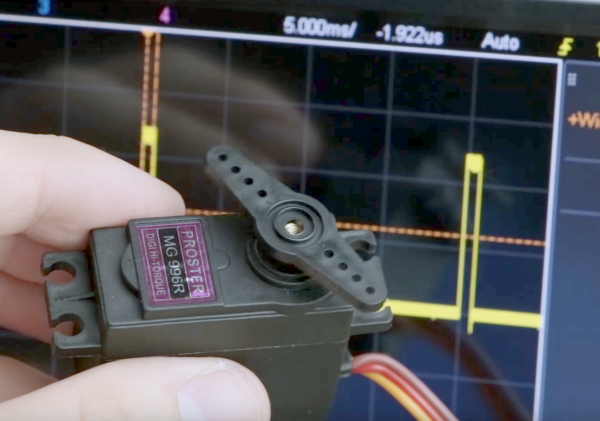
Servos are pretty basic fare for the seasoned hacker. But everyone has to start somewhere, and there’s sure to be someone who’ll benefit from this primer on servo internals. Who knows – maybe even the old hands will pick up something from a fresh perspective.

[GreatScott!] has been building a comprehensive library of basic electronics videos over the last few years that covers everything from using a multimeter to programming an Arduino. The last two installments delve into the electromechanical realm with a treatment of stepper motors along with the servo video below. He covers the essentials of the modern RC-type servo in a clear and engaging style that makes it easy for the newbie to understand how a PWM signal can translate into positional changes over a 180° sweep. He shows how to control a servo directly with an Arduino, with bonus points for including a simple 555-based controller circuit too. A quick look at the mods needed to convert any servo to continuous rotation wraps up the video.

If [GreatScott!]’s video whets your appetite for more, be sure to check out [Richard Baguley]’s deeper dive into servos. And when you’re ready to put your new-found knowledge into practice, maybe a nice project would be to convert a hobby servo into a linear actuator.

Continue reading “Primer On Servos Hits All The Basics”

Dual-boot Your Arduino

There was a time, not so long ago, when all the cool kids were dual-booting their computers: one side running Linux for hacking and another running Windows for gaming. We know, we were there. But why the heck would you ever want to dual-boot an Arduino? We’re still scratching our heads about the application, but we know a cool hack when we see one; [Vinod] soldered the tiny surface-mount EEPROM on top of the already small AVR chip! (Check the video below.)

aAside from tiny-soldering skills, [Vinod] wrote his own custom bootloader for the AVR-based Arduino. With just enough memory to back up the AVR’s flash, the bootloader can shuffle the existing program out to the EEPROM while flashing the new program in. For more details, read the source.

While you might think that writing a bootloader is deep juju (it can be), [Vinod]’s simple bootloader application is written in C, using a style that should be familiar to anyone who has done work with an Arduino. It could certainly be optimized for size, but probably not for readability (and tweakability).

Why would you ever want to dual boot an Arduino? Maybe to be able to run testing and stable code on the same device? You could do the same thing over WiFi with an ESP8266. But maybe you don’t have WiFi available? Whatever, we like the hack and ‘because you can’ is a good enough excuse for us. If you do have a use in mind, post up in the comments!

Continue reading “Dual-boot Your Arduino”

Minecraft Sword Lights Up When Nearby Friends

With All Hallow’s Eve looming close, makers have the potential to create some amazing costumes we’ll remember for the rest of the year. If you’re a fan of the hugely addict-*cough* popular game Minecraft, perhaps you’ve considered cosplaying as your favorite character skin, but lacked the appropriate props. [Graham Kitteridge] and his friends have decided to pay homage to the game by making their own light-up Minecraft swords.

These swords use 3D-printed and laser-cut parts, designed so as to hide the electronics for the lights and range finder in the hilt. Range finder? Oh, yes, the sword uses an Arduino Uno-based board to support NewPixels LEDs and a 433Mhz radio transmitter and receiver for ranged detection of other nearby swords that — when they are detected — will trigger the sword to glow. Kind of like the sword Sting, but for friendlies. Continue reading “Minecraft Sword Lights Up When Nearby Friends”

Navigation Thing: Four Days, Three Problems, And Fake Piezos

The Navigation Thing was designed and built by [Jan Mrázek] as part of a night game activity for high school students during week-long seminar. A night-time path through a forest had stations with simple tasks, and the Navigation Thing used GPS, digital compass, a beeper, and a ring of RGB LEDs to provide a bit of “Wow factor” while guiding a group of students from one station to the next. The devices had a clear design direction:

“I wanted to build a device which a participant would find, insert batteries, and follow the beeping to find the next stop. Imagine the strong feeling of straying in the middle of the night in an unknown terrain far away from civilization trusting only a beeping thing you found. That was the feeling I wanted to achieve.”

The Navigation Things (there are six in total) guide users to fixed waypoints with GPS, a digital compass, and a ring of WS2812 LEDs — but the primary means of feedback to the user is a beeping that gets faster as you approach the destination. [Jan] had only four days to make all six units, which was doable. But as most of us know, delivering on a tight deadline is often less about doing the work you know about, and more about effectively handling the unexpected obstacles that inevitably pop up in the process.

Continue reading “Navigation Thing: Four Days, Three Problems, And Fake Piezos”

Newsflash: A Bunch Of Arduinos Is Not An Autonomous Car

Nobody’s perfect. Sometimes you’re up late at night writing a blog post and you stumble upon an incredible story. You write it up, and it ends up being, well, incredible. IEEE Spectrum took the bait on this video (embedded below) where [Keran McKenzie] claims to have built a self-driving car for under $1,000 AUS with Arduinos.

The video is actually pretty funny, and we don’t think it’s intended to be a mass-media hoax as much as a YouTube joke. After letting the car “take over” for a few seconds, it swerves and [Keran] pretends to have hit something. (He’s using his knees people!) There are lots of takes with him under the car, and pointing at a single wire that supposedly makes the whole thing work. Yeah, right.

Continue reading “Newsflash: A Bunch Of Arduinos Is Not An Autonomous Car”

Scissors Make Great Automatic Cable Cutters

The team at [2PrintBeta] required a bunch of cables, heat shrink, and braid to be cut for their customers. They looked into an industrial cable cutter, but decided the price was a little too high, so they decided to make their own. They had a bunch of ideas for cutting: Using a razor blade?  Or a Dremel with a cutting wheel? What they came up with was a DIY cable cutter that uses a pair of scissors, a pair of stepper motors, a pair of 3D printed wheels and an Arduino.

The first thing the team had to do was to mount the scissors so they would cut reliably. One of the stepper motors was attached to a drive wheel that had a bolt mounted on it. This went through one of the scissors’ handles, the other handle was held in place on the machine using screws. The second stepper motor was used to rotate the wheels that drives the cable through to the correct length. [2PrintBeta] used a BAM&DICE shield and two DICE-STK stepper motor drivers on an Arduino Mega to control the cutter.

The [2PrintBeta] team are pretty good at doing things themselves, as we’ve seen previously with their DIY plastic bender. And again, with this automatic cable cutter, they’ve seen a need and resolved it using the things at their disposal and some DIY ingenuity.

Continue reading “Scissors Make Great Automatic Cable Cutters”