An artistic representation of a red Moon, hovering over the Earth

Is That The Moon Worming Its Way Into Your BIOS?

When facing a malware situation, the usual “guaranteed solution” is to reinstall your OS. The new developments in malware world will also require you to have a CH341 programmer handy. In an arguably inevitable development, [Kaspersky Labs] researchers have found an active piece of malware, out in the wild, that would persist itself by writing its bootstrap code into the BIOS chip. It doesn’t matter if you shred the HDD and replace it with a new one. In fact, so-called MoonBounce never really touches the disk at all, being careful to only store itself in RAM, oh, and the SPI flash that stores the BIOS code, of course.

MoonBounce is Microsoft-tailored, and able to hook into a chain of components starting from the UEFI’s DXE environment, through the Windows Loader, and finishing as a part of svchost.exe, a process we all know and love.

This approach doesn’t seem to be widespread – yet, but it’s not inconceivable that we’ll eventually encounter a ransomware strain using this to, ahem, earn a bit of extra cash on the side. What will happen then – BIOS reflashing service trucks by our curbsides? After all, your motherboard built-in BIOS flasher UI is built into the same BIOS image that gets compromised, and at best, could be disabled effortlessly – at worst, subverted and used for further sneaky persistence, fooling repairpeople into comfort, only to be presented with one more Monero address a week later.

Will our hardware hacker skills suddenly go up in demand, with all the test clip fiddling and SOIC-8 desoldering being second nature to a good portion of us? Should we stock up on CH341 dongles? So many questions!

This week’s installment of “threat vectors that might soon become prevalent” is fun to speculate about! Want to read about other vectors we might not be paying enough attention to? Can’t go wrong with supply-chain attacks on our repositories! As for other auxiliary storage-based persistence methods – check out this HDD firmware-embedded proof-of-concept rootkit. Of course, we might not always need the newfangled ways to do things, the old ways still work pretty often – you might only need to disguise your malicious hardware as a cool laptop accessory to trick an average journalist, even in a hostile environment.

Continue reading “Is That The Moon Worming Its Way Into Your BIOS?”

A bird-shaped yellow PCB with legs wound out of wire, perched on its creator's arm. The bird has a lot of through-hole components on it, as well as an assortment of different-colored LEDs.

Printed Circuit Bird Family Calls For Us To Consider Analog

On our favourite low-attention-span content site, [Kelly Heaton] has recently started sharing a series of “Printed Circuit Birds”. These are PCBs shaped like birds, looking like birds and chirping like birds – and they are fully analog! The sound is produced by a network of oscillators feeding into each other, and, once tuned, is hardly distinguishable from the bird songs you might hear outside your window. Care and love was put into making this bird life-like – it perches on Kelly’s arm with legs woven out of single-strand wire and talons made out of THT resistors, in the exact same way you would expect a regular bird to sit on your arm – that is, if you ever get lucky enough. It’s not just one bird – there’s a family of circuit animals, including a goose, a crow and even a cricket.

Why did these animals came to life – metaphorically, but also, literally? There must be more to a non-ordinary project like this, and we asked Kelly about it. These birds are part of her project to explore models of consciousness in ways that we typically don’t employ. Our habit is to approach complex problems in digital domains, but we tend to miss out on elegance and simplicity that analog circuits are capable of. After all, even our conventional understanding of a neural network is a matrix of analog coefficients that we then tune, a primitive imitation of how we assume human brains to work – and it’s this “analog” approach that has lately moved us ever so closer to reproducing “intelligence” in a computer.

Kelly’s work takes a concept that would have many of us get the digital toolkit, and makes it wonderfully life-like using a small bouquet of simple parts. It’s a challenge to our beliefs and approaches, compelling in its grace, urging us to consider and respect analog circuits more when it comes to modelling consciousness and behaviours. If it’s this simple to model sounds and behaviour of a biological organism, a task that’d have us writing DSP and math code to replicate on a microcontroller – what else are we missing from our models?

Kelly has more PCBs to arrive soon in preparation for her NYC exhibit in February, and will surely be posting updates on her Twitter page! We’ve covered her work before, and if you haven’t seen it yet, her Supercon 2019 talk on Electronic Naturalism would be a great place to start! Such projects tend to inspire fellow hackers to build other non-conventional projects, and this chirping pendant follows closely in Kelly’s footsteps! The direction of this venture reminds us a lot of BEAM robotics, which we’ve recently reminisced upon as something that’s impacted generations of hackers to look at electronics we create through an entirely different lens.

Continue reading “Printed Circuit Bird Family Calls For Us To Consider Analog”

A Zhengbang Pick&Place machine, with a Virustotal 53/69 result and "53 security vendors and 1 sandbox flagged this file as mailcious" crudely overlaid on top of the image

Zhengbang Pick & Places Your Confidential Data In The Bag, Slowly

Isn’t it convenient when your pick-and-place machine arrives with a fully-set-up computer inside of it? Plug in a keyboard, mouse and a monitor, and you have a production line ready to go. Turns out, you can have third parties partake in your convenience by sharing your private information with them – as long as you plug in an Ethernet cable! [Richard] from [RM Cybernetics] has purchased a ZhengBang ZB3245TSS machine, and in the process of setting it up, dutifully backed up its software onto a USB stick – as we all ought to.

This bit of extra care, often missed by fellow hackers, triggered an antivirus scanner alert, and subsequently netted some interesting results on VirusTotal – with 53/69 result for a particular file. That wasn’t conclusive enough – they’ve sent the suspicious file for an analysis, and the test came back positive. After static and dynamic analysis done by a third party, the malware was confirmed to collect metadata accessible to the machine and send it all to a third-party server. Having contacted ZhengBang about this mishap, they received a letter with assurances that the files were harmless, and a .zip attachment with replacement “clean” files which didn’t fail the antivirus checks.

It didn’t end here! After installing the “clean” files, they also ran a few anti-malware tools, and all seemed fine. Then, they plugged the flash drive into another computer again… to encounter even more alerts than before. The malware was equipped with a mechanism to grace every accessible .exe with a copy of itself on sight, infecting even .exe‘s of the anti-malware tools they put on that USB drive. The article implies that the malware could’ve been placed on the machines to collect your company’s proprietary design information – we haven’t found a whole lot of data to support that assertion, however; as much as it is a plausible intention, it could have been a case of an unrelated virus spread in the factory. Surprisingly, all of these discoveries don’t count as violations of Aliexpress Terms and Conditions – so if you’d like to distribute a bunch of IoT malware on, say, wireless routers you bought in bulk, now you know of a platform that will help you!

This goes in our bin of Pretty Bad News for makers and small companies. If you happen to have a ZhengBang pick-and-place machine with a built-in computer, we recommend that you familiarize yourself with the article and do an investigation. The article also goes into details on how to reinstall Windows while keeping all the drivers and software libraries working, but we highly recommend you worry about the impact of this machine’s infection spread mechanisms, first.

Supply chain attacks, eh? We’ve seen plenty of these lately, what’s with communities and software repositories being targeted every now and then. Malware embedded into devices from the factory isn’t a stranger to us, either – at least, this time we have way more information than we did when Supermicro was under fire.

Editor’s Note: As pointed out by our commenters, there’s currently not enough evidence to assert that Zhengbang’s intentions were malicious. The article has been edited to reflect the situation more accurately, and will be updated if more information becomes available.

Editor’s Note Again: A rep from Zhengbang showed up in the comments and claims that this was indeed a virus that they picked up and unintentionally passed on to the end clients.

A tupperware-sized 3D-printed aeroponics cell, a grid-like contraption, with about 30 cloves of garlic in it, about five of them starting to grow. The cell is printed with white plastic, and there's a semi-transparent acrylic roof with LED strips attached to its underside, lifted about 3-4 inches above the garlic.

Aeroponic Cell Grows Garlic, Forwards CellSol Packets

Certain pictures draw attention like no other, and that’s what happened when we stumbled upon a Twitter post about “resuscitating supermarket garlic” by [Robots Everywhere]. The more we looked at this photo, the more questions popped up, and we couldn’t resist contacting the author on Twitter – here’s what we’ve learned!

This is an aeroponics cell – a contraption that creates suitable conditions for a plant to grow. The difference of aeroponics, when compared to soil or hydroponics methods, is that the plant isn’t being submerged in soil or water. Instead, its roots are held in the air and sprayed with water mist, providing both plenty of water but also an excess of oxygen, as well as a low-resistance space for accelerated root growth – all of these factors that dramatically accelerate nutrient absorption and development of the plant. This cell design only takes up a tiny bit of space on the kitchen countertop, and, in a week’s time, at least half of the cloves have sprouted!

Much like a garlic bulb, this project has layers to it – in that this aeroponic cell is also a CellSol node! The CellSol project is a distributed communication system that can use LoRa and WiFi for its physical layer, enabling you to build widely spanning mesh networks that even lets you connect your smartphone to it where it’s called for – say, as an internet-connected hub for other devices to send their data through. We’ve covered CellSol and it’s hacker-friendliness previously, and one of the intentions of this design is to show how any device with a bit of brains and a SX1276 module can help you form a local CellSol network, or participate in some larger volunteer-driven CellSol-powered effort.

If, like us, you’re looking at this picture and thinking “this is something I’d love to see on my desk”, [Robots Everywhere] has published the STL files for making a hydroponic cell like this at home, as well as all the code involved, and some demo videos. Hopefully, the amount of aeroponics projects in our tips line is only going to increase! We’ve covered Project EDEN before, a Hackaday Prize 2017 entry that works to perfect an aeroponics approach to create an indoor greenhouse. There’s also a slew of hydroponics projects to have graced our pages, from hardware store-built to 3D printed ones!

Continue reading “Aeroponic Cell Grows Garlic, Forwards CellSol Packets”

Remoticon 2021: Unbinare Brings A Reverse-Engineering Toolkit Into Recycling

Unbinare is a small Belgian company at the forefront of hacking e-waste into something useful, collaborating with recycling and refurbishing companies. Reverse-engineering is a novel way to approach recycling, but it’s arguably one of the most promising ways that we are not trying at scale yet. At Hackaday Remoticon 2021, Maurits Fennis talked about Unbinare’s efforts in the field and presented us with a toolkit he has recently released as a part of his work, as well as described how his background as an artist has given him insights used to formulate foundational principles of Unbinare.

Image showing an Unbinare OISTER boardUnbinare’s tools are designed to work in harmony with each other, a requirement for any productive reverse-engineering effort. OI!STER is a general-purpose salvaged MCU research board, with sockets to adapt to different TQFP chip sizes. This board is Maurits’s experience in reverse-engineering condensed into a universal tool, including a myriad of connectors for different programming/debugging interfaces. We don’t know the board’s full scope, but the pictures show an STM32 chip inside the TQFP socket, abundant everywhere except your online retailer of choice. Apart from all the ways to break out the pins, OI!STER has sockets for power and clock glitching, letting you target these two omnipresent Achilles’ heels with a tool like ChipWhisperer.

Continue reading “Remoticon 2021: Unbinare Brings A Reverse-Engineering Toolkit Into Recycling”

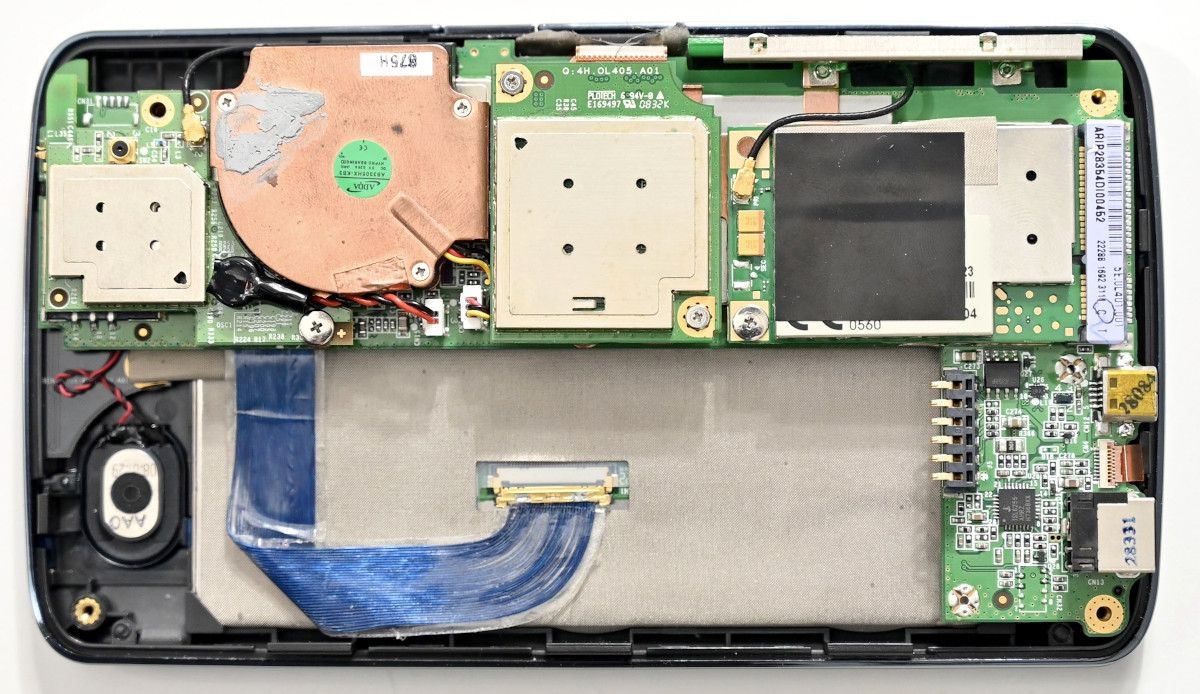
A PoE adapter's RJ45 jack added inside an Acer laptop

Laptop Empty Space Filled With RS485 And PoE

Out of all the laptop upgrade options typically available, you wouldn’t expect this specific one. [controlmypad] decided to take a part of his RS485 device programming workflow and put it inside of a spare laptop he picked up for cheap. Typically, he’d occupy some desk space and lay out an unwieldy combination of a USB-RS485 dongle, a PoE power injector, a PSU for that injector, and a few cables to join it all – being extra weight in the tool bag, cluttering the workspace when laid out, and the RS485 adapter slowly wearing out the USB ports during the work-related motions. No reason that all of this couldn’t be packed inside a laptop, however.

What helps a lot is that, in many modern cheap laptops, the motherboard is fairly small, and the DVD drive plastic placeholder can be omitted without second thought. Cutting off the plastic molding from both of the adapters turns them into a nicely reusable circuit board and a small PoE module, respectively. After laborious yet careful cutting of the laptop case with a hobby knife, the PoE injector fits right in and, essentially, adds an extra RJ45 port to the laptop. From where the Hackaday.io write-up left off, it doesn’t seem like this mod got fully completed, but most of the important details are there for us to learn from. What got left out is connecting it to an internal USB port (should help that the motherboard’s schematics are available online), as well as creating 12V-24V from the laptop’s power rails. At this point, however, this mod is a big step forward usability-wise, even if it still requires an external PSU.

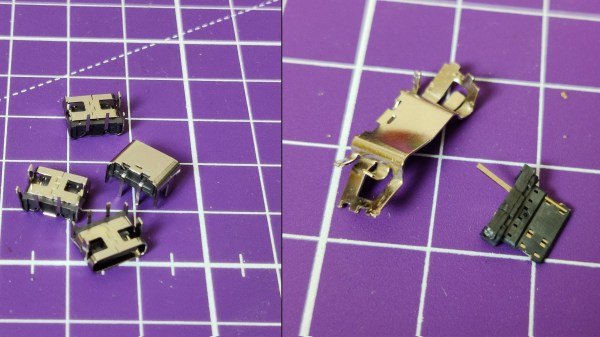
Laptop internal upgrade projects are rare but cherished – it’s a combination of “daring”, “inquisitive” and “meticulous” that results in people successfully hacking on a thing they certainly were not meant to hack, and have that thing serve their needs better. Apart from all the EEE PC upgrade options that set the bar for a generation of laptop modders, there’s a myriad of unconventional laptop modification vectors – you could do a thorough from-scratch Type-C charging port conversion, replace your webcam with an FSF-endorsed open firmware WiFi dongle, build in a “12-axis” sensor for auto-orientation and data-logging, or invent a remote self-destruct mechanism for your laptop. Those are, indeed, quite a few things you won’t typically find in the list of available options while customizing your laptop at the manufacturer website.

An image describing parts of a Tesla modem board

LTE Modem Transplant For A Tesla Imported Into Europe

When modern connected cars cross continents, novel compatibility problems crop up. [Oleg Kutkov], being an experienced engineer, didn’t fret when an USA-tailored LTE modem worked poorly on his Tesla fresh off its USA-Europe import journey, and walks us through his journey of replacing the modem with another Tesla modem module that’s compatible with European LTE bands.

[Oleg]’s post goes through different parts on the board and shows you how they’re needed in the bigger picture of the Tesla’s Media Computer Unit (MCU), even removing the LTE modem’s shield to describe the ICs underneath it, iFixit teardown diagram style! A notable highlight would be an SIM-on-chip, essentially, a SIM card in an oh-so-popular DFN package, and thankfully, replacing it with a socket for a regular SIM card on some extender wires has proven fruitful. The resulting Tesla can now enjoy Internet connectivity at speeds beyond those provided by EDGE. The write-up should be a great guide for others Tesla owners facing the same problem, but it also helps us make electric cars be less alike black boxes in our collective awareness.

Not all consequences of Tesla design decisions are this minor; for instance, this year, we’ve described a popular eMMC failure mode of Tesla cars and how Tesla failed to address it. Thankfully, Tesla cars are becoming more of a hacker community target, whether it’s building a computer-vision-assisted robot to plug in a charging cable, getting it repaired for a fraction of the dealership cost, or even assembling your own Tesla from salvage parts!