The Smaller, Tinier Arduino Platform

While many of the Arduino platforms are great tools for gaining easy access to microcontrollers, there are a few downsides. Price and availability may be the highest on the list, and for those reasons, some have chosen to deploy their own open-source Arduino-compatible boards.

The latest we’ve seen is the Franzininho, an Arduino Gemma-like board that’s based on the ATtiny85, a capable but tiny microcontroller by Atmel in a compact 8-pin configuration. This board has everything the Gemma has, including a built-in LED and breakout pins. One of the other perks of the Franzininho over the Gemma is that everything is based on through-hole components, making the assembly much easier than the surface mount components of the Gemma.

It’s worth noting that while these boards are open source, the Arduinos are as well. It’s equally possible to build your own 100% identical Arduino almost as easily. If you want more features, you can add your own by starting from one of these platforms and do whatever you want with it, like this semi-educational Atmel breakout board.

Thanks to [Clovis] for the tip!

Never Go To The Office Breakroom Again

If you’re tired of having to make small talk with random people in the office break room every time you need a cup of coffee, or simply don’t have the time to get up to pour yourself some more, it would be nice if there was a way you could have your cup filled for you, right at your desk. With this new drink dispenser, you won’t have to get up or even pour your drinks yourself!

We’ve certainly seen plenty of automatic drink makers, but those are more suited to parties and complicated drink mixing. This beverage dispenser is more for the person who knows their tastes and simply wants to save some time. It’s also much simpler, using a peristaltic pump for serving a single liquid from a large bottle into a glass, and using a load cell to know when to stop filling. The peristaltic pump is a little slow though, so it’s best to set the glass back in the dispenser and let it top you off each time.

We’re a big fan of time savers around here, especially when it comes to improving workflow. Of course, the best time saver is a clean, well-organized shop which will help you out whether you’re building a drink dispenser or anything else.

Continue reading “Never Go To The Office Breakroom Again”

The Best New Amiga Title Of 2018?

Just because a system becomes obsolete for most of us doesn’t mean that everyone stops working with them. Take a look at this brand new game for the Amiga 500 called Worthy, which is sure to make most of us regret ever upgrading our home computers, despite the improvements made since 1987.

The group who developed the game is known as Pixelglass and they have done a lot of work on this platform, releasing several games over the past few years. Their latest is Worthy, an action-adventure game that looks similar to the top-down perspective Zelda games from the SNES. It’s an impressive piece of work for a system that few of us own anymore, but if you have one (or even if you have a good emulator) you might want to give it a whirl.

If developing games for retro systems is your style, this isn’t limited to personal computers like the Amiga. We’ve seen development platforms for the Super Nintendo that will let you run your own code, and even other methods for working with the Sega Saturn if you’re feeling really adventurous.

Thanks to [Chappy1978] for the tip!

Continue reading “The Best New Amiga Title Of 2018?”

Raytheon’s Analog Read-Only Memory Is Tube-Based

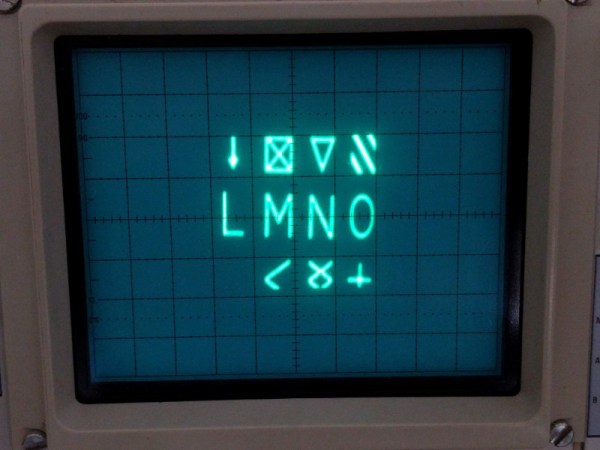
There are many ways of storing data in a computer’s memory, and not all of them allow the computer to write to it. For older equipment, this was often a physical limitation to the hardware itself. It’s easier and cheaper for some memory to be read-only, but if you go back really far you reach a time before even ROMs were widespread. One fascinating memory scheme is this example using a vacuum tube that stores the characters needed for a display.

[eric] over at TubeTime recently came across a Raytheon monoscope from days of yore and started figuring out how it works. The device is essentially a character display in an oscilloscope-like CRT package, but the way that it displays the characters is an interesting walk through history. The monoscope has two circuits, one which selects the character and the other determines the position on the screen. Each circuit is fed a delightfully analog sine wave, which allows the device to create essentially a scanning pattern on the screen for refreshing the display.

[eric] goes into a lot of detail on how this c.1967 device works, and it’s interesting to see how engineers were able to get working memory with their relatively limited toolset. One of the nice things about working in the analog world, though, is that it’s relatively easy to figure out how things work and start using them for all kinds of other purposes, like old analog UHF TV tuners.

Lightning Generator From Electric Lighter

Generating high voltages isn’t too hard. A decent transformer will easily get you into the 100s of kilovolts, provided you’re a power company and have access to millions of dollars and a substation to put it. If you want to go above that then things start getting difficult, and most tend to look in other places for high voltages such as voltage multipliers.

These devices use nothing but capacitors and diodes, as [Jay] from [Plasma Channel] shows us how to build a small desktop version of a voltage multiplier that can produce almost 70 kV. That’s enough to throw a substantial spark, powered by nothing but a rechargable battery found in an electric lighter. They can also be cheaper than transformers to a point, since they require less insulation and less copper and iron. The voltage multiplier works in stages, with each stage boosting the voltage to a critical level above the stage before it similar to a Marx generator.

Similar designs are used by laboratories to simulate lightning strikes, and can generate millions of volts. They’re a cost-effective way of generating huge voltage pulses and studying everything from the effects of lightning on various equipment to generating X-rays in fusion power tests. We’ve even seen them in use in lasers.

Continue reading “Lightning Generator From Electric Lighter”

A HID For Robots

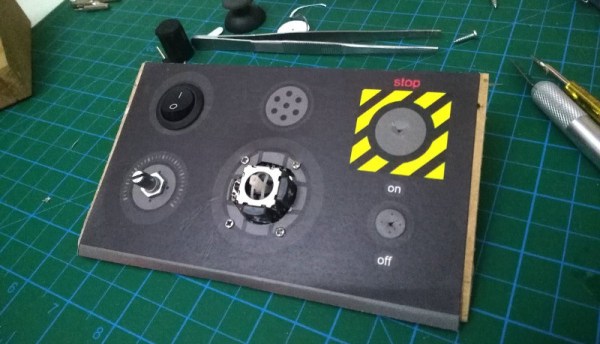
Whether with projects featured here or out in the real world, we have a tendency to focus most upon the end product. The car, solar panel, or even robot. But there’s a lot more going on behind the scenes that needs to be taken care of as well, whether it’s fuel infrastructure to keep the car running, a semiconductor manufacturer to create silicon wafers, or a control system for the robot. This project is one of the latter: a human interface device for a robot arm that is completely DIY.

While robots are often automated, some still need human input. The human input can be required all the time, or can be used to teach the robot initially how to perform a task which will then be automated. This “keyboard” of sorts built by [Ahmed] comes with a joystick, potentiometer, and four switch inputs that are all fully programmable via an Arduino Due. With that, you can perform virtually any action with whatever type of robot you need, and since it’s based on an Arduino it would also be easy to expand.

The video below and project page have all the instructions and bill of materials if you want to roll out your own. It’s a pretty straightforward project but one that might be worth checking out since we don’t often feature controllers for other things, although we do see them sometimes for controlling telescopes rather than robots.

Continue reading “A HID For Robots”

Inverted Pendulum For The Control Enthusiast

Once you step into the world of controls, you quickly realize that controlling even simple systems isn’t as easy as applying voltage to a servo. Before you start working on your own bipedal robot or scratch-built drone, though, you might want to get some practice with this intricate field of engineering. A classic problem in this area is the inverted pendulum, and [Philip] has created a great model of this which helps illustrate the basics of controls, with some AI mixed in.

Called the ZIPY, the project is a “Cart Pole” design that uses a movable cart on a trolley to balance a pendulum above. The pendulum is attached at one point to the cart. By moving the cart back and forth, the pendulum can be kept in a vertical position. The control uses the OpenAI Gym toolkit which is a way to easily use reinforcement learning algorithms in your own projects. With some Python, some 3D printed parts, and the toolkit, [Philip] was able to get his project to successfully balance the pendulum on the cart.

Of course, the OpenAI Gym toolkit is useful for many more projects where you might want some sort of machine learning to help out. If you want to play around with machine learning without having to build anything, though, you can also explore it in your browser.

Continue reading “Inverted Pendulum For The Control Enthusiast”