Video Of The Arduino FPGA Board Demo At Maker Faire

This week, Arduino announced a lot of new hardware including an exceptionally interesting FPGA development board aimed at anyone wanting to dip their toes into the seas of VHDL and developing with programmable logic. We think it’s the most interesting bit of hardware Arduino has released since their original dev board, and everyone is wondering what the hardware actually is, and what it can do.

This weekend at Maker Faire Bay Area, Arduino was out giving demos for all their wares, and yes, the Arduino MKR Vidor 4000 was on hand, being shown off in a working demo. We have a release date and a price. It’ll be out next month (June 2018) for about $60 USD.

But what about the hardware, and what can it do? From the original press releases, we couldn’t even tell how many LUTs this FPGA had. There were a lot of questions about the Mini PCIe connectors, and we didn’t know how this FPGA would be useful for high-performance computation like decoding video streams. Now we have the answers.

The FPGA on board the Arduino Vidor is an Altera Cyclone 10CL016. This chip has 16k logic elements, and 504 kB memory block. This is on the low end of Altera’s FPGA lineup, but it’s still no slouch. In the demo video below, it’s shown decoding video and identifying QR codes in real time. That’s pretty good for what is effectively a My First FPGA™ board.

Also on board the Vidor is a SAMD21 Cortex-M0+ microcontroller and a uBlox module housing an ESP-32 WiFi and Bluetooth module. This is a really great set of chips, and if you’re looking to get into FPGA development, this might just be the board for you. We haven’t yet seen the graphic editor that will be used to work with IP for the FPGA (for those who don’t care to write their own VHDL or Verilog), but we’re looking forward to the unveiling of that new software.

Arduino Just Introduced An FPGA Board, Announces Debugging And Better Software

Today ahead of the Bay Area Maker Faire, Arduino has announced a bevy of new boards that bring modern features and modern chips to the Arduino ecosystem.

Most ambitious of these new offerings is a board that combines a fast ARM microcontroller, WiFi, Bluetooth, and an FPGA. All this is wrapped in a package that provides Mini HDMI out and pins for a PCIe-Express slot. They’re calling it the Arduino MKR Vidor 4000.

Bringing an FPGA to the Arduino ecosystem is on the list of the most interesting advances in DIY electronics in recent memory, and there’s a lot to unpack here. FPGA development boards aren’t new. You can find crates of them hidden in the storage closet of any University’s electronics lab. If you want to buy an FPGA dev board, the Terasic DE10 is a good starter bundle, the iCEstick has an Open Source toolchain, and this one has pink soldermask. With the release of the MKR Vidor, the goal for Arduino isn’t just to release a board with an FPGA; the goal is to release a tool that allows anyone to use an FPGA.

The key to democratizing FPGA development is Arduino’s work with the Arduino Create ecosystem. Arduino Create is the company’s online IDE that gives everyone the ability to share projects and upload code with Over-the-Air updates. The MKR Vidor will launch with integration to the Arduino Create ecosystem that includes a visual editor to work with the pre-compiled IP for the FPGA. That’s not to say you can’t just plug your own VHDL into this board and get it working; that’s still possible. But Arduino would like to create a system where anyone can move blocks of IP around with a tool that’s easy for beginners.

A Facelift for the Uno WiFi

First up is the brand new Arduino Uno WiFi. While there have been other boards bearing the name ‘Arduino Uno WiFi’ over the years, a lot has changed in the world of tiny radio modules and 8-bit microcontrollers over the past few years. The new Arduino Uno WiFi is powered by a new 8-bit AVR, the ATMega4809. The ATMega4809 is a new part announced just a few months ago, and is just about what you would expect from the next-generation 8-bit Arduino; it runs at 20MHz, has 48 kB of Flash, 6 kB of SRAM, and it comes in a 48-pin package. The ATMega4809 is taking a few lattices of silicon out of Microchip’s playbook and adds Custom Configurable Logic. The CCL in the new ATMega is a peripheral that is kinda, sorta like a CPLD on chip. If you’ve ever had something that could be more easily done with logic gates than software, the CCL is the tool for the job.

But a new 8-bit microcontroller doesn’t make a WiFi-enabled Arduino. The wireless power behind the new Arduino comes from a custom ESP-32 based module from u-blox. There’s also a tiny crypto chip (Microchip’s ATECC508A) so the Uno WiFi will work with AWS. The Arduino Uno WiFi will be available this June.

But this isn’t the only announcement from the Arduino org today. They’ve been hard at work on some killer features for a while now, and now they’re finally ready for release. What’s the big news? Debuggers. Real debuggers for the Arduino that are easy to use. There are also new boards aimed at Arduino’s IoT strategy.

Continue reading “Arduino Just Introduced An FPGA Board, Announces Debugging And Better Software”

Review: FG-100 DDS Function Generator

I don’t have a signal generator, or more specifically I don’t have a low frequency signal generator or a function generator. Recently this fact collided with my innocent pleasure in buying cheap stuff of sometimes questionable quality. A quick search of your favourite e-commerce site and vendor of voice-controlled internet appliances turned up an FG-100 low frequency 1Hz to 500kHz DDS function generator for only £15 ($21), what was not to like? I was sold, so placed my order and eagerly awaited the instrument’s arrival.

The missing function generator is a gap in the array of electronic test instruments on my bench, and it’s one that maybe isn’t as common a device as it once might have been. My RF needs are served by a venerable Advance signal generator from the 1960s, a lucky find years ago in the back room of Stewart of Reading, but at the bottom end of the spectrum my capabilities are meagre. So why do I need another bench tool?

It’s worth explaining what these devices are, and what their capabilities should be. In simple terms they create a variety of waveforms at a frequency and amplitude defined by their user. In general something described as a signal generator will only produce one waveform such as a sine or a square wave, while a function generator will produce a variety such as sine, square, and sawtooth waves. More accomplished function generators will also allow the production of arbitrary waveforms defined by the user. It is important that these instruments have some level of calibration both in terms of their frequency and the amplitude of their output. It is normal for the output to range from a small fraction of a volt to several volts. How would the FG-100 meet these requirements? Onward to my review of this curiously inexpensive offering.

Continue reading “Review: FG-100 DDS Function Generator”

Retro Computer Badge For Hackaday Belgrade Has Everything You Wished For Back In The Day

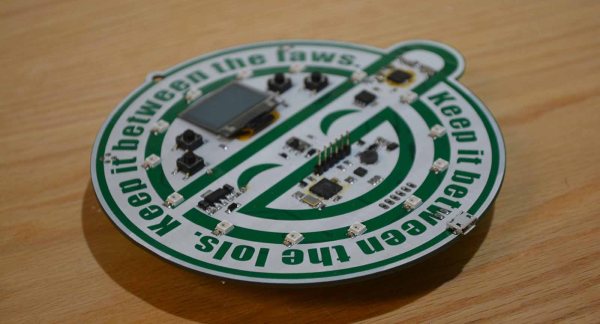
The hardware badge for the Hackaday Belgrade conference is a Retro Computer that you wear around your neck. I have one in my hands and it’s truly a work of art. It’s beautiful, it’s fun to play with, and it will be an epic platform for a glorious weekend of badge hacking! Check out the first look video, then join me below as I drill down into the details.

Get your ticket now for Hackaday Belgrade, our premier European hardware conference at the end of this month. It’s a day filled with talks, works, food, fun, and of course everyone through the door gets one of these incredible badges. The best part is the community that turns out for this event and that includes the Hacker Village that takes hold in the evening. We’ll be hacking the badges until the wee hours of the morning alongside hardware demos, presentations, lightning talks, and live IDM and DJ sets.

Continue reading “Retro Computer Badge For Hackaday Belgrade Has Everything You Wished For Back In The Day”

The Eric Lundgren Story: When Free Isn’t Free

At this point, you’ve almost certainly heard the tale of Eric Lundgren, the electronics recycler who is now looking at spending 15 months in prison because he was duplicating freely available Windows restore discs. Of no use to anyone who doesn’t already have a licensed copy of Windows, these restore discs have little to no monetary value. In fact, as an individual, you couldn’t buy one at retail if you wanted to. The duplication of these discs would therefore seem to be a victimless crime.

Eric Lundgren

Especially when you hear what Eric wanted to do with these discs. To help extend the functional lifespan of older computers, he intended on providing these discs at low cost to those looking to refurbish Windows computers. After each machine had its operating system reinstalled, the disc would go along with the computer in hopes the new owner would be able to utilize it themselves down the road.

It all sounds innocent enough, even honorable. But a quick glance at Microsoft’s licensing arrangement is all you need to know the whole scheme runs afoul of how the Redmond giant wants their operating system installed and maintained. It may be a hard pill to swallow, but when Eric Lundgren decided to use Microsoft’s product he agreed to play by their rules. Unfortunately for him, he lost.

Continue reading “The Eric Lundgren Story: When Free Isn’t Free”

Scratch-Built Ornithopter: Here’s How I Flapped My Way To Flight

One of humankind’s dreams has always been to fly like a bird. For a hacker, an achievable step along the path to that dream is to make an ornithopter — a machine which flies by flapping its wings. An RC controlled one would be wonderful, controlled flight is what everyone wants. Building a flying machine from scratch is a big enough challenge, and a better jumping-off point is to make a rubber band driven one first.

I experimented with designs which are available on the internet, to learn as much as possible, but I started from scratch in terms of material selection and dimensions. You learn a lot about flight through trial and error, and I’m happy to report that in the end I achieved a great little flyer built with a hobby knife and my own two hands. Since then I’ve been looking back on what made that project work, and it’s turned into a great article for Hackaday. Let’s dig in!

Continue reading “Scratch-Built Ornithopter: Here’s How I Flapped My Way To Flight”

Simple Ethereum Vending Machines With NodeMCU

Recently, we covered how to use the Etherscan API to query data (a wallet balance) from the Ethereum blockchain with NodeMCU. It’s a very useful method for retrieving information from a blockchain on embedded systems where storage and memory are an issue.

It has some limitations though. Most notably, it’s polling the API at some interval to retrieve information whether it has changed or not. I would like to be able to receive data more efficiently than this, and quickly enough to make simple vending machines possible. While we’ve seen videos of Bitcoin-based Red Bull vending machines before, they required an NFC card to use.

If we could receive information about Ethereum transactions quickly and reliably enough, we could build a similar vending machine without requiring an NFC card as an intermediary. Simply send to an address via some method, and receive goods!

It turns out we can do exactly that with NodeMCU using WebSocket. Like HTTP, WebSocket is a communications protocol that uses TCP connections (typically over port 80), but it allows full-duplex communication. In other words, you can establish a connection to a server, and send/receive messages without needing to poll the server.

As in the previous example, we’ll use a NodeMCU running Lua. You may wish to refer to it for compile options and information about the screen, which will be the same in this case. Unlike the previous article, you will not need an API key from Etherscan to use this service (not yet, anyway). As usual, we’ll start off by connecting to WiFi:

wifi.setmode(wifi.STATION)
wifi.setphymode(wifi.PHYMODE_B)
station_cfg={}
station_cfg.ssid="Your SSID"
station_cfg.pwd="Your Password"
station_cfg.save=true
wifi.sta.config(station_cfg)

Connecting to a server with WebSockets is easy, but since we’re not using HTTP, we’ll have to remove the https:// and replace that with ws://. (Note: not wss:// because we’ve not enabled encryption yet.)

ws:connect(‘ws://socket.etherscan.io/wshandler’)

Next, we need to report back when the connection is established as the trigger to run additional code. It will return an error code if the connection fails to be established. Handling these error codes in a sensible way is an excellent feature, but we’ll handle that later:

ws:on("connection", function(ws)
    print('got ws connection')
    end)

Now, we need to extend the above to subscribe to an Eth address, and add some new code to do something when a transaction occurs. Note that the API requires that you subscribe to an address within 60 seconds of connecting. It also states that you have to send a ping event to the server every 20 seconds to keep the connection alive, so we’ll need to set a recurring timer for that.

If you’re using ESPlorer, you can send the ping request manually by entering =ws:send('{"event": "ping"}') and pressing Send. This is a useful way to test the connection status.

The address I used seems to have frequent transactions so is reasonable for testing. Be advised though that sitting and waiting for a transaction to happen to test the code creates a slow development cycle so some patience is necessary here.

ws = websocket.createClient()
ws:on("connection", function(ws)
    print('got ws connection')
    ws:send('{"event": "txlist", "address": "0x2a65aca4d5fc5b5c859090a6c34d164135398226"}')
    end)

ws:on("receive", function(_, msg, opcode)
    print('got message:', msg, opcode)
    end)

You should see something like what follows below. The first message is a simple confirmation of connection, the second confirms your subscription to an address, and the third is what you get sent when a transaction occurs. You can subscribe to up to 30 addresses with a single connected device! Note that the data is all in JSON format, which is something we’ll take advantage of later.

got message: {"event":"welcome"} 1
got message: {"event":"subscribe-txlist", "status":"1", "message":"OK, 0x2a65aca4d5fc5b5c859090a6c34d164135398226"} 1
got message: {"event":"txlist","address":"0x2a65aca4d5fc5b5c859090a6c34d164135398226","result":[{"blockNumber":"5532531","timeStamp":"1525098009","hash":"0xe5ec497cb5b38811e8bf5db67a056a2bdd4aa9b68df5c8e8225cb300cbcfa413","nonce":"3363391","blockHash":"0xf446f77d92ed29c221e8451b8048113969ed305a7dd49177e10b422e8e2c4bda","transactionIndex":"172","from":"0x2a65aca4d5fc5b5c859090a6c34d164135398226","to":"0xec5fdfba35c01c6ad7a00085e70e8f30cd121597","value":"24418350000000000","gas":"50000","gasPrice":"4000000000","input":"0x","contractAddress":"","cumulativeGasUsed":"7896403","gasUsed":"21000","confirmations":"1"}]} 1

That’s quite a mess of transaction data, and unfortunately the datum of interest is in the ‘result’ field – which is nested JSON. In the last article, we converted simple JSON to a Lua table using the excellent sjson module. We’ll do the same here after verifying the message type is a transaction (txlist).

ws:on("receive", function(_, msg, opcode)
    print('got message:', msg, opcode)
    ok, ethdata = pcall(sjson.decode, msg)
    if ok then
        msgtype = (ethdata["event"])
        if msgtype == "txlist" then
...

The NodeMCU documentation specifically notes that nested JSON can cause out-of-memory errors. For that reason we use pcall (protected call) to contain any such errors when decoding our JSON message. Next, we extract the contents of the ‘value’ field, nested within the ‘result’ field:

if msgtype == "txlist" then
    wei = ethdata.result[1].value
    print (wei)
    eth = wei/1000000000000000000
    print (eth)
    end

It took me a few hours to figure out how to deal with nested tables, but in the end it was actually quite clean and easy — I was just being dense. Now, we need to add a basic provision to handle errors when the websocket is closed:

ws:on("close", function(_, status)
    print('connection closed', status)
    print('Reconnecting...')
    ws = nil -- required to Lua gc the websocket client
    tmr.alarm(0,4000,tmr.ALARM_SINGLE,transact) -- This reconnects after 4 seconds
end)

To wrap it all up, we encase the code in a couple of functions — first, one to establish a connection, subscribe to the right address, and notify when there is a transaction. Next we need one to display the amount of Eth transferred. Finally, we need a ‘ping’ function to call every 20 seconds or less to keep the connection alive. Overall this turned out to be more robust than expected and has yet to encounter an error. Check out the full code listing here. Note that I’ve also added a little code above to interface with a 128×32 OLED screen, the same one we used previously.

Now that it works, let’s consider im/practical applications. It’s a neat way to display Ethereum transactions in real-time, say if you do livestreaming and accept Eth donations and want them to trigger something fancy. Or, you could make a somewhat insecure vending machine. Clearly, getting a secure WebSocket up and running is the next order of business.

You could also set a timer where the length depends on the amount of Eth received. This would allow for things like public advertisements that go away for a while if someone pays a fee. (Please don’t do this!) Maybe a conference room for rent with the power controlled this way? Hackerspace membership payment? An electric bicycle that charges you for power used?

In any case, it’s not legal to use cryptocurrency as a form of payment in my country so I can’t implement any of the above examples at this time. If you’ve got a better application, please share it in the comments!