Smart Outlet Cover Offers Lessons On Going From Project To Product

Going from idea to one-off widget is one thing; engineering the widget into a marketable product is quite another. So sometimes it’s instructive to take an in-depth look at a project that was designed from the get-go to be a consumer product, like this power indicating wall outlet cover plate. The fact that it’s a pretty cool project helps too.

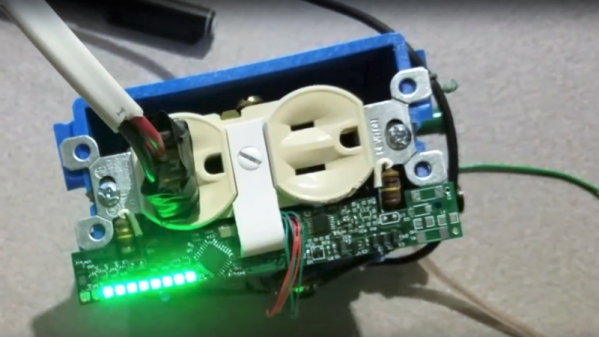
Although [Vitaliy] has been working on this project for a while, he only recently tipped us off to it, and we’re glad he did because there’s a lot to learn here. His goal was to build a replacement cover for a standard North American power outlet that indicates how much power is being used by whatever is plugged into it. He set constraints that included having everything fit into the familiar outlet cover form factor, as well as to not require any modification to the existing outlet or rewiring, so that a consumer can just remove the old cover and put on the new one. Given the extremely limited space inside an outlet cover, these were significant challenges, but [Vitaliy] found a way. Current is sensed with two inductors positioned to sense magnetic flux within the outlet, amplified by a differential amp, and power use is calculated by an ATmega328 for display on 10 LEDs. Power for the electronics is tapped right from the outlet wiring terminals by spring clips, and everything fits neatly inside the cover.

It’s a great design, but not without issues. We look forward to seeing [Vitaliy] tackle those problems and bring this to market. For more on what it takes to turn a project into a product, check out our own [Lewin Day]’s story of bringing a guitar effects pedal to market.

Continue reading “Smart Outlet Cover Offers Lessons On Going From Project To Product”

Learn What Did And Didn’t Work In This Prototyping Post-Mortem

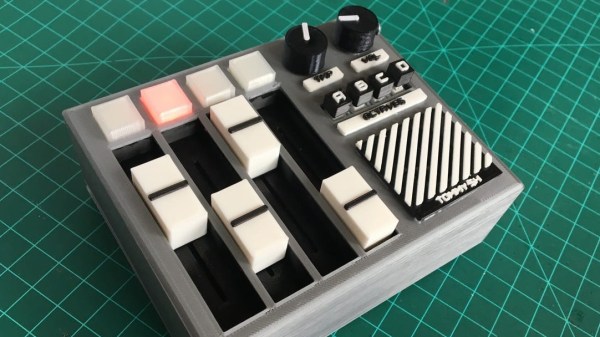
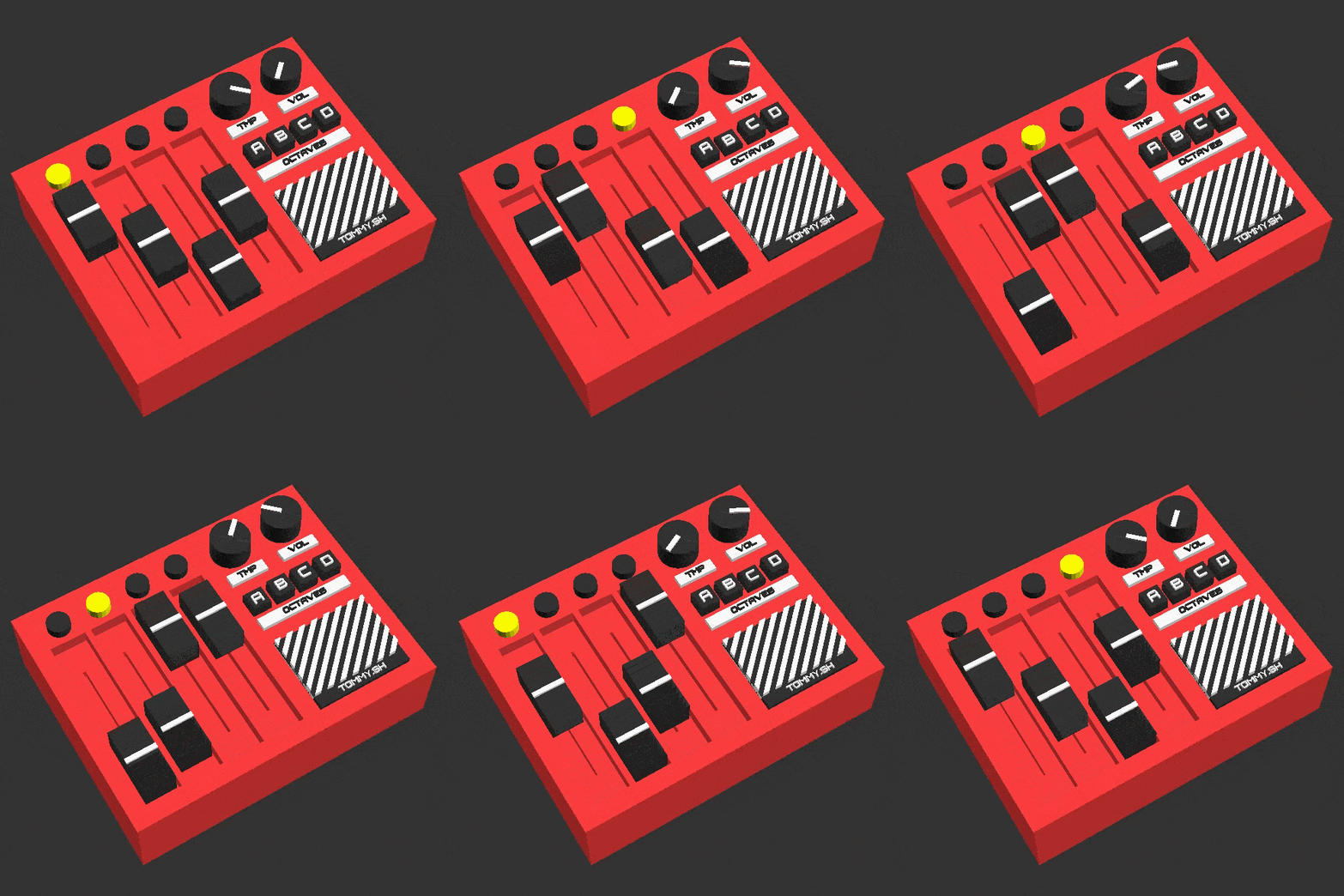
[Tommy] is a one-man-shop making electronic musical things, but that’s not what this post is about. This post is about the outstanding prototyping post-mortem he wrote up about his attempt to turn his Four-Step Octaved Sequencer into a viable product. [Tommy] had originally made a hand-soldered one-off whose performance belied its simple innards, and decided to try to turn it into a product. Short version: he says that someday there will be some kind of sequencer product like it available from him, “[B]ut it won’t be this one. This one will go on my shelf as a reminder of how far I’ve come.”

The unit works, looks great, has a simple parts list, and the bill of materials is low in cost. So what’s the problem? What happened is that through prototyping, [Tommy] learned that his design will need many changes before it can be used to create a product, and he wrote up everything he learned during the process. Embedded below is a demo of the prototype that shows off how it works and what it can do, and it helps give context to the lessons [Tommy] shares.

Continue reading “Learn What Did And Didn’t Work In This Prototyping Post-Mortem”

Whatever Happened To The Desktop Computer?

If you buy a computer today, you’re probably going to end up with a laptop. Corporate drones have towers stuffed under their desks. The cool creative types have iMacs littering their open-plan offices. Look around on the online catalogs of any computer manufacturer, and you’ll see there are exactly three styles of computer: laptops, towers, and all-in-ones. A quick perusal of Newegg reveals an immense variety of towers; you can buy an ATX full tower, an ATX mid-tower, micro-ATX towers, and even Mini-ITX towers.

It wasn’t always this way. Nerds of a sufficient vintage will remember the desktop computer. This was, effectively, a tower tilted on its side. You could put your monitor on top, negating the need for a stack of textbooks bringing your desktop up to eye level. The ports, your CD drive, and even your fancy Zip drive were right there in front of you. Now, those days of desktop computers are long gone, and the desktop computer is relegated to history. What happened to the desktop computer, and why is a case specifically designed for a horizontal orientation so hard to find?

Continue reading “Whatever Happened To The Desktop Computer?”

Dig Into The Apple Device Design Guide

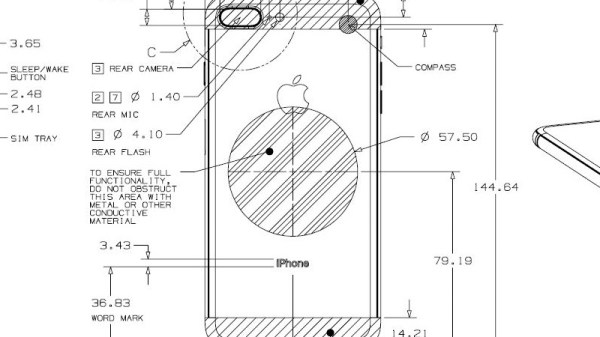
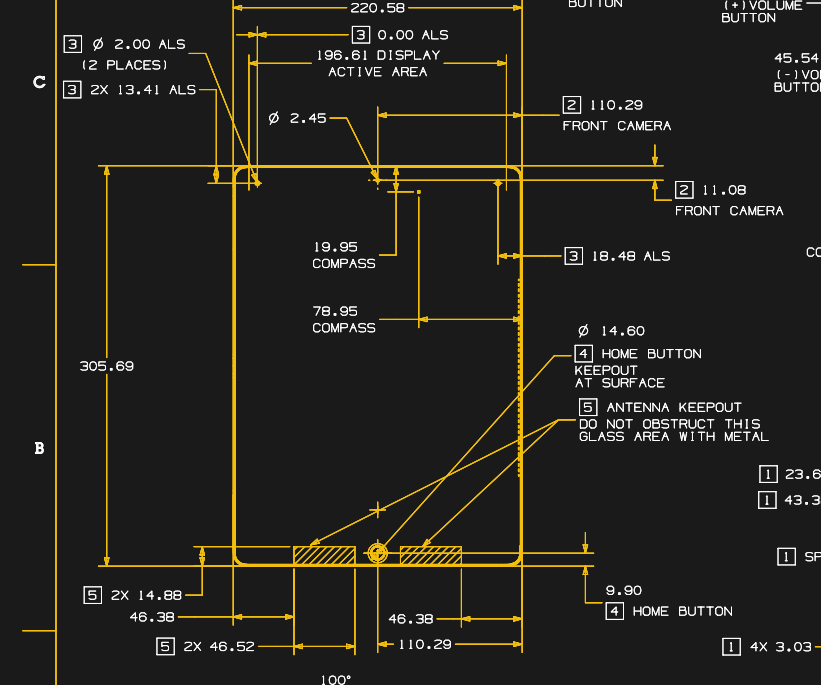
Millions of people worldwide have just added new Apple gadgets to their lives thanks to the annual end of December consumerism event. Those who are also Hackaday readers are likely devising cool projects incorporating their new toys. This is a good time to remind everybody that Apple publishes information useful for such endeavors: the Accessory Design Guidelines for Apple Devices (PDF).

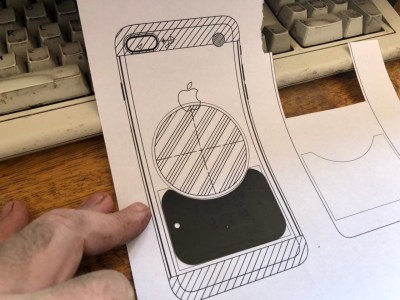
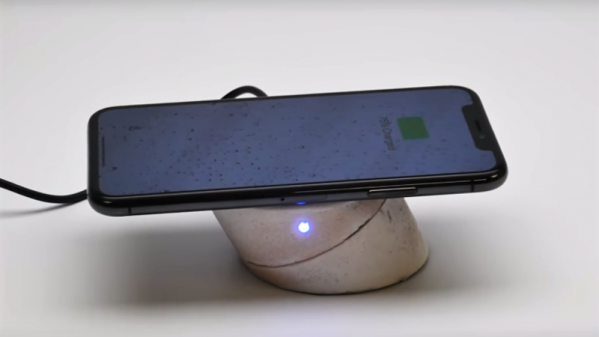
This comes to our attention because [Pablo] referenced it to modify an air vent magnet mount. The metal parts of a magnetic mount interferes with wireless charging. [Pablo] looked in Apple’s design guide and found exactly where he needed to cut the metal plate in order to avoid blocking the wireless charging coil of his iPhone 8 Plus. What could have been a tedious reverse-engineering project was greatly simplified by Reading The… Fine… Manual.
Apple has earned its reputation for hacker unfriendliness with nonstandard fasteners and liberal use of glue. And that’s even before we start talking about their digital barriers. But if your project doesn’t involve voiding the warranty, their design guide eliminates tedious dimension measuring so you can focus on the fun parts.

Dimensioned drawing of Apple iPad Pro

This guide is packed full of dimensioned drawings. A cursory review shows that they look pretty good and aren’t terrible at all. Button, connector, camera, and other external locations make this an indispensable tool for anyone planning to mill or print an interface for any of Apple’s hardware.

So let’s see those projects! Maybe a better M&M sorter. Perhaps a time-lapse machine. Or cure your car’s Tesla envy and put a well-integrated iPad into the dashboard.

Hackaday Superconference Talk: Cory Grosser

When we look at a product or project here at Hackaday it is likely that our interest has been caught by its internal technology, or perhaps by its functionality. It is easy to forget that there is another angle to each and every item that graces these pages, and it is every bit as important as those we have already mentioned. Aesthetic design, the look and feel of a product, is something that is so often overlooked.

One of the speakers at the Hackaday Superconference was [Cory Grosser], one of America’s leading independent product designers, and the designer of the Supplyframe Design Lab in which the Superconference was being held. In his talk he covered some of the principles of design, touching on its psychology and its purpose in creating a successful product. In doing so he delivered a fascinating talk full of insights into the design of products both famous and somewhat obscure.

Continue reading “Hackaday Superconference Talk: Cory Grosser”

Fully-functional Oscilloscope On A PIC

When troubleshooting circuits it’s handy to have an oscilloscope around, but often we aren’t in a lab setting with all of our fancy, expensive tools at our disposal. Luckily the price of some basic oscilloscopes has dropped considerably in the past several years, but if you want to roll out your own solution to the “portable oscilloscope” problem the electrical engineering students at Cornell produced an oscilloscope that only needs a few knobs, a PIC, and a small TV.

[Junpeng] and [Kevin] are taking their design class, and built this prototype to be inexpensive and portable while still maintaining a high sample rate and preserving all of the core functions of a traditional oscilloscope. The scope can function anywhere under 100 kHz, and outputs NTSC at 30 frames per second. The user can control the ground level, the voltage and time scales, and a trigger. The oscilloscope has one channel, but this could be expanded easily enough if it isn’t sufficient for a real field application.

All in all, this is a great demonstration of what you can accomplish with a microcontroller and (almost) an engineering degree. To that end, the students go into an incredible amount of detail about how the oscilloscope works since this is a design class. About twice a year we see a lot of these projects popping up, and it’s always interesting to see the new challenges facing students in these classes.

Continue reading “Fully-functional Oscilloscope On A PIC”

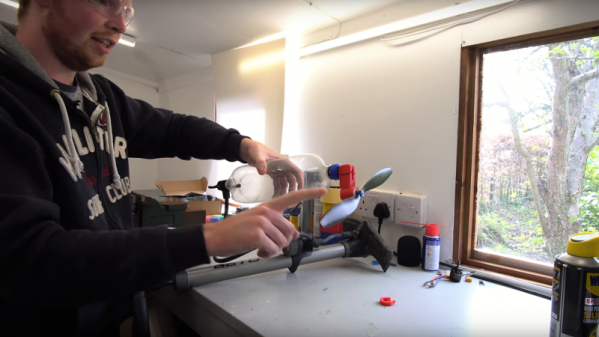
A Passive Mixer’s Adventure Through Product Development

The year was 2014, and KORG’s volca line of pint-sized synthesizers were the latest craze in the music world. Cheap synths and drum machines were suddenly a reality, all in a backpack-friendly form factor. Now practically anyone could become an electronic music sensation!

I attended a jam with friends from my record label, and as was the style at the time, we all showed up with our latest and greatest gear. There was the microKORG, a MiniNova, and a couple of guitars, but all attention was on the volcas, which were just so much fun to pick up and play with.

There was just one problem. Like any game-changing low-cost hardware, sacrifices had been made. The volcas used 3.5mm jacks for audio and sync pulses, and the initial lineup came with a bassline, lead, and drum synth. Syncing was easy, by daisy chaining cables between the boxes, but if you wanted to record or mix, you’d generally need to stack adapters to get your signals in a more typical 6.5mm TS format used by other music hardware.

After mucking around, I did some research on what other people were doing. Most were suffering just like we were, trying to patch these little machines into full-sized mixing desks. It seemed like overkill — when you just want to muck around, it’s a bit much to drag out a 24 channel powered mixer. I wanted a way to hook up 3 of these machines to a single set of headphones and just groove out.

To solve this problem, we needed a mixer to match the philosophy of the volcas; simple, accessible, and compact. It didn’t need to be gold-plated or capable of amazing sonic feats, it just had to take a few 3.5mm audio sources, and mix them down for a pair of headphones.

I’d heard of people using headphone splitters with mixed results, and it got me thinking about passive mixing. Suddenly it all seemed so clear — I could probably get away with a bunch of potentiometers and some passives and call it a day! With a friend desperate to get their hands on a solution, I decided to mock up a prototype and took it round to the studio to try out.

Continue reading “A Passive Mixer’s Adventure Through Product Development”