Rescue An Old Washing Machine With Modern Controls

The humble washing machine is an appliance that few of us are truly passionate about. They’re expected to come into our lives and serve faithfully, with a minimum of fuss. In the good old days, it was common for a washing machine to last for well over 20 years, and in doing so ingratiate itself with its masters. Sadly now while the simple mechanical parts may still be serviceable, the electronics behind the scenes can tend to fail. This is a Russian story (Google Translate link) about giving a new brain to an old friend.

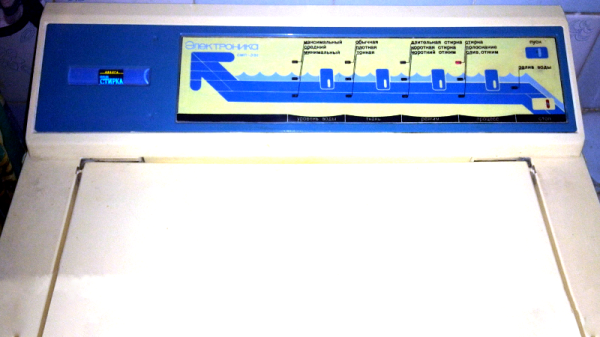
The machine in question is known as an Oriole, and had served long and hard. Logic chips and entire controllers had been replaced, but were continuing to fail. Instead, a replacement was designed to keep the machine operational for some time yet. Rather than relying on recreating the full feature set of the machine it was decided to eliminate certain things for simplicity. Settings for different fabric types or wash modes were eliminated, which is an easy choice if like most people all your washes are done in the same mode anyway. A water level sensor was found to be no longer functioning properly and was simpler to eliminate than repair.

The brain is a PIC microcontroller, with an ESP12 acting as a webserver for monitoring and control. Additionally, a glass lens was taken from some former medical equipment and neatly installed in the control panel of the machine before an OLED display, giving the machine far more feedback than before. Control is still done with the machine’s original buttons. Temperature sensors were added as well to allow the machine to shut itself down in the event of an overheating problem. It’s all tied together on what looks to be a classic single-sided homebrew PCB.

It’s a great project that shows it’s easy to bring modern electronic might to bear on vintage mechanical hardware, with great results. A washing machine lives to see another day, another load – and the landfill remains just that much lighter, to boot.

We’ve seen controller builds for old washing machines before, too – like replacing mechanical control with an Arduino.

[Thanks to Tirotron for sending this in!]

Turn A Car Into A Game Controller

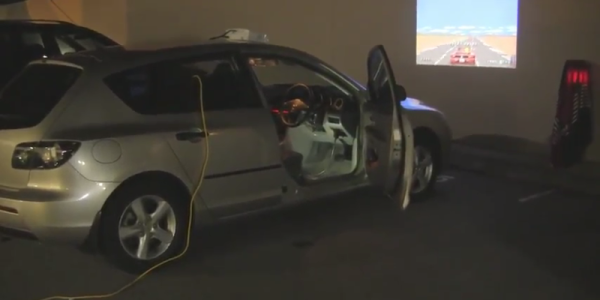
The CAN bus has become a staple of automotive engineering since it was introduced in the late ’80s, but in parallel with the spread of electronic devices almost every single piece of equipment inside a car has been put on the CAN bus. While there are opinions on whether or not this is a good thing, the reality is that enough data is gathered on this bus to turn an unmodified modern car into a video game controller with just a little bit of code.

The core of [Scott]’s project is a laptop and a Python program that scrapes information about the car from the car’s CAN bus, including positions of the pedals and the steering wheel. This information can be accessed by plugging an adapter into the OBD-II port (a standard for all cars made after 1995). From there, the laptop parses the CAN data into keyboard and mouse commands for your video game of choice.

This is an interesting investigation into the nitty-gritty of the CAN bus, but also a less dangerous demonstration of all of the data available from the car than some other cases we’ve seen. At least [Scott]’s Mazda (presumably) lacks any wireless attack vectors!

Continue reading “Turn A Car Into A Game Controller”

Hackaday Prize Entry: Reflowduino, The Open Source Reflow Oven Controller

Face it — you want a reflow oven. Even the steadiest hands and best eyes only yield “meh” results with a manual iron on SMD boards, and forget about being able to scale up to production. But what controller should you use when you build your oven, and what features should it support? Don’t worry — you can have all the features with this open source reflow oven controller.

Dubbed the Reflowduino for obvious reasons, [Timothy Woo]’s Hackaday Prize entry has everything you need in a reflow oven controller, and a few things you never knew you needed. Based on an ATMega32, the Reflowduino takes care of the usual tasks of a reflow controller, namely running the PID loop needed to accurately control the oven’s temperature and control the heating profile. We thought the inclusion of a Bluetooth module was a bit strange at first, but [Timothy] explains that it’s a whole lot easier to implement the controller’s UI in software than in hardware, and it saves a bunch of IO on the microcontroller. The support for a LiPo battery is somewhat baffling, as the cases where this would be useful seem limited since the toaster oven or hot plate would still need a mains supply. But the sounder that plays Star Wars tunes when a cycle is over? That’s just for fun.

Hats off to [Timothy] for a first-rate build and excellent documentation, which delves into PID theory as well as giving detailed instructions for every step of the build. Want to try lower-end reflow? Pull out a halogen work light, or perhaps fire up that propane torch.

Why Only Use One Controller When You Can Use ALL Of Them?

After booting up his RetroPie system, [jfrmilner] had the distinct feeling that something was off. Realizing that the modern Xbox 360 controller didn’t fit right when reliving the games of his youth, he rounded up all his old controllers to make sure he always had the right gamepad for the game.

Wanting to keep the controllers unmodified — so they could still be used on the original systems — he had to do a bit of reverse-engineering and source some controller sockets before building his controller hub. Using shift-in registers, shift-out registers, and some multiplexers, he designed a large circuit selector — which acts as a shield for an Arduino Micro — so all the controllers remain connected. A potentiometer allows him to select the desired controller and a few arcade buttons which access RetroPie shortcuts really round out the hub. Check out the demo after the break!

Continue reading “Why Only Use One Controller When You Can Use ALL Of Them?”

Game Gear HDMI With SNES Controller

With its backlit color screen and Master System compatibility, the Game Gear was years ahead of its main competition. The major downside was that it tore through alkaline batteries quickly, and for that reason the cheaper but less equipped Game Boy was still able to compete. Since we live in the future, however, the Game Gear has received new life with many modifications that address its shortcomings, including this latest one that adds an HDMI output.

The core of the build is an FPGA which is used to handle pixel decoding and also handles the HDMI output. The FPGA allows for a speed high enough to handle all the data that is required, although [Stephen] still has to iron out some screen-filling issues, add sound over HDMI, and take care of a few various pixel glitches. To turn this hack into a complete hodgepodge of adapters, though, [Stephen] has also added an SNES controller adapter to the Game Gear as well. Nintendo has featured Sonic in many of its games, so although we may have disagreed back in the early 90s we think that this Sega/Nintendo pairing is not crossing any boundaries anymore.

Game Gears have had their share of other modifications as well to make them more capable as a handheld system than they were when they were new. We’ve also seen them turned into a console system (they were Master System compatible, after all) and converted into other things entirely, too.

Continue reading “Game Gear HDMI With SNES Controller”

This Isn’t The R2-D2 Controller You’re Looking For

Who loves a good R2-D2 robot? Everyone, but especially young Star Wars fans who — frustratingly — have no problem spotting a controller and spoiling the illusion of an R2 unit brought to life. [Bithead942]’s concealed his R2-D2’s remote and re-establishes the illusion of an autonomous droid — no Jedi mind-tricks necessary.

[Bithead942] prefers to accompany his droid in traditional a Rebel Alliance pilot’s suit, so that gives him a bit of extra space under the jumpsuit to help conceal the controller. Dismantling a Frsky Taranis X9D controller, [Bithead942] meditated on how to use it while so concealed. In a stroke of insight, he thought of his unused Wiimote nunchucks, and launched into the build.

Continue reading “This Isn’t The R2-D2 Controller You’re Looking For”

Drop-in Controller For EBay K40 Laser Engraver Gets Results

[Paul de Groot] wrote in to let us know about a drop-in controller replacement he designed for those economical K40 laser engravers that are everywhere on eBay. With the replacement controller, greatly improved engraving results are possible along with a simplified toolchain. Trade in the proprietary software and that clunky security dongle for Inkscape and a couple of plugins! [Paul] felt that the work he accomplished was too good to keep to himself, and is considering a small production run.

Laser engravers are in many ways not particularly complex devices; a motion controller moves the head in x and y, and the laser is turned on or off when needed. But of course, the devil is in the details and there can be a surprising amount of stuff between having a design on your screen and getting it cut or engraved in the machine. Designing in Inkscape, exporting to DXF, importing the DXF to proprietary software (which requires a USB security dongle to run), cleaning up any DXF import glitches, then finally cutting the job isn’t unusual. And engraving an image with varying shades and complex dithering? The hardware may be capable, but the stock software and controller? Not so much. It’s easy to see why projects to replace the proprietary controllers and software with open-source solutions have grown.

Cheap laser engravers may come with proprietary controllers and software, but they don’t need to stay that way. Other efforts we have seen in this area include LaserWeb, which provides a browser-based interface to a variety of open-source motion controllers like Grbl or Smoothieware. And if you’re considering a laser engraver, take a few minutes to learn from the mistakes of other people.