Knockoff Kapton Nearly Sinks DIY Flex PCB Project

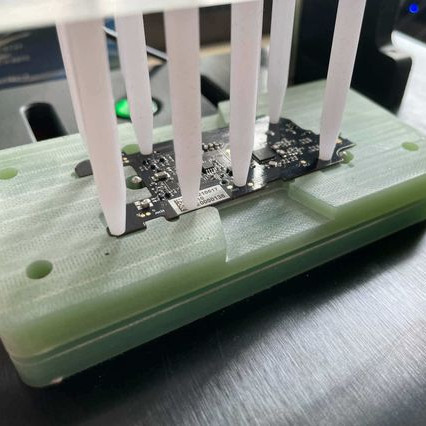
[TinkersProjects] experimented with making their own flexible PCB for LED modules inside a special fixture, and the end result was at least serviceable despite some problems. It does seem as though the issues can be at least partially blamed on some knockoff Kapton tape, which is what [TinkersProjects] used as a backing material.

Incomplete etching on this DIY flexible PCB, but still salvageable.

The approach was simple: after buying some copper foil and wide Kapton tape, simply stick the foil onto the tape and use the toner transfer method to get a PCB pattern onto the copper. From there, the copper gets etched away in a chemical bath and the process is pretty much like any other DIY PCB. However, this is also where things started to go wonky.

Etching was going well, until [TinkersProjects] noticed that the copper was lifting away from the Kapton tape. Aborting the etching process left a messy board, but it was salvageable. But another problem was discovered during soldering, as the Kapton tape layer deformed from the heat, as if it were a piece of heat shrink. This really shouldn’t happen, and [TinkersProjects] began to suspect that the “Kapton” tape was a knockoff. Switching to known-good tape was an improvement, but the adhesive left a bit to be desired because traces could lift easily. Still, in the end the DIY flexible PCB worked, though the process had mixed results at best.

Flexible PCBs have been the backbone of nifty projects like this self-actuating PoV display, so it’s no surprise that a variety of DIY PCB methods are getting applied to it.

Heat Turns 3D Printer Filament Into Springs

The next time you find yourself in need of some large-ish plastic springs, maybe consider [PattysLab]’s method for making plastic springs out of spare filament. The basic process is simple: tightly wind some 3D printer filament around a steel rod, secure it and wrap it in kapton tape, then heat it up. After cooling, one is left with a reasonably functional spring, apparently with all the advantages of annealed plastic.

The basic process may be simple, but [PattysLab] has a number of tips for getting best results. The first is to use a 3D-printed fixture to help anchor one end of filament to the steel rod, then use the help of an electric drill to wind the filament tightly. After wrapping the plastic with kapton tape (wrap counter to the direction of the spring winding, so that peeling the tape later doesn’t pull the spring apart), he suspends it in a pre-heated oven at 120 C for PLA and 160 C for PETG. How long does it stay in there? [PattysLab] uses the following method: when the spring is wound, he leaves a couple inches of filament sticking out to act as a visual indicator. When this segment of filament sags down, that’s his cue to begin the retrieval process. After cooling, the result is a compression or extension spring, depending on how it was wound before being heated.

[PattysLab] shared a short video on this Reddit post that shows both springs in action, and the process is all covered in the video, embedded below.

Continue reading “Heat Turns 3D Printer Filament Into Springs”

All The Good VR Ideas Were Dreamt Up In The 60s

Virtual reality has seen enormous progress in the past few years. Given its recent surges in development, it may come as a bit of a surprise to learn that the ideas underpinning what we now call VR were laid way back in the 60s. Not all of the imagined possibilities have come to pass, but we’ve learned plenty about what is (and isn’t) important for a compelling VR experience, and gained insights as to what might happen next.

If virtual reality’s best ideas came from the 60s, what were they, and how did they turn out?

Interaction and Simulation

First, I want to briefly cover two important precursors to what we think of as VR: interaction and simulation. Prior to the 1960s, state of the art examples for both were the Link Trainer and Sensorama.

The Link Trainer was an early kind of flight simulator, and its goal was to deliver realistic instrumentation and force feedback on aircraft flight controls. This allowed a student to safely gain an understanding of different flying conditions, despite not actually experiencing them. The Link Trainer did not simulate any other part of the flying experience, but its success showed how feedback and interactivity — even if artificial and limited in nature — could allow a person to gain a “feel” for forces that were not actually present.

Sensorama was a specialized pod that played short films in stereoscopic 3D while synchronized to fans, odor emitters, a motorized chair, and stereo sound. It was a serious effort at engaging a user’s senses in a way intended to simulate an environment. But being a pre-recorded experience, it was passive in nature, with no interactive elements.

Combining interaction with simulation effectively had to wait until the 60s, when the digital revolution and computers provided the right tools.

The Ultimate Display

In 1965 Ivan Sutherland, a computer scientist, authored an essay entitled The Ultimate Display (PDF) in which he laid out ideas far beyond what was possible with the technology of the time. One might expect The Ultimate Display to be a long document. It is not. It is barely two pages, and most of the first page is musings on burgeoning interactive computer input methods of the 60s.

The second part is where it gets interesting, as Sutherland shares the future he sees for computer-controlled output devices and describes an ideal “kinesthetic display” that served as many senses as possible. Sutherland saw the potential for computers to simulate ideas and output not just visual information, but to produce meaningful sound and touch output as well, all while accepting and incorporating a user’s input in a self-modifying feedback loop. This was forward-thinking stuff; recall that when this document was written, computers weren’t even generating meaningful sounds of any real complexity, let alone visual displays capable of arbitrary content. Continue reading “All The Good VR Ideas Were Dreamt Up In The 60s”

Watch This Scaly Gauntlet’s Hypnotizing, Rippling Waves

[Will Cogley]’s mechanized gauntlet concept sure has a hypnotizing look to it, and it uses only a single motor. Underneath the scales is a rod with several cams, each of which moves a lever up and down in a rippling wave as it rotates. Add a painted scale to each, and the result is mesmerizing. This is only a proof of concept prototype, and [Will] learned quite a few lessons when making it, but the end result is a real winner of a visual effect.

The gauntlet uses one motor, 3D printed hardware, and a mechanical linkage between the wrist and the rest of the forearm. Each of the scales is magnetically attached to the lever underneath, which provides some forgiveness for when one inevitably bumps into something. You can see the gauntlet without the scales in the video, embedded below the break, which should make clear how the prototype works.

The scales were created with the help of a Mayku desktop vacuum former by making lightweight copies of 3D printed scales. Interestingly, 3D printing each scale with full supports made for a useful mold; there was no need to remove supports from underneath the prints, because they are actually a benefit to the vacuum forming process. When vacuum forming, the presence of overhangs can lead to plastic wrapped around the master, trapping it, but the presence of the supports helps prevent this. 3D prints don’t hold up very well to the heat involved in vacuum forming, but they do well enough for a short run like this. Watch it in action and listen to [Will] explain the design in the video, embedded below.

Continue reading “Watch This Scaly Gauntlet’s Hypnotizing, Rippling Waves”

Heavy Raspberry Pi User? Keep An HDMI-to-USB Capture Device Around

Here’s a simple tip from [Andy], whose Raspberry Pi projects often travel with him outside the workshop: he suggests adding a small HDMI-to-USB video capture device to one’s Raspberry Pi utility belt. As long as there is a computer around, it provides a simple and configuration-free way to view a Raspberry Pi’s display that doesn’t involve the local network, nor does it require carrying around a spare HDMI display and power supply.

Raspberry Pi’s display, viewed on a Mac as if it were a USB webcam. No configuration required.

The usual way to see a Pi’s screen is to either plug in an HDMI display or to connect remotely, but [Andy] found that he didn’t always have details about the network where he was working (assuming a network was even available) and configuring the Pi with a location’s network details was a hassle in any case. Carrying around an HMDI display and power supply was also something he felt he could do without. Throwing a small HDMI-to-USB adapter into his toolkit, on the other hand, has paid off for him big time.

The way it works is simple: the device turns an HDMI video source into something that acts just like a USB webcam’s video stream, which is trivial to view on just about any desktop or laptop. As long as [Andy] has access to some kind of computer, he can be viewing the Pi’s display in no time.

Many of his projects (like this automated cloud camera timelapse) use the Pi camera modules, so a quick way to see the screen is useful to check focus, preview video, and so on. Doing it this way hit a real sweet spot for him. We can’t help but think that one of these little boards could be a tempting thing to embed into a custom cyberdeck build.

How Researchers Used Salt To Give Masks An Edge Against Pathogens

Masks are proven tools against airborne diseases, but pathogens — like the COVID-19 virus — can collect in a mask and survive which complicates handling and disposal. [Ilaria Rubino], a researcher at the University of Alberta, recently received an award for her work showing how treating a mask’s main filtration layer with a solution of mostly salt and water (plus a surfactant to help the wetting process) can help a mask inactivate pathogens on contact, thereby making masks potentially re-usable. Such masks are usually intended as single-use, and in clinical settings used masks are handled and disposed of as biohazard waste, because they can contain active pathogens. This salt treatment gives a mask a kind of self-cleaning ability.

Analysis showing homogenous salt coating (red and green) on the surface of fibers. NaCl is shown here, but other salts work as well.

How exactly does salt help? The very fine salt coating deposited on the fibers of a mask’s filtration layer first dissolves on contact with airborne pathogens, then undergoes evaporation-induced recrystallization. Pathogens caught in the filter are therefore exposed to an increasingly-high concentration saline solution and are then physically damaged. There is a bit of a trick to getting the salt deposited evenly on the polypropylene filter fibers, since the synthetic fibers are naturally hydrophobic, but a wetting process takes care of that.

The salt coating on the fibers is very fine, doesn’t affect breathability of the mask, and has been shown to be effective even in harsh environments. The research paper states that “salt coatings retained the pathogen inactivation capability at harsh environmental conditions (37 °C and a relative humidity of 70%, 80% and 90%).”

Again, the salt treatment doesn’t affect the mask’s ability to filter pathogens, but it does inactivate trapped pathogens, giving masks a kind of self-cleaning ability. Interested in the nuts and bolts of how researchers created the salt-treated filters? The Methods section of the paper linked at the head of this post (as well as the Methods section in this earlier paper on the same topic) has all the ingredients, part numbers, and measurements. While you’re at it, maybe brush up on commercially-available masks and what’s inside them.

Slick DIY Compound Bow Uses Coiled Springs, Toothbrush Heads

Compound bows (unlike recurve bows, their more mechanically-simple relatives) use a levering system with pulleys and spring tension to grant the user a mechanical advantage. We’re not exactly sure what to call [Zünder’s] bow design. He shared his unconventional take on a DIY bow that uses coiled springs as well as some other unique features.

Toothbrush heads and 3D printing make an enclosed, bristle-supported arrow rest.

What we really dig about [Zünder]’s design is how easy it is to grasp how it all works. As he demonstrates using the bow, the way the levers, pulleys, and spring tension all work together is very clear. The 3D-printed quiver and arrow rest are nice added touches, and we especially love the use of three toothbrush heads to provide contained support for a nocked arrow. The ring of bristles are sturdy enough to easily support the shaft, and don’t interfere with the arrow’s fletching.

[Zünder] has a photo gallery with a few additional photos and closeups, and you can watch him demonstrate his bow in the video embedded below.

Continue reading “Slick DIY Compound Bow Uses Coiled Springs, Toothbrush Heads”