Retractable Console Allows Wheelchair User To Get Up Close And Personal

[Rhonda] has multiple sclerosis (MS), a disease that limits her ability to walk and use her arms. She and the other residents of The Boston Home, an extended care facility for people with MS and other neuromuscular diseases, rely on their wheelchairs for mobility. [Rhonda]’s chair comes with a control console that swings out of the way to allow her to come up close to tables and counters, but she has problems applying enough force to manually position it.

Sadly, [Rhonda]’s insurance doesn’t cover a commercial solution to her problem. But The Boston Home has a fully equipped shop to extend and enhance residents’ wheelchairs, and they got together with students from MIT’s Principles and Practices of Assistive Technology (PPAT) course to hack a solution that’s not only useful for [Rhonda] but should be generally applicable to other chairs. The students analyzed the problem, measured the forces needed and the clearances required, and built a prototype pantograph mount for the control console. They’ve made the device simple to replicate and kept the BOM as inexpensive as possible since patients are often out-of-pocket for enhancements like these. The video below shows a little about the problem and the solution.

Wheelchair hacks are pretty common, like the 2015 Hackaday Prize-winning Eyedrivomatic. We’ve also covered totally open-source wheelchairs, both manual and electric.

Continue reading “Retractable Console Allows Wheelchair User To Get Up Close And Personal”

Dumb Coffee Grinder Gets Smarter With Time

[Forklift] has a Rancilio Rocky, a prosumer-level coffee grinder that’s been a popular mainstay for the last few decades. It’s a simple machine with a direct-drive motor. Rocky has one job, and it will do that job in one of 55 slightly different ways as long as someone is pushing the grind button. What Rocky doesn’t have is any kind of metering technology. There’s no way to govern the grind length, so repeatable results rely on visual estimates and/or an external clock. Well, there wasn’t until [Forklift] designed a programmable timer from the ground up.

The timer interface is simple—there’s a D-pad of buttons for navigation through the OLED screen, and one button to start the grind. The left and right buttons move through four programmable presets that get stored in the EEPROM of the timer’s bare ATMega328P brain. Grind duration can be adjusted with the up/down buttons.

We like that [Forklift] chose to power it by piggybacking on the 240VAC going to the grinder. The cord through the existing grommet and connects with spade terminals, so there are no permanent modifications to the grinder. Everything about this project is open source, including the files for the 7-segment font [Forklift] designed.

Tea aficionados may argue that creating their potion is the more time sensitive endeavor. We’ve got you covered there. Only question is, one button or two?

Reverse Engineering The Nintendo Wavebird

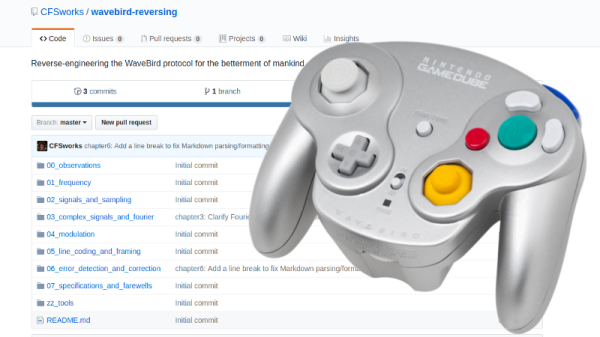
Readers who were firmly on Team Nintendo in the early 2000’s or so can tell you that there was no accessory cooler for the Nintendo GameCube than the WaveBird. Previous attempts at wireless game controllers had generally either been sketchy third-party accessories or based around IR, and in both cases the end result was that the thing barely worked. The WaveBird on the other hand was not only an official product by Nintendo, but used 2.4 GHz to communicate with the system. Some concessions had to be made with the WaveBird; it lacked rumble, was a bit heavier than the stock controllers, and required a receiver “dongle”, but on the whole the WaveBird represented the shape of things to come for game controllers.

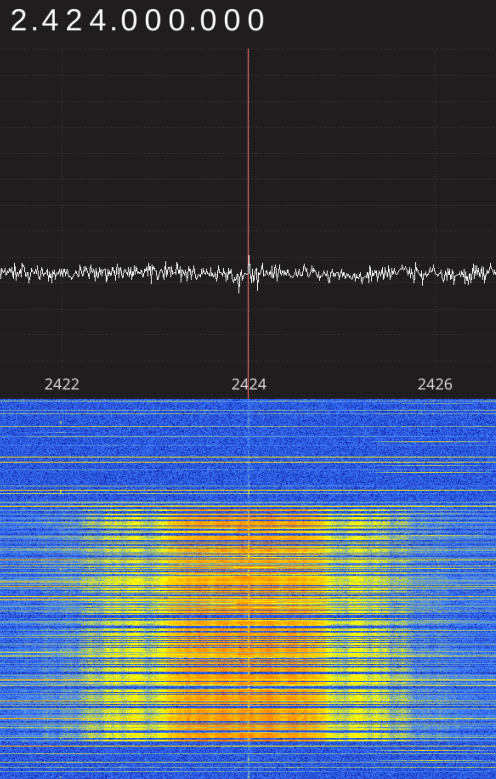
Finding the center frequency for the WaveBird

Given the immense popularity of the WaveBird, [Sam Edwards] was somewhat surprised to find very little information on how the controller actually worked. Looking for a project he could use his HackRF on, [Sam] decided to see if he could figure out how his beloved WaveBird communicated with the GameCube. This moment of curiosity on his part spawned an awesome 8 part series of guides that show the step by step process he used to unlock the wireless protocol of this venerable controller.

Even if you’ve never seen a GameCube or its somewhat pudgy wireless controller, you’re going to want to read though the incredible amount of information [Sam] has compiled in his GitHub repository for this project.

Starting with defining what a signal is to begin with, [Sam] walks the reader though Fourier transforms, the different types of modulations, decoding packets, and making sense of error correction. In the end, [Sam] presents a final summation of the wireless protocol, as well as a simple Python tool that let’s the HackRF impersonate a WaveBird and send button presses and stick inputs to an unmodified GameCube.

This amount of work is usually reserved for those looking to create their own controllers from the ground up, so we appreciate the effort [Sam] has gone through to come up with something that can be used on stock hardware. His research could have very interesting applications in the world of “tool-assisted speedruns” or even automating mindless stat-grinding.

Hacking An AUX Port For A Google Home Mini

Even if you don’t want to add an AUX audio output port to your Google Home Mini, you’ll still want to see a pair of videos from [SnekTek]. After all, you’ll eventually want to open it up, and putting it over some boiling water might not have been your first idea. You can see both videos, below.

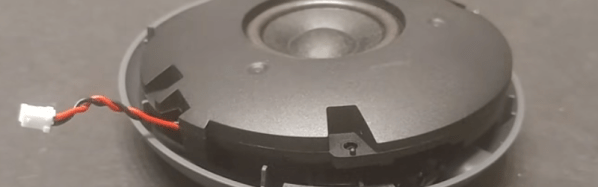
However, he did want to add an AUX port. The biggest challenge was finding a place to put the connector. Even after identifying a likely spot, a bolt interfered with the case closing and so he removed it. The one bolt didn’t seem to bother the final result.

Continue reading “Hacking An AUX Port For A Google Home Mini”

This Coin Cell Can Move That Train!

[Mike Rigsby] has moved a train with a coin cell. A CR2477 cell to be exact, which is to say one of the slightly more chunky examples, and the train in question isn’t the full size variety but a model railroad surrounding a Christmas tree, but nevertheless, the train moved.

A coin cell on its own will not move a model locomotive designed to run on twelve volts. So [Mark] used a boost converter to turn three volts into twelve. The coin cell has a high internal resistance, though, so first the coin cell was discharged into a couple of supercapacitors which would feed the boost converter. As his supercaps were charging, he meticulously logged the voltage over time, and found that the first one took 18 hours to charge while the second required 51 hours.

This is important and useful data for entrants to our Coin Cell Challenge, several of whom are also going for a supercap approach to provide a one-off power boost. We suspect though that he might have drawn a little more from the cell, had he selected a dedicated supercap charger circuit.

Continue reading “This Coin Cell Can Move That Train!”

Using Gmail With OAUTH2 In Linux And On An ESP8266

One of the tasks I dread is configuring a web server to send email correctly via Gmail. The simplest way of sending emails is SMTP, and there are a number of scripts out there that provide a simple method to send mail that way with a minimum of configuration. There’s even PHP mail(), although it’s less than reliable.

Out of the box, Gmail requires OAUTH2 for authentication and to share user data, which has the major advantage of not requiring that you store your username and password in the application that requires access to your account. While they have an ‘allow less secure apps’ option that allows SMTP access for legacy products like Microsoft Outlook, it just doesn’t seem like the right way forward. Google documents how to interact with their API with OAUTH2, so why not just use that instead of putting my username and password in plaintext in a bunch of prototypes and test scripts?

Those are the thoughts that run through my head every time this comes up for a project, and each time I’ve somehow forgotten the steps to do it, also forgotten to write it down, and end up wasting quite a bit of time due to my own foolishness. As penance, I’ve decided to document the process and share it with all of you, and then also make it work on an ESP8266 board running the Arduino development environment.

Continue reading “Using Gmail With OAUTH2 In Linux And On An ESP8266”