Arduino Activated Automotive Aerodynamic Apparatus Is… (Spoiler Alert!)

Sometimes a great hack is great for no other reason than that it’s fun, and [Michael Rechtin]’s DIY Active Aero Spoiler and Air Brake certainly qualifies as a fun hack. This is a mod designed to live in a world where looks are everything, stickers add horsepower, and a good sound system is more important than good wheel alignment. Why is that? Because like the switch that exists only to activate the mechanism that turns it off, the DIY Active Aero Spoiler and Air Brake seen below is almost completely useless. So to understand its allure, we must understand its inspiration.

For a few decades now, luxury sports car manufacturers have been adding active aerodynamic components to their vehicles. For example, several Porsche models feature adaptive spoilers that adjust to driving conditions. Super cars such as the Bugatti Veyron have spoilers that flip up at high angles during braking to increase drag and reduce braking distance. All of these features are sadly missing from the average two or four door family-car-turned-wannabe-track-fiend. Until now!
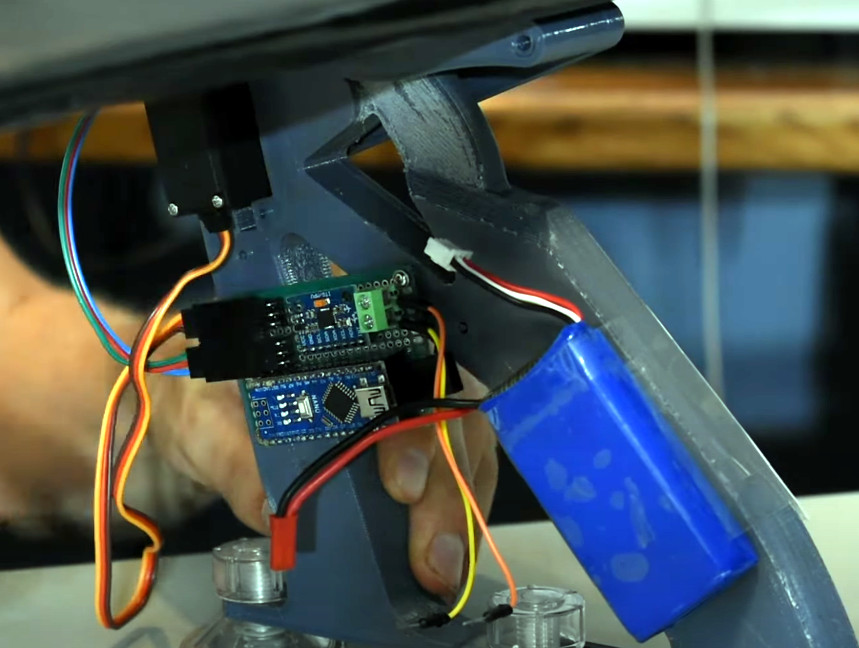
[Michael] has created a new active spoiler for every mall-bound muffler-challenged hand me down. The build starts with a CNC cut foam wing which is covered with fiberglass, Bondo (an automotive necessity) and some faux carbon fiber for that go-fast feel. An Arduino, IMU, two servos, and a battery pack detect deceleration and automatically increase the spoiler angle just like the big boys, but without needing any integration into the vehicles systems. Or bolts, for that matter.

It’s unlikely that the braking force is enough to slow down the vehicle though, given that it’s not enough to pop the suction cups holding it to the trunk lid. But does it have the “wow” factor that it was designed to induce? Spoiler Alert: It does!

As it turns out, this isn’t the first adjustable spoiler featured here at Hackaday, and this adjustable spoiler on a car that’s made for actual racing is quite interesting.

Continue reading “Arduino Activated Automotive Aerodynamic Apparatus Is… (Spoiler Alert!)”
What do we want? Monowheel!

Monowheel Mayhem: When Good Gyroscopic Precession Goes Bad

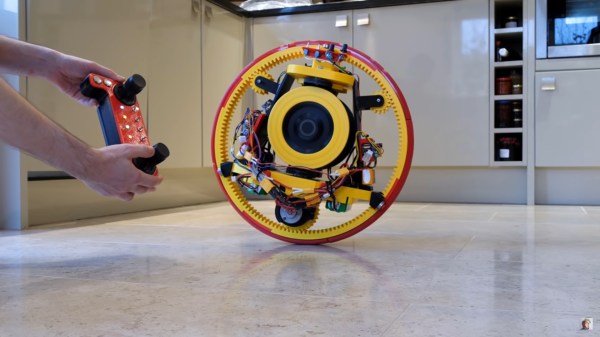
Since the dawn of the age of the automobile, motorheads have been obsessed with using as few wheels as possible. Not satisfied with the prospect of being incompletely maimed by a motorcycle, the monocycle was born. Gracing the covers of Popular magazines and other periodicals, these futuristic wheels of doom have transfixed hackers of all kinds. [James Bruton] is one such hacker, and in the video below the break you can see his second iteration of a 3d printed monowheel.

[James]’ wonderful monowheel is beautifully engineered. Bearing surfaces, gears, idlers, motors, and yes, twin gyroscopes are all contained within the circumference of the tire. The gyroscopes are actuated by a rather large servo, and are tied together by a gear that keeps their positions in sync. Their job is to keep the monowheel balanced at all times.

But as [James] discovered, the chief difficulty of only having one wheel isn’t lateral balancing. Ask any monocyclist and they’ll assure you that it’s possible. The real trick is balancing the machine fore and aft. Unlike a two wheeled velocipede, the monowheel has nothing to exert torque against save for a bit of gravity.

As [James] found out the hard way, it was within this fore-aft balancing act that the gyroscopic precession reared its ugly head. The concept is explained well in the video. We won’t spoil the surprise ending because the explanation and conclusion are quite good so make sure to watch to the end!

If you’d like to look at [James]’ first version, we covered it here. And if you’re the daredevil type, perhaps we can interest in you in a two stroke human sized monowheel that will probably end in an ER visit. At least they wore a helmet. Thanks to [Baldpower] for the tip!

Continue reading “Monowheel Mayhem: When Good Gyroscopic Precession Goes Bad”

Self balancing wheeled robot with auto-righting arms lofted high

A Self Righting Balancing Robot Configured The Easy Way

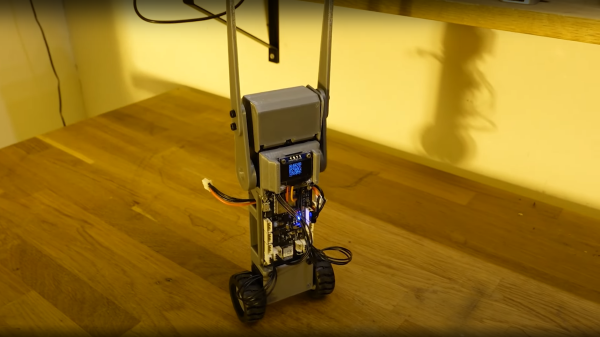
Norwegian electronics hacker [Hans Jørgen] aka [time expander] on YouTube, has a clear interest in robotics, and for his latest effort, decided that it was time to build a custom controller platform. Since [Hans] had a pile of Dynamixel servo motors lying around to test it with, a good first project for the platform was a simple self-balancing wheeled robot. (Video, embedded below)

We say ‘simple’ but that isn’t really the case, as there is a fair bit going on to get this to work. The first problem, is sensing, which was quickly solved with the excellent BMO055 IMU chip. Next, what to do when it falls over? Simply adding some servo-controlled arms, allowed the robot to flip itself back upright. Control is covered with a ESP32-WROOM-32D module from our friends at Espressif, which enables remote firmware uploading over the air (OTA update) as well as parameter tuning. In order to implement the latter, [Hans] chose to use bonjour/mDNS which is an implementation of zero-configuration networking. This gets the ESP32 onto the WiFi, but it isn’t immediately obvious how to connect to it, without a little digging around. To simply connection, [Hans] implemented a dynamic QR code via the connected OLED. This is just one of the those tiny 0.96″ displays that you see touted all over our corners of the internet.

Simply by scanning the QR code with any compatible device to hand brings up a simple configuration web page, allowing one to tweak the PID controller parameters, and get that balancing robot into check. Great stuff!

The PCB was designed in Eagle, firmware for the ESP32 is available, 3D models for the plastic are designed with fusion 360, and [Hans] is even currently working on some preliminary Alexa integration. What a fun project!

All the above, albeit an early cut (look out for bugs!) is available on the project GitHub for your viewing pleasure.

We’re no stranger to self-balancing 3D-printed bots, whilst you’re here, why not checkout A problematic Self-Balancing Sonic the Hedgehog? If wheeled bots aren’t your cup-of-tea, there’s a not-at-all freaky one-legged bouncing bot that may be of interest.

Continue reading “A Self Righting Balancing Robot Configured The Easy Way”

Turn signal monitor

Annoy Yourself Into Better Driving With This Turn Signal Monitor

Something like 99% of the people on the road at any given moment will consider themselves an above-average driver, something that’s as statistically impossible as it is easily disproven by casual observation. Drivers make all kinds of mistakes, but perhaps none as annoying and avoidable as failure to use their turn signal. This turn signal monitor aims to fix that, through the judicious use of negative feedback.

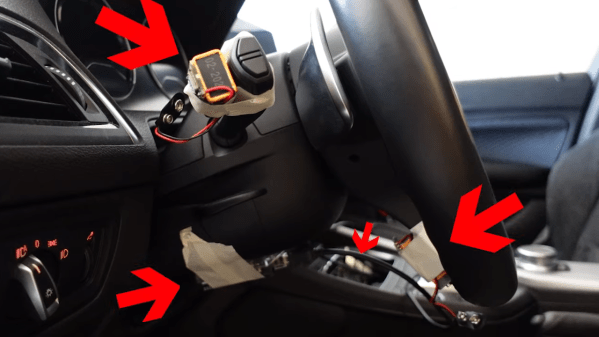
Apparently, [Mark Radinovic] feels that he has a predisposition against using his turn signal due to the fact that he drives a BMW. To break him of that habit, one that cost him his first BMW, he attached Arduino Nano 33 BLEs to the steering wheel and the turn signal stalk. The IMUs sense the position of each and send that over Bluetooth to an Arduino Uno WiFi. That in turn talks over USB to a Raspberry Pi, which connects to the car’s stereo via Bluetooth to blare an alarm when the steering wheel is turned but the turn signal remains untouched. The video below shows it in use; while it clearly works, there are a lot of situations where it triggers even though a turn signal isn’t really called for — going around a roundabout, for example, or navigating a sinuous approach to a drive-through window.

While [Mark] clearly built this tongue firmly planted in cheek, we can’t help but think there’s a better way — sniffing the car’s CANbus to determine steering angle and turn signal status comes to mind. This great workshop on CANbus sniffing from last year’s Remoticon would be a great place to start if you’d like a more streamlined solution than [Mark]’s.

Continue reading “Annoy Yourself Into Better Driving With This Turn Signal Monitor”

Sit Up Straight!: Open Source Bluetooth Posture Sensing

As more and more people spend their working hours behind a computer, bad posture and the accompanying back pain and back problems become a growing epidemic. To combat this in his own daily life, [ImageryEel] made PosturePack, a wearable Bluetooth-enabled posture sensor.

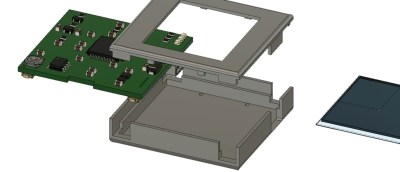
The PosturePack is designed to fit into a small pocket sewn into the pack of an undershirt, between the shoulder blades. It consists of a custom PCB with an ATmega32U4, BNO055 IMU, Bluetooth module,  small LiPo and power circuitry. Based on the orientation data from the IMU, a notification is sent over Bluetooth to a smartphone whenever the user hunches forward.

[ImageryEel] says although the mobile notifications worked, haptic feedback integrated into the unit would be a better option. This could also be used to remind the user to stand up and take a break now and then, and provide an alternative to a smartwatch for activity monitoring without sending every movement to someone else’s servers. Software will always be the hardest part for projects like these, especially as the device become “smarter”. Learning to recognize activity and postures is actually a good place for tiny machine learning models.

Compared The posture sensors we covered before had to be installed and set up at a specific workstation, like an ultrasound-based version attached to a chair, and a webcam-based version.

Peripheral Doesn’t Need Deskspace

Some of us are suckers for new hardware. There’s absolutely nothing shameful about a drawer overflowing with gamepads, roll-up keyboards, and those funny-shaped ergonomic mice. MyTeleTouch won’t sate your itch for new hardware because [Dimitar Danailov] didn’t design hardware you hold, because it uses your phone as a catch-all Human Interface Device, HID. A dongle plugs into a standard USB port, and your Android phone can emulate a USB keyboard, mouse, or gamepad over Bluetooth.

Chances are high that you already set up your primary computer with your favorite hardware, but we think we’ve found a practical slant for a minimalist accessory. Remember the last time you booted an obsolete Windows desktop and dug out an old mouse with a questionable USB plug? How long have you poked around the bottom of a moving box trying to find a proprietary wireless keyboard dongle, when you just wanted to type a password on your smart TV? What about RetroPi and a game controller? MyTeleTouch isn’t going to transform your daily experience, but it’ll be there when you don’t want to carry a full-size keyboard down three flights of stairs to press {ENTER} on a machine that spontaneously forgot it has a touch screen. If you don’t have opportunities to play the hero very often, you can choose to play the villain. Hide this in a coworker’s USB port, and while they think you’re sending a text message, you could be fiddling with their cursor.

We enjoy a good prank that everyone can laugh off, and we love little keyboards and this one raises the (space) bar.

Continue reading “Peripheral Doesn’t Need Deskspace”

Bike Computer Powers On Long After Your Legs Give Out

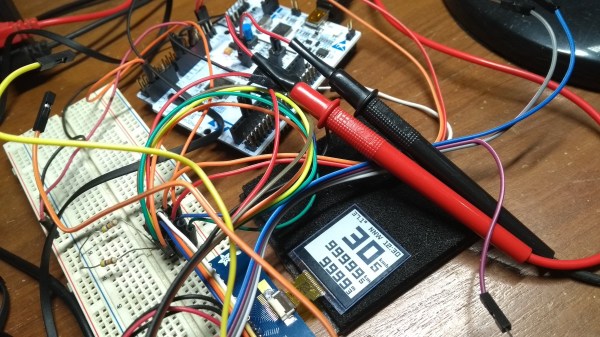
A typical bicycle computer from the store rack will show your speed, trip distance, odometer, and maybe the time. We can derive all this data from a magnet sensor and a clock, but we live in a world with all kinds of sensors at our disposal. [Matias N.] has the drive to put some of them into a tidy yet competent bike computer that has a compass, temperature, and barometric pressure.

The brains are an STM32L476 low-power controller, and there is a Sharp Memory LCD display as it is a nice compromise between fast refresh rate and low power. E-paper would be a nice choice for outdoor readability (and obviously low power as well) but nothing worse than a laggy speedometer or compass.



In a show of self-restraint, he didn’t try to replace his mobile phone, so there is no GPS, WiFi, or streaming music. Unlike his trusty phone, you measure the battery life in weeks, plural. He implemented EEPROM memory for persistent data through power cycles, and the water-resistant board includes a battery charging circuit for easy topping off between rides.

When you toss the power of a mobile phone at a bike computer, someone will unveil the Android or you can measure a different kind of power from your pedals.

Continue reading “Bike Computer Powers On Long After Your Legs Give Out”