The Photo Lab That Flew To The Moon

When planning a trip by car these days, it’s pretty much standard practice to spin up an image of your destination in Google Maps and get an idea of what you’re in for when you get there. What kind of parking do they have? Are the streets narrow or twisty? Will I be able to drive right up, or will I be walking a bit when I get there? It’s good to know what’s waiting for you, especially if you’re headed someplace you’ve never been before.

NASA was very much of this mind in the 1960s, except the trip they were planning for was 238,000 miles each way and would involve parking two humans on the surface of another world that we had only seen through telescopes. As good as Earth-based astronomy may be, nothing beats an up close and personal look, and so NASA decided to send a series of satellites to our nearest neighbor to look for the best places to land the Apollo missions. And while most of the feats NASA pulled off in the heyday of the Space Race were surprising, the Lunar Orbiter missions were especially so because of how they chose to acquire the images: using a film camera and a flying photo lab.

Continue reading “The Photo Lab That Flew To The Moon”

Need A Tiny CRT? Karaoke Might Just Help

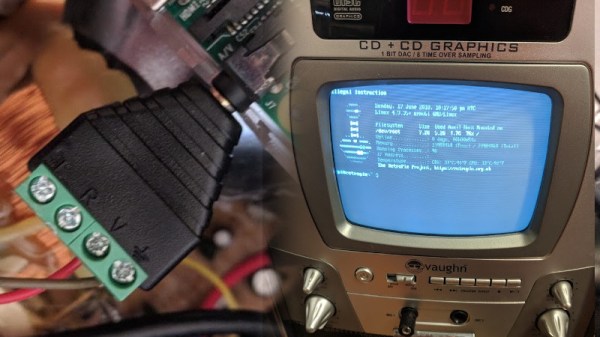
[Brett] is working on a video installation, and for the past few months, has been trying to get his hands on tiny CRTs any way he can. After initially coming up short, he happened across a karaoke machine from 2005, and got down to work.

Karaoke machines of this vintage are typically fairly low-rent affairs, built cheaply on simple PCBs. [Brett] found that the unit in question was easy to disassemble, having various modules on separate PCBs joined together with ribbon cables and headers. However, such machines rarely have video inputs, as they’re really only designed to display low-res graphics from CD-G format discs.

While investigating the machine, initial research online proved fruitless. In the end, a close look at the board revealed just what [Brett] was looking for – a pin labeled video in! After throwing in a Raspberry Pi Zero and soldering up the composite output to the karaoke machine’s input pin, the screen sprung to life first time! This initial success was followed by installing a Raspberry Pi 3 for more grunt, combined with a Screenly install – and a TRS adapter the likes of which we’ve never seen before. This allows video to be easily pushed to the device remotely over WiFi. [Brett] promises us there is more to come.

Karaoke is a sparse topic in the Hackaday archives, but we’ve seen a couple builds, like this vocal processor. If you’ve got the hacks, though? You know where to send ’em.

Philo Farnsworth, RCA, And The Battle For Television

The parenthood of any invention of consequence is almost never cut and dried. The natural tendency to want a simple story that’s easy to tell — Edison invented the light bulb, Bell invented the telephone — often belies the more complex tale: that most inventions have uncertain origins, and their back stories are often far more interesting as a result.

Inventing is a rough business. It is said that a patent is just a license to get sued, and it’s true that the determination of priority of invention often falls to the courts. Such battles often pit the little guy against a corporate behemoth, the latter with buckets of money to spend in making the former’s life miserable for months or years. The odds are rarely in the favor of the little guy, but in few cases was the deck so stacked against someone as it was for a young man barely out of high school, Philo Farnsworth, when he went up against one of the largest companies in the United States to settle a simple but critical question: who invented television?

Continue reading “Philo Farnsworth, RCA, And The Battle For Television”

Vlogging With Vintage 1980s Equipment

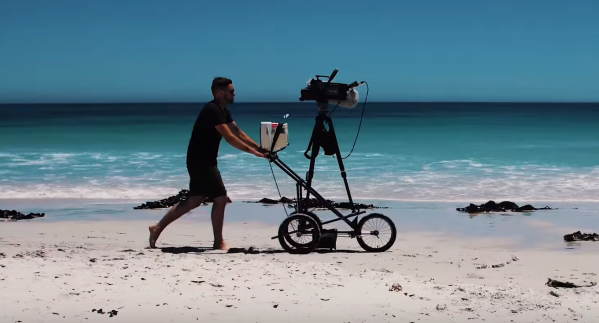
[Dan Mace] decided to try vlogging 1980s style. To do this, he built Pram Cam — a one-man mobile video recording setup using vintage gear. [Dan] is a YouTuber from Cape Town, South Africa. His goal for this project was to motivate people to get out there and make videos. Smartphones, action cams, and modern video equipment all have made it incredibly easy to create content.

[Dan] reminds us of this by grabbing a vintage 1984 video camera – a Grundig vs150 VHS recorder. He couples the camera with a sturdy video tripod, blimp microphone, CRT TV as a monitor, and everything else needed for a period-accurate recording setup.

In a build sequence even the A-Team would appreciate, [Dan] tears down a rusty old three wheel pram, or baby carriage for the Americans out there. He then mounts the video setup to the pram frame using duct tape, zip ties, and a few odd pieces of wood. The result is a proper hacked off-road rolling video studio.

He then uses Pram Cam to film some of the great scenery in Cape Town — beaches, rocky cliffs, and even a helicopter ride. To say the pram was a bit more cumbersome than a cell phone would be the understatement of the year.

The video quality from the camera looks quite a bit worse than we would expect. Some of this may be due to Dan’s digitizing system though the chances are it’s from the camera itself. The Grundig captured video using a Saticon, which was Hitachi’s version of the video camera tube. That’s right, this is a tube based camera – no CMOS sensor, nor CCD. Tubes might not have Jello effect, but they do have all the blooming, motion blur, and other problems one might expect from a 34-year-old device.

What becomes of the Pram Cam? You’ll have to watch the video below to find out. Dan’s message is clear though: get out there and film something. Of course this is Hackaday, so if we’ll add that you should build something — then film it!

Continue reading “Vlogging With Vintage 1980s Equipment”

Nvidia Transforms Standard Video Into Slow Motion Using AI

Nvidia is back at it again with another awesome demo of applied machine learning: artificially transforming standard video into slow motion – they’re so good at showing off what AI can do that anyone would think they were trying to sell hardware for it.

Though most modern phones and cameras have an option to record in slow motion, it often comes at the expense of resolution, and always at the expense of storage space. For really high frame rates you’ll need a specialist camera, and you often don’t know that you should be filming in slow motion until after an event has occurred. Wouldn’t it be nice if we could just convert standard video to slow motion after it was recorded?

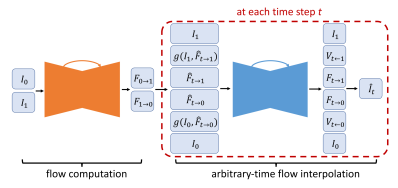
That’s just what Nvidia has done, all nicely documented in a paper. At its heart, the algorithm must take two frames, and artificially create one or more frames in between. This is not a manual algorithm that interpolates frames, this is a fully fledged deep-learning system. The Convolutional Neural Network (CNN) was trained on over a thousand videos – roughly 300k individual frames.

Since none of the parameters of the CNN are time-dependent, it’s possible to generate as many intermediate frames as required, something which sets this solution apart from previous approaches.  In some of the shots in their demo video, 30fps video is converted to 240fps; this requires the creation of 7 additional frames for every pair of consecutive frames.

The video after the break is seriously impressive, though if you look carefully you can see the odd imperfection, like the hockey player’s skate or dancer’s arm. Deep learning is as much an art as a science, and if you understood all of the research paper then you’re doing pretty darn well. For the rest of us, get up to speed by wrapping your head around neural networks, and trying out the simplest Tensorflow example.

Continue reading “Nvidia Transforms Standard Video Into Slow Motion Using AI”

Rolling Old School With Copy Protection From The 1980s

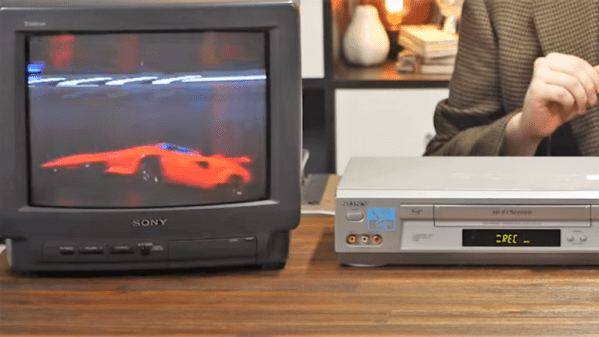
Oh, for the old days when sailing the seas of piracy was as simple as hooking a couple of VCRs together with a dubbing cable. Sure, the video quality degraded with each generation, but it was so bad to start out with that not paying $25 for a copy of “Ghostbusters” was a value proposition. But then came The Man with all his “rules” and “laws” about not stealing, and suddenly tapes weren’t so easy to copy.

If you’ve ever wondered how copy protection worked in pre-digital media, wonder no more. [Technology Connections] has done a nice primer on one of the main copy protection scheme from the VHS days. It was dubbed “Analog Protection System” or “Analog Copy Protection” by Macrovision, the company that developed it. Ironically, Macrovision the company later morphed into the TiVo Corporation.

The idea for Macrovision copy protection was to leverage the difference between what a TV would accept as a valid analog signal and what the VCR could handle. It used the vertical blanking interval (VBI) in the analog signal, the time during which the electron beam returns to the top of the frame. Normally the VBI has signals that the VCR uses to set its recording levels, but Macrovision figured out that sending extra signals in the VBI fooled the VCR’s automatic gain controls into varying the brightness of the recorded scenes. They also messed with the vertical synchronization, and the effect was to make dubbed tapes unwatchable, even by 1985 standards.

Copy protection was pretty effective, and pretty clever given the constraints. With Digital Rights Management, it’s easier to put limits on almost anything — coffee makers, arcade games, and even kitty litter all sport copy protection these days. It almost makes us nostalgic for the 80s.

Continue reading “Rolling Old School With Copy Protection From The 1980s”

No-Battery HD Video Streaming Does It With Backscatter

What if Google Glass didn’t have a battery? That’s not too far fetched. This battery-free HD video streaming camera could be built into a pair of eyeglass frames to stream HD video to a nearby phone or other receiver using no bulky batteries or external power source. Researchers at the University of Washington are using backscatter to pull this off.

The problem is that a camera which streams HD video wirelessly to a receiver consumes over 1 watt due to the need for a digital processor and transmitter. The researchers have separated the processing hardware into the receiving unit. They then send the analog pixels from the camera sensor directly to backscatter hardware. Backscatter involves reflecting received waves back to where they came from. By adding the video signal to those reflected waves, they eliminated the need for the power-hungry transmitter. The full details are in their paper (PDF), but here are the highlights.

Battery-free camera design approach

On the camera side, the pixel voltages (CAM Out) are an analog signal which is fed into a comparator along with a triangular waveform. Wherever the triangle wave’s voltage is lower than the pixel voltage, the comparator outputs a 0, otherwise, it outputs a 1. In this way, the pixel voltage is converted to different pulse widths. The triangular waveform’s minimum and maximum voltages are selected such that they cover the full possible range of the camera voltages.

The sub-carrier modulation with the XOR gate in the diagram is there to address the problem of self-interference. This is unwanted interference from the transmitter of the same frequency as the carrier. And so the PWM output is converted to a different frequency using a sub-carrier. The receiver can then filter out the interference. The XOR gate is actually part of an FPGA which also inserts frame and line synchronization patterns.

They tested two different implementations with this circuit design, a 112 x 112 grayscale one at up to 13 frames per second (fps) and an HD one. Unfortunately, no HD camera on the market gives access to the raw analog pixel outputs so they took HD video from a laptop using USB and ran that through a DAC and then into their PWM converter. The USB limited it to 10 fps.

The result is that video streaming at 720p and 10 fps uses as low as 250 μW and can be backscattered up to sixteen feet. They also simulated an ASIC which achieved 720p and 1080p at 60 fps using 321 μW and 806 μW respectively. See the video below for an animated explanation and a demonstration. The resulting video is quite impressive for passive power only.

If the University of Washington seems familiar in the context of backscatter, that’s because we’ve previously covered their battery-free (almost) cell phone. Though they’re not the only ones experimenting with it. Here’s where backscatter is being used for a soil network. All of this involves power harvesting, and now’s a great time to start brushing up on these concepts and building your own prototypes. The Hackaday Prize includes a Power Harvesting Challenge this year.

Continue reading “No-Battery HD Video Streaming Does It With Backscatter”