Mouse Finds New Home In Pinball Machine

Restoring pinball machines is an excellent hobby, and can even be more than that as we see businesses like bars and museums focusing on them as a main attraction. There’s all kinds of intrigue to be found, from esoteric mechanical systems to classic electronics and unique artwork. For those building new pinball machines, though, one way to bypass a lot of the hassle of finding antiquated parts is to build a digital machine with an analog feel, like this machine which repurposes a computer mouse in an interesting way.

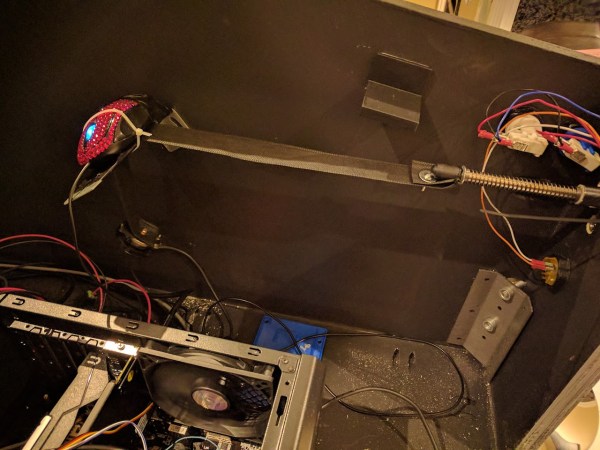
One of the important design considerations with a more modern system like this is to preserve the mechanical components that the player interacts with, in this case the plunger. This pinball machine is really just a large screen driven by a computer, but the plunger is a spring-loaded one from an old analog machine. Attached to the end of the plunger inside the cabinet is a cloth strap which passes underneath an old optical mouse. When the plunger is pulled and released, the mouse registers the position of the plunger and sends that information to the computer controlling the pinball display.

We really appreciate a KISS-style design like this in general. Mice are a proven, reliable technology and the metal components of the plunger are unlikely to ever wear out, which means that at least this part of the new pinball machine is unlikely to need much maintenance over the lifespan of the cabinet itself. For other ways of preserving the original feel of old machines, take a look at this build which incorporates all kinds of tricks within a MAME cabinet.
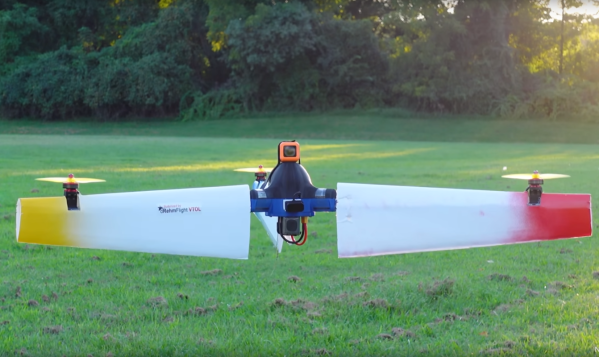

Winged Drone Gets Forward Flight Capability

Drones are pretty common in the electoronics landscape today, and are more than just a fun hobby. They’ve enabled a wide array of realtors, YouTubers, surveyors, emergency responders, and other professionals to have an extremely powerful tool at their disposal. One downside to these tools is that the power consumption tends to be quite high. You can either stick larger batteries on them, or, as [Nicholas] demonstrates, just spin them really fast during flight.

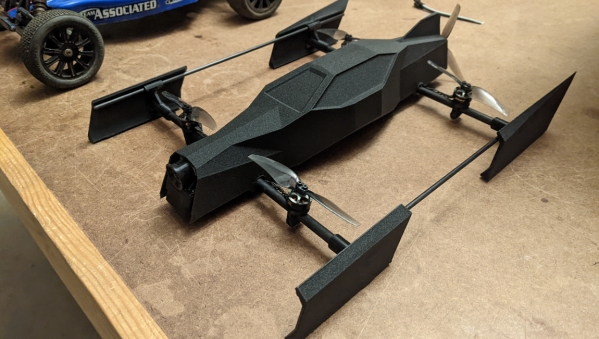
We featured his first tests with this multi-modal drone flight style a while back, but here’s a quick summary: by attaching airfoils to the arms of each of the propellers and then spinning the entire drone, the power requirements for level flight can be dramatically reduced. This time, he’s back to demonstrate another benefit to this unique design, which is its ability to turn on its side and fly in level flight like an airplane. It’s a little bizarre to see it in the video, as it looks somewhat like a stationary propeller meandering around the sky, but the power requirements for this mode of flight are also dramatically reduced thanks to those wings on the arms.

There are a few downsides to this design, namely that the vertical wing only adds drag in level flight, so it’s not as efficient as some bi-wing designs, but it compromises for that loss with much more effective hover capabilities. He also plans to demonstrate the use of a camera during spin-hover mode as well in future builds. It’s an impressive experiment pushing the envelope of what a multi-rotor craft can do, and [Nicholas] still has plans to improve the design, especially when it comes to adding better control when it is in spin-hover mode. We’d expect plenty of other drones to pick up some of these efficiency gains too, except for perhaps this one.

Continue reading “Winged Drone Gets Forward Flight Capability”

DVD Drives Turned Into Microscopes

With the advent of streaming services, plenty of people are opting to forego the collection of physical media. In turn, there are now a lot of optical drives sitting unused in parts bins and old computers. If you’d like something useful to do with this now-obsolete technology, you can have a try at turning one into a laser microscope.

This build requires two DVD pickups. By scanning once horizontally and once vertically and measuring the returning light from the DVD laser, an image can be created. For this build, the second pickup is used to move the object itself. The entire device is controlled by an Analog Discovery 2, although this principle could be ported to other microcontroller platforms. Thanks to the extremely fine laser in a DVD and the precise movements of the motors found in the control machinery, the images obtained using this method have the potential to be more detailed than comparable visible light microscopes.

While this isn’t quite scanning electron microscope territory, it’s good enough to clearly image the internal workings of a de-capped integrated circuit. Something like this could be indispensable for reverse-engineering ICs or troubleshooting other comparably small electronics, with resolutions higher than can typically be obtained with visible light microscopes. We’ve even seen similar builds in the past which build microscopes like this as dedicated lab equipment.

Peer-Reviewed Continuity Tester

One of the core features of the scientific community is the concept of “peer review” where any claims made by a scientist are open to be analyzed and reproduced by others in the community for independent verification. This leads to either rejection of ideas which can’t be reproduced, or strengthening of those ideas when they are. In this community we typically only feature the first step of this process, the original projects from various builders, but we don’t often see someone taking those instructions and “peer reviewing” someone’s build. This is one of those rare cases.

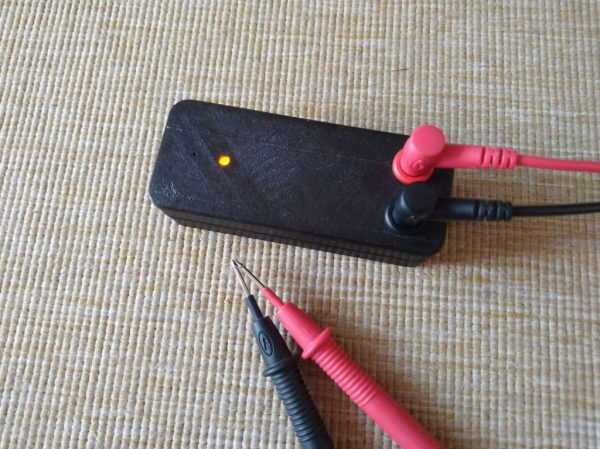
[oxullo] came across [Leo]’s original build for the ultimate continuity tester. This design is much more sensitive than the function which is built in to most multi-meters, and when building this tool specifically some other refinements can be built in as well. [oxullo] began by starting with the original designs, but made several small modifications. Most of these were changing to surface-mount parts, and switching some components for ones already available. Even then, there was still a mistake in the PCB which was eventually corrected. The case for this build is also 3D printed instead of being made out of metal, and with the original video to work from the rest fell into place easily.

[oxullo] is getting comparable results with this continuity tester, so we can officially say that this design is peer reviewed and tested to the highest of standards. If you’re in need of a more sensitive continuity sensor, or just don’t want to shell out for a Fluke meter when you don’t need the rest of its capabilities, this is the way to go. And don’t forget to check out our original write-up for this tester if you missed it the first time around.

Casting Metal With A Microwave And Vacuum Cleaner

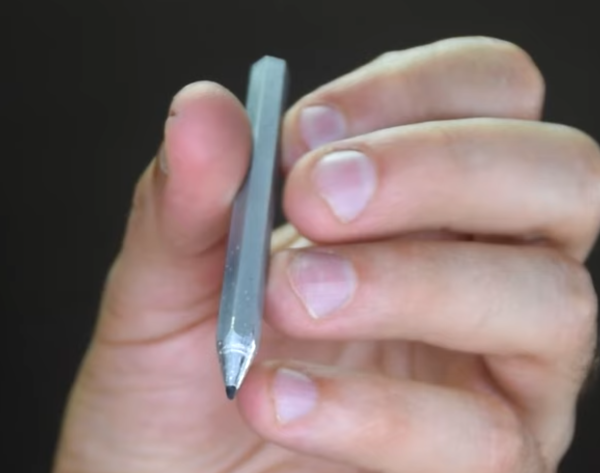
Metalworking might conjure images of large furnaces powered by coal, wood, or electricity, with molten metal sloshing around and visible in its crucible. But metalworking from home doesn’t need to use anything more fancy than a microwave, at least according to [Denny] a.k.a. [Shake the Future]. He has a number of metalworking tools designed to melt metal using a microwave, and in this video he uses them to make a usable aluminum pencil with a graphite core.

Before getting to the microwave kiln, the pencil mold needs to be prepared. A 3D-printed pencil is first created with the graphite core, and then [Denny] uses a plaster of Paris mixture to create the mold for the pencil. The 3D printed plastic is left inside the mold and placed in the first microwave kiln, which is turned on just enough to melt the plastic out of the mold, leaving behind the graphite core. From there a second kiln goes into the microwave to melt the aluminum.

Once the molten aluminum is ready, it is removed from the kiln and poured in the still-warm pencil mold. This is where [Denny] has another trick up his sleeve. He’s using a household vacuum cleaner to suck the metal into place before it cools, creating a rudimentary but effective vacuum forming machine. The result is a working pencil, at least after he wears down a few razor blades attempting to sharpen the metal pencil. For more information about how [Denny] makes these microwave kilns, take a look at some of his earlier projects.

Continue reading “Casting Metal With A Microwave And Vacuum Cleaner”

A Drone For The Rest Of Us

As anyone who’s spent Christmas morning trying to shake a quadcopter out of a tree can attest, controlling these fast moving RC vehicles can be tricky and require a bit of practice to master. [Erik] wanted to simplify this a little bit so his children and friends could race with him, and the end result is a drone that only needs two inputs to fly.

The results of his experimentation with simplifying the controls resulted in a “speeder” type drone which attempts to keep a certain distance off of the ground on its own thanks to an extremely fast time-of-flight sensor. The pilot is then left to control the throttle and the steering only, meaning that [Erik] can use pistol-style RC controllers for these machines. They have some similarities to a quadcopter, but since they need to stay level in flight they also have a fifth propeller on the back, similar to an airboat. This allows for a totally separate thrust control than would normally be available on a quadcopter.

The resulting vehicle is immediately intuitive to fly, behaving more like an RC car than a quadcopter. This also required quite a bit of processing power to compute the proper roll and yaw from a single steering input, but after many prototypes the result is impressive, especially since it was also built to use FPV as a means of control. One of the videos below demonstrates this video, and looks extremely fun to fly, and we wouldn’t mind seeing a race with these types of speeders much like we saw in the past with a group of pod-racing quadrotors.

Continue reading “A Drone For The Rest Of Us”

The NES Gets Its Own OS

Until recently, most video game systems didn’t need their own operating systems in order to play games. Especially in the cartridge era — the games themselves simply ran directly on the hardware and didn’t require the middleman of an operating system for any of the functionality of the consoles. There were exceptions for computers that doubled as home computers such as the Commodore, but systems like the NES never had their own dedicated OS. At least, until [Inkbox] designed and built the NES-OS.

The operating system does not have any command line, instead going directly for a graphical user interface. There are two programs that make up the operating system. The first is a settings application which allows the user to make various changes to the appearance and behavior of the OS, and the second is a word processor with support for the Japanese “Family Keyboard” accessory. The memory on the NES is limited, and since the OS loads entirely into RAM there’s only enough leftover space for eight total files. Those files themselves are limited to 832 bytes, which is one screen’s worth of text without scrolling.

While it might seem limited to those of us living in the modern era, the OS makes nearly complete use of the available processing power and memory of this 1980s system that was best known for Super Mario Bros. and Duck Hunt. It’s an impressive build for such a small package, and really dives into a lot of the hardware and limitations when building software for these systems. If you need more functionality than that, we’d recommend installing Linux on the NES Classic instead.

Continue reading “The NES Gets Its Own OS”