Learn Arduino In Time And In Tune For Christmas

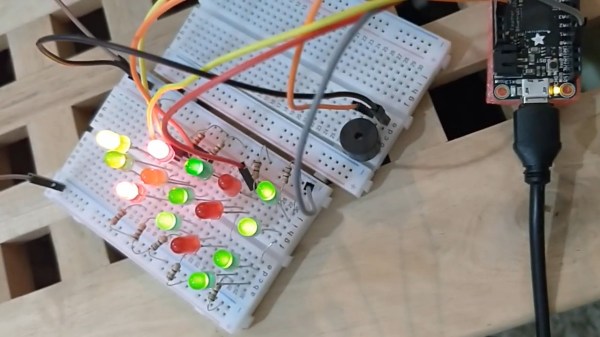
If you’re one of the lucky ten thousand today who still haven’t tried programming electronics with the Arduino platform, this detailed guide by [Dafna Mordechai] should hopefully give you enough incentive to pick it up now and make a simple bit of Christmas-themed decoration with it.

The guide isn’t exactly aimed at complete ground-up beginners but it does give some pointers on where to look up whatever information you don’t have in order to follow along. Other than that, it’s very simple and has well-detailed steps, showing you how to turn a breadboard into a simple animated arrangement of LEDs in the shape of a Christmas tree, along with a piezo buzzer playing “Jingle Bells”. If you’ve never done this sort of stuff before, [Dafna] explains in pretty good detail which part of the code does what, making it pretty simple if you want to play around with it and customize it to your taste.

Once you’ve gotten the hang of the basics of Arduino, why not try a project that’s a little more elaborate? Without having to stray too far from your comfort zone, you can easily build a kid’s toy full of switches and lights or even a very extra clock that has no shortage of lights and dials.
An Open Assistive Robotic Arm To Help People Feed Themselves

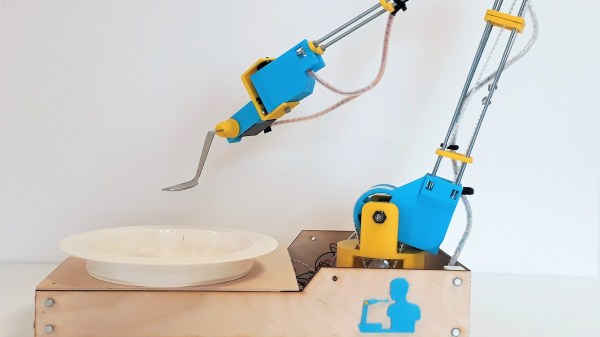
Despite being otherwise capable, not everyone is able to feed themselves. [Julien]’s robot arm project aims to bring this crucial independence back to those people. Assistive devices in this space do exist, but as always they’re prohibitively expensive and the approval process is a nightmare. The development of the arm started by working closely with people who needed it at a local hospital. We note with approval, quite a few cardboard mock-ups to get the size and shape right before more formal work was done in CAD.

The robot arm only has to support a very light payload so its construction can be quite light. A frame of steel rods or plywood is all that’s required. We like how the motion is transferred from stepper motors to the joints of the arm by generously sized timing belts allowing the weight of the arm to remain towards the base. The team behind the project has gotten it to a point, but they’re hoping it will inspire community involvement as they move forward with it.

It’s worth noting, this is not the first assistive eating aid we’ve covered.

DIY Thermal Imager Uses DIY Gaussian Blur

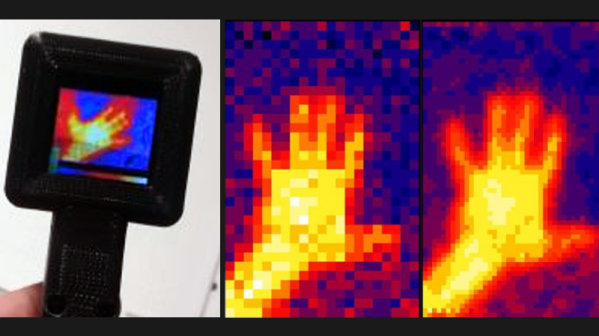
Under the right circumstances, Gaussian blurring can make an image seem more clearly defined. [DZL] demonstrates exactly this with a lightweight and compact Gaussian interpolation routine to make the low-resolution thermal sensor data display much better on a small OLED.

[DZL] used an MLX90640 sensor to create a DIY thermal imager with a small OLED display, but since the sensor is relatively low-resolution at 32×24, displaying the data directly looks awfully blocky. Gaussian interpolation to improve the display looks really good, but it turns out that the full Gaussian interpolation isn’t a trivial calculation write on your own. Since [DZL] wanted to implement it on a microcontroller, the lightweight implementation was born. The project page walks through the details of Gaussian interpolation and how some effective shortcuts were made, so be sure to give it a look.

The MLX90640 sensor also makes an appearance in the Open Thermal Camera, one of the entries for the 2019 Hackaday Prize. If you’re interested in thermal imaging, don’t miss this teardown of a thermal imaging camera.

Build Your Own Solenoid Engine

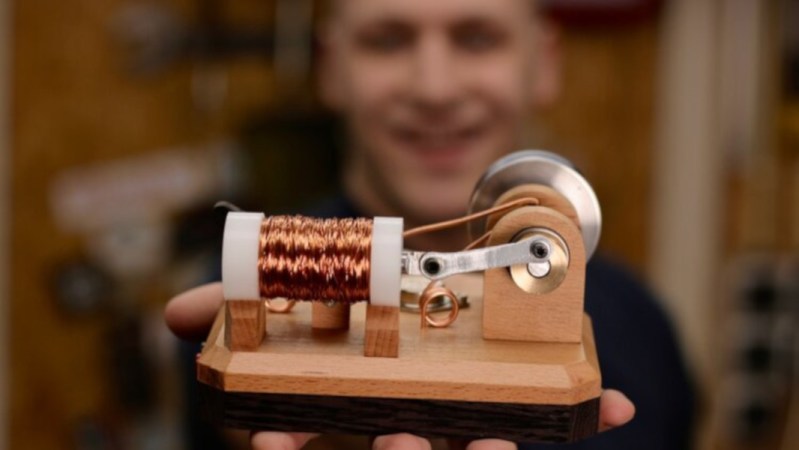
A solenoid engine is a curiosity of the electrical world. By all measures, using electricity to rotate something can be done almost any other way with greater efficiency and less hassle. But there’s just something riveting about watching a solenoid engine work. If you want to build one of your own and see for yourself, [Emiel] aka [The Practical Engineer] has a great how-to.

For this build though he used a few tools that some of us may not have on hand, such as a lathe and a drill press. The lathe was used to make the plastic spool to hold the wire, and also to help wind the wire onto the spool itself rather than doing it by hand. He also milled the wood mounts and metal bearings as well, and the quality of the work really shows through in the final product. The final touch is the transistor which controls power flow to the engine.

If you don’t have all of the machine tools [Emiel] used it’s not impossible to find substitute parts if you want to build your own. It’s an impressive display piece, or possibly even functional if you want your build to have a certain steampunk aesthetic (without the steam). You can even add more pistons to your build if you need extra power.

Continue reading “Build Your Own Solenoid Engine”

Tinker Pilot Project Cranks Cockpit Immersion To 11

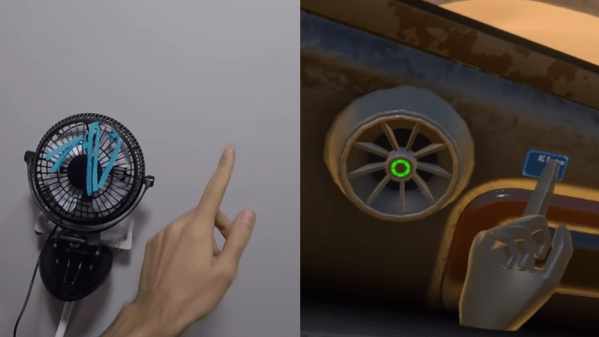
One of the more interesting ideas being experimented with in VR is 1:1 mapping of virtual and real-world objects, so that virtual representations can have physically interaction in a normal way. Tinker Pilot is a VR spaceship simulator project by [LLUÍS and JAVI] that takes this idea and runs with it, aiming for the ability to map a cockpit’s joysticks, switches, and other hardware to real-world representations. What does that mean? It means a virtual cockpit with flight sticks, levers, and switches that have working physical versions that actually exist exactly where they appear to be.

A few things about the project design caught our eye. One is the serial communications protocol intended to interface easily with microcontrollers, allowing for feedback between the program and any custom peripherals. (By the way, this is the same approach Kerbal Space Program took with KSPSerialIO, which enables custom mission control hardware at whatever level of complexity a user may wish to implement.)

The possibilities are demonstrated starting around 1:09 in the teaser trailer (embedded below) in which a custom controller is drawn up in CAD, then 3D-printed and attached to an Arduino, and finally the 3D model is imported into the cockpit as a 1:1 representation of the actual working unit, with visual positional feedback.

Unlike this chair experiment we saw which attached a Vive Tracker to a chair, there is no indication of needing positional trackers on individual controls in Tinker Pilot. In a cockpit layout, controls can be reasonably expected to remain in fixed positions relative to the cockpit, meaning that they can be set up as 1:1 representations of a physical layout and otherwise left alone. The kind of experimentation that is available today even to individual developers or small teams is remarkable, and it’s fascinating to see the ideas being given some experimentation.

Continue reading “Tinker Pilot Project Cranks Cockpit Immersion To 11”

A Better Embroidery Machine, With 3D Printing And Common Parts

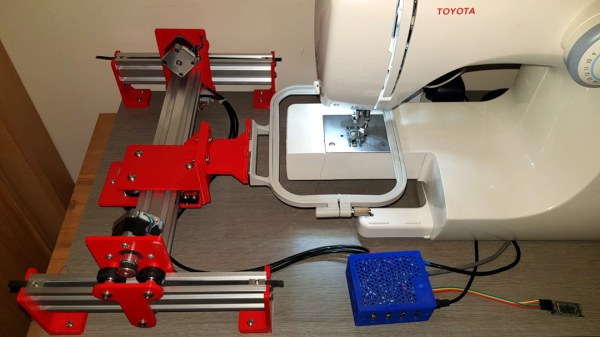
In concept, an everyday sewing machine could make embroidery a snap: the operator would move the fabric around in any direction they wish while the sewing machine would take care of slapping down stitches of colored thread to create designs and filled areas. In practice though, getting good results in this way is quite a bit more complex. To aid and automate this process, [sausagePaws] has been using CNC to take care of all the necessary motion control. The result is the DIY Embroidery Machine V2 which leverages 3D printed parts and common components such as an Arduino and stepper drivers for an economical DIY solution.

It’s not shown in the photo here, but we particularly like the 3D printed sockets that are screwed into the tabletop. These hold the sewing machine’s “feet”, and allow it to be treated like a modular component that can easily be removed and used normally when needed.

The system consists of a UI running on an Android tablet, communicating over Bluetooth to an Arduino. The Arduino controls the gantry which moves the hoop (a frame that holds a section of fabric taut while it is being embroidered), while the sewing machine lays down the stitches.

[sausagePaws]’s first version worked well, but this new design really takes advantage of 3D printing as well as the increased availability of cheap and effective CNC components. It’s still a work in progress that is a bit light on design details, but you can see it all in action in the video embedded below.

Continue reading “A Better Embroidery Machine, With 3D Printing And Common Parts”

Add An Ant To Your Desk For Some Compact PCB Manufacturing

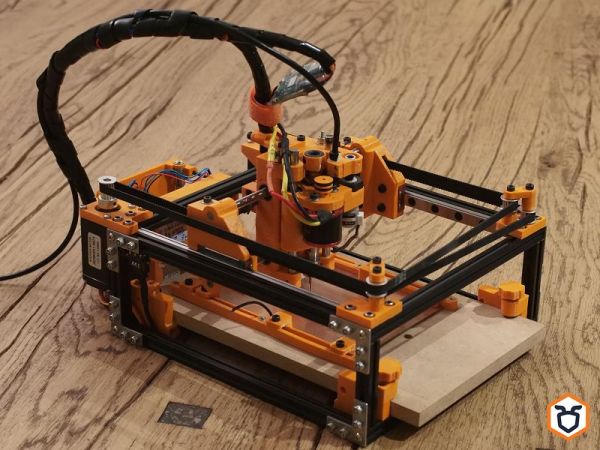
Usually when one thinks of using a CNC machine for producing PCBs, one thinks of those big, bulky CNC machines that pretty much fill an entire desk. But what if a CNC machine could be small enough to fit on a desk without getting in the way, yet still be useful enough to make single- and double-sided PCBs? This was the idea behind The Ant, the compact PCB manufacturing machine which [Mattia] and [Angelo] designed and open sourced.

In addition to the above linked Bitbucket repository for the project, the ‘Ant Team’ has a YouTube channel on which they have a range of rather professionally edited videos on the project, ranging from constructing the little machine, to various updates and more  Also see the video that is attached after the link for a visual introduction to the project.

Support and community interaction is mostly performed via the Reddit group for the project, where the diminutive machine finds a welcoming community as it continues to evolve. The machine itself is specified at this point as being able to built from commercially available and 3D printed parts, requiring no further tools for cutting or shaping. The precision is about 0.2 mm trace spacing.

Optical alignment for double-sided boards is achieved using a USB micro camera and the bCNC software, while the cost for materials is said to be quite inexpensive when compared with commercial solutions

Honestly, after seeing the machine in action, wouldn’t you want to have a CNC machine that’s so small and good-looking on your desk? If there’s one thing one might want to add, it’s probably a way to deal with the copper dust that’s produced while creating PCBs. Having to clean that off the desk after each PCB manufacturing session would get a bit cumbersome, we imagine.

Continue reading “Add An Ant To Your Desk For Some Compact PCB Manufacturing”