Basic geocaching consists of following GPS coordinates to a location, then finding a container which is concealed somewhere nearby. Like any activity, people tend to add their own twists to keep things interesting. [Jangeox] recently posted a video of the OLED Snail 2.0 to show off his most recent work. (This is a refinement of an earlier version, which he describes in a blog post.)
Another of [Jangeox]’s Electronic Waypoints[Jangeox] spices up geocaching by creating electronic waypoints, and the OLED Snail is one of these. Instead of GPS coordinates sending someone directly to a goal, a person instead finds a waypoint that reveals another set of coordinates and these waypoints are followed like a trail of breadcrumbs.
A typical waypoint is an ATTINY85 microcontroller programmed to display an animated message on the OLED, and the message reveals the coordinates to the next waypoint. The waypoint is always cleverly hidden, and in the case of the OLED Snail 2.0 the enclosure is the shell of a large snail containing the electronics encased in resin. This means that the devices have a finite lifespan — the battery sealed inside is all the power the device gets. Fortunately, with the help of a tilt switch the electronics can remain dormant until someone picks it up to start the show. Other waypoints have included a fake plant, and the fake bolt shown here. Video of the OLED Snail 2.0 is embedded below.
What do you get when you put an ultra-bright LED in the palm of a glove, and strobe it controlled by an accelerometer? A Time Control Glove! In creator [MadGyver]’s own words, it’s “just a stroboscope with frequency adjustment” but the effect is where all the fun is.
The Time Control Glove uses the stroboscopic effect, which many of us have seen used in timeless water drop fountains where the strobe rate makes drops appear to change speed, freeze in place, and even change direction. [MadGyver] made the entire assembly portable by putting it into a glove. An on-board accelerometer toggles the strobe in response to a shake, and the frequency is changed by twisting the glove left or right. The immediate visual feedback to the physical motions is great. The whole effect is really striking on the video, which is embedded below.
[Super 73] make electric scooters, and they made some Star Wars Speeder Bikes with a twist for Halloween; adding some mirrored panels around the bottoms of the bikes made for a decent visual effect that requires no upkeep or fancy workings. Having amazed everyone with the bikes, they followed them up with a video of the build process.
The speeders are shells built around their Super 73 electric scooter, with bases of what looks like MDF sitting on anchor points. Onto the base platforms goes cardboard and expanding foam to create the correct shapes, which are then sanded then coated in fiberglass and bondo. Then it’s time for paint, weathering, and all the assorted bits and pieces needed to make the speeders as screen-accurate as possible. The real finishing touch are the mirrored panels to conceal the wheels and create a levitation illusion. As long as the mirrors are angled so that they reflect the pavement when viewed by a pedestrian, it works fairly well.
Top it off with costumes and a ride around town (with plenty of cameras of course, they naturally wanted to grab some eyeballs) and we have to say, the end result looks nifty. Both the showcase and making-of videos are embedded below.
Plywood laser-cuts fairly well but has drawbacks when used in serious production runs, as [Marie] explains in a blog post about a quest for the ultimate laser-cutting plywood. One of the things [Nervous System] makes and sells is generative jigsaw puzzles, and they shared their experience with the challenges in producing them. The biggest issue was the wood itself. They ended up getting a custom plywood made to fit their exact needs, a process that turned out neither as complex nor as unusual as it may sound.
An example of how a dense knot hidden in one of the plywood layers caused the laser to not cut all the way through.
Plywood is great because it’s readily available, but there are some drawbacks that cause problems when trying to do serious production of laser-cut plywood pieces. Laser cutting works best when the material being cut is consistent, but there can be areas of inconsistent density in plywood. If the laser encounters an unexpected knot somewhere in the wood, there is no way to slow down or to increase power to compensate. The result is a small area where the laser perhaps doesn’t quite make it through. A picture of an example from my workshop shows what this looks like.
When doing basic project work or prototyping, this kind of issue is inconvenient but usually some trimming and sanding will sort things out. When doing a production run for puzzles like [Nervous System] was doing, the issue is more serious:
A jigsaw puzzle with a large number of cuts in a relatively small area has a higher chance of running into any problem spots in the material. If they exist, the laser will probably encounter them.
Trouble spots in plywood can be on the inside layers, meaning they can’t be detected visually and are only discovered after they cause an incomplete cut.
Increasing laser power for the whole job is an incomplete solution, as excessive laser power tends to make the cuts uglier due to increased scorching and charring.
An inspection process becomes needed to check each puzzle piece for problems, which adds time and effort.
A puzzle that had even one piece that did not cut properly will probably be scrapped because rework is not practical. That material (and any time and money that went into getting the nice artwork onto it) becomes waste.
Plywood is great stuff and can look gorgeous, but [Marie] says they struggled with its issues for a long time and eventually realized they had gone as far as they could with off-the-shelf plywoods, even specialty ones. They knew exactly what they needed, and it was time for something custom-made to serve those specific needs.
Having your own plywood custom-made may sound a little extreme, but [Marie] assures us it’s not particularly difficult or unreasonable. They contacted a small manufacturer who specialized in custom aircraft plywoods and was able to provide their laser-cut plywood holy grail: a 3-ply sheet, with high quality basswood core with birch veneers, and a melamine-based glue. It cuts better than anything else they have used, and [Marie] says that after four years they had certainly tried just about everything.
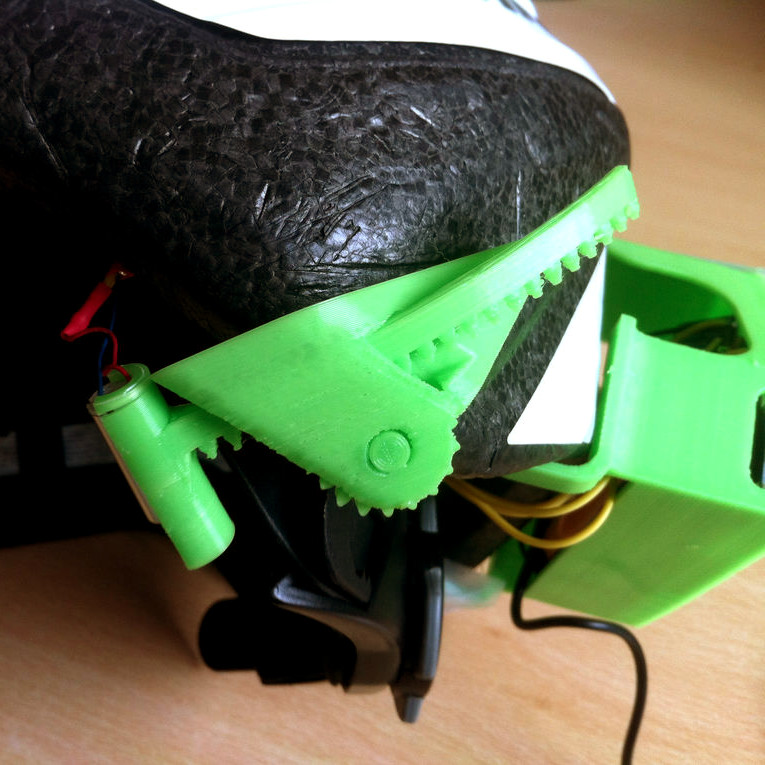
[Tommy] shares a simple 3D printing design tip that will be self-evident to some, but a bit of a revelation to others: the concept of a sacrificial bridge to avoid awkward support structures. In the picture shown, the black 3D print has small bridges and each bridge has a hole. The purpose of these bits is to hold a hex nut captive in the area under the bridge; a bolt goes in through the round hole in the top.
Readers familiar with 3D printing will see right away that printing the bridges might be a problem. When a printer gets to the first layer of the bridge, it will be trying to lay filament in empty space. By itself this is not usually a problem as long as a bridge is short, flat, and featureless. Unfortunately this bridge has a hole in it, and that hole means the printer will be trying to draw circles in mid-air, rather than simply stretching filament point-to-point across a gap. One solution would be to add a small amount of support structure, but that just moves the problem. Removing small supports from enclosed spaces can be a real hassle.
To solve this [Tommy] added what he calls a “sacrificial bridge”, shown as blue in the CAD image. He essentially gives the hole a flat bottom, so that the printer first lays down a thin but solid bridge as a foundation. Then, the portion with the round hole is printed on top of that. With this small design change, the print becomes much more reliable with no support structure required.
There is a bit of post-work involved since each hole needs to be drilled out to punch through the thin sacrificial bridge underneath, but it definitely beats digging out little bits of support structure instead.
A lot of work has gone into hacking common items (like IKEA Lack tables) into useful and effective 3D printer enclosures, but [Stefan.Lu] has taken a harder look at the whole business. He decided to start with some specific goals that were unmet by current solutions. In particular, he wanted to allow for proper ventilation and exhaust. Not only do some filaments smell bad, but there is ongoing research around UFP (ultra-fine particles) emitted from the 3D printing process. Just in case UFPs turn out to be this generation’s asbestos or something equally terrible, [Stefan.Lu] felt that a bit more work and expense up front would be worth it to meet his goals of a ventilation-friendly enclosure.
In addition to ventilation and exhaust, [Stefan.Lu] wanted to locate the printer at a comfortable working height, and preferred not to build things entirely from scratch. He did it for well under $200 by using a common storage rack shelf as the foundation and acrylic panels for the sides, and a few thoughtful uses of basic hardware. The angled metal supports made for easy attachment points and customization, and a combination of solid shelf plus anchoring to the wall put an end to vibrations. The side panels are secured by magnets, and [Stefan.Lu] points out that if you don’t have access to a laser cutter, cast acrylic withstands drilling and cutting better than extruded acrylic.
The final touch was a fire alarm, which is an excellent precaution. 3D printers are heating elements with multiple moving parts and they often work unattended. It makes sense to have a fire alarm around, or at least not enclose the device in highly flammable material in the first place.
This video demonstrates a really interesting experiment: sticking a Vive Tracker onto an ordinary chair in order to sync it up perfectly with its VR counterpart. The result? A chair that is visible in VR as a virtual object, but has a 1:1 physical world version occupying the same space. This means that unlike any other virtual object, this chair can be seen, touched, felt, moved, and actually sat in while the user is immersed in VR.
The purpose of this experiment seems to have been to virtually explore seating arrangements for real-world environments, and spawned a theatre planning tool by design studio [Agile Lens]. But we wonder if there’s unrealized potential in the idea of connecting physical objects that can be touched and held (or sat on) with their VR counterparts. Video demos of the chair test are embedded below.