Hacking When It Counts: The Magnetron Goes To War

In 1940, England was in a dangerous predicament. The Nazi war machine had been sweeping across Europe for almost two years, claiming countries in a crescent from Norway to France and cutting off the island from the Continent. The Battle of Britain was raging in the skies above the English Channel and southern coast of the country, while the Blitz ravaged London with a nightly rain of bombs and terror. The entire country was mobilized, prepared for Hitler’s inevitable invasion force to sweep across the Channel and claim another victim.

We’ve seen before that no idea that could possibly help turn the tide was considered too risky or too wild to take a chance on. Indeed, many of the ideas that sprang from the fertile and desperate minds of British inventors went on to influence the course of the war in ways they could never have been predicted. But there was one invention that not only influenced the war but has a solid claim on being its key invention, one without which the outcome of the war almost certainly would have been far worse, and one that would become a critical technology of the post-war era that would lead directly to innovations in communications, material science, and beyond. And the risks taken to develop this idea, the cavity magnetron, and field usable systems based on it are breathtaking in their scope and audacity. Here’s how the magnetron went to war.

Continue reading “Hacking When It Counts: The Magnetron Goes To War”
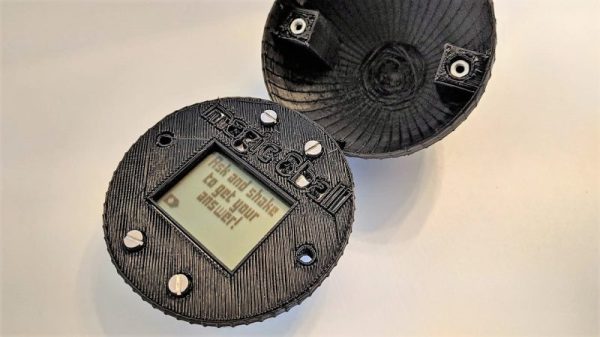
Rubber Duck Debugging The Digital Way

Anyone who slings code for a living knows the feeling all too well: your code is running fine and dandy one minute, and the next minute is throwing exceptions. You’d swear on a stack of O’Reilly books that you didn’t change anything, but your program stubbornly refuses to agree. Stumped, you turn to the only one who understands you and pour your heart out to a little yellow rubber duck.

When it comes to debugging tools, this digital replacement for the duck on your desk might be even more helpful. Rubber duck decoding, where actually explaining aloud to an inanimate object how you think the code should run, really works. It’s basically a way to get you to see the mistake you made by explaining it to yourself; the duck or whatever – personally, I use a stuffed pig– is just along for the ride. [platisd] took the idea a step further and made his debugging buddy, which he dubs the “Dialectic Ball,” in the form of a Magic 8-Ball fortune teller. A 3D-printed shell has an ATtiny84, an accelerometer, and an LCD screen. To use it, you state your problem, shake it, and read the random suggestion that pops up. The list has some obvious suggestions, like adding diagnostic print statements or refactoring. Some tips are more personal, like talking to your local guru or getting a cup of coffee to get things going again. The list can be customized for your way of thinking. If nothing else, it’ll be a conversation piece on your desk.

If you’re more interested in prognostication than debugging, we have no shortage of Magic 8-Ball builds to choose from. Here’s one in a heart, one that fits in a business card, and even one that drops F-bombs.

Continue reading “Rubber Duck Debugging The Digital Way”

A Tinfoil-Free Internet Of Ceiling Fans

Putting everything on the Internet is getting easier and easier, what with the profusion of Internet-ready appliances as well as cheap and plentiful IoT modules to integrate legacy devices. Think IoT light bulbs, refrigerators and dishwashers that can be controlled from a smartphone, and the ubiquitous Sonoff modules. But once these things are on the net, what are they talking about? Are they saying things behind your back? Are they shipping data about your fridge contents off to some foreign land, to be monetized against your will?

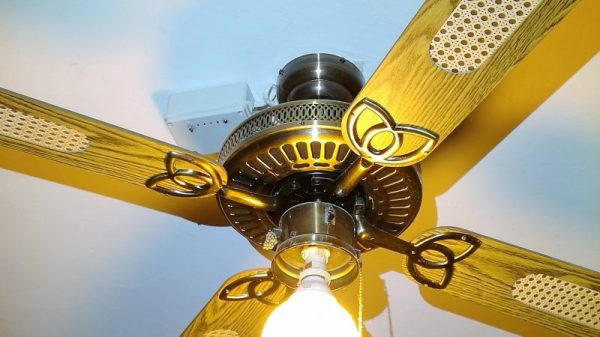
Maybe, maybe not, but short of a tinfoil helmet the only way to protect yourself is to build your own system. This IoT control for ceiling fans is a good example, with the added benefit that most wireless ceiling fan remotes are kind of lousy. [microentropie] didn’t like the idea of going the Sonoff route, so his custom controller is based on that IoT workhorse, the ESP8266. There are two versions, one switching the light and fan loads with relays, and one with triacs. The ESP serves up its own web page for control rather than using a cloud service, and is capable of setting up the fan to turn on and off automatically at preset times or temperatures. Everything sits in an unobtrusive box on the ceiling near the fan, but we bet this could be miniaturized enough to fit right inside the fan housing.

If some of [microentropie]’s code looks familiar, it might be because he borrowed it from his IoT rice cooker project.

Dive Inside This Old Quartz Watch

In an age of smartwatches, an analog watch might seem a little old-fashioned. Whether it’s powered by springs or a battery, though, the machinery that spins those little hands is pretty fascinating. Trouble is, taking one apart usually doesn’t reveal too much about their tiny workings, unless you get up close and personal like with this microscopic tour of an analog watch.

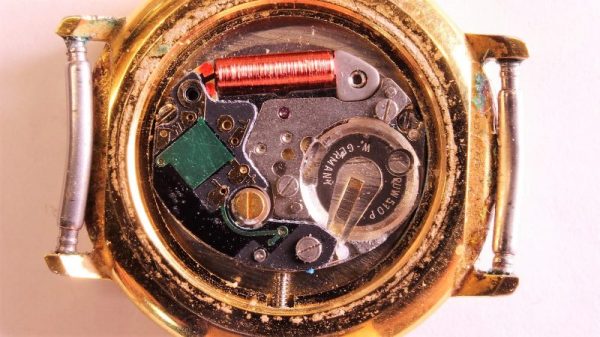
This one might seem like a bit of a departure from [electronupdate]’s usual explorations of the dies within various chips, but fear not, for this watch has an electronic movement. The gross anatomy is simple: a battery, a coil for a tiny stepper motor, and the gears needed to rotate the hands. But the driver chip is where the action is. With some beautiful die shots, [electronupdate] walks us through the various areas of the chip – the oscillator, the 15-stage divider cascade that changes the 32.768 kHz signal to a 1 Hz pulse, and a remarkably tiny H-bridge for running the stepper. We found that last section particularly lovely, and always enjoy seeing the structures traced out. There are even some great tips about using GIMP for image processing. Check out the video after the break.

[electronupdate] knows his way around a die, and he’s a great silicon tour guide, whether it’s the guts of an SMT inductor or a Neopixel close-up. He’s also looking to improve his teardowns with a lapping machine, but there are a few problems with that one so far.

Continue reading “Dive Inside This Old Quartz Watch”

Classifying Crystals With An SDR Dongle

When it comes to radio frequency oscillators, crystal controlled is the way to go when you want frequency precision. But not every slab of quartz in a tiny silver case is created equal, so crystals need to be characterized before using them. That’s generally a job for an oscilloscope, but if you’re clever, an SDR dongle can make a dandy crystal checker too.

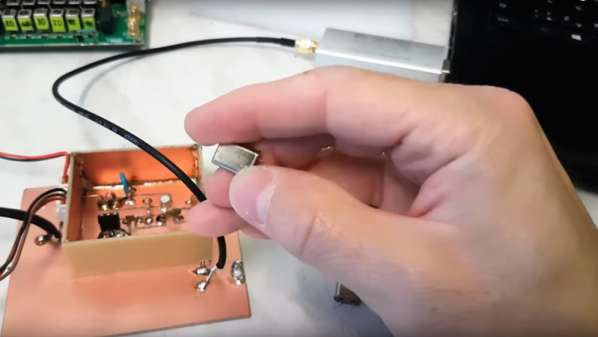
The back story on [OM0ET]’s little hack is interesting, and one we hope to follow up on. The Slovakian ham is building what looks to be a pretty sophisticated homebrew single-sideband transceiver for the HF bands. Needed for such a rig are good intermediate frequency (IF) filters, which require matched sets of crystals. He wanted a quick and easy way to go through his collection of crystals and get a precise reading of the resonant frequency, so he turned to his cheap little RTL-SDR dongle. Plugged into a PC with SDRSharp running, the dongle’s antenna input is connected to the output of a simple one-transistor crystal oscillator. No schematics are given, but a look at the layout in the video below suggests it’s just a Colpitts oscillator. With the crystal under test plugged in, the oscillator produces a huge spike on the SDRSharp spectrum analyzer display, and [OM0ET] can quickly determine the center frequency. We’d suggest an attenuator to change the clipped plateau into a sharper peak, but other than that it worked like a charm, and he even found a few dud crystals with it.

Fascinated by the electromechanics of quartz crystals? We are too, which is why [Jenny]’s crystal oscillator primer is a good first stop for the curious.

Continue reading “Classifying Crystals With An SDR Dongle”

Mechanisms: Abrasives

In our “Mechanisms” series, we’ve featured the fascinating bits and pieces that go into making our mechanical world work. From simple machines such as screws and levers, from springs to couplings, and even more complex mechanisms like zippers and solenoids, we’ve covered the gamut. But we haven’t talked about one of the very earliest mechanisms, captured from nature by our clever ancestors to do useful work like grinding grain and shaping materials into tools: grit, sand, abrasives.

Continue reading “Mechanisms: Abrasives”

Magnetic Spheres Line Up For Rotary Encoder Duty

When it comes to rotary encoders, there are plenty of options. Most of them involve putting a credit card number into an online vendor’s website, though, and that’s sometimes just not in the cards. In that case building your own, like this encoder using magnetic spheres, is a pretty cool way to go too.

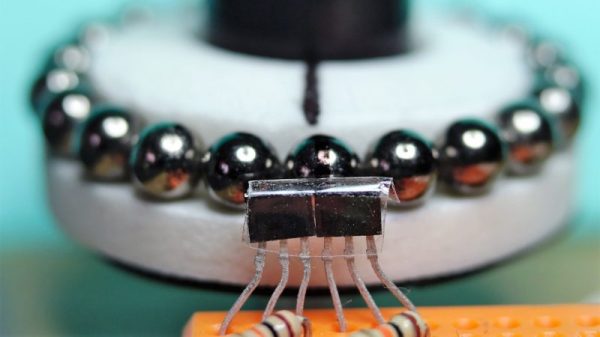
If he’d had less time to spare, we imagine [Antonio Ospite] would have gone for a commercial solution rather than building an encoder from scratch. Then again, he says his application had noise considerations, so maybe this was the best solution overall. He had some latching Hall effect sensors lying around, but lacked the ring magnet that is usually used with such sensors in magnetic encoders. But luckily, he had a mess of magnetic spheres, each 5 mm in diameter. Lined up in a circle around a knob made from a CD spindle, the spheres oriented themselves with alternating poles, which is just what the Hall sensors want to see. The sensors were arranged so the pulses are 90° apart, and can resolve 4.29° steps. Check out the video below to watch it work.

Small, cheap and effective are always good things. But magnets aren’t the only thing behind homebrew rotary encoders. A couple of microswitches might do in a pinch, or maybe even scrapped hard drives would suffice.

Continue reading “Magnetic Spheres Line Up For Rotary Encoder Duty”