The Most Expensive D20 You’ll See Today

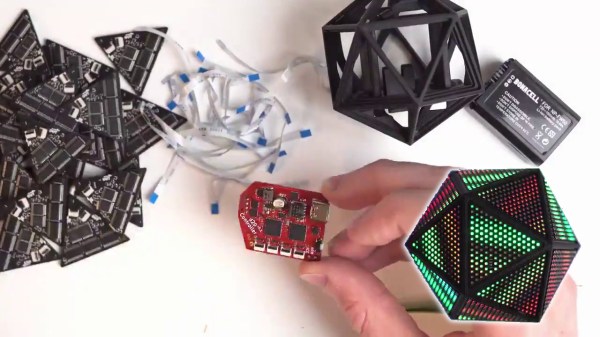
Roll your negotiation skill, because this d20 is a hefty one. The Tweet is also below. We are charmed by [Greg Davill]’s twenty-sided LED contraption, but what do we call it? Is it a device? A sculpture? A die? Even though “d20” is right on his custom controller PCB, we don’t think this will grace the table at the next elf campaign since it is rather like taking a Rolls Royce to the grocery store. Our builder estimates the price tag at $350 USD and that includes twenty custom PCB light panels with their components, a controller board, one battery pack, and the 3D printed chassis that has to friction-fit the light faces.

Power and communication for all the panels rely on twenty ribbon cables daisy-chained throughout the printed scaffolding, which you can see in the picture above. [Greg] made a six-sided LED cube last year, and there are more details for it, but we suspect he learned his lesson about soldering thousands of lights by hand. There are one-hundred-twenty LEDs per panel, times twenty, that is over two-thousand blinkenlights. We don’t yet have specs on the controller, but last time he used a SAMD51 processor to support over three-thousand lights. We don’t know where he’ll go next, but we’re game if he wants to make a chandelier for Hackaday’s secret underground lair.

(Editor’s Note: If you were at Supercon last year, and you got to play with this thing in the flesh, it’s worth it!)

Continue reading “The Most Expensive D20 You’ll See Today”

Peripheral Doesn’t Need Deskspace

Some of us are suckers for new hardware. There’s absolutely nothing shameful about a drawer overflowing with gamepads, roll-up keyboards, and those funny-shaped ergonomic mice. MyTeleTouch won’t sate your itch for new hardware because [Dimitar Danailov] didn’t design hardware you hold, because it uses your phone as a catch-all Human Interface Device, HID. A dongle plugs into a standard USB port, and your Android phone can emulate a USB keyboard, mouse, or gamepad over Bluetooth.

Chances are high that you already set up your primary computer with your favorite hardware, but we think we’ve found a practical slant for a minimalist accessory. Remember the last time you booted an obsolete Windows desktop and dug out an old mouse with a questionable USB plug? How long have you poked around the bottom of a moving box trying to find a proprietary wireless keyboard dongle, when you just wanted to type a password on your smart TV? What about RetroPi and a game controller? MyTeleTouch isn’t going to transform your daily experience, but it’ll be there when you don’t want to carry a full-size keyboard down three flights of stairs to press {ENTER} on a machine that spontaneously forgot it has a touch screen. If you don’t have opportunities to play the hero very often, you can choose to play the villain. Hide this in a coworker’s USB port, and while they think you’re sending a text message, you could be fiddling with their cursor.

We enjoy a good prank that everyone can laugh off, and we love little keyboards and this one raises the (space) bar.

Continue reading “Peripheral Doesn’t Need Deskspace”

Game Boy Plays Forever

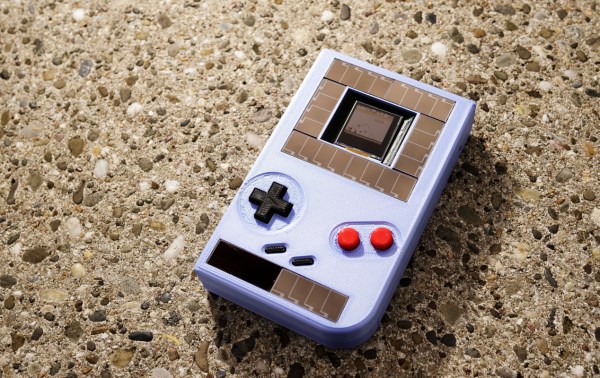
For those of us old enough to experience it first hand, the original Game Boy was pretty incredible, but did have one major downside: battery consumption. In the 90s rechargeable batteries weren’t common, which led to most of us playing our handhelds beside power outlets. Some modern takes on the classic Game Boy address these concerns with modern hardware, but this group from the Delft University of Technology and Northwestern has created a Game Boy clone that doesn’t need any batteries at all, even though it can play games indefinitely.

This build was a proof-of-concept for something called “intermittent computing” which allows a computer to remain in a state of processing limbo until it gets enough energy to perform the next computation. The Game Boy clone, fully compatible with the original Game Boy hardware, is equipped with many tiny solar panels which can harvest energy and is able to halt itself and store its state in nonvolatile memory if it detects that there isn’t enough energy available to continue. This means that Super Mario Land isn’t exactly playable, but other games that aren’t as action-packed can be enjoyed with very little impact in gameplay.

The researchers note that it’ll be a long time before their energy-aware platform becomes commonplace in devices and replaces batteries, but they do think that internet-connected devices that don’t need to be constantly running or powered up would be a good start. There are already some low-powered options available that can keep their displays active when everything else is off, so hopefully we will see even more energy-efficient options in the near future.

Thanks to [Sascho] for the tip!

Continue reading “Game Boy Plays Forever”

3D-Printed Flight Controls Use Magnets For Enhanced Flight Simulator 2020 Experience

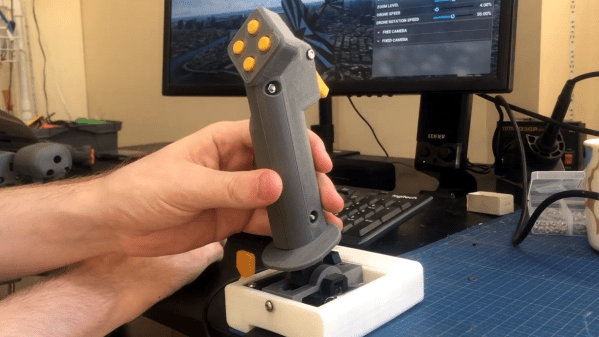
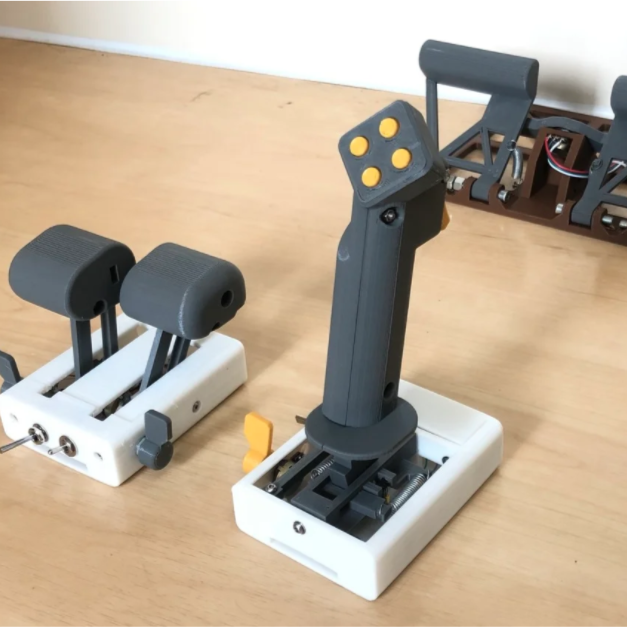
We have seen quite a few DIY joystick designs that use Hall effect sensors, but [Akaki Kuumeri]’s controller designs (YouTube video, embedded below) really make the most of 3D printing to avoid the need for any other type of fabrication. He’s been busy using them to enhance his Microsoft Flight Simulator 2020 experience, and shares not just his joystick design, but makes it a three-pack with designs for throttle and pedals as well.

Hall effect sensors output a voltage that varies in proportion to the presence of a magnetic field, which is typically provided by a nearby magnet. By mounting sensors and magnets in a way that varies the distance between them depending on how a control is moved, position can be sensed and communicated to a host computer.

In [Akaki]’s case, that communication is done with an Arduino Pro Micro (with ATmega32U4) whose built-in USB support allows it to be configured and recognized as a USB input device. The rest is just tweaking the physical layouts and getting spring or elastic tension right. You can see it all work in the video below.

Continue reading “3D-Printed Flight Controls Use Magnets For Enhanced Flight Simulator 2020 Experience”

Karting Hands-Free

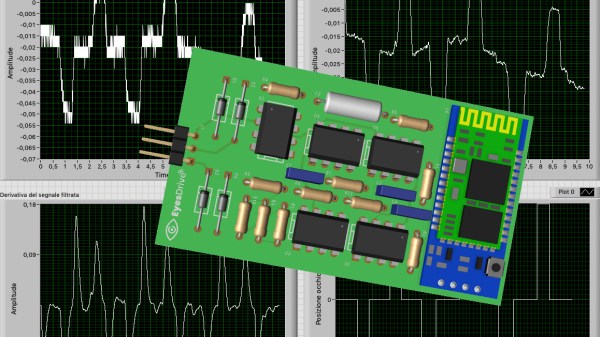
Some of us have computer mice with more buttons than we have fingers, resolution tracking finer than a naked eye can discern, and forced-air vents. All these features presuppose one thing; the user has a functioning hand. [Federico Runco] knows that amyotrophic lateral sclerosis, ALS, or Lou Gehrig’s disease, will rob a person of their ability to use standard computer inputs, or the joystick on a motorized wheelchair. He is building EyesDrive for the 2020 Hackaday Prize, to restore that mobility to ALS patients. There are already some solutions, but this one focuses on a short bill of materials.

Existing systems are expensive and often track pupil location, which returns precise data, but EyesDrive only discerns, left, right, and resting. For these, we need three non-invasive electrodes, a custom circuit board with amplifiers, signal processing circuits, and a microcontroller. He includes a Bluetooth socket on the custom PCBs, which is the primary communication method. In the video below he steers a virtual kart around a knotty course to prove that his system is up to the task of an urban wheelchair.

EyesDrive by [Federico Runco] should not be confused with the HackadayPrize2015 winner, Eyedrivomatic, lead by two remarkable hackers, Steve Evans and Patrick Joyce.

Continue reading “Karting Hands-Free”

Sudden Death Rainbow Sorting Game Reveals Your True Colors

When [marzsman]’s eight-year-old daughter thought up a game they could play together involving rainbows, he was all ears. She is a certified rainbow expert, after all. They had a few R&D sessions and came up with a rainbow sorting speed trial game that looks fun to play and fairly easy to build.

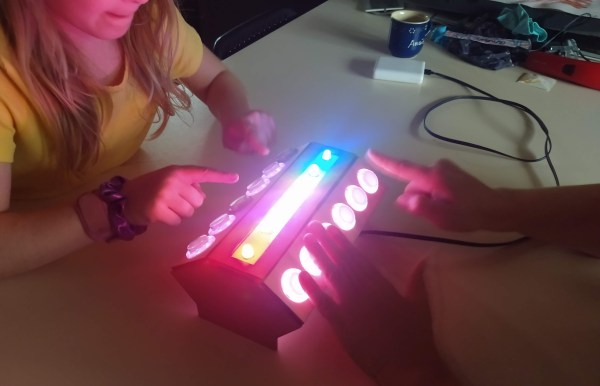
Press that blue button on the side, and the RGB LEDs along the top are put in randomized order. The object of this game is simple — just sort the rainbow before the other player by pressing each LED’s corresponding arcade button. Whoever sorts faster is rewarded with a rainbow animation behind their set of way-cool clear buttons.

Inside the laser-cut box is an Espruino, which is a handy little microcontroller that speaks JavaScript. All of the arcade buttons are wired up as a key matrix. The astute among you have noticed there is six of everything, and that’s because indigo light is too hard to distinguish from blue. Check out the intense gameplay after the break.

If [marzsman]’s daughter wants to learn computer science, rainbows are good for that, too.

Continue reading “Sudden Death Rainbow Sorting Game Reveals Your True Colors”

Automation With A New Twist

Turning on a lightbulb has never been easier. You can do it from your mobile. Voice activation through home assistants is robust. Wall switches even play nicely with the above methods. It was only a matter of time before someone decided to make it fun, if you consider a Rubik’s cube enjoyable. [Alastair Aitchison] at Playful Technology demonstrated that it is possible to trigger a relay when you match all the colors. Video also after the break.

The cube does little to obfuscate game data, so in this scope, it sends unencrypted transmissions. An ESP32 with [Alastair]’s Arduino code, can track each movement, and recognize a solved state. In the video, he solves the puzzle, and an actuator releases a balloon. He talks about some other cool things this could do, like home automation or a puzzle room, which is in his wheelhouse judging by the rest of his YouTube channel.

We would love to see different actions perform remote tasks. Twisting the top could set a timer for 1-2-3-4-5 minutes, while the bottom would change the bedroom lights from red-orange-yellow-green-blue-violet. Solving the puzzle should result in a barrage of NERF darts or maybe keep housemates from cranking the A/C on a whim.

Continue reading “Automation With A New Twist”